

How to Set Up Google Shopping Feed: Complete Agency Guide
Last Updated

Understanding Google Shopping Feeds for Australian Retailers
For Australian retailers, Google Shopping is a powerful way to reach online shoppers. Simply having a website isn't enough anymore. You need to actively showcase your products where customers are searching, and that's increasingly on Google. This is where Google Shopping feeds come in. They connect your product inventory with potential customers, delivering product information directly to Google's search results. It's like having a well-organized catalog in a digital marketplace.
So, what is a Google Shopping feed? It's a structured file containing all the important details about your products. This includes information like product titles, descriptions, prices, availability, images, and unique identifiers like GTINs (Global Trade Item Numbers). This detailed information lets Google display your products clearly and informatively in Shopping ads, giving shoppers what they need to make a buying decision. Check out this helpful resource: How to master your Google Shopping feed.
Why Are Google Shopping Feeds Crucial for Australian Businesses?
Setting up a Google Shopping feed is increasingly vital for Australian businesses due to the booming eCommerce sector. Online shopping in Australia is growing rapidly. By 2024, 17.08 million Australians shopped online monthly, a 45% increase from 11.78 million in 2020. That's approximately 63.94% of the Australian population! This number is projected to reach 23.14 million by 2029. For more statistics, see this report. This growth emphasizes the importance of product visibility where Australians are shopping, and Google Shopping is a key platform.
Key Components of a Google Shopping Feed
For a successful feed, it needs to be structured correctly and have the right information. This data is what makes your products shine in search results. Let's look at some key components:
-
Product Title: The first thing shoppers see. Use clear, concise titles that accurately describe the product and include relevant keywords.
-
Product Description: Provide compelling descriptions that highlight key features and benefits. Consider what would appeal to an Australian shopper.
-
Price and Availability: Keep pricing accurate and availability up-to-date. Inaccuracies can frustrate shoppers and damage your brand.
-
Product Images: High-quality product images are essential for attracting clicks and driving sales.
-
GTIN: These unique identifiers are often required and help Google match your products with the right searches.
These core elements are essential for a successful Google Shopping feed, ensuring your products are presented correctly to potential customers. By optimizing each component, you can improve visibility and attract more qualified leads. This, in turn, creates a better shopping experience for your customers.
Setting Up Your Google Merchant Center Account the Right Way

Now that we know the power of Google Shopping feeds, let's get your Google Merchant Center account up and running. Think of it as mission control for your products on Google Shopping. A well-configured account is the key to a winning Google Shopping strategy.
Registering Your Google Merchant Center Account
First, visit the Google Merchant Center website and click "Sign Up." You'll need a Google account. If you're already using Google services for your business, stick with the same account. This keeps things simple and makes analyzing your data easier.
Next, tell Google about your business. You'll need your business name, address, and website. Make sure this information is accurate and matches your website exactly. This helps Google verify your business and builds trust with your shoppers.
Verifying Your Website and Claiming Your Business
Verifying your website is critical. Google needs to know you own the website you listed. You can do this by adding a meta tag to your website's HTML, uploading an HTML file, or using Google Tag Manager. Pick the method that works best for your technical skills and website setup.
After that, you'll need to claim your business. This proves it's yours and stops anyone else from using your brand on Google. This protects your brand identity and ensures accurate information is shown to potential customers.
Configuring Essential Account Settings
Once your account is verified, it's time to configure some important settings:
-
Shipping: Clearly define your shipping zones and costs. This is especially important for Australian businesses, since shipping can really influence buying decisions. Being upfront about shipping costs creates a better experience for your customers.
-
Tax: Set up your tax settings according to Australian tax laws. This ensures you're charging the right GST and avoids any legal issues.
-
Returns: Explain your return policy and make sure it follows Australian consumer law. A clear return policy makes customers feel confident and minimizes potential problems.
Linking Your Google Ads Account
Connecting your Google Ads account to your Merchant Center is a smart move. This simplifies campaign management and lets you see how your Shopping ads are performing. You get a complete picture of your advertising and can optimize for better outcomes.
Troubleshooting Common Setup Issues
Sometimes, things don't go perfectly during setup. Here are some common issues and how to fix them:
-
Website Verification Problems: Check that you've added the verification method correctly. If it's a meta tag, make sure it's in the
<head>section of your homepage's HTML. -
Incorrect Business Information: Review your business info in Merchant Center and fix any mistakes. Make sure everything matches your website and official business registration.
-
Shipping or Tax Configuration Errors: Go over your shipping and tax settings, ensuring they follow Australian rules and reflect your actual business practices.
By carefully following these setup steps, you're setting yourself up for successful Google Shopping campaigns. This helps you showcase your products professionally and accurately to customers all over Australia. It also makes things smoother for you and your customers.
Creating Product Data Feeds That Actually Convert
Creating a product data feed is more than just meeting the technical requirements of platforms like Google. It's about understanding your market and optimizing for how customers shop. In Australia, this means building a feed that resonates with Aussie shoppers while also adhering to Google's guidelines.
Essential Feed Attributes for the Australian Market
Success in Google Shopping hinges on several key product data attributes. Product titles, for instance, are your first impression. They need to stand out. Instead of generic descriptions, use clear, concise, and keyword-rich titles. Think "Stylish Leather Boots for Women – Winter Collection" instead of just "Women's Shoes."
Product descriptions are your chance to go beyond simple features. Focus on benefits and tell a story. How does your product solve a problem or improve a shopper's life? When selling a barbeque, don't just list its dimensions; paint a picture of family gatherings and delicious meals.
Pricing matters. Competitive pricing strategies are crucial for attracting price-conscious Australian consumers. Availability management is equally important. Keeping your stock levels up-to-date prevents wasted clicks and frustrated customers. Finally, GTINs (Global Trade Item Numbers) are essential. These unique identifiers help Google connect your products with the right searches. Accurate pricing, availability, and GTINs, coupled with well-crafted titles and descriptions, are key for visibility. For a deeper dive into the Australian eCommerce landscape and its growth, check out these Australian eCommerce Statistics.
Structuring Your Feed File
Several file formats work for product data feeds: XML, TXT, or CSV. Each offers a different way to organize your product information. The best choice depends on your technical capabilities and the size of your inventory.
-
XML (Extensible Markup Language): Ideal for large, complex inventories due to its flexibility.
-
TXT (Text): A simpler format suited for smaller inventories or those comfortable with text editing.
-
CSV (Comma-Separated Values): This common spreadsheet format is easily created and managed.
Plenty of online resources provide templates and examples to help you structure your feed correctly, no matter which format you choose. These templates can give you a solid starting point.
Advanced Optimisation Techniques
Once the basics are in place, consider advanced techniques to refine your feed. Custom labels allow you to categorize products based on your business needs. This enables targeted bidding and promotions. You could label products by season, sales performance, or profit margin.
Strategic product categories help your products appear in the most relevant Google Shopping searches. Choose categories that accurately reflect your products and align with how shoppers search. Finally, condition specifications – like new, used, or refurbished – ensure you target the right audience and set clear expectations.
By mastering these elements, you'll increase product visibility, improve click-through rates, and drive more conversions in the competitive Australian online marketplace.
Uploading and Configuring Feeds for Maximum Performance
After carefully creating your product data feed, the next step is getting it into Google Merchant Center. This guide will walk you through uploading and configuring your feed to ensure peak performance from the get-go.
Choosing the Right Upload Method
The optimal upload method depends on your business size and inventory complexity. For smaller businesses with fewer products, a manual upload directly through the Google Merchant Center interface might suffice. However, this isn't scalable for larger businesses.
For businesses with dynamic inventories, scheduled fetches are a great option. Google will regularly pull updated product data from your server. Automated feeds are also possible via SFTP/FTP or Google Sheets integrations. This keeps your data fresh, which is especially crucial for businesses with frequent price or availability fluctuations.
Mapping Your Feed Attributes
Accurate mapping of your feed attributes is essential. This links the data in your feed to the corresponding fields in Google Merchant Center. Proper mapping ensures Google understands your product information, improving your Shopping Ads performance.
For example, your "product title" attribute needs to be mapped to Google's "title" attribute. This prevents errors and ensures your products are displayed accurately.
Troubleshooting Feed Processing Errors
Encountering errors after uploading a feed is normal. Google provides diagnostic reports that pinpoint specific issues, such as missing required attributes, incorrect data formats, or invalid values. Systematically addressing these issues will get your products approved and displayed in Shopping Ads.
Scheduling Feed Updates
Fresh product data is critical, especially for items with fluctuating prices or availability. Feed scheduling ensures your Google Shopping listings are in sync with your real-time inventory.
You can schedule automatic updates daily, weekly, or even more frequently, depending on your data's volatility. This prevents issues like advertising incorrect prices or selling out-of-stock products.
Utilizing Feed Rules and Supplemental Feeds
Feed rules and supplemental feeds are powerful tools for optimizing your product data without altering the primary feed file. Feed rules enable bulk changes, such as adjusting prices or updating availability. Supplemental feeds allow you to add extra information, like promotional text or custom labels, to your primary feed. These tools can save significant time and effort.
Monitoring Your Feed Health
Once your feed is live, ongoing monitoring is crucial. Regular checks can reveal issues affecting Shopping ad performance, such as data errors or compliance problems with Google's policies.
Google Merchant Center provides tools to track key metrics. This data helps you understand what's working and identify areas for improvement, contributing to better visibility and stronger performance.
Advanced Optimisation Strategies That Drive Results
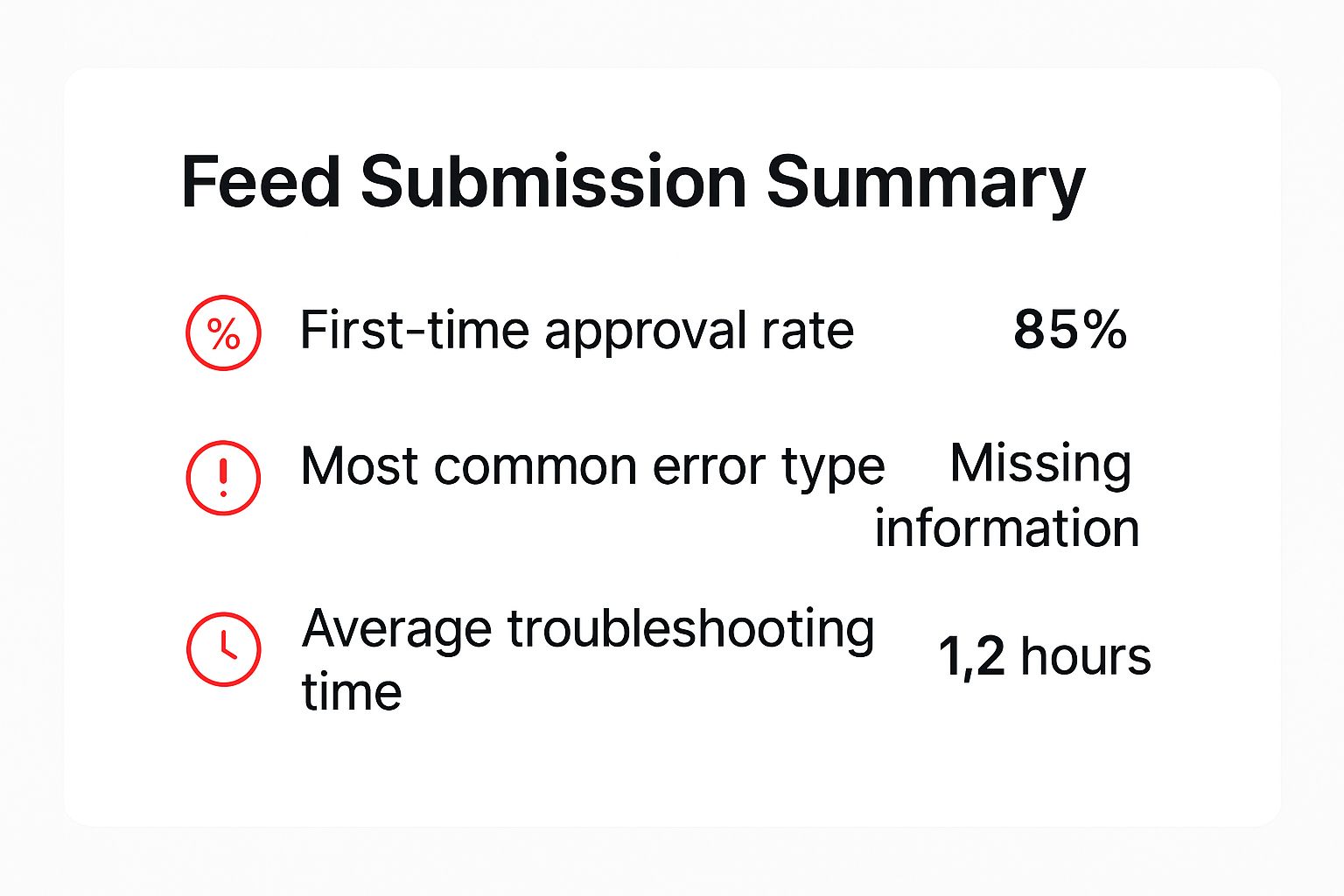
This infographic provides a snapshot of key data points related to Google Shopping feed submissions. It highlights the first-time approval rate, the most frequent error types, and the typical time it takes to troubleshoot issues. Common errors, as shown, can have a substantial impact on getting your feed approved. This underscores the importance of accurate data right from the beginning. Proactive monitoring and swift troubleshooting are crucial for minimising delays and ensuring your products are seen.
Optimising Your Product Titles and Descriptions
Creating a successful Google Shopping feed involves more than simply uploading your product information. Ongoing optimisation is essential. This means constantly refining your product titles and descriptions to effectively target Australian shoppers.
For instance, incorporate relevant keywords that Australian shoppers frequently use when searching for products similar to yours. Also, showcase the key features and benefits of your products in your descriptions. Focus on what sets your products apart from the competition. This approach will boost your click-through rates and attract more qualified potential customers.
Mastering Keyword Inclusion and Bid Management
Strategically incorporating keywords is vital for ensuring your products appear in relevant search results. Put yourself in the shoes of an Australian shopper. What search terms would they use to find your products? Naturally weave those keywords into your product titles and descriptions.
Effective bid management is equally important. You might find this resource helpful: How to master your Google Ads bidding strategy. In 2025, the average cost-per-click (CPC) for Google Ads in Australia is projected to be approximately $1.82 AUD for the retail sector. This figure can vary due to seasonal factors and other influences. Learn more about Australian CPC trends. Careful bid management is therefore essential for maximising your return on investment.
Improving Feed Quality and Handling Disapprovals
Maintaining a high feed quality score is paramount for achieving good visibility and keeping advertising costs down. Regularly check your feed for errors and disapprovals. Address any issues promptly to keep your feed healthy.
This proactive approach will prevent your products from being suspended and ensure they continue to reach your target audience. For example, if a product is disapproved because it's missing a GTIN, quickly update your feed with the correct information.
The following table provides a helpful checklist for Australian retailers looking to optimize their Google Shopping feeds. It outlines key optimisation tasks, their impact on feed performance, the difficulty of implementation, and the potential for improvement.
Google Shopping Feed Optimisation Checklist: Essential optimisation tasks and their impact on feed performance for Australian retailers
| Optimisation Task | Impact Level | Implementation Difficulty | Expected Improvement |
|---|---|---|---|
| Optimise Product Titles & Descriptions | High | Medium | High |
| Strategic Keyword Inclusion | High | Medium | Medium |
| Effective Bid Management | High | High | High |
| Regular Monitoring & Disapproval Handling | High | Low | High |
| Leveraging Automated Bidding | Medium | Medium | Medium |
| Seasonal Bid & Product Offering Adjustments | Medium | Medium | Medium |
This checklist offers a roadmap for enhancing your feed and, ultimately, your sales performance. Focusing on these key areas will contribute significantly to your success on Google Shopping.
Leveraging Automated Bidding and Seasonal Adjustments
Google's automated bidding features can significantly simplify your campaign management. These tools employ machine learning to optimise your bids in real-time, potentially boosting conversions while saving you valuable time. This frees you to focus on other important aspects of your business.
Furthermore, remember to consider seasonal trends in Australia. Adjust your bids and product offerings to align with peak shopping periods, such as Christmas or end-of-financial-year sales. This ensures your products are prominently displayed when shoppers are most actively searching. This proactive strategy can dramatically impact your sales.
Maintaining Feed Health and Monitoring Performance
Creating a successful Google Shopping presence involves more than just a basic feed setup. Consistent monitoring and maintenance are essential for staying competitive, especially in the dynamic Australian online marketplace. This section covers important monitoring practices that can help your business thrive.
Tracking Feed Processing Status and Setting Up Alerts
After uploading your feed to the Google Merchant Center, regularly check its processing status. The Merchant Center dashboard offers valuable information about how Google interprets your data. Setting up email alerts for feed errors is crucial for addressing problems quickly. Catching issues like missing attributes or formatting errors early can prevent them from impacting your campaign performance.
Data Quality Checks and Inventory Updates
Maintaining a healthy feed requires regular data quality checks. Schedule routine reviews of your product information to ensure accuracy. Ask yourself: Are my prices up-to-date? Is my stock information accurate? Are my product descriptions still relevant? These periodic checks will help you identify and fix any inaccuracies.
Also, develop efficient workflows for updating your product information, pricing, and inventory. These processes need to scale effectively as your business grows. Automating these updates whenever possible can save you time and minimize manual errors, ensuring your feed stays accurate and reliable.
Leveraging Google’s Performance Reporting Tools
Google Merchant Center offers robust performance reporting tools that go beyond basic feed processing. They provide valuable data on how your products perform in Google Shopping results. Track important metrics like impression share, click-through rates (CTR), and conversion data. Analyzing these metrics will help you understand what appeals to Australian shoppers and identify areas for improvement.
This data empowers you to make informed decisions about your Google Shopping strategy. For example, if your CTR is low, you might need to adjust your product titles or images. Analyzing performance data enables you to refine your approach and improve results. Understanding these metrics can also inform your overall marketing strategies by providing insights into customer behavior and preferences. Google Shopping feeds power automated product listing ads, showcasing product images, prices, and merchant information. This helps businesses compete effectively as online marketplaces expand. The growth of e-commerce in Australia is linked to the ability of feeds to provide detailed product data that attracts both customers and Google's algorithm. Learn more about the Australian market with these insights into Australian SEO and content marketing.
Troubleshooting Common Feed Issues and Policy Violations
Even with diligent maintenance, you might encounter feed issues like disapproved products or policy violations. Familiarize yourself with Google’s Shopping policies and establish procedures for handling these problems. A proactive approach prevents minor issues from escalating and potentially leading to account suspension.
Staying current with Google's evolving requirements is crucial. Policy changes can significantly affect your feed’s performance. Regularly review and adapt your feed to ensure ongoing compliance and maintain a competitive edge. Staying informed helps you anticipate potential challenges and adjust your strategy accordingly.
Key Takeaways and Your Path Forward
Your journey to mastering Google Shopping feeds for your Australian business ends here. This section summarizes key steps and ongoing strategies for measurable growth. We’ll provide checklists, milestones, and indicators of success to help you on your way to Google Shopping feed mastery.
Consolidating the Essentials: Checklist for Setup and Optimization
Before moving into advanced techniques, solidify your foundation with this checklist:
- Merchant Center Account: Is your account verified and linked to Google Ads? Are shipping, tax, and return policies configured for Australia?
- Product Data Feed: Are your product titles, descriptions, pricing, and availability optimized? Have you included GTINs for all applicable products?
- Feed Upload and Configuration: Is your feed attribute mapping correct? Are automated updates scheduled? Have you implemented feed rules and supplemental feeds?
These core elements ensure your products are correctly represented and easily discoverable for Australian shoppers.
Milestones for Tracking Progress: From Setup to Ongoing Success
To help guide your progress, the table below outlines a realistic timeline for setting up and optimizing your Google Shopping feed.
To understand the steps involved in setting up your Google Shopping feed, take a look at the table below. It outlines the timeline and milestones involved from initial setup through ongoing optimization.
Google Shopping Feed Setup Timeline: Realistic timeline and milestones for setting up and optimising your Google Shopping feed
| Phase | Duration | Key Tasks | Success Metrics |
|---|---|---|---|
| Initial Setup | 1-2 Weeks | Account creation, feed creation, initial upload | Feed approved, products listed |
| Optimisation | Ongoing (Monthly) | Refine product data, adjust bids, monitor performance | Increased clicks, conversions, ROI |
| Expansion | As Needed | Explore new product categories, advanced features | Growth in reach and market share |
This timeline provides a framework for your journey, enabling you to track progress and identify any areas that may need attention.
Indicators of Success: Beyond Clicks and Conversions
Clicks and conversions are vital metrics. However, other metrics provide valuable insights into the health and effectiveness of your feed. Monitoring your impression share helps you understand your visibility within Google Shopping results. A low impression share suggests areas for optimization. Regularly reviewing your click-through rate (CTR) is important. A low CTR may indicate issues with your product titles or images. Finally, analyzing conversion data helps you identify the most valuable products and keywords driving the most impactful actions.
Advanced Features and Integrations: Amplifying Your Results
As your campaigns mature, explore advanced features like local inventory ads. These showcase products available in your physical stores, attracting nearby shoppers. Vehicle ads specifically target car buyers, while dynamic remarketing re-engages past website visitors with personalized product recommendations.
Pitfalls to Avoid and Resources to Leverage
Be prepared for common issues like disapproved products or feed errors, especially during the initial few months. Utilize Google Merchant Center’s diagnostic tools to quickly identify and resolve these problems. Stay informed about Google’s policy updates and best practices through their resources and industry blogs. This proactive approach ensures you remain compliant and competitive.
Building on Your Success: Expansion and Integration
Once your feed performs well, consider expanding into new product categories. Integrate your feed strategy with broader digital marketing initiatives for maximum reach and impact. By implementing these strategies and continuously optimizing your feed, you can position your Australian business for sustained growth in the competitive e-commerce landscape. For professional support with setup and management, consider partnering with experts at Click Click Bang Bang. Our team can help you navigate the complexities of Google Shopping and maximize your return on investment. Contact us today for a free consultation and learn how we can boost your online presence and drive sales.
Read NeXt
Or Read Our Latest
- How to Set Up Google Ads in Australia: Complete 2026 Guide
- Google Merchant Center Setup: The Complete 2026 Guide
- Business Manager Setup Facebook: The Complete 2026 Guide
- Google Ads Account Setup: Expert Guide for 2026
- Search Ads Optimisation: A Practical Guide for 2026
- Manual vs Automated Bidding for PPC Success
Click. CLick. Subscribe.
Get our best PPC insights, industry updates, and power moves delivered straight to your inbox. No fluff, just high-caliber strategies that actually work.
Don’t Leave Just Yet
Try Us For 30-Days,
Risk Free!!
We guarantee that you’ll love our work within the first 30 days, if not you’ll get your money back.
What have you got to lose?