

Cross Domain Tracking: A Practical Guide for GA4 in 2026
Last Updated

You're probably looking at GA4 right now and seeing something that doesn't add up. Paid campaigns are driving traffic, users are clearly reaching checkout, sales are happening, yet reports show a suspicious jump in direct traffic, inflated new users, and conversion paths that stop halfway through the journey.
That usually happens when your customer moves between domains and GA4 treats that movement like the start of a new visit. A common Australian example is a user landing on a brand site such as a .com.au domain, then moving into a separate checkout, booking engine, payment gateway, or hosted form. Marketing thinks the campaign worked. Analytics says the conversion came from direct. Finance sees inconsistent return on ad spend. Everyone starts debating channel performance when the underlying cause is tracking architecture.
Cross domain tracking fixes that break. It carries the same user identity across domains so GA4 can treat one journey as one journey, instead of several disconnected sessions.
Why Your Analytics Are Lying About Your Customer Journey
A typical failure looks harmless at first.
A shopper clicks a Meta ad, lands on your main site, browses product pages, then clicks through to a separate checkout domain. They complete the purchase. Ideally, that's one session driven by paid media. In a broken GA4 setup, it often becomes two sessions and sometimes two users. The campaign gets less credit than it deserves, and direct traffic gets too much.
That's not a minor reporting annoyance. It changes budget decisions.
An Australian audit found that without proper cross domain tracking, GA4 splits journeys into separate sessions, causing a documented 35 to 42% underreporting of conversion rates for Australian retailers according to Local Marketing Group's cross-domain tracking guide. If you're reporting to a board, defending media spend, or trying to understand channel profitability, that kind of gap corrupts the whole conversation.
The break usually happens at the most valuable moment
The most important step in the journey is often where tracking falls apart:
- Marketing site to checkout: A user moves from your content or product pages into a separate transaction environment.
- Main domain to booking engine: Lead generation or appointment flows often live on third-party platforms.
- Store to payment gateway: Redirects through PayPal AU, Afterpay, or similar services can reset attribution if the setup is weak.
Australian businesses run into this constantly because multi-domain journeys are common. Different platforms, hosted checkouts, consent tools, and payment flows create more handoffs than most generic guides account for.
Practical rule: If users leave one domain before converting, assume your attribution is broken until you've verified otherwise.
Cross domain tracking isn't the same as cross-device tracking for marketers, but they often get confused. Cross-device tracking tries to connect the same person across phone, tablet, and desktop. Cross domain tracking solves a different problem. It keeps the same session intact when that person moves between websites or controlled web properties.
If your reports show direct traffic “winning” conversions that you know started in paid or email, your analytics probably isn't reflecting the actual customer journey. It's reflecting a technical misconfiguration.
Understanding the Mechanics of a Unified User Session
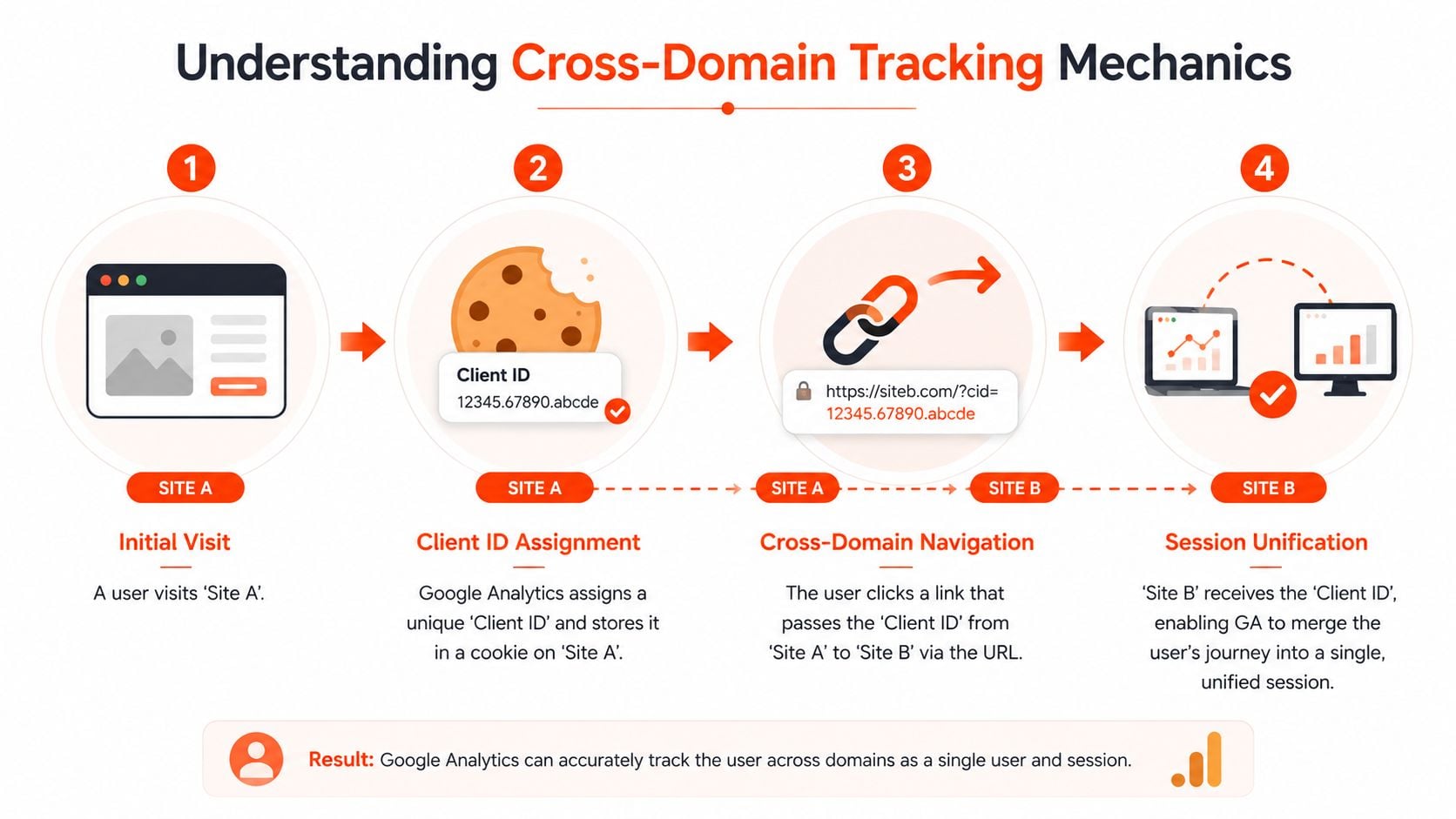
A user reads your product page on example.com.au, clicks through to a hosted checkout, pays, and lands on the confirmation page. In GA4, that can show up as two different users and two different sessions if identity is not passed correctly between domains. The conversion still happened. The attribution did not survive the handoff.
GA4 ties activity together with a Client ID stored in a first-party cookie. That works well while the user stays on one domain. Once they move to another domain, that cookie cannot be read there, so GA4 may generate a new Client ID and treat the same person like a new visitor.
How GA4 carries identity across domains
The fix is straightforward in principle. When a user clicks from Site A to Site B, GA4 appends a linker parameter to the URL. In most setups, that parameter is _gl. It passes the identity data the second domain needs so GA4 can continue the same session instead of starting a fresh one.
If that parameter is stripped out by a redirect, payment step, booking engine, or custom script, continuity breaks immediately.
That is why clean implementation matters more than checkbox-level configuration. A solid Google Analytics setup for multi-domain journeys has to account for what happens between the click and the page load, not just what is configured inside the GA4 interface.
Referral handling decides whether the session restarts
Passing the Client ID is only part of the job. GA4 also needs to recognise that the second domain is part of the same journey, not a new traffic source.
If that referral logic is wrong, the reports can still split the session even when the linker parameter is present. The result is familiar. Paid search gets the visit. Direct or referral gets the sale.
Australian businesses hit this problem more often because the path to conversion often includes platforms outside the main site stack. PayPal AU, Afterpay, Zip, event booking tools, franchise microsites, and practice management portals all introduce extra redirects and domain changes. Privacy settings add another layer. If one domain asks for consent differently, or loads analytics later than the previous domain, session continuity becomes unreliable.
What has to be true for a unified session
Cross-domain tracking holds together when these conditions are met:
| Requirement | Why it matters |
|---|---|
| Same GA4 Measurement ID | Every domain in the journey must send data into the same GA4 property and stream. |
| Linker parameter preserved | The _gl value has to survive clicks, redirects, gateway hops, and URL rewriting. |
| Referral handling aligned | Trusted domains in the journey must not overwrite the original acquisition source. |
| Consent logic consistent | Analytics storage rules need to behave consistently across domains, especially under Australian privacy requirements. |
The expensive mistake is assuming the platform will sort this out on its own. It will not. Cross-domain tracking works when identity, referral logic, and consent behaviour all line up across every handoff in the journey.
Your Step-by-Step GA4 and GTM Configuration
A common Australian failure point looks like this. A customer lands on the main site, clicks through to an Afterpay step, completes payment, and GA4 records a new session or a referral from the payment domain. The settings in GA4 looked fine. The implementation across the stack was not.
The fix starts with control. Use one GA4 property, one Measurement ID, and one managed tagging approach across every domain involved in the journey. If a business is still mixing GTM, old theme code, plugin installs, and agency leftovers from previous rebuilds, cross-domain tracking becomes unreliable fast.

Configure the domains inside GA4
In GA4, go to Admin > Data Streams > Configure Tag Settings > Configure Your Domains.
Add every domain that forms part of the same conversion path. That usually includes more than the main website. For Australian businesses, it often means a checkout subdomain, a third-party booking engine, a franchise or location microsite, or a hosted payment step that still sits inside the commercial journey.
Use exact-match rules where possible. Broad matching creates avoidable errors, especially when businesses operate multiple related domains for campaigns, regions, or franchisees.
The setup sequence is straightforward:
- Open the web data stream and find Configure Your Domains.
- Add each participating domain that should share the same session.
- Save the changes and test live links between domains.
- Check that the
_glparameter is appended during the handoff. - Confirm the same user is preserved in GA4 debugging tools after the domain change.
That gets GA4 ready to accept cross-domain traffic. It does not clean up a messy tagging setup by itself.
Use GTM as the source of truth
For any business with more than a basic brochure site, GTM should control the GA4 configuration. It gives the team one place to manage tags, one release process, and one version history when something breaks after a site update.
A hardcoded install can work on a very simple setup. In practice, it creates too many failure points once developers, CMS plugins, checkout tools, and consent platforms all start touching the page.
A stable operating model usually looks like this:
- One GA4 configuration tag in GTM firing across every participating domain
- One shared Measurement ID across the entire journey
- Cross-domain settings managed in the same implementation
- Preview and QA before publishing, especially after checkout or consent changes
If the wider account setup is inconsistent, fix that first with a proper Google Analytics setup for business reporting. Cross-domain tracking depends on a clean foundation.
Remove conflicting tracking before you configure anything else
The implementation mistake I see most often is duplicate GA4 logic. A site has GTM installed correctly, but an older gtag.js snippet is still hardcoded in the theme, inserted by a plugin, or loaded only on checkout templates. Both versions try to initialise analytics. One carries the cross-domain settings. The other does not.
That is how businesses end up with duplicate pageviews, broken linker behaviour, and source changes halfway through conversion.
Run this audit before changing GA4 settings:
- Inspect page source for hardcoded
gtag.js - Check CMS plugins that may still inject GA or Google tag code
- Confirm there is only one GTM container unless a documented multi-container setup is intentional
- Review checkout, booking, and payment templates separately, because these pages often bypass the main site template
- Test consent mode behaviour on each domain, especially where one vendor controls the banner and another controls the checkout
That last point matters more in Australia than many generic guides admit. If one domain waits for consent and the next domain fires analytics immediately, the user journey can split even when the domain list is correct. Privacy Act compliance and Consent Mode need to be handled consistently across the full path, not page by page.
A practical GTM checklist
Use this checklist during implementation and again after launch:
- Confirm one Measurement ID across all domains in the same journey
- Make sure the GA4 configuration tag fires on every participating domain
- Enable cross-domain measurement in GA4 for each approved domain
- Remove or disable duplicate hardcoded tracking
- Test real user paths, including payment gateways, booking tools, and redirects
- Check whether URL rewriting, app handoffs, or gateway redirects strip the
_glparameter - Validate consent behaviour on both sides of the domain change
- Review referrals in GA4 after testing, especially for PayPal AU, Afterpay, Zip, and hosted booking platforms
A walkthrough can help when you need to compare your screens against a live example:
What a good implementation looks like
A good setup is boring. One property. One tagging method. One consistent consent approach. Every domain in scope tested using the actual conversion path, not a guessed path from a staging environment.
What fails is the rushed version. Someone adds domains in GA4, assumes that solved it, and never checks the old code sitting in the CMS, the payment redirect stripping parameters, or the different consent defaults on the booking domain. That is how Australian businesses lose attribution on high-value transactions and make channel decisions from incomplete data.
Advancing Your Tracking with a Server-Side Setup
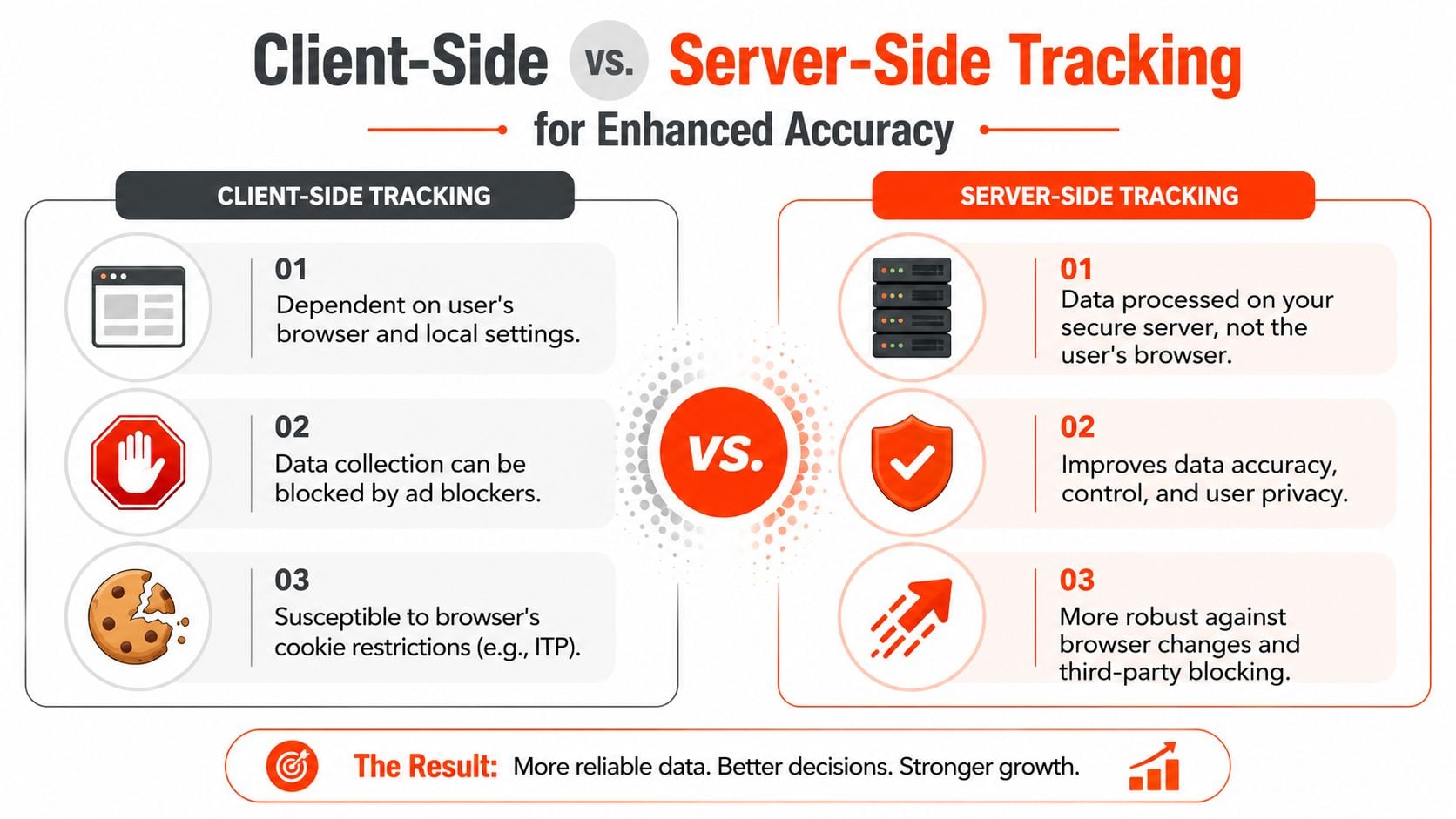
Client-side tracking is still where most businesses start. The browser loads your tags, the browser stores identifiers, and the browser sends hits to analytics platforms. That model is easy to launch, but it leaves too much of your data quality in the hands of browser behaviour, redirect chains, and front-end inconsistencies.
For a business that depends on reliable attribution, that's a weak foundation.
Why server-side changes the equation
With server-side tagging, the browser sends data to your server container first. From there, your server forwards the cleaned and validated data to GA4 and other platforms. That gives you more control over identity handling, payload quality, and what gets shared downstream.
For Australian e-commerce retailers, that matters. According to AU-focused analytics audits on Zigpoll, server-side tagging reduces cross-domain conversion attribution errors to 4.2%, compared with 18.7% for client-side only setups.
That's the difference between “roughly directional” reporting and reporting you can use to make spending decisions with confidence.
Client-side versus server-side in practical terms
| Approach | Strength | Weak point |
|---|---|---|
| Client-side only | Faster to launch and simpler for basic properties | More exposed to browser restrictions, redirects, script conflicts, and inconsistent consent execution |
| Server-side tagging | Better control over data collection and forwarding | Requires stronger implementation discipline and technical ownership |
This isn't just about attribution. It's also about governance. With a server container, teams can inspect, standardise, and filter what gets sent to third-party vendors. That creates a cleaner handoff between analytics, advertising, and privacy compliance.
When the upgrade is worth it
You don't need server-side tagging for every site. You do need it when these conditions are true:
- You rely on paid media attribution: If budget allocation depends on channel performance, cleaner session continuity pays for itself.
- Your journey crosses multiple systems: Checkout platforms, gateways, forms, and booking engines add more opportunities for client-side failure.
- Privacy control matters operationally: A server-side layer gives you tighter control over what data leaves your environment.
- Your current data is already suspect: If direct traffic is taking too much credit, you need more than cosmetic fixes.
A lot of retailers reach this point after trying to debug browser-side problems for too long. The implementation gets patched repeatedly, but reporting still feels unstable. At that stage, it's more efficient to redesign the data flow than keep treating symptoms.
If you're measuring purchases across separate storefront and checkout environments, effective e-commerce conversion tracking usually benefits from server-side design, not just browser-side fixes.
Client-side tracking asks the browser to behave. Server-side tracking assumes the browser won't.
Verifying Your Cross-Domain Tracking Is Working
Never trust a cross domain tracking setup because the settings page looks right. Trust it only after you've tested the journey end to end.
Most failed implementations don't fail loudly. They fail subtly, inside redirects, on specific devices, or only when a payment step gets involved. The interface can show a tidy configuration while live users still split into separate sessions.
Step 1 checks the visible clue
Run the actual user journey yourself. Start on the first domain and click through to the second domain using the same path a real user would take.
On the destination URL, look for the _gl parameter. In some environments, you may also inspect related analytics parameters depending on the setup. If that identifier doesn't appear when the user moves across domains, session continuity is already at risk.
Don't test a shortcut URL that users never touch. Test the actual CTA, product link, checkout button, or booking path.
Step 2 checks the browser behaviour
Open Developer Tools and inspect the Network panel while you repeat the journey. You're looking for two things:
- The destination request keeps the linker parameter intact: If redirects strip it out, GA4 can't continue the identity properly.
- The analytics payload aligns across the transition: The browser should show a coherent handoff, not a fresh start driven by a self-referral or duplicate script.
This is also where hidden implementation issues surface. JavaScript redirects, CDN rewrites, consent banners, and theme-level scripts often interfere with the transfer even when GA4 settings are correct.
Step 3 checks the data that actually reaches GA4
Use GA4 DebugView to confirm what matters most. The client_id should remain consistent as you move from one domain to the next.
That check matters because visual URL decoration alone isn't enough. A parameter can appear in the browser but still fail to produce a unified session if consent logic blocks storage or another script overwrites the identifier.
Use this short verification routine every time you deploy changes:
- Click through the live path from the originating domain to the destination domain.
- Inspect the URL and redirects to confirm the linker parameter survives.
- Review DebugView and verify the same client_id persists through the journey.
If the client_id changes between domains, the setup isn't fixed. It doesn't matter how tidy the admin settings look.
One more practical point. Test on desktop and mobile. Australian businesses often discover that a setup appears fine in one environment and breaks in another because redirects, consent prompts, or mobile-specific checkout flows behave differently.
Common Cross-Domain Tracking Mistakes to Avoid
A common Australian ecommerce scenario looks like this. A customer clicks a paid ad, browses your site, chooses Afterpay or PayPal AU at checkout, completes payment, and returns to the confirmation page. In GA4, that sale suddenly appears under a referral source or as a new session. The campaign that drove the purchase loses credit.
That failure usually comes from missed implementation details, not from GA4 itself. Teams configure cross-domain linking in the admin panel, see linker parameters in a few URLs, and stop there. The gaps tend to show up later in payment returns, consent changes, platform checkouts, and older embedded tools.
Payment gateways create the most expensive errors
For many Australian businesses, payment providers are the first place attribution breaks. A user leaves your site, lands on a gateway or hosted payment environment, then comes back. If referral handling is wrong, GA4 can credit the gateway instead of the original source.
This problem shows up often with Afterpay, PayPal AU, and platform-managed checkout flows. Generic GA4 guides often focus on simpler US checkout patterns and skip the local gateway behaviour Australian merchants deal with every day.
Four mistakes that keep recurring
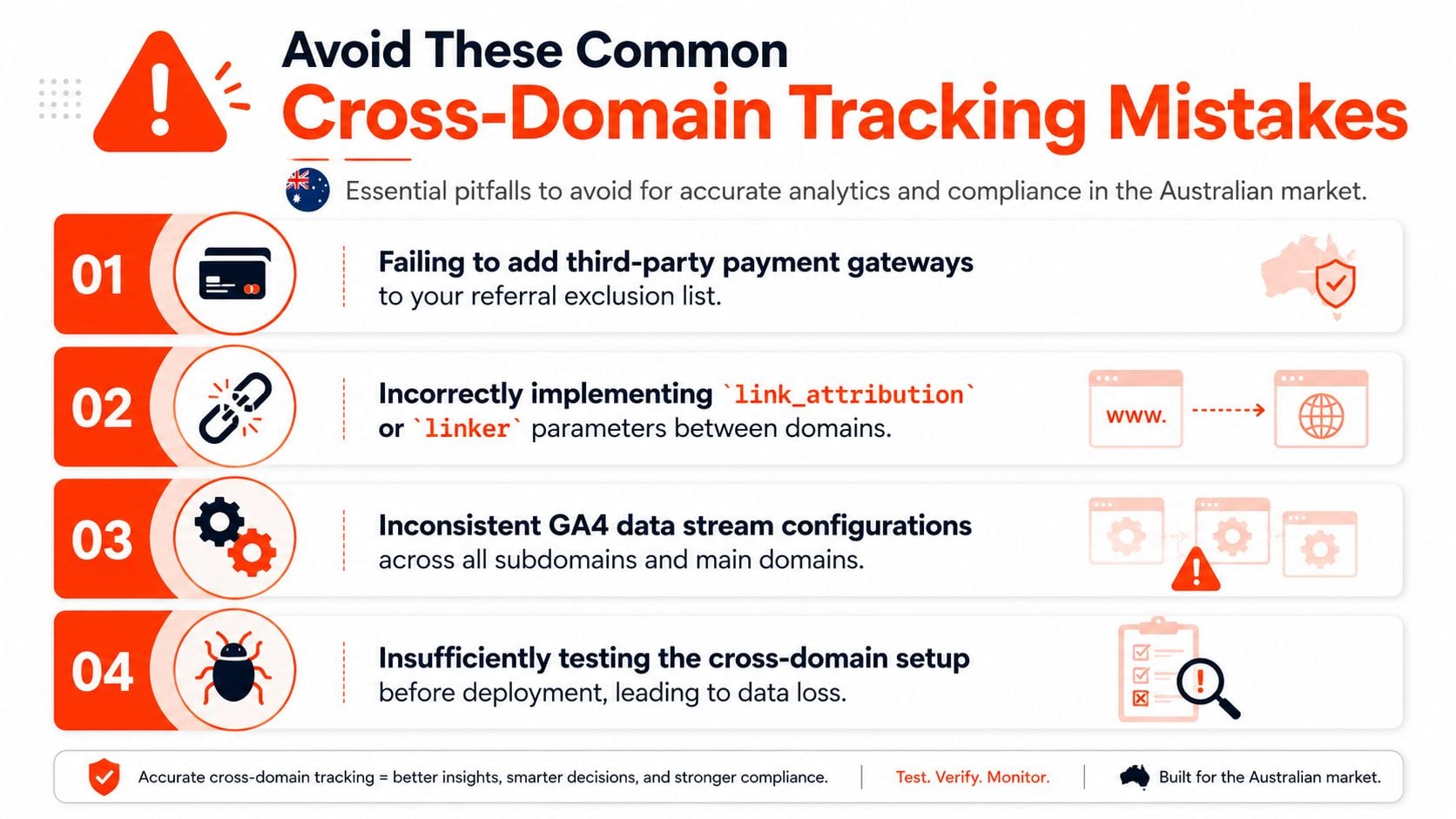
- Ignoring gateway domains: If payment providers are not handled correctly, conversions can be attributed to the gateway domain instead of the campaign, channel, or landing page that started the visit.
- Assuming subdomains are always covered: Some setups pass identity cleanly across subdomains. Others break because of separate tagging, hosted environments, or inconsistent consent behaviour.
- Leaving duplicate tagging in place: An old gtag.js install, app-injected script, or theme plugin can overwrite identifiers and break the session handoff you configured in GTM.
- Testing only the ideal journey: Clean desktop tests miss the paths that usually fail first, such as mobile checkout, payment returns, consent declines, and redirected confirmation pages.
AU-specific traps generic guides tend to miss
Australian implementations often break outside the obvious GA4 settings.
| Pitfall | Why it causes trouble |
|---|---|
| Afterpay and PayPal AU returns | Gateway hops can create self-referrals, false referrals, and split sessions |
| Inconsistent consent settings across domains | One domain may store analytics identifiers while another blocks or resets them |
| Hosted Shopify or platform checkout flows | Identity transfer can fail if the checkout environment is only partly aligned with your main site |
| Iframe-based forms or older embedded tools | The customer completes a step, but the tracking context does not carry across cleanly |
A single successful test proves very little. Judge the setup against the ugliest real journey your customers take.
Privacy handling matters here too. Australian businesses face real scrutiny around consent, disclosure, and data handling, especially when multiple domains or third-party checkout steps are involved. If the main site and checkout apply different consent rules, the result is not just messy attribution. It can also create a governance problem that legal, marketing, and data teams all have to clean up later.
The fix is disciplined implementation. Map every domain involved in the journey. Include payment providers, hosted checkout pages, booking engines, form tools, and confirmation environments. Then check referral handling, consent behaviour, and tag duplication across the full path. That is how you stop GA4 from inventing new sessions and start getting reports you can trust.
If your GA4 reports don't reflect how customers move from ad click to checkout, Click Click Bang Bang can help audit the tracking architecture, fix cross-domain attribution gaps, and rebuild reporting so paid media decisions are based on reality instead of broken sessions.
Read NeXt
Or Read Our Latest
- Best Seo Agency Australia Guide 2026
- Cross Domain Tracking: A Practical Guide for GA4 in 2026
- Performance Max Campaigns: An AU Business Guide for 2026
- Pay for Advertisement: A Guide to Costs & ROI in 2026
- SEO Cost Australia 2026: Your Guide to Pricing
- Offline Conversion Tracking: Guide for AU Businesses 2026
Click. CLick. Subscribe.
Get our best PPC insights, industry updates, and power moves delivered straight to your inbox. No fluff, just high-caliber strategies that actually work.
Don’t Leave Just Yet
Try Us For 30-Days,
Risk Free!!
We guarantee that you’ll love our work within the first 30 days, if not you’ll get your money back.
What have you got to lose?