

Conversion Tracking Setup: A Complete AU Guide
Last Updated
You open Google Ads and see a healthy stream of conversions. The CRM tells a different story. Form submissions are missing, purchases appear twice, phone enquiries have no campaign source, and GA4 reports fewer sales than the ad account. The campaign may not be the problem. Your conversion tracking setup may be measuring different actions, pages, users, or attribution paths across each platform.
That matters in Australia's high-spend digital market. Internet advertising reached AUD 18.4 billion in calendar year 2025, while search advertising contributed AUD 8.0 billion, or 43.8% of total spend, according to IAB Australia and PwC reporting covered by PPC Land. Video also reached AUD 5.4 billion in the same reporting, so advertisers increasingly need measurement that remains consistent across search, video, display, social, websites, and CRMs.
This guide takes a practitioner's view. It focuses on the failure points that appear in Australian accounts, the technical choices that influence bidding and reporting, and the privacy obligations that sit underneath every pixel, event, and customer record.
Why Most Conversion Tracking Setups Fail Australian Advertisers
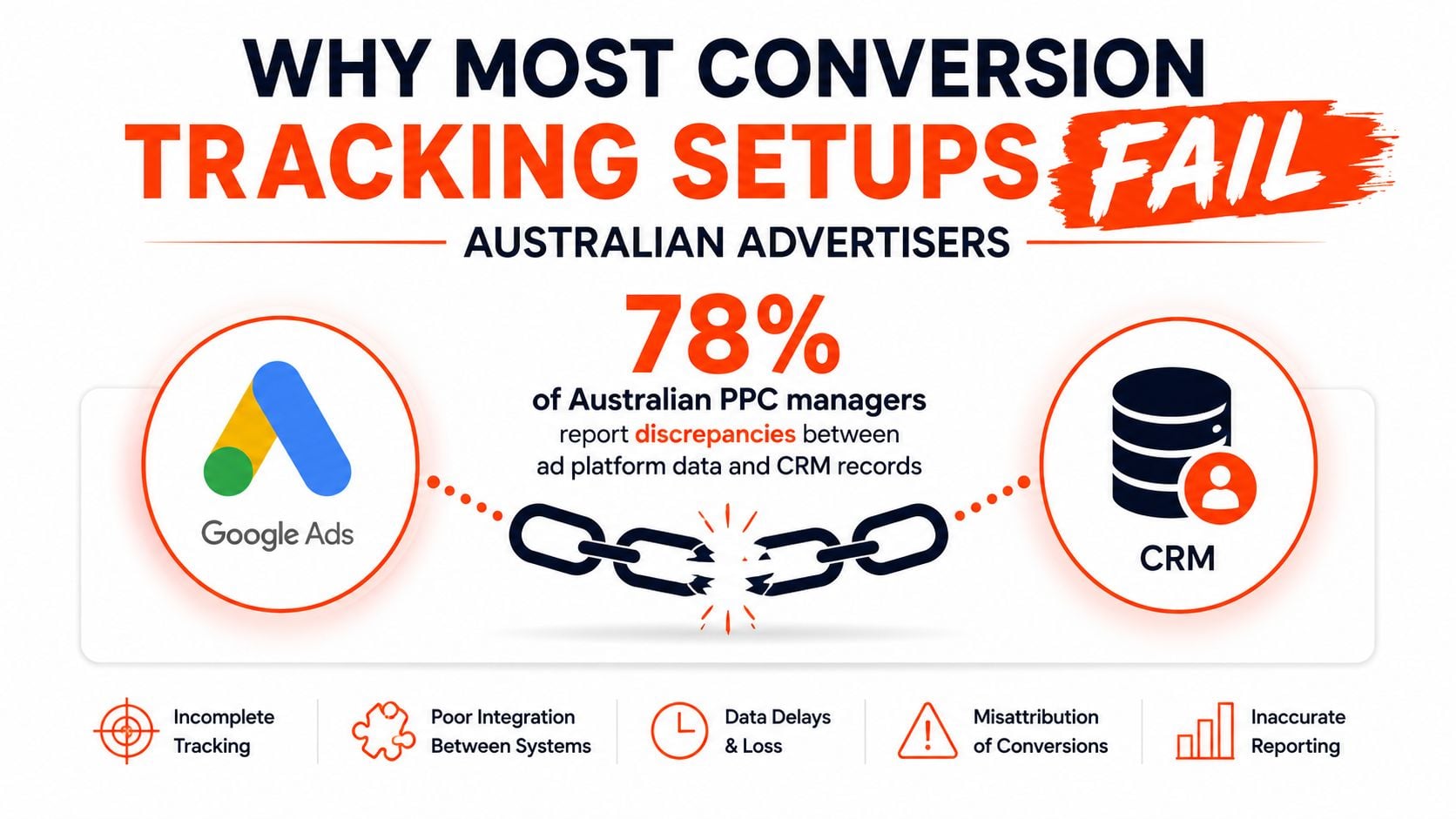
An Australian advertiser usually notices the problem after the budget has already been spent. Google Ads reports conversions at an acceptable cost, but the sales team can't find the corresponding opportunities in the CRM. Or GA4 records a purchase while Google Ads shows a different total. Each system may be working according to its own rules, yet the business still lacks a dependable answer to the question that matters, which campaigns generated valuable customers?
The first cause is implementation mismatch. Google's Australian help documentation recommends setting up conversion tracking, then verifying that the tag is installed and firing correctly. Google also identifies page coverage and entry-path differences as common reasons Google Ads and GA4 don't match, particularly when one implementation measures a broader or narrower set of pages than the other. Review the Google Ads AU troubleshooting guidance before changing campaign settings.
The numbers platforms report aren't interchangeable
Google Ads, GA4, Meta, and a CRM answer different measurement questions. Google Ads evaluates conversions through its own ad interaction and attribution settings. GA4 applies its configured analytics collection and attribution logic. A CRM may only recognise a lead after validation, sales acceptance, or an offline revenue event.
A frequent error is treating an imported GA4 event as a perfect substitute for native Google Ads conversion tracking. Independent analysis cited in industry reporting found GA4 captured about 15% fewer conversions than Universal Analytics, and about 40% fewer than native Google Ads tracking inside Google Ads when used as the Google Ads conversion source. Those differences can change bidding signals, CPA targets, and ROAS interpretation, as described in Bidnamic's analysis of GA4 conversion tracking limitations.
Practical rule: Treat platform totals as diagnostic views, not as a single shared ledger.
Fragmented journeys make weak tagging more expensive
Ipsos iris launched in Australia in March 2023 as a digital audience measurement currency endorsed by the IAB. Its January 2023 data found Australians spent an average of 107 hours online per month across smartphone, PC or laptop, and tablet devices, as reported by Ipsos. The important implication for tracking isn't the audience statistic by itself. It's the need to account for journeys that begin on one device, continue on another, and finish through a different channel.
A last-click setup often loses the research stage, remarketing interaction, or assisted conversion. A tag that fires only on a thank-you page can also fail when a form submits through AJAX, a payment provider redirects through another domain, or a checkout confirmation loads dynamically.
The commercial context raises the stakes. With AUD 8.0 billion invested in Australian search advertising in 2025, small attribution errors can influence keyword exclusions, budget allocation, bidding signals, and revenue forecasts across substantial media programmes. A proper setup prevents the team from optimising towards duplicate purchases, unqualified leads, or events that never reach the CRM.
Designing Your Conversion Event Architecture Before Installing Tags
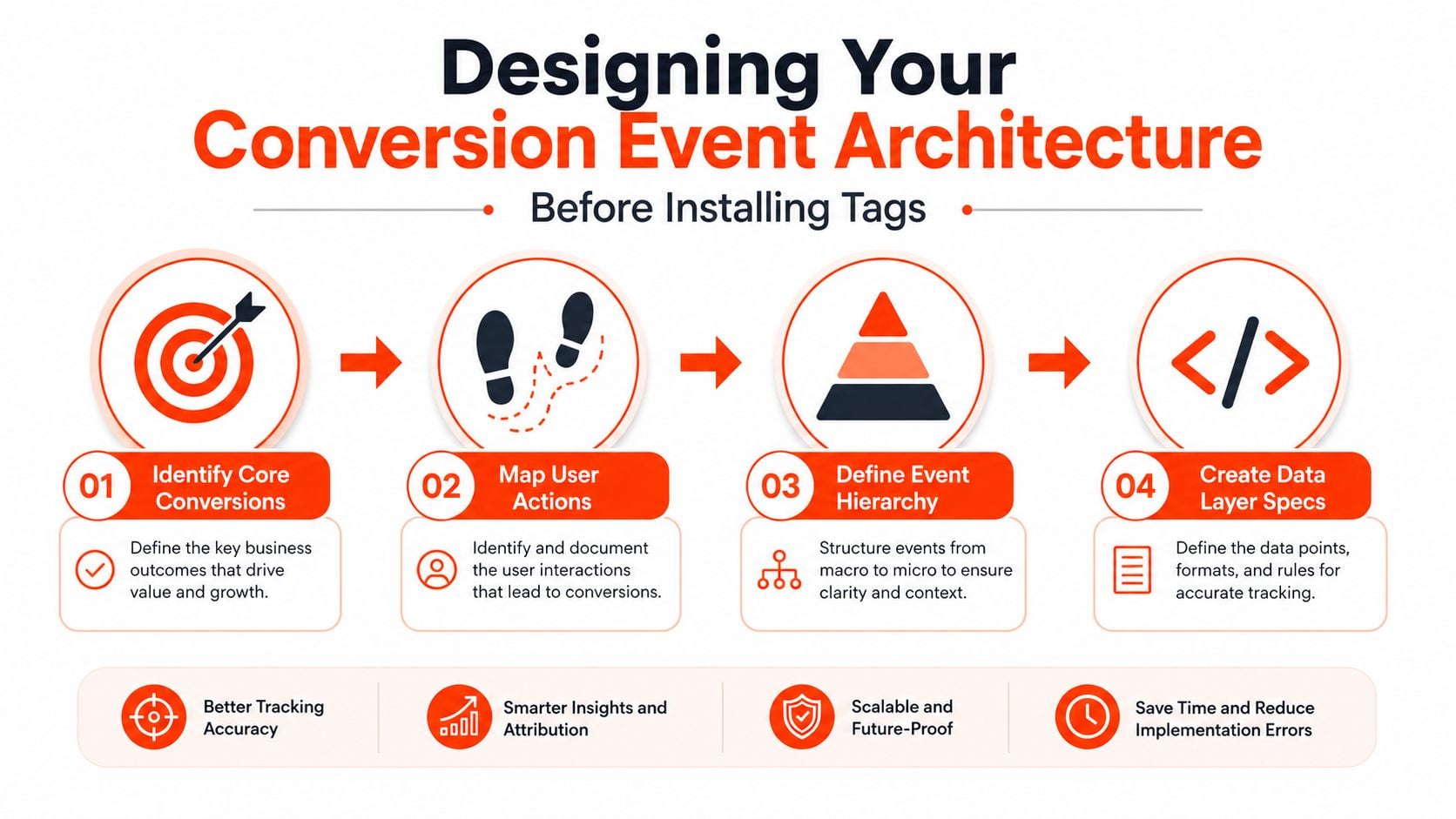
The strongest tracking implementations begin with a document, not a tag. Before opening Google Tag Manager, define what the business considers a successful outcome and how that outcome moves through the funnel.
A purchase, qualified enquiry, booked consultation, phone call, quote request, and completed application may all matter. They shouldn't automatically receive the same optimisation status. The architecture needs to distinguish actions that should influence automated bidding from actions that are useful for analysis but too weak or too frequent to guide budget decisions.
Start with business outcomes
Create an event mapping sheet with columns for the business action, event name, source, trigger, value, counting method, platform destination, and optimisation role. Keep the naming consistent across tools, even where each platform uses a different interface.
A practical hierarchy might look like this:
- Primary conversions should represent the outcome you're willing to optimise towards, such as a completed purchase or a submitted lead.
- Secondary events can include product views, checkout starts, brochure downloads, form starts, or engagement actions. They support diagnosis and audience building without necessarily entering the main bidding signal.
- Offline outcomes should connect accepted leads, sales-qualified opportunities, completed jobs, or revenue back to the original click wherever the CRM can preserve the relevant identifiers.
Use clear names such as purchase_complete, lead_submit, phone_call_qualified, and quote_request. Avoid names like event_7 or form_conversion_final, which force future analysts to inspect implementation details before understanding the event.
Define counting and value rules
A lead typically represents one meaningful business opportunity, while an e-commerce account may need to count every completed transaction. Set the conversion action accordingly. A repeated form confirmation shouldn't create multiple leads, and a purchase shouldn't lose its transaction value because the event was configured as a generic page view.
For each event, document:
- Trigger condition, for example a server-confirmed purchase rather than a button click.
- Transaction ID, to reduce duplicate purchase reporting.
- Currency and value, sourced from the data layer for variable-value sales.
- Required consent state, especially where user-provided or sensitive data may be involved.
- Destination systems, including Google Ads, GA4, Meta, the CRM, and reporting tools.
The data layer should carry the facts required by every destination, not just a generic event name. For a purchase, that may include the order identifier, value, currency, products, and customer details only where collection and disclosure are appropriate.
Design for cross-device interpretation
You can't force every platform to produce identical totals. You can create a consistent event definition, align page coverage, preserve campaign identifiers, and explain each platform's attribution method to stakeholders.
That distinction prevents a common failure. Teams often add more events when reporting disagrees, creating a larger tracking estate without improving measurement. A smaller architecture with clearly defined primary conversions, reliable transaction data, and documented ownership is easier to audit and more useful for optimisation.
Implementing Google Ads and GA4 Conversion Tracking Through GTM
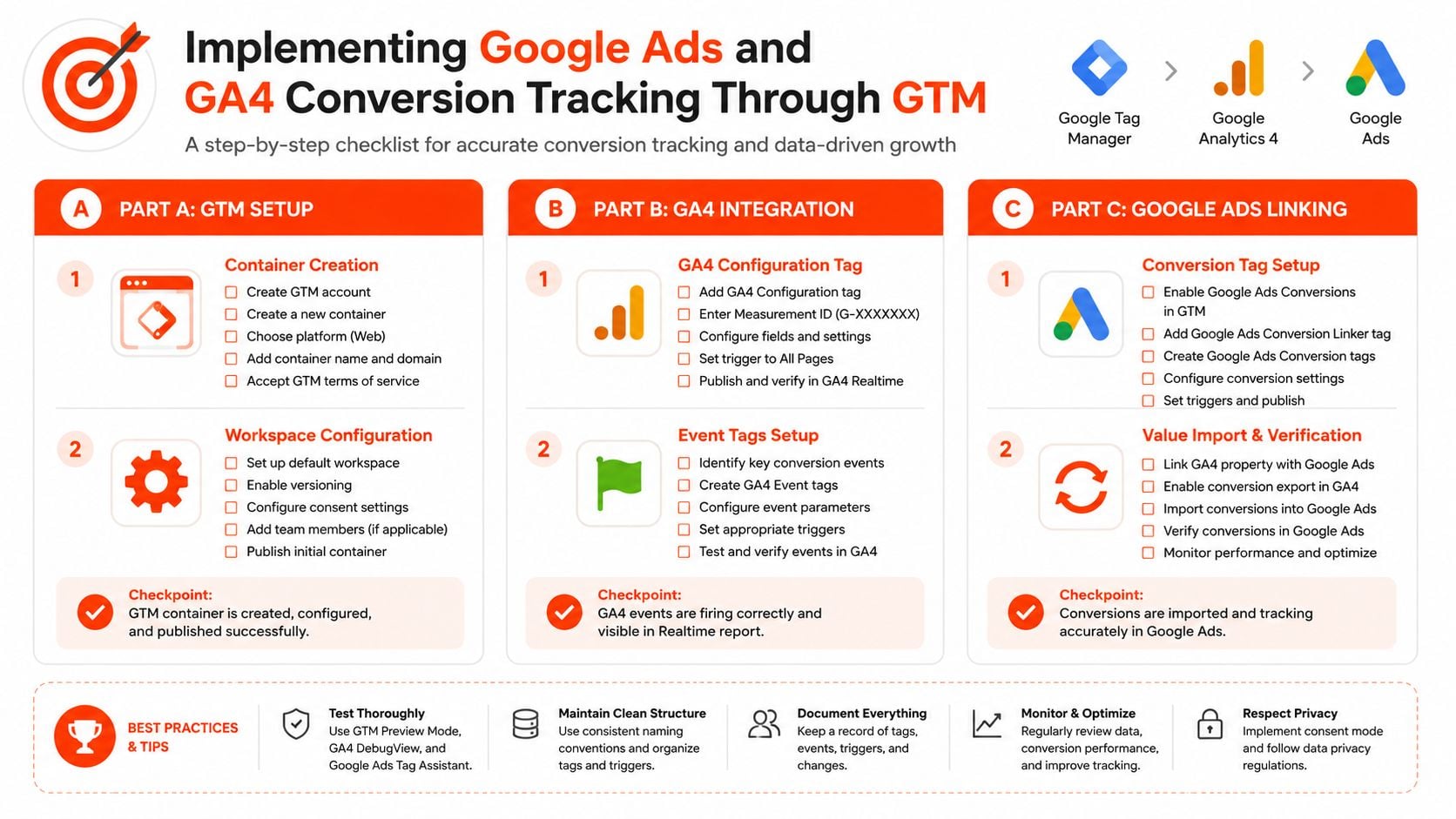
Google Tag Manager should be a controlled deployment layer, not a storage bin for undocumented tags. Create a workspace naming convention, record the change, and assign an owner for approval. Before configuring conversions, confirm that the container loads across every relevant page template, including regional, checkout, and confirmation paths used by Australian visitors.
Build the Google foundation
Configure the Google tag for the relevant Ads account with an all-pages trigger. In current implementations, it provides the first-party measurement foundation that older containers often associated with a separate Conversion Linker tag. Review the account's current setup instructions rather than copying a legacy configuration, then test whether ad click information persists through the conversion path.
Create the Google Ads conversion action before building its GTM tag. Copy the conversion ID and label into GTM, then restrict firing to the genuine success condition:
- Purchases, use a confirmed data layer purchase with value, currency, and transaction ID.
- Lead forms, use a successful submission event or server-confirmed response, not a submit-button click.
- Phone calls, use the configured call conversion mechanism and separate completed calls from incidental link taps where possible.
Choose the counting method according to the business action. A lead normally represents one opportunity, while valid transactions may need individual counting. Repeated confirmation-page loads should not create additional leads.
Send the same event to GA4
Create the GA4 event tag from the same data layer event and map parameters consistently. The GA4 purchase event must represent the same completed purchase that activates Google Ads. If Ads fires on a thank-you page while GA4 fires from a checkout callback, the platforms are measuring different populations, so their totals will diverge.
Use GTM Preview to inspect event order, variables, trigger conditions, and tag status. Test transaction ID and value on every e-commerce scenario. For lead generation, include validation failures, duplicate submissions, refreshes, redirects, and back-button behaviour. A successful test should show one business event and the expected destination tags, not merely a green tag status.
Native Google Ads conversion tracking can be the safer choice when Ads optimisation is the priority. Page coverage and entry paths must match the intended conversion journey. GA4 imports can introduce further attribution and reporting differences, particularly when the original event is filtered, delayed, or defined differently from the Ads action.
Use this Google Ads conversion tracking guide with your account-specific documentation for implementation details and troubleshooting. Keep a written record of the conversion action, trigger, parameters, consent condition, and destination so another practitioner can audit the setup without relying on GTM history alone.
Enhanced conversions can use hashed first-party data to support matching, but automatic collection should not be enabled without reviewing the data present and whether its use is permitted. Configure user-provided data deliberately through GTM, connect it to the intended event, and apply consent conditions before the tag fires. This matters for Australian businesses managing privacy obligations alongside platform attribution.
A short visual walkthrough can help teams identify the relevant GTM screens and firing sequence:
Meta Pixel and Server-Side Tagging for Privacy-Resilient Tracking
The Meta Pixel remains the simplest starting point for many advertisers. It can capture browser events such as page views, leads, and purchases, then pass them to Meta for reporting, audience creation, and campaign optimisation. Its weakness is dependency on the browser, where consent choices, browser restrictions, network failures, and ad blockers can interrupt collection.
Conversions API changes the delivery path. Instead of relying only on a browser request, the business sends selected events from its server or an intermediary endpoint. That can improve resilience, but it doesn't make poor event definitions accurate. A server can reliably send the wrong purchase, duplicate a lead, or disclose data without an appropriate legal basis.
Choose the least complex architecture that solves the problem
| Approach | Strength | Trade-off |
|---|---|---|
| Meta Pixel | Fastest implementation and straightforward browser debugging | More exposed to browser and consent limitations |
| Pixel plus Conversions API | Combines browser context with server delivery | Requires event IDs and reliable deduplication |
| GTM Server-Side | Centralises routing and gives the team more control over data handling | Adds hosting, configuration, monitoring, and maintenance |
| Custom server endpoint | Can fit an existing engineering and CRM stack | Depends heavily on development ownership and documentation |
For a smaller lead-generation account with a simple website, a well-configured Pixel may be sufficient if the consent flow and event quality are sound. An e-commerce retailer with payment redirects, repeat purchases, and a CRM-backed fulfilment process has a stronger case for server delivery. B2B teams may also benefit when the commercially meaningful event occurs after form submission, such as when a lead is accepted or qualified.
Deduplication is not optional
If the browser and server send the same event, both must carry a shared event identifier. Meta can then distinguish one conversion received through two delivery paths from two separate conversions. Without that identifier, the account may report inflated results and train optimisation towards duplicate signals.
Review event match quality, payload fields, consent status, and server logs together. Don't treat a higher platform count as proof of better measurement. The customer data platform guide provides useful context for deciding how customer events should move between marketing systems and operational records.
Server-side tagging also carries an ongoing burden. Someone must maintain the container, monitor failures, update platform specifications, control access, and document which fields are sent to each destination. The right choice is the one your team can operate consistently, not the most elaborate architecture available.
Navigating Australian Privacy Requirements for Conversion Tracking
A pixel can fire correctly and still breach an organisation's privacy obligations. Australian advertisers must assess what each event contains, where the data is sent, how users are informed, and whether consent is required before collection or disclosure.
The OAIC advises organisations to generally seek express opt-in consent when a tracking pixel is likely to collect and disclose sensitive information to third-party platforms. Its 2025–26 priorities include advertising technology and pixel tracking, as explained in the OAIC guidance on tracking pixels and privacy obligations.
Consent needs to control firing
A consent management platform must pass a clear state into GTM before marketing tags load. Configure the container so:
- Analytics tags fire only under the conditions supported by the privacy notice and consent framework.
- Advertising tags stay blocked until the required marketing permission is recorded.
- Sensitive events receive a stricter review, including express opt-in where the OAIC guidance generally expects it.
- Withdrawal choices change tag behaviour and remain available to the user.
- Data layer fields omit unnecessary personal information before events reach advertising platforms.
A privacy policy alone does not control collection. If the Pixel, Google Ads tag, or enhanced conversion data fires on page load, the implementation may ignore the user's consent decision. GTM triggers and consent checks must enforce that decision technically.
Record the consent state alongside each event where the platform and implementation allow it. This makes later audits easier and helps analysts distinguish missing permission from a genuine tracking failure.
Performance and compliance can coexist
Privacy-aware measurement can still support campaign decisions. Separate business analytics from advertising activation, document the purpose of each event, and define a reporting method for consented and non-consented traffic.
An e-commerce purchase event may need value and transaction details, while an audience or remarketing tag may require a separate consent state. A lead-generation site should decide whether a form completion is sufficient or whether additional customer details are being disclosed to a third party.
A data privacy compliance service can help review the connection between legal requirements, consent management, and GTM configuration. Involve privacy counsel when health-related enquiries, financial circumstances, or other potentially sensitive information enters the tracking workflow. Cross-platform attribution gaps should also be documented, because consent restrictions can make Google Ads, GA4, Meta, and CRM records diverge without indicating a technical fault.
Verification and Debugging Workflow for Accurate Conversion Data
Publishing a tag isn't verification. A reliable process tests the entire path from ad click to completed action, then compares the resulting records across the platforms that the business uses.
Start in GTM Preview and Debug mode. Test the form, checkout, call link, and confirmation flow rather than triggering an event manually in the browser console. Confirm the event name, variables, consent state, trigger conditions, and firing order.
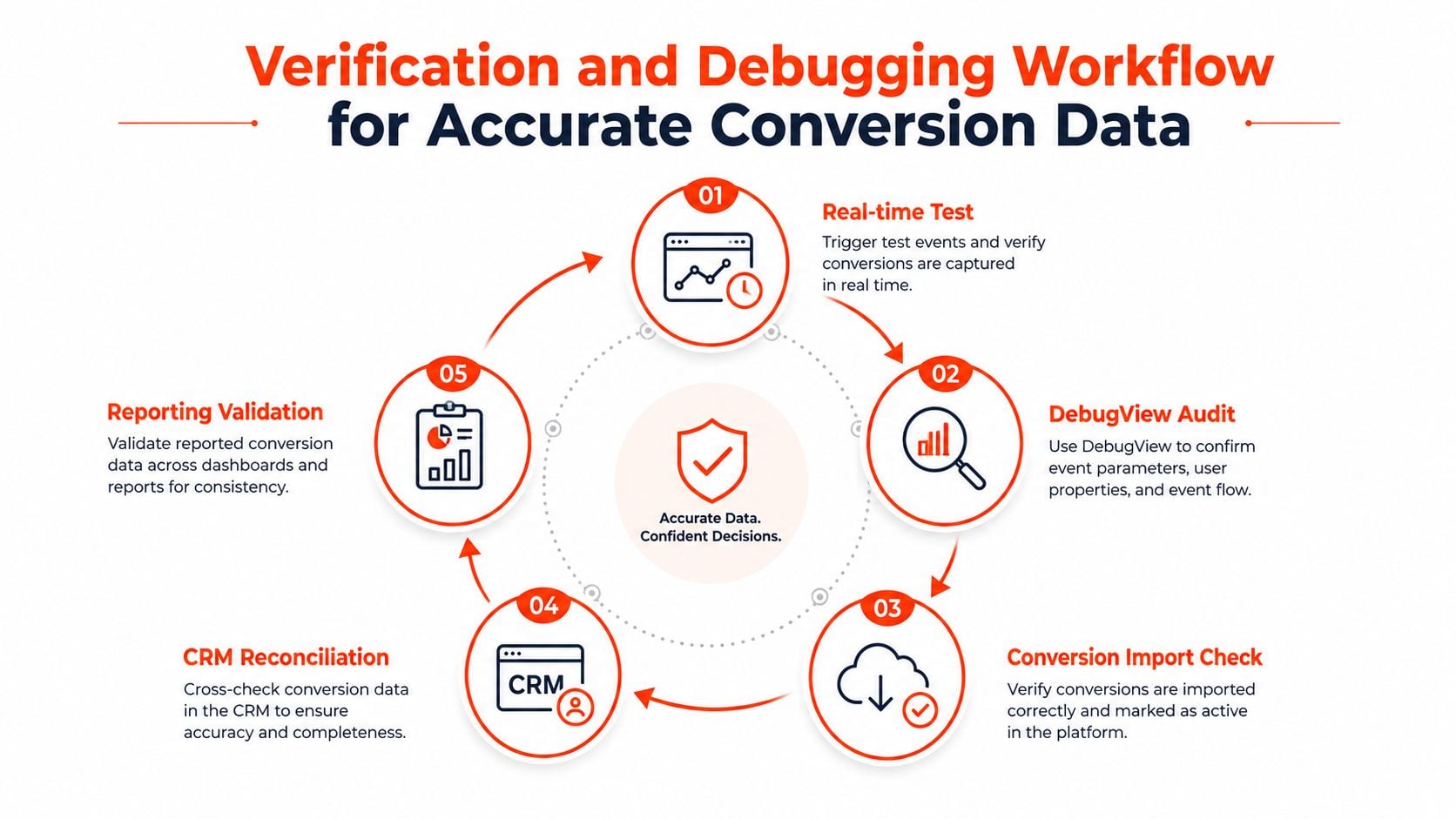
Run a layered test
- Real-time test, submit a controlled form or complete a test purchase and record the transaction identifier.
- GTM inspection, check which tags fired, which were blocked, and which variables were populated.
- GA4 DebugView, confirm the event name and parameters arrived as intended.
- Google Ads validation, use Tag Assistant and the conversion action diagnostics to confirm registration.
- Meta testing, inspect browser and server payloads through Test Events, including the shared event ID when both paths are active.
Then reconcile the records. Compare Google Ads, GA4, Meta, and the CRM over the same period and using the same conversion definition. A difference doesn't automatically mean one system is broken. It becomes actionable when you can identify whether the cause is attribution, consent, delayed CRM qualification, page coverage, duplicate firing, or a missing identifier.
For ongoing monitoring, a practical data observability guide can help structure checks for freshness, completeness, anomalies, and schema changes across reporting pipelines.
Use Australian performance context carefully
Expert benchmarking cited in Google's Australian documentation suggests that well-implemented search campaigns for Australian SMEs commonly deliver roughly 4.0% average conversion rate, with top-quartile accounts reaching 8.0% or more and bottom-quartile accounts falling below 2.0%, as referenced in the Google Ads AU documentation. These ranges are not a pass or fail test for every business. They're a prompt to investigate whether an unusual result reflects genuine demand, offer quality, traffic intent, or broken measurement.
Before launch, test successful and unsuccessful paths, reloads, back-button behaviour, duplicate submissions, payment failures, consent rejection, mobile layouts, and cross-domain redirects. Fixing those issues before budget flows through the account is far cheaper than reconstructing corrupted data later.
Integrating Conversion Data Into Reporting and Campaign Optimisation
A reporting dashboard should show more than the conversion column. It should explain how each platform defines the event, which attribution model it uses, when data becomes available, and how the CRM validates the outcome.
Keep separate fields for platform-reported conversions, qualified leads, completed sales, revenue, and consent status. Google Ads may remain the optimisation source for paid search, while GA4 provides cross-channel analysis and the CRM supplies the commercial outcome. Those systems can work together without being forced into identical totals.
Make attribution differences visible
Document the attribution method beside every KPI. Google Ads data-driven attribution, GA4 cross-channel reporting, and Meta attribution windows can assign credit differently even when they receive the same underlying event. Stakeholders need that explanation before they compare platform totals in a performance meeting.
A useful dashboard includes:
- Spend and delivery, by platform, campaign, and market.
- Primary conversions, using the agreed event definitions.
- Conversion value, where the data layer and CRM support reliable values.
- Qualified outcomes, such as accepted opportunities or completed sales.
- Tracking health, including event freshness, missing values, duplicate IDs, and consent-related reductions.
- Reconciliation notes, explaining known timing or attribution differences.
Treat tracking as operational infrastructure
Website releases can change form selectors, checkout URLs, consent states, and data layer structures. Ad platforms can also change tag requirements and reporting interfaces. Assign ownership for monitoring, keep a versioned event specification, and audit high-value conversion paths after significant site changes.
A practical maintenance rhythm includes checking tag health, validating key events, reviewing CRM matching, and comparing reported outcomes with business records. Don't wait for a sudden ROAS shift to investigate. A small monitoring failure can remain hidden until campaign decisions have already adapted to bad signals.
Conversion tracking setup is therefore a recurring discipline. The strongest Australian accounts align event architecture, native platform tags, GA4 reporting, CRM outcomes, privacy controls, and a documented testing process. That alignment gives campaign managers a defensible basis for changing bids, reallocating spend, and explaining performance without pretending every platform measures the same thing.
Click Click Bang Bang helps Australian businesses implement and audit conversion tracking across Google Ads, GA4, Meta, and related PPC channels, with reporting tied to commercial outcomes rather than platform totals alone. If your CRM, analytics, and ad accounts disagree, visit Click Click Bang Bang to discuss a practical tracking and campaign optimisation plan.
Read NeXt
Or Read Our Latest
- Manual vs Automated Bidding for PPC Success
- Conversion Tracking Setup: A Complete AU Guide
- Instagram Advertising Australia: Complete 2026 Guide
- Pay Per Click: A Beginner’s Guide for Australian Marketers
- Display Advertising on Google: The Complete Australian Guide
- Stakeholder Communication Plan How to Build One That Works
Click. CLick. Subscribe.
Get our best PPC insights, industry updates, and power moves delivered straight to your inbox. No fluff, just high-caliber strategies that actually work.
Don’t Leave Just Yet
Try Us For 30-Days,
Risk Free!!
We guarantee that you’ll love our work within the first 30 days, if not you’ll get your money back.
What have you got to lose?