

Phone Call Tracking: Methods, Metrics, and Best Practices
Last Updated
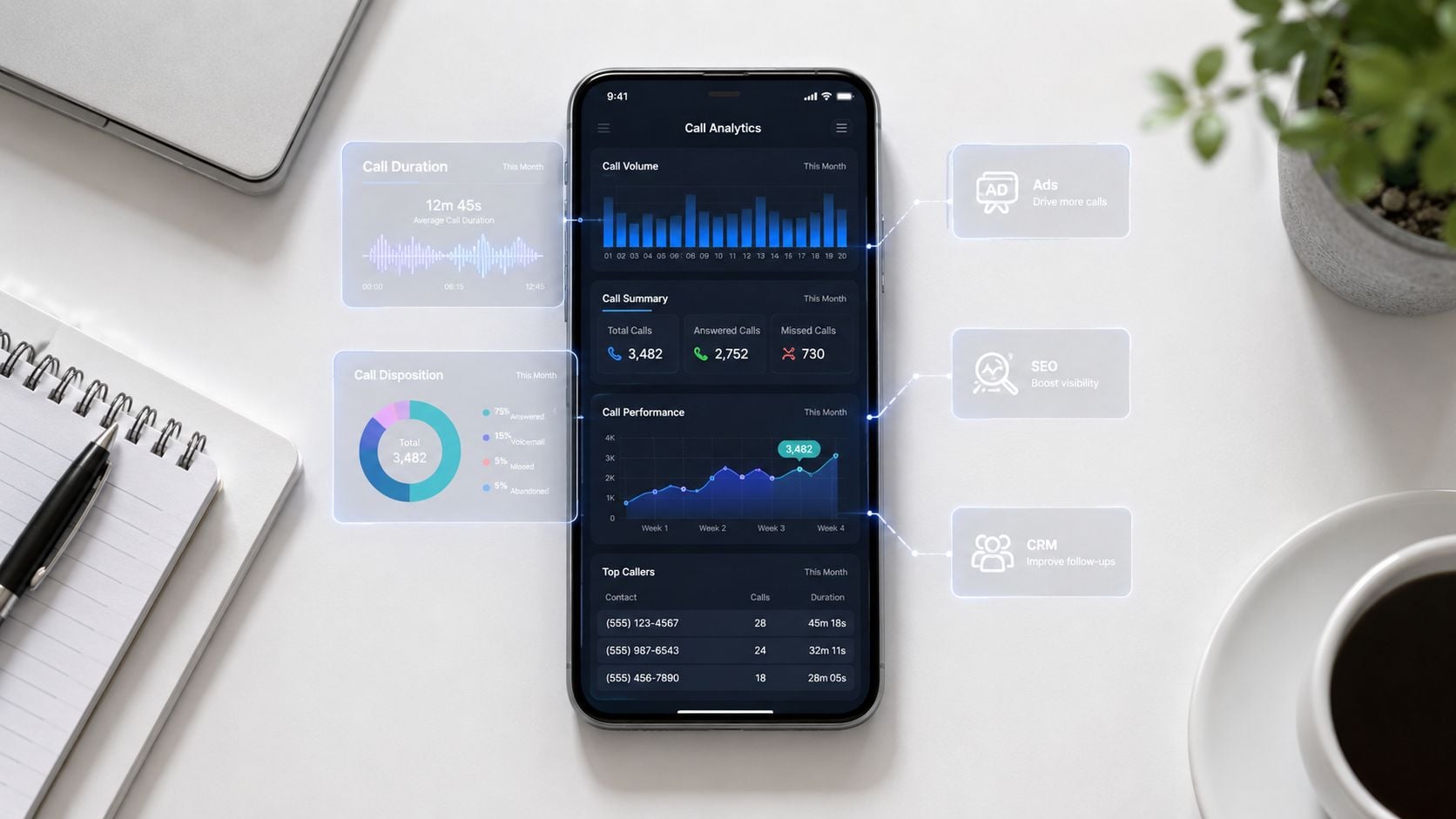
The phone rings, the sales team answers, and another decent lead disappears into a spreadsheet with no source, no keyword, no page path, and no clear owner. That's the measurement gap most Australian marketers live with, especially when calls still do the heavy lifting for service businesses, local operators, and any campaign that converts offline. Phone call tracking exists to close that gap, not to create more vanity reporting.
Many teams already know how to count clicks and form fills. The problem starts the moment a buyer decides to call instead of submit a form, because the web analytics chain usually stops at the phone number on the page. If you can't connect that call back to the ad, SEO page, or agent outcome that caused it, you're left optimising on guesswork rather than revenue.
Why Most Marketers Underestimate Phone Call Tracking
A common scene in Australian SMEs is painfully familiar. The phones are busy, the office manager is juggling callbacks, and the marketing report still says a campaign is “performing” because it drove traffic. Nobody can say which keyword produced the profitable enquiry, which landing page caused the call, or whether the team is getting better at handling high-intent callers.
That's why phone call tracking is better understood as a measurement layer, not a telco feature. Google Ads does support call reporting in Australia through the Phone calls, Phone Impr., and PTR columns, and Google notes that those metrics only include events starting on or after 11 October 2018, which matters when you're comparing campaign history for optimisation work. Google also says call reporting data can be analysed directly in the Campaigns, Ad groups, Ads, or Search keyword tabs, which is exactly where media buyers need it, not buried in an external report. Google Ads call reporting documentation
The attribution break happens at the handset
Clicks are visible. Sessions are visible. Form submissions are visible. The attribution chain falls apart when someone decides to call, because the intent is now on the phone line rather than in the browser session.
That's why many businesses think they're measuring demand when they're really only measuring part of the path. If a prospect arrives from search, browses pricing, then calls, a standard analytics setup often records the visit but not the call outcome. The question isn't whether the phone rang, it's whether that ring came from a channel worth funding again.
Practical rule: if you can't tie the call back to source, you're not doing conversion optimisation, you're just collecting call volume.
A lot of guides stop at that point, but the useful work starts here. Once the phone call becomes a measurable event inside the marketing stack, you can separate campaigns that create revenue from campaigns that merely create noise. That's the difference between having a call log and having a performance system.
What Phone Call Tracking Means
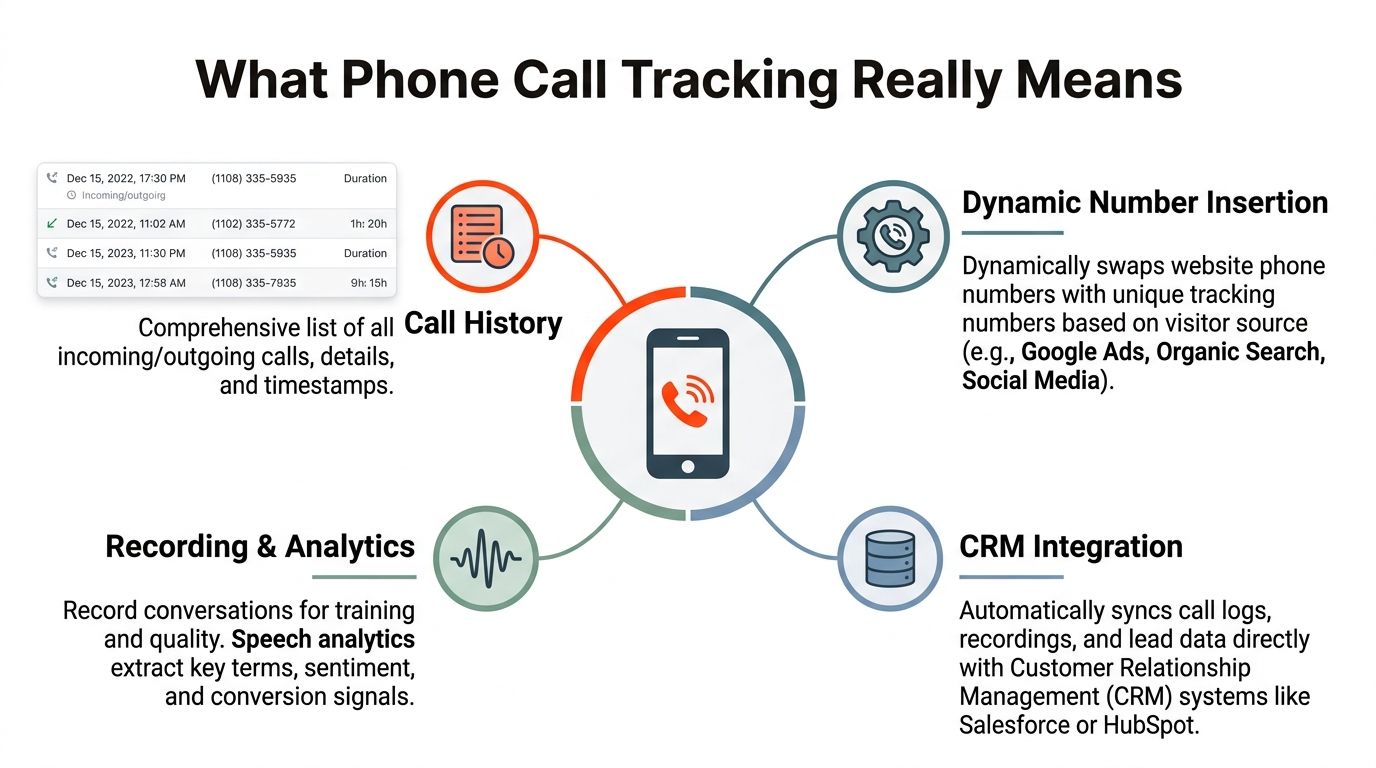
At its simplest, a call history is a record of date, time, number, and duration. Australians have long relied on that kind of log through carrier records and app-based history tools, and a common APAC-style example is MyJio-style statement access, where users can review call history across 7, 15, 30, or custom date ranges, with history available up to 180 days. MyJio call history guide
That basic structure is the starting point. Marketing-grade phone call tracking adds the context a bill never gives you, such as the source, campaign, keyword, landing page, and session that led to the call. Once that context exists, a call becomes a measurable conversion record you can analyse, route, and optimise, rather than a line item in a phone log.
Call event versus call conversion
A call event tells you the phone rang. A call conversion tells you the call produced value for the business. That distinction sounds obvious, but reports often miss it because they stop at activity rather than outcome.
Modern systems collect caller ID, timestamp, and attribution metadata, then forward the call to the business line so each campaign can be isolated to its own DID. Platforms also commonly support local, area-code, and toll-free number selection, which helps when you are separating paid search, SEO, offline campaigns, and brand activity. Call tracking number provisioning
From logs to attribution
The technical benchmark most AU marketers should care about is dynamic number insertion (DNI) with a per-session or per-channel number pool. In practice, the displayed number changes on page load, then the inbound call gets matched back to the web session or source that saw that number. Call-tracking software overview
For teams that want a practical measurement framework, inbound and outbound call KPIs help separate raw call volume from calls that matter to revenue. Once you treat the phone as a measurable conversion path, you can work with it as a proper marketing channel instead of a mystery box. A plain-English definition that holds up in practice is this, phone call tracking is the process of connecting a call to the marketing source, campaign, and outcome that produced it.
Core Methods Marketers Use to Track Calls
The method you choose depends on how people contact you. A local plumber with search ads, a retailer running catalogue mailers, and a B2B team capturing demo requests do not need the same stack, because the value of the call and the source of the call are different problems.
Choose the method around the campaign, not the other way around
DNI is the default for website traffic. It swaps the number on the page, ties that number to the visitor's session, and lets you see which source, campaign, or landing page created the call. Static forwarding numbers work better for offline channels like print, radio, and signage, where there is no browser session to attach. Call analytics platforms add recordings, transcription, tagging, and CRM hand-off, which is where tracking becomes operational rather than purely attribution-led.
Call-only ads and call assets in Google Ads are different again, because the ad itself is designed to trigger the phone call. They are useful when the call is the intended conversion event, but they do not replace tracking across the rest of the journey. Mature stacks usually combine two or more methods because one method rarely captures every path.
| Method | Best for | Attribution depth | Typical cost |
|---|---|---|---|
| DNI | Website traffic from paid search, SEO, and referrals | High, down to source and session | Usually higher setup effort |
| Static or dedicated forwarding numbers | Offline campaigns, local listings, print, radio, signage | Medium, source-level if numbers are separated well | Usually lower complexity |
| Call analytics platforms | Teams that need recordings, transcription, outcomes, and CRM hand-off | High, especially when integrated with CRM | Usually higher than simple forwarding |
| Call-only ads and call assets | Search campaigns where the phone call is the intended conversion | Medium to high inside Google Ads | Depends on media spend and platform setup |
If you want a shortlist of platform types and feature trade-offs, the best call tracking software roundup is useful as a comparison lens, even if you end up choosing a simpler stack. The key is matching capability to use case, not paying for intelligence you will not use.
What the common methods solve
DNI answers the source question. Forwarding numbers answer the offline campaign question. Analytics platforms answer the quality and outcome question. Call-only ads answer the intent question.
Buying a number alone rarely delivers attribution, it usually only provides a routing rule.
That is why stronger implementations are layered. A Google Ads team might use call assets for high-intent search, DNI for website traffic, and analytics software to tag outcomes and push closed-loop data into CRM. If you need a practical way to connect those call events back into reporting, the process is similar to offline conversion tracking, because the work is tying the phone call to a source the platforms can use. The right mix depends on whether you care most about source, quality, or revenue proof.
Connecting Call Tracking to Google Ads, SEO, and CRM
A call count on its own does not close the measurement gap. The value comes when the call record moves into Google Ads, organic reporting, and the CRM, because that is what lets paid media, SEO, and sales work from the same evidence instead of three separate versions of the truth.
Google Ads needs the conversion loop closed
In Google Ads, the practical setup is to import call conversions back into reporting so bidding can use them. Google's call reporting framework already exposes call events in campaign, ad group, ad, and keyword views, which makes it possible to connect paid media to inbound calls without treating the call as a hidden offline result.
That matters because a campaign can look weak on clicks and still deliver strong call outcomes. If the call only lives in a standalone system, the ad platform never learns which traffic is valuable, so Smart Bidding and manual optimisation are both working without the full picture.
SEO needs calls, not just rankings
Organic reporting often overweights pageviews and undercounts intent. DNI fixes that by attributing calls back to the organic session, so SEO teams can see which pages generate phone enquiries alongside form fills and other micro-conversions.
That matters most on local-service pages, pricing pages, and comparison content, where the caller often skips the form entirely. Once calls sit beside the rest of the engagement data, SEO stops being judged only on visibility and starts being judged on lead behaviour.
CRM is where revenue proof lives
The hand-off is simple in theory and messy in practice. Call logs, recordings, transcripts, and outcome tags need to land in Salesforce, HubSpot, or another CRM so sales and marketing can see one shared record of lead quality. Without that hand-off, the marketing team knows where the call came from, but not what happened after the rep answered.
An internal implementation reference that helps when mapping this out is offline conversion tracking for Google Ads. Once the CRM starts receiving call context, closed deals can be tied back to the source that created them rather than left as orphaned revenue.
Implementation reality: if the call record does not reach the CRM cleanly, the attribution story usually breaks at the exact point leadership wants proof.
That is why integration depth matters more than dashboard polish. A neat report is useful, but a synced call outcome that updates pipeline stages is what turns phone call tracking into a revenue optimisation tool.
Planning Your Call Tracking Implementation
The setup decisions happen before the first number goes live. If those decisions are sloppy, the reporting will be sloppy too, and the team will spend months arguing about whether the problem is the source, the landing page, or the lead itself.
Start with number architecture and source separation
Pick the number type based on campaign intent. Local numbers can feel more familiar for region-based campaigns, area-code numbers help with geographic relevance, and toll-free numbers can support national campaigns where brand recall matters. The more important point is source separation, because each campaign or channel should get its own tracking line if you want clean reporting.
Tagging conventions matter just as much. Use a consistent structure for source, medium, and campaign so the call record lines up with the rest of your analytics. If the naming drifts, the reporting drifts with it, and nobody trusts the dashboard.
Routing, recording, and testing need to be designed together
Forward calls to the right line, but also define what happens during business hours, after hours, and when the primary line is busy. Overflow logic should be explicit, because missed calls are often a routing problem rather than a demand problem. Recording and transcription settings should be decided at the same time, since they affect both analysis and compliance.
For a practical Google Ads implementation reference, Google Ads conversion tracking setup is a useful internal guide when the goal is to connect call activity to media performance. The last step is QA, and it should be ruthless.
- Test live calls end to end: Confirm the number swaps, the call connects, and the attribution data lands where it should.
- Check priority pages: Make sure DNI is firing on the landing pages that matter most, not just the homepage.
- Verify CRM hand-offs: Open the CRM record and confirm the call, source, and outcome appear correctly.
- Review routing logic: Validate business hours, overflow, and voicemail behaviour before launch day.
If the test call doesn't show up in reporting exactly as expected, the live campaign won't fix itself later.
That's the part many teams skip. They launch the numbers, assume the integration works, and only discover the mismatch after budget has already been spent. A careful setup is slower on day one, but it saves far more time than it costs.
Metrics and Reporting That Matter
Call volume is the easiest number to celebrate, and also the easiest to misread. A busy phone line can point to strong demand, poor routing, repeated service issues, or irrelevant traffic, and raw volume by itself does not tell you which one you are dealing with.
Start with volume, then move to quality
Baseline metrics still matter. Call volume, call duration, and answer rate show whether the channel is generating contact and whether someone is there to pick up. After that, reporting needs to shift toward quality.
That means tagging qualified calls, conversion-tagged calls, and outcome scores from the sales team. It also means reviewing recordings and transcriptions for objections, script friction, and recurring questions that show intent. Rather than watching every call, use sampled call intelligence to improve the ones that matter.
A good reference point for deeper conversation analysis is call center analytics software, because the value sits in the relationship between source, outcome, and agent behaviour. If a campaign produces a lot of calls but few real opportunities, the quality tag will show that before revenue does.
Source-level ROI is the reporting layer leadership cares about
Source-level ROI comes from joining call data to CRM revenue. That is where marketers see whether search, SEO, or referral traffic is producing calls that close. Without that join, a team can mistake activity for performance and overfund channels that generate ringing without revenue.
Call recordings and transcripts also help with coaching. If the same objections keep appearing, or agents are missing the same qualification cues, the issue likely lies in the script or the process rather than the ad. That is why call analytics should sit inside a monthly report that includes source, quality, and follow-up actions rather than just a chart of how many times the line rang.
Build the monthly report around decisions
A useful report does not need to be flashy. It needs to answer where to spend more, where to spend less, and which team needs coaching. If SEO is driving fewer calls but more qualified ones, that is a budget story. If a paid channel is driving calls with weak outcomes, that is a targeting or landing page story.
For teams that need reporting beyond basic call counts, the mix of source, outcome, and agent data is where privacy and compliance guidance for call tracking and operational reporting have to line up. If the sales team does not tag outcomes consistently, the reporting cannot mature, no matter how good the platform is.
Privacy, Consent, and Australian Compliance Considerations
The compliance question isn't a side issue. In Australia, call tracking touches privacy, recording consent, data retention, and sometimes state-based surveillance rules, which means the setup has to be designed with legal obligations in mind from the start.
Metadata is not the same as recording
Logging call metadata is a different risk profile from recording or transcribing the conversation. Metadata like timestamp, caller ID, and attribution source can still be personal information, so it needs to be handled under the Australian Privacy Principles when it sits inside a system linked to a person. How you store, access, and dispose of that data matters.
Recording is a bigger step. Australian privacy and surveillance requirements can vary by state and use case, and the practical reality is that many marketing teams should assume disclosure and consent need to be handled carefully before any recording starts. If a business wants transcription or AI-driven conversation analysis, it should also think about retention, accuracy, and who can access the output.
Put disclosure into the workflow
The safest operational approach is to make disclosure part of the call flow, not a hidden clause in a policy page. That usually means telling callers that the call may be recorded or transcribed, making sure the privacy policy reflects the actual workflow, and involving legal review when the setup spans multiple states or regulated industries.
If you're mapping that into a marketing stack, this internal reference is a good companion: data privacy compliance for marketing teams. The main point is simple, compliance is a design constraint, not a cleanup task.
Plain rule: if the caller wouldn't reasonably expect the recording or transcription, don't bury the disclosure.
AI transcription adds another layer because the conversation is now machine-readable and searchable. That's useful for sales coaching and reporting, but it also raises questions about data retention and how long those transcripts should live. The cleanest approach is to define the use case first, then limit the data to what the team needs.
The businesses that get this right treat privacy as part of the measurement architecture. They decide what gets disclosed, what gets stored, and who can see it before the first call ever lands in the system.
Common Pitfalls and Your Next Steps
Most call tracking failures are boring. Teams treat every call as a conversion, ignore call quality, skip outcome tagging, record without proper disclosure, or leave DNI turned off on the pages that drive the most calls. A mature setup does the opposite, with source-level reporting, CRM integration, outcome tags, and compliance built in.
This week, audit your current numbers, define call outcomes with the sales team, enable DNI on priority pages, and review your recording and consent workflow. The goal isn't more calls in a spreadsheet, it's a clear line of sight from marketing spend to phone-driven revenue.
If you want call tracking that connects media, SEO, and CRM data without turning your reporting into a mess, Click Click Bang Bang can help build the measurement foundation properly. Visit Click Click Bang Bang to talk through your current setup, tighten the attribution flow, and make sure the calls you're already paying for show up as revenue.
Read NeXt
Or Read Our Latest
- Localization Strategy: How to Win in Any Market
- Phone Call Tracking: Methods, Metrics, and Best Practices
- Supplier Relationship Management: Strategic Guide 2026
- Reporting Portal Login: Access Your Client Dashboard Fast
- How to Calculate Sample Size for A/B Tests and Campaigns
- How to Fix Google Merchant Center Errors Step by Step
Click. CLick. Subscribe.
Get our best PPC insights, industry updates, and power moves delivered straight to your inbox. No fluff, just high-caliber strategies that actually work.
Don’t Leave Just Yet
Try Us For 30-Days,
Risk Free!!
We guarantee that you’ll love our work within the first 30 days, if not you’ll get your money back.
What have you got to lose?