

Ecommerce Conversion Tracking: A Complete Guide for 2026
Last Updated

You're probably in one of two situations right now.
Either your ads are generating sales, but the numbers don't line up between Shopify, GA4, Google Ads, and Meta. Or you've already installed “tracking”, but you still can't answer the question that matters most: which campaigns are producing profitable revenue?
That gap is where ecommerce conversion tracking stops being a technical task and starts becoming a commercial one. If your purchase event is wrong, duplicated, blocked, or incomplete, every optimisation decision that follows is shaky. Bids drift. remarketing audiences fill with the wrong users. Budget moves to channels that look good in-platform but don't hold up when you compare them to actual orders.
For Australian ecommerce brands, local buying behaviour adds friction that many generic guides ignore. Mobile dominates traffic. Privacy settings interrupt browser tracking. Shipping and GST can change purchase intent late in the checkout. If your setup doesn't account for those realities, you aren't just missing data. You're training ad platforms on the wrong signals.
Why Accurate Conversion Tracking is Non-Negotiable
A common pattern in ecommerce is this: the account looks busy, traffic is coming in, and the reporting dashboard says plenty is happening. Then finance asks a simple question about return on ad spend, and nobody can give a clean answer.
That usually isn't an ad problem first. It's a tracking problem.
In Australia, the average ecommerce conversion rate stood at 2.8% in 2025, with mobile accounting for 68% of traffic. Businesses using GA4 conversion tracking to analyse their funnel saw rates improve by up to 1.7 percentage points, and tracked campaigns delivered 3.5x higher ROAS, according to the average conversion rate for ecommerce data referenced here. That gap is the commercial cost of poor measurement.
When tracking is inaccurate, teams usually make three expensive mistakes:
- They back winners too late. A high-intent campaign can look average if purchases aren't attributed properly.
- They cut useful traffic too early. Upper-funnel campaigns often assist conversions that last-click reports won't recognise.
- They optimise for the wrong behaviour. If the platform can't reliably see purchases, it starts favouring softer events that don't always correlate with revenue.
Practical rule: If you can't trust the conversion event, you can't trust the bid strategy built on top of it.
This is why ecommerce conversion tracking shouldn't sit in a developer backlog as “analytics setup”. It's the operating system for paid media. Google Ads and Meta don't improve because you spend more. They improve because you feed them clean conversion data.
If you want a useful companion read on maximizing Google Ads return on investment, this piece from Come Together Media explains the commercial side of proving ad ROI well. The technical setup only matters because it gives that ROI conversation real evidence.
Mapping Your E-commerce Conversion Funnel
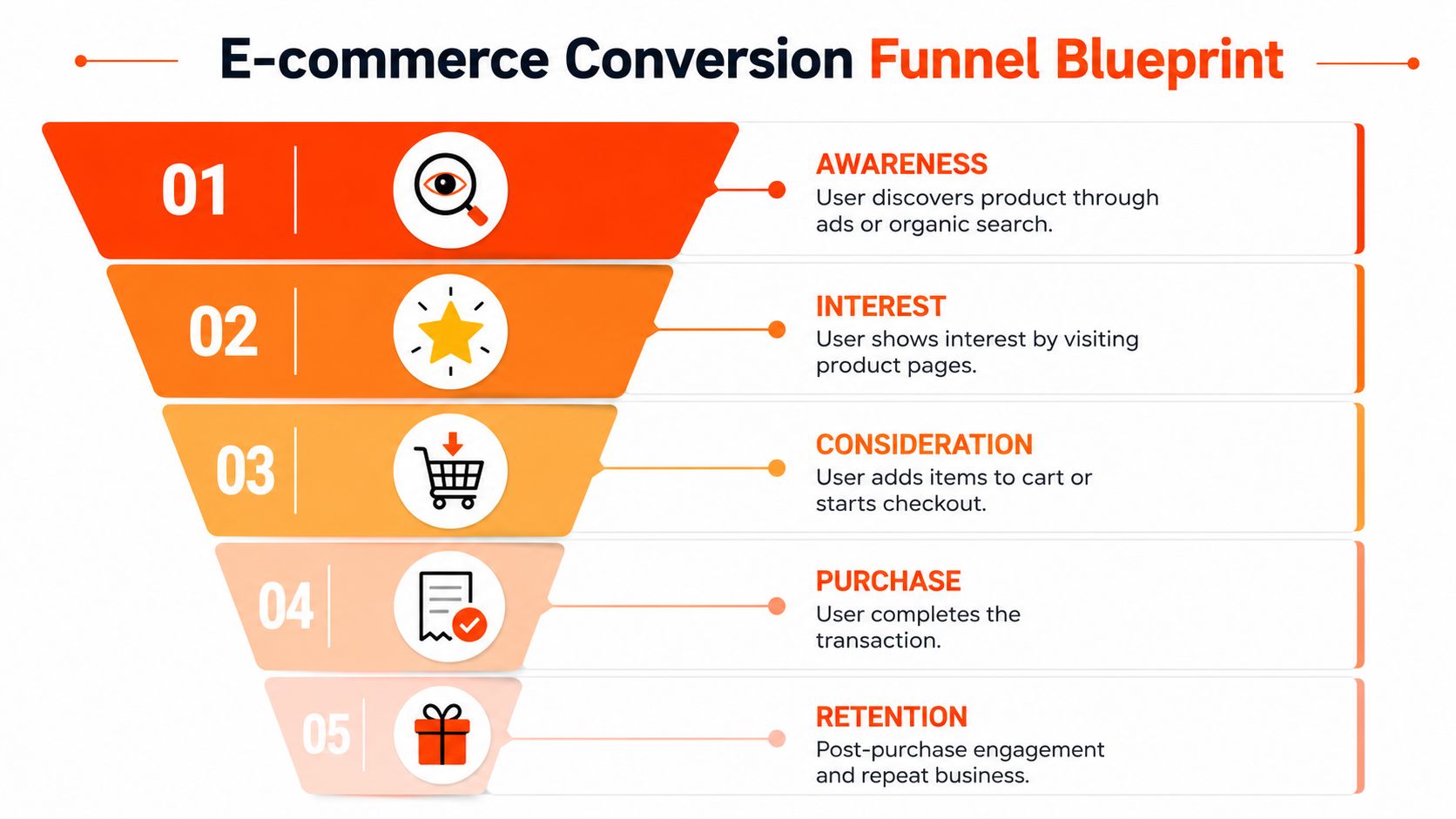
Before touching Google Tag Manager, document your funnel on paper or in a shared sheet. Most broken setups start with a technical implementation built on a vague business definition of “conversion”.
For ecommerce, the macro-conversion is usually the purchase. But that isn't enough on its own. You also need the micro-conversions that explain how a user moved, or failed to move, toward that purchase.
In a typical Australian ecommerce funnel, 100% of users view a product, 11.8% add to cart, 5.4% initiate checkout, and 3.1% complete a purchase, based on these AU conversion funnel benchmarks. Those figures matter because they tell you where to look when revenue stalls.
Separate diagnosis events from outcome events
A clean funnel map usually includes:
- Product interest events such as product view and collection interaction. These show whether traffic is reaching relevant products.
- Intent events such as add_to_cart and begin_checkout. These reveal whether product pages and merchandising are doing their job.
- Outcome events such as purchase. This is the event that should carry revenue and transaction detail.
- Retention events such as repeat purchase or email signup after purchase. These help you understand customer value beyond the first order.
The mistake I see often is businesses tracking the end result only. That leaves you blind to the leak. If purchases fall, is it because the ad traffic is poor, the product page isn't persuasive, the cart is weak, or checkout creates friction? Without the middle events, you're guessing.
Keep the event plan consistent across platforms
Your event naming should make sense in GA4, Google Ads, and Meta. It doesn't have to be identical in every interface, but the business meaning should be stable.
A practical funnel map for a Shopify or custom ecommerce store should answer:
- What user action happened?
- Where did it happen?
- What product or basket was involved?
- Did the event carry value?
- Which platform needs that signal?
If your marketing manager calls it “checkout started” and your developer calls it “step_two_complete”, confusion arrives fast.
Track only the events you'll use. Over-instrumented setups look advanced but often create noise. A smaller event set with clear commercial meaning is better than a huge event library nobody trusts.
Include checkout friction in the map
For Australian retailers, it's smart to document where costs appear. Shipping, GST, and delivery speed can change intent late in the journey, so treat those moments as part of the funnel logic, not just the checkout design.
A separate usability lens helps here. If you're reviewing ways to improve user experience checkout, this Bridge Global resource is useful because it frames checkout as a measurable conversion system rather than a design afterthought.
Core Implementation with Google Tag Manager and GA4
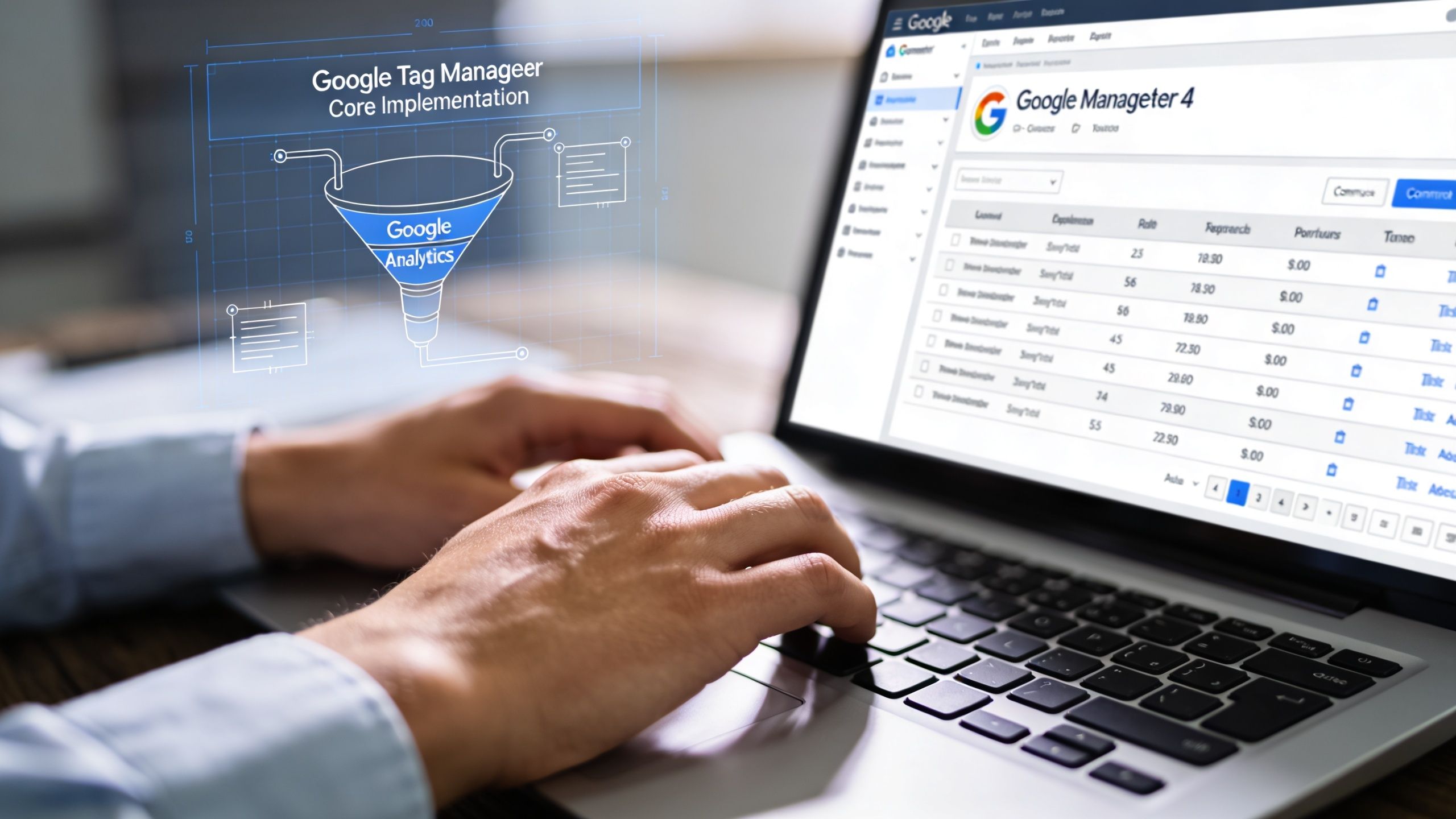
Google Tag Manager is the deployment layer. GA4 is the measurement layer. Keep those roles clear and your setup gets much easier to manage.
GTM controls when tags fire and what data gets passed. GA4 receives the event data, stores it, and makes it available for reporting, audience building, and import into ad platforms. If you blur those roles, debugging becomes painful.
Build the purchase event properly
For a standard GA4 purchase event, the technical spec requires firing gtag('event', 'purchase') with transaction_id, value, currency set to AUD, and an items array, according to this GA4 ecommerce conversion setup reference. That sounds simple, but each field has a job:
| Field | Why it matters |
|---|---|
transaction_id |
Prevents duplicate counting and gives you a clean order reference |
value |
Sends commercial value to GA4 and downstream platforms |
currency |
Keeps revenue reporting consistent for Australian stores |
items |
Connects the order back to products, categories, and basket composition |
If one of those is missing, your reporting loses usefulness fast. A purchase without transaction ID can double count. A purchase without value can't inform ROAS properly. A purchase without items limits product-level insight.
Use the data layer, not page scraping
A reliable implementation pulls ecommerce data from the site's data layer or platform-generated event object. Don't rely on scraping text from the page if you can avoid it. Scraping breaks when templates change, discount labels move, or the checkout layout is redesigned.
A sensible implementation flow looks like this:
- Create the GA4 property and confirm base pageview tracking is live.
- Define the ecommerce data layer with developers so product, cart, checkout, and purchase details are passed consistently.
- Configure GTM tags and triggers for the mapped events from your funnel plan.
- Mark purchase as a conversion in GA4 once the event is arriving cleanly.
- Link GA4 to Google Ads only after validation, not before.
A tag that fires is not the same as a conversion that's trustworthy.
Choose the right firing logic
Purchase tags should generally fire on a confirmed order completion state, commonly the thank-you page or equivalent post-purchase event. What matters isn't the URL alone. What matters is certainty that payment and order creation have succeeded.
Poor firing logic causes two recurring problems:
- False positives from users refreshing a page or revisiting an order confirmation URL
- Missed purchases when the checkout uses embedded or app-based flows that don't load the expected page state
For that reason, the event source should be tied to a reliable order signal from the platform whenever possible.
Attribution settings affect how useful the data becomes
Once your purchase event is stable, import conversions into Google Ads and use Data-Driven Attribution where it fits your account. Australian benchmarks cited in the source above indicate ROAS can improve by 15% to 20% compared to last-click when this is implemented correctly via the GA4 and Google Ads setup. The key point isn't the interface setting alone. It's that better attribution only helps when the underlying event is clean.
Building Resilience with Server-Side Tagging and Meta CAPI
Browser-only tracking used to be enough for many stores. It isn't now.
Cookie restrictions, browser privacy controls, and blocked scripts mean the browser often fails to tell the whole truth about what happened. If your setup relies only on a client-side pixel, you'll lose signals before they ever reach Meta or Google.

In Australia, up to 42% of mobile users employ some form of cookie blocking. Implementing the Meta Conversions API alongside the standard Pixel can lift tracking accuracy to 92% and increase Meta ROAS by as much as 26%, based on this Meta CAPI ecommerce tracking reference. That's why serious ecommerce conversion tracking now uses a hybrid approach.
What client-side misses
A standard browser pixel is useful because it captures immediate user actions inside the session. It's also easy to deploy. But it has obvious weaknesses:
- Ad blockers can stop it
- Consent settings can limit it
- Browser rules can shorten attribution visibility
- Network interruptions can prevent the event from reaching the platform
Server-side tagging addresses those gaps by sending event data from your server environment rather than relying only on the customer's browser. That doesn't replace browser tracking. It strengthens it.
Why Meta Pixel and CAPI work best together
For Meta, the strongest pattern is Pixel plus Conversions API with event deduplication. The pixel records browser activity. CAPI sends the same key conversion events from the server side. Meta then uses event IDs to deduplicate and avoid inflated counts.
That matters for three reasons:
| Approach | Strength | Weakness |
|---|---|---|
| Pixel only | Fast browser signal | Vulnerable to blocking and data loss |
| CAPI only | More resilient data delivery | Less visibility into some browser context |
| Pixel + CAPI | Better coverage and stronger matching | Requires careful deduplication and QA |
If you're building a privacy-resilient setup, it also helps to understand how first-party data works in practice. That's the foundation underneath stronger server-side measurement.
The best tracking architecture isn't the one with the most tools. It's the one that survives real user behaviour, privacy settings, and platform changes.
A short explainer can help if your internal team needs a visual overview of the shift toward server-side tracking:
Where server-side tagging earns its keep
This approach is especially useful when:
- Your Meta reporting is consistently below actual order volume
- Mobile traffic is strong but mobile-attributed purchases look weak
- You rely on remarketing audiences that seem too small
- Your store uses app-based or accelerated checkout flows
It also creates cleaner conditions for privacy compliance because the business can control how data is processed before it's sent downstream. That doesn't remove legal obligations, but it gives you more control than firing everything directly from the browser and hoping for the best.
Validating Your Tracking and Debugging Errors
A live tag is not proof of a correct setup. Validation is where ecommerce conversion tracking becomes usable.
The fastest way to lose confidence in reporting is to skip QA, launch campaigns, and discover weeks later that purchases were duplicated or values were missing. At that point, the reporting issue becomes a bidding issue because the platforms have already optimised around bad data.

Run a controlled test purchase
Do at least one controlled purchase from start to finish. Use a real product, move through the actual checkout flow, and watch the event path in your tools.
Your check should include:
- GTM Preview mode to confirm the right triggers fired and only once
- GA4 DebugView to verify event names and parameters arriving correctly
- Browser helpers such as Tag Assistant or Meta Pixel Helper to spot implementation issues
- Back-end order confirmation so you know the transaction really existed
For broader setup guidance, this practical page on website conversion tracking is a useful reference point when you're comparing the tag behaviour to the business outcome.
What to inspect on every key event
Look beyond whether the event appeared. Inspect the payload.
For purchase events, check:
- Transaction ID is present and unique
- Value matches the order total being sent for reporting
- Currency is AUD if you trade in Australian dollars
- Items array contains the expected product information
- No duplicate purchase fires occur on refresh or revisit
For micro-conversions, focus on whether the action represents a genuine customer step or just a UI interaction. A click on a cart icon is rarely as useful as a confirmed add_to_cart event.
Diagnostic shortcut: If platform revenue is consistently higher than store revenue for the same date range, suspect duplicate counting before you suspect “great performance”.
Keep a simple QA checklist
A short checklist beats memory every time:
- Test on mobile and desktop
- Test with consent accepted and limited
- Test discount codes and shipping variations
- Test repeat page loads on confirmation pages
- Record screenshots of event payloads for sign-off
That last point matters. When a developer changes theme code, payment apps, or checkout elements later, you need a baseline to compare against. Good validation isn't only about fixing what's broken today. It gives your team a known-good version to defend in the future.
Connecting Conversions to PPC and Rethinking Attribution
Once clean conversion data is flowing, the next mistake is usually strategic. Teams treat attribution as if the platform report is the truth rather than one interpretation of the truth.
That's where good ecommerce conversion tracking earns its real value. It lets you challenge simplistic reporting and make budget decisions with more context.
In Australia, existing tracking often fails to account for 79% of ecommerce traffic coming from mobile, which leads to 25% to 35% underreporting of conversions in GA4 for retailers, according to this cross-device conversion tracking analysis. When that happens, PPC campaigns are often over-optimised for desktop, even though the customer journey may start on a phone and finish somewhere else.
Last-click is often the wrong story
Last-click attribution rewards the final touchpoint. It's neat, easy to explain, and often incomplete.
A shopper might:
- discover the product via a Meta ad on mobile
- return through a Google brand search later
- purchase on desktop after comparing delivery options
In a last-click report, brand search gets the credit. That doesn't mean brand search created the demand. It means it closed the session.
This is one reason imported conversions and stronger attribution settings matter. If you want to improve Google campaign decisions, a dedicated reference on Google Ads conversion tracking is worth reviewing alongside your GA4 setup.
What to do instead
A better approach is to read attribution in layers.
| Layer | What it tells you |
|---|---|
| Platform attribution | How Google or Meta thinks its own traffic contributed |
| GA4 path analysis | How users moved across channels and devices |
| Store order data | What actually happened commercially |
| Assisted conversion view | Which channels influenced revenue before the final click |
You don't need a perfect model to improve decision-making. You need one that reflects how your customers really shop.
Focus on commercial patterns, not channel ego
When mobile starts the journey and desktop closes it, don't cut the mobile campaign because it “doesn't convert”. Ask whether it assists profitable orders. The same applies to prospecting campaigns that look weak in direct ROAS terms but fill remarketing pools and branded search demand.
That shift changes how budget gets allocated. Instead of rewarding whichever channel happens to catch the last click, you start rewarding the channels that move customers toward purchase.
Last-click tells you who finished the conversation. It rarely tells you who started it or who kept it moving.
Common Pitfalls and How to Solve Them
Most tracking failures aren't caused by one catastrophic mistake. They come from small blind spots that stack up.
The dangerous part is that many of these setups look fine on the surface. Tags fire. Dashboards populate. Campaigns spend. But the logic underneath is fragile.
In Australia, failure to transparently account for GST and regional shipping costs can inflate cart abandonment by 18%. Standard last-click attribution also misses the nuance, while multi-touch models can reveal that PPC drives 2.5x more assisted conversions than typically reported, according to this analysis of checkout friction and attribution blind spots.
Pitfall one with duplicate purchases
If the same purchase event can fire from both a theme app and GTM, your numbers will look better than reality. That sounds nice until bidding algorithms start chasing phantom value.
Solve it by making one system the source of truth and validating transaction IDs. If the order confirmation page can be refreshed, your deduplication logic matters even more.
Pitfall two with consent handled badly
Some teams hear “privacy compliance” and respond by suppressing so much tracking that their reporting becomes unusable. Others ignore consent handling and create legal and operational risk.
The right approach is controlled measurement. Configure consent-aware tagging, decide which events can still be modelled or passed server-side where appropriate, and document the logic so marketing and development understand the same rules.
Pitfall three with GST and shipping hidden too late
Australian shoppers often make the go-or-no-go decision late in checkout when shipping or final pricing becomes clear. If your reporting only treats purchase as the event that matters, you miss the commercial signal hiding one step earlier.
Track the checkout moments that explain the drop. Then compare those events by source, device, and campaign. That's where marketing teams often discover that an ad isn't the issue. The issue is what the user sees after the click.
Pitfall four with international payment assumptions
Stores expanding across borders often carry local payment and checkout assumptions into new markets, then wonder why conversion quality drops. Operational friction at payment stage can undo strong campaign performance.
If you're reviewing payment complexity while avoiding revenue loss during international expansion, this Suby article is useful because it frames processor and checkout issues as growth risks, not just finance admin.
The cleanest ad account can't rescue a checkout that surprises users with cost or payment friction at the finish line.
Frequently Asked Questions
Below are the questions that come up most often when teams are tightening their ecommerce conversion tracking setup.
| Question | Answer |
|---|---|
| What is the single most important conversion to track for an online store? | The purchase event. It should include transaction ID, value, currency, and item data so reporting can connect ad spend to revenue. |
| Should I only track purchases? | No. Purchases tell you the result. Micro-conversions such as product view, add to cart, and checkout start help you find where users drop off. |
| Is GA4 enough on its own? | GA4 is the core analytics layer, but many stores need GTM for flexible deployment and a server-side component or CAPI setup for stronger resilience. |
| Why do Shopify, GA4, and ad platforms show different numbers? | They often use different attribution logic, reporting windows, and tracking methods. Small differences are normal. Large differences usually need investigation. |
| Do I need Meta CAPI if I already have the Pixel? | In many cases, yes. The hybrid setup is more resilient because browser-only tracking can miss conversions. |
| How often should tracking be audited? | Audit after any site redesign, checkout change, app installation, payment method update, or major campaign shift. Also review it routinely even when nothing obvious has changed. |
| What should marketing managers ask developers for? | A documented data layer, clear event definitions, unique transaction IDs, and a shared testing process before anything goes live. |
| What's the biggest strategic mistake in attribution? | Treating last-click as the whole story. It often undervalues the channels that create demand earlier in the journey. |
If your store is spending on Google Ads, Meta, or Shopping campaigns and you're not fully confident in the numbers, Click Click Bang Bang can help you turn tracking into something commercially useful, not just technically installed. We set up and pressure-test conversion tracking so your campaigns optimise against real business outcomes, with transparent reporting and a practical focus on ROI.
Read NeXt
Or Read Our Latest
- Manual vs Automated Bidding for PPC Success
- Conversion Tracking Setup: A Complete AU Guide
- Instagram Advertising Australia: Complete 2026 Guide
- Pay Per Click: A Beginner’s Guide for Australian Marketers
- Display Advertising on Google: The Complete Australian Guide
- Stakeholder Communication Plan How to Build One That Works
Click. CLick. Subscribe.
Get our best PPC insights, industry updates, and power moves delivered straight to your inbox. No fluff, just high-caliber strategies that actually work.
Don’t Leave Just Yet
Try Us For 30-Days,
Risk Free!!
We guarantee that you’ll love our work within the first 30 days, if not you’ll get your money back.
What have you got to lose?