

Google Analytics Setup: GA4 & Conversion Tracking Guide
Last Updated

You've got campaigns ready to launch, stakeholders want clean reporting, and someone has already asked why revenue in Google Analytics doesn't match the sales platform. That's usually the moment Google Analytics setup stops being a routine admin task and becomes a commercial risk.
For paid media, a weak GA4 setup doesn't just create messy dashboards. It distorts bidding signals, muddies attribution, and makes good campaigns look average. If purchases, lead submissions, or checkout steps aren't configured properly, you're asking Google Ads, Meta, or LinkedIn to optimise against partial information.
A solid setup starts before the first tag fires. It starts with decisions about account structure, deployment method, event design, and validation. Those decisions shape what you can trust later when you're judging return on ad spend, comparing channels, or defending budget.
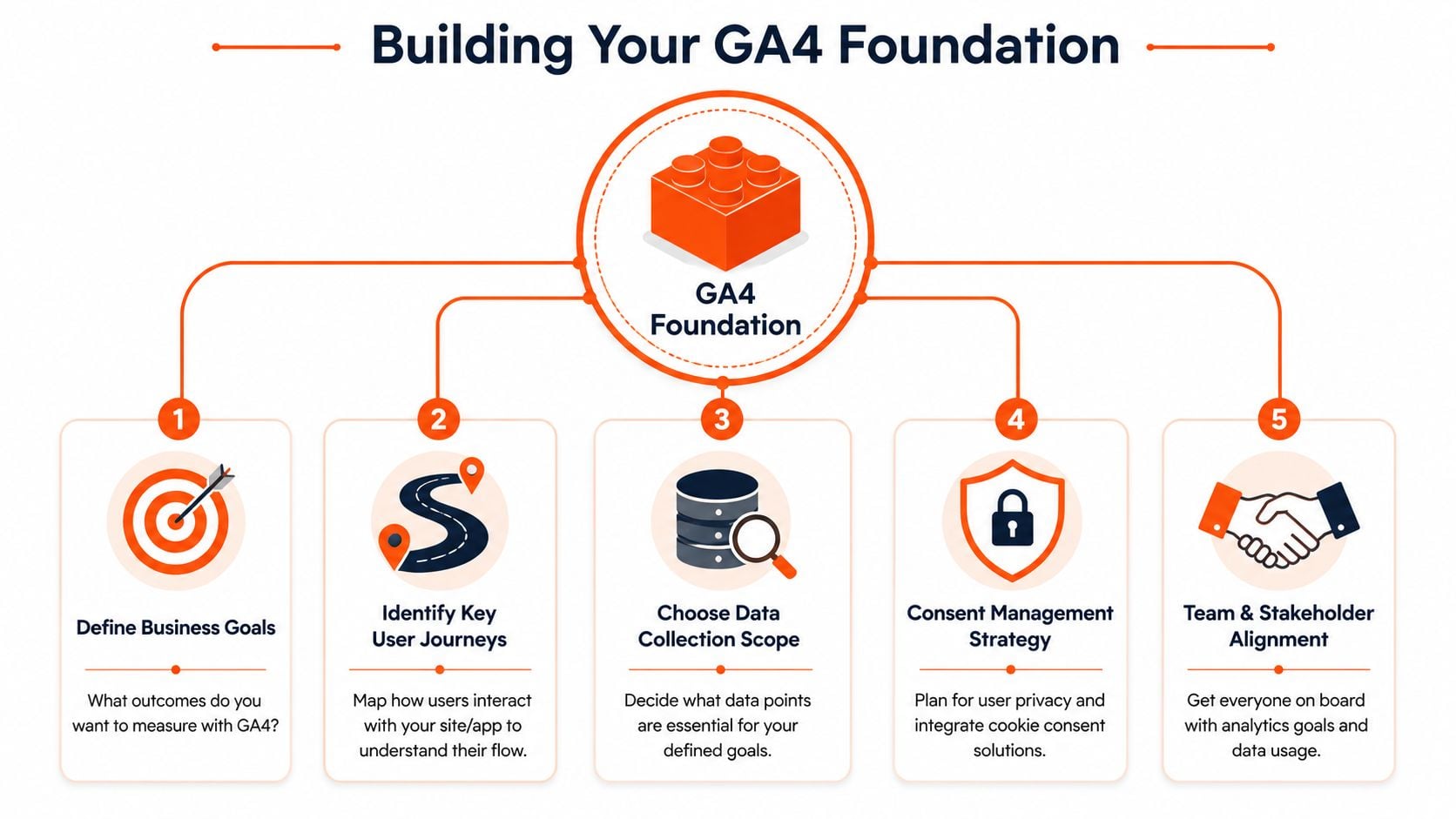
Building Your GA4 Foundation
A common paid media failure starts here. Campaigns launch, traffic looks healthy, then revenue lands in the wrong currency, yesterday's sales show up in today's report, and the team starts questioning every ROAS number. By that point, the issue is not tagging. It is foundation.
GA4 starts with three admin choices: account, property, and data stream. Google outlines that setup sequence in its Google Analytics setup instructions. The structure looks simple, but these choices decide how cleanly you can report on paid traffic, separate brands or regions, and control access without creating admin debt later.
Use the account as the company-level container. Use the property as the reporting environment you want to trust for commercial decisions. Use the data stream as the source of website or app data feeding that property.
For advertisers, the property deserves the most thought. It should reflect how the business measures performance, not just where the tag happens to sit. If one property mixes multiple brands, countries, or test environments, channel reporting gets noisy fast. Paid teams end up explaining data instead of using it.
Set time zone and currency before anything else
Two early settings affect reporting every day: time zone and currency.
If finance closes revenue in AUD, GA4 should report in AUD. If the marketing team reviews daily results on Australian business time, the property time zone should match that operating rhythm. Otherwise, paid media reviews start from a bad baseline. Daypart analysis shifts. Promo cut-off times drift. End-of-month reconciliation turns into manual cleanup.
I treat these settings as measurement controls, not admin housekeeping. Bidding decisions, budget pacing, and e-commerce reporting all depend on them being right from day one.
Practical rule: Match GA4 to the way the business reports revenue and reviews daily performance. Do not leave defaults in place and hope to fix the interpretation later.
Create the web data stream with intent
Once the property settings are right, create the web data stream for the site you are measuring. Google's standard implementation process uses the stream's Measurement ID to connect the site to the property. The technical step is straightforward. The commercial implication is not.
Before anyone installs a tag, define what the stream needs to support:
- Primary business outcomes: purchases, qualified leads, booked calls, quote requests
- High-value journeys: product view to cart to checkout, landing page to form submit
- Break points in the journey: external checkout, payment gateway, booking platform, CRM form
- Access needs: marketing, analytics, developers, agencies, stakeholders approving spend
Those answers shape every setup choice that follows. If the business relies on Shopify, WooCommerce, a headless checkout, or a third-party lead form, the stream cannot be treated like a generic pageview pipe. It needs to support the revenue and conversion signals your ad platforms will depend on later.
If you want an extra walkthrough that complements Google's documentation, this GA4 configuration guide is useful for aligning the technical setup with business goals rather than treating installation like a copy-paste job.
Foundation mistakes that cost advertisers later
The expensive problems usually come from small setup shortcuts made early.
| Decision | What works | What causes reporting problems |
|---|---|---|
| Property structure | One clearly defined property for a distinct business reporting use case | Mixing brands, regions, or test traffic into the same property |
| Currency | Matching the currency used for actual revenue reporting | Leaving the default setting unchecked |
| Time zone | Matching campaign pacing, trading hours, and finance reporting windows | Using a time zone that shifts daily results |
| Access | Giving the right people admin and reporting access before launch | Sharing logins or fixing permissions during launch week |
A good foundation feels uneventful. That is exactly what you want. If account structure, property settings, and stream decisions are clean, paid media reporting stays credible when spend increases and e-commerce data starts feeding bidding platforms.
Choosing Your Tag Deployment Path
The next decision is how GA4 gets onto the site. Many businesses often accidentally choose a setup that's fine for pageviews but painful for advertising.
You've got three realistic paths: direct gtag.js installation, Google Tag Manager, and server-side GTM. All can work. They just solve different problems.
When direct gtag.js is enough
If the website is simple, the tracking needs are light, and a developer can reliably manage code releases, direct installation can be perfectly acceptable. Google's own help flow supports copying the Measurement ID from the stream and placing the Google tag after the <head> tag on each page. For a brochure site with modest reporting needs, that's often enough.
The downside appears when marketing needs change. If you want to add custom events, manage multiple ad platforms, test changes without code deployments, or troubleshoot quickly, direct tagging becomes rigid.
Direct installation suits businesses that want:
- Basic page tracking
- Minimal event complexity
- Developer-led release control
- A lean tag stack
It doesn't suit teams that are actively running paid media across several platforms and adjusting measurement often.
Why most advertisers should use GTM
For active PPC accounts, Google Tag Manager is usually the better operational choice. It gives marketers and analysts a central place to deploy and govern tags. That matters when Google Ads, remarketing, lead tracking, and custom GA4 events all need to work together.
I prefer GTM on most e-commerce and lead-gen builds because it separates tracking management from site code. That doesn't remove the need for good implementation. It just makes change control far cleaner.
A quick comparison:
| Deployment path | Best fit | Main trade-off |
|---|---|---|
| Direct gtag.js | Simple sites with low tracking complexity | Less flexibility for future changes |
| Google Tag Manager | Most advertisers running multiple platforms | Requires stronger governance and testing |
| Server-side GTM | Advanced setups with stricter data handling needs | More technical overhead |
If you want a broader comparison of how these tools differ in practice, this guide for businesses on web analytics is a useful primer, especially for teams still confusing GA4 reporting with tag deployment.
Google Analytics tells you what was recorded. Google Tag Manager helps control how the recording happens.
Where server-side GTM fits
Server-side GTM is not the default answer for every business. It makes sense when the organisation has the technical support to manage it and has a clear reason to invest in a more advanced collection setup.
For many small and mid-sized advertisers, going straight to server-side is like buying warehouse racking before confirming what inventory you stock. The architecture may be impressive, but it won't fix weak event definitions, poor QA, or unclear reporting goals.
A clean rule of thumb works well here. If you're still sorting out core GA4 events, start with web GTM. If your measurement programme is already disciplined and privacy or infrastructure requirements justify more complexity, then evaluate server-side GTM properly.
Designing Your DataLayer for E-commerce and Leads
Pageviews tell you that traffic arrived. They don't tell you whether the visit had commercial value. For advertising, that gap is where wasted budget hides.
The dataLayer is the mechanism that passes structured information from your site into tools like Google Tag Manager and GA4. Think of it as the packing slip attached to each important user action. Without it, GA4 may know that something happened. With it, GA4 can understand what happened, what it was worth, and what context should travel with the event.

E-commerce purchase example
On an online store, a purchase event should carry enough detail to support reporting, audience building, and ad platform optimisation. A simple example might look like this:
<script>
window.dataLayer = window.dataLayer || [];
window.dataLayer.push({
  event: 'purchase',
  transaction_id: 'ORD-12345',
  value: 149.00,
  currency: 'AUD',
  items: [
    {
      item_id: 'SKU-001',
      item_name: 'Running Shoe',
      item_category: 'Footwear',
      price: 149.00,
      quantity: 1
    }
  ]
});
</script>
The point isn't the exact field names in isolation. The point is consistency. If one template sends transaction_id, another sends order_id, and a third sends nothing at all, reporting breaks down.
What each part is doing:
eventtells GTM and GA4 what business action occurred.transaction_idhelps distinguish one order from another.valuegives the conversion commercial weight.currencymatters for revenue reporting consistency.itemsadds product-level context for merchandising and campaign analysis.
For paid search and Shopping campaigns, this structure gives you a much stronger read on which products and traffic sources are producing real revenue, not just sessions.
Lead generation example
Lead-gen sites need the same discipline, even if there's no cart. The event should explain what kind of lead occurred, where it came from on-site, and any useful business context.
<script>
window.dataLayer = window.dataLayer || [];
window.dataLayer.push({
  event: 'generate_lead',
  form_name: 'Contact Us',
  lead_type: 'Demo Request',
  page_location: '/book-a-demo',
  value: 25,
  currency: 'AUD'
});
</script>
The reason this matters is operational. GA4's event model lets teams define outcomes with precision, and practitioner guidance shows that tracked actions can later be marked as key events and even assigned values such as $25 in tutorial examples in this GA4 key events walkthrough.
That doesn't mean every lead should have a value assigned blindly. It means GA4 supports that measurement approach if the business has a clear valuation method.
What strong dataLayer design looks like
A good schema should answer commercial questions, not just technical ones. For example:
- Which form was submitted? Important when multiple forms exist across service lines.
- Which product was purchased? Useful for campaign and merchandising analysis.
- What was the transaction or lead value? Needed for return analysis.
- Where did the action happen? Handy when several templates or funnels exist.
If your organisation is thinking seriously about audience quality and measurement ownership, it's worth grounding your event strategy in a first-party data approach rather than relying on loose platform signals alone.
A weak dataLayer gives you activity. A strong dataLayer gives you decision-making material.
What usually goes wrong
Most implementation issues aren't caused by GA4. They're caused by vague requirements.
Common examples include:
- Developers push only a thank-you pageview, so there's no context about value, product, or form type.
- Different forms use different naming rules, so lead reporting fragments.
- Revenue is passed inconsistently, which makes channel comparison unreliable.
- The event exists but the parameters don't, so the report tells you a purchase happened without telling you what was purchased.
For advertisers, the fix is to define the schema before development begins. Don't ask for “GA4 tracking”. Ask for explicit business events and the parameters each one must include.
Tracking What Matters with Key Events
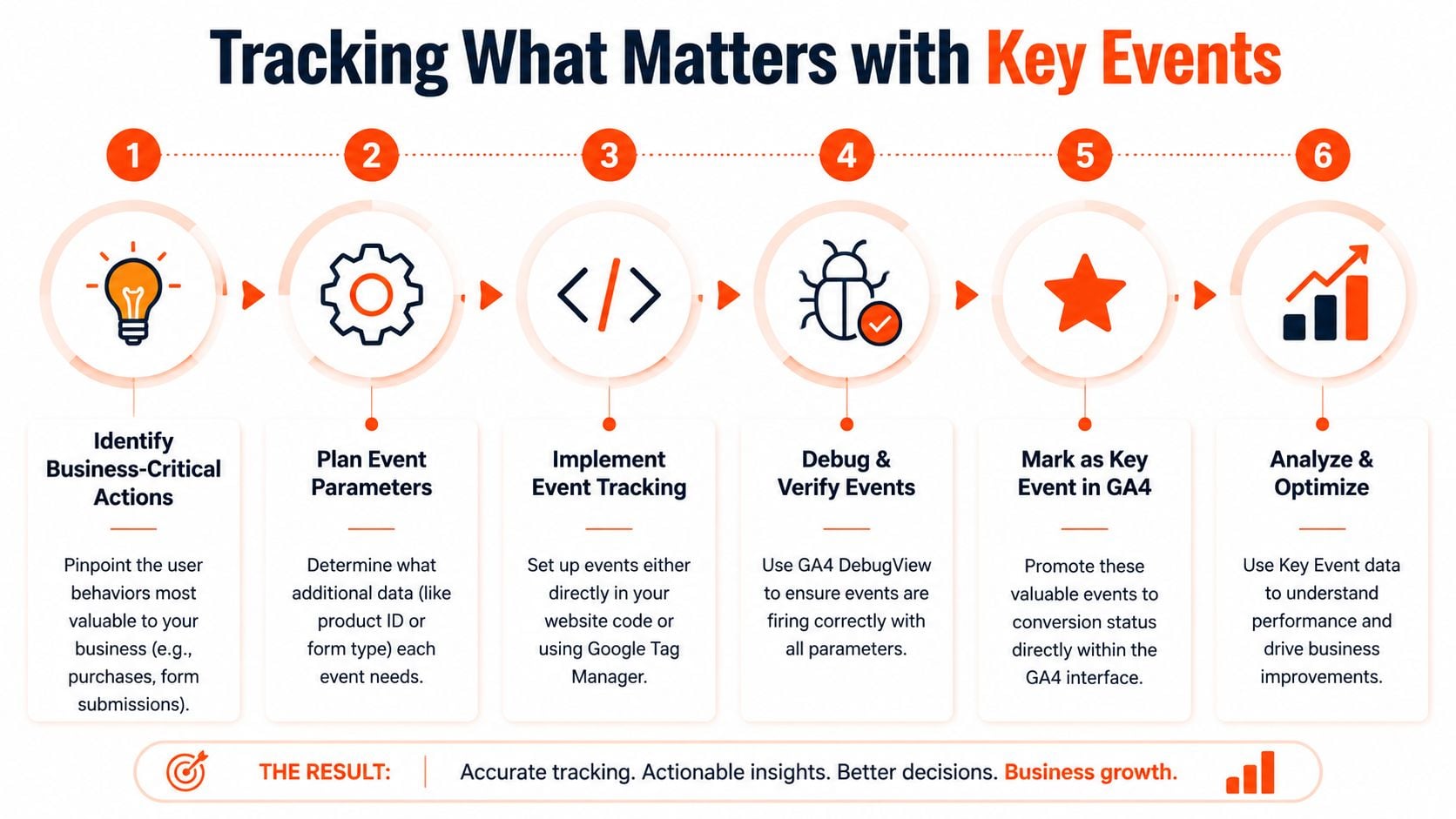
A common paid media problem looks like this. Campaigns are driving traffic, GA4 shows plenty of activity, but no one can say which actions should guide budget decisions. That usually comes back to weak key event choices, not weak ad performance.
In GA4, an event only becomes commercially useful when you mark it as a Key Event. Collection and business priority are separate decisions. That distinction matters because ad accounts perform better when optimisation is tied to outcomes that reflect revenue, lead quality, or both.
Which events deserve Key Event status
For e-commerce, purchase is usually the main one. For lead generation, the answer is narrower than many teams expect. A qualified enquiry, booked consultation, or application start may deserve Key Event status. A generic click on a phone number usually does not.
The trade-off is simple. If you mark too few events, you miss useful signals. If you mark too many, GA4 reports become noisy and Google Ads can end up learning from weak proxies instead of business outcomes.
Use this filter before you mark anything as a Key Event:
| Event | Should it be a Key Event | Why |
|---|---|---|
| Purchase | Usually yes | Direct revenue outcome |
| Qualified lead form submit | Usually yes | Strong indicator of pipeline value |
| Newsletter signup | Maybe | Useful for some nurture-heavy models, weak for direct-response optimisation |
| Scroll or page view | Usually no | Engagement signal, not a commercial result |
Mark the actions you would trust to judge campaign ROI.
That standard keeps reporting clean and protects bidding strategy from bad inputs.
How the setup works in practice
The mechanics are simple. The judgement is the hard part.
- Send the event correctly through GTM or site code.
- Trigger the action so GA4 receives it.
- Confirm the event name and parameters are correct in testing.
- Mark it as a Key Event in GA4.
The important check is not whether the event fired once. It is whether the event consistently represents the same business action every time. If generate_lead includes low-intent contact forms, job enquiries, and real sales leads in one bucket, the setup is technically working and commercially weak.
For advertisers, GA4 and ad platform measurement need to line up. If you are also deciding which actions should feed bidding platforms, this guide to Google Ads conversion tracking for advertisers helps clarify what belongs in GA4, what should be imported, and what should stay as an observation metric.
A quick visual walkthrough can help if you want to see the interface logic in action:
Why this matters for paid advertising ROI
Key Events change how performance gets judged across acquisition and revenue reporting. That matters because campaign decisions are only as good as the outcome signal behind them.
I regularly see accounts where the media buying is blamed first. Then we review the setup and find the account has been optimising toward shallow actions such as button clicks, page engagement, or broad lead events with no qualification. The result is predictable. Reported performance looks acceptable, sales quality does not, and budget shifts happen too late.
For e-commerce, poor Key Event setup makes product and campaign analysis less reliable. For lead generation, it creates an even bigger problem because the platform cannot distinguish between a valuable enquiry and a low-intent action unless you define that difference in the measurement plan.
What works and what fails
What works
- Marking only commercially meaningful events
- Keeping event names stable across the site
- Matching event definitions to CRM and sales-stage reality
- Reviewing reports after launch to confirm the event is useful, not just present
What fails
- Treating micro-engagements like outcomes
- Renaming core events every few months
- Letting marketing and sales use different lead definitions
- Assuming the setup is finished because one test conversion appeared in DebugView
A polished dashboard can still point budget in the wrong direction. Key Events are where GA4 setup starts affecting ROI, not just reporting.
Essential Integrations for Paid Advertisers
A standalone GA4 property is useful. For active advertisers, its full value appears when it's connected to the platforms that spend money and make targeting decisions.
The first integration to prioritise is Google Ads. Linking GA4 with Google Ads supports audience sharing and creates a cleaner path for using GA4 outcomes in campaign optimisation. That matters when you want the platform to learn from on-site behaviour rather than from shallow click metrics.
Google Ads linkage and audience use
For most advertisers, the operational reason to link GA4 and Google Ads is simple. You want campaign decisions to reflect what users do after the click, not just whether they arrived.
The integration becomes especially useful when you're building remarketing audiences from behaviour such as product views, cart actions, or lead-related engagement. It also supports stronger alignment between analytics reporting and media execution.
If you're working through the broader measurement side as well, this guide to Google Ads conversion tracking is a practical companion because it helps frame where GA4 fits versus direct ad platform tracking.
Cross-domain tracking when the journey spans multiple sites
Cross-domain tracking matters when a user journey moves from one domain to another, such as from a marketing site to a separate checkout or booking engine. Without that continuity, the journey can fragment into separate sessions, which weakens attribution and confuses paid media analysis.
You don't need cross-domain tracking because it's fashionable. You need it if the commercial path crosses domains.
Use it when:
- Checkout is hosted elsewhere
- A booking platform lives on a separate domain
- Lead capture happens on another owned environment
Skip it when everything important already happens within one domain and subdomain structure that's being handled correctly.
BigQuery when standard reports stop answering real questions
BigQuery isn't a starting-point integration for every business. It becomes relevant when the standard GA4 interface can't answer the reporting questions your team keeps asking.
That usually happens when advertisers want to inspect raw event data more thoroughly, build custom analysis around funnel behaviour, or reconcile marketing data with internal systems. The trade-off is complexity. If your event model is weak, exporting weak data to BigQuery won't magically fix the problem.
For teams that need implementation support across analytics and paid media systems, Click Click Bang Bang is one option that includes analytics integration and conversion tracking as part of campaign setup, alongside the ad platforms themselves.
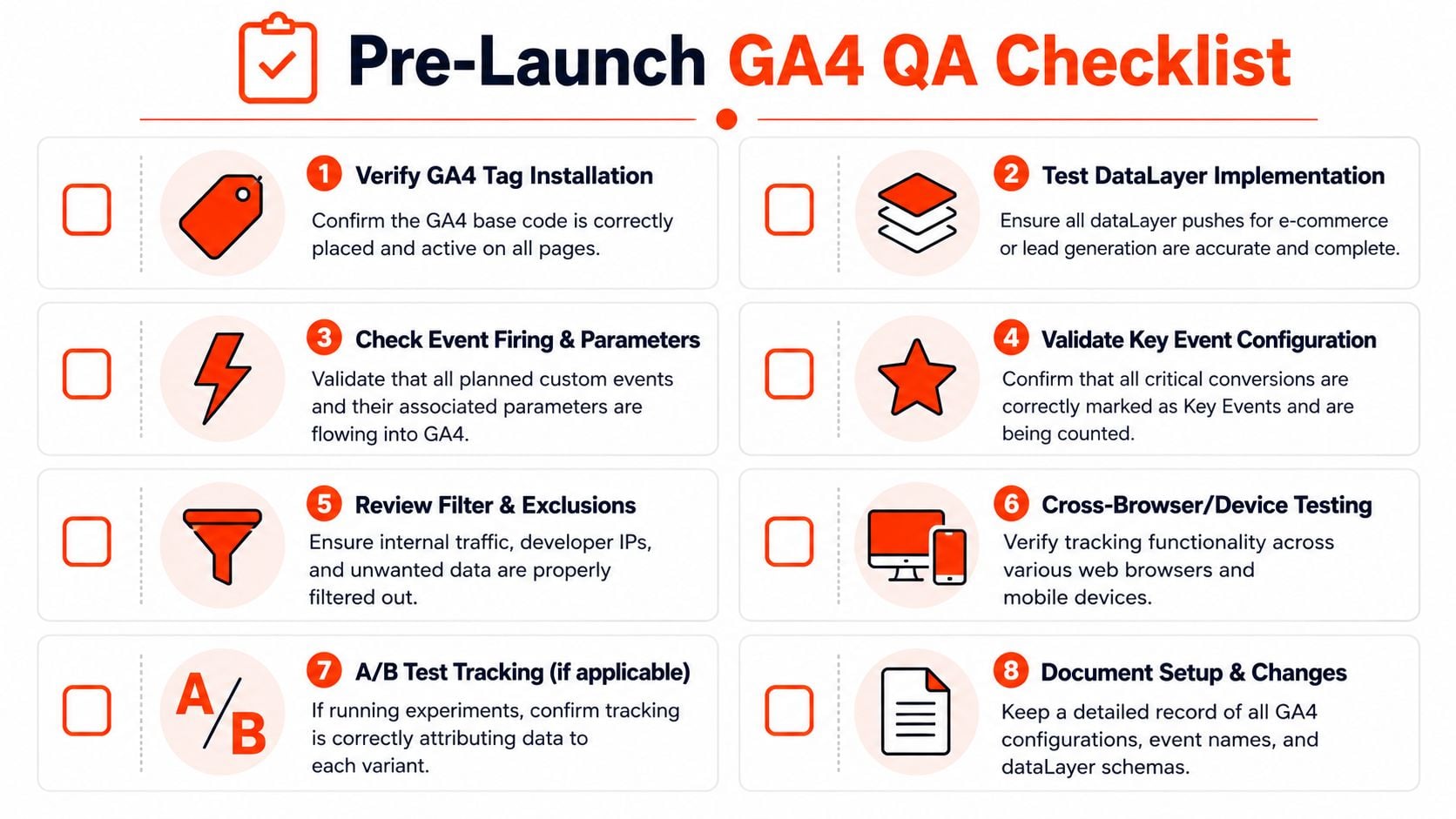
Your Pre-Launch QA and Troubleshooting Checklist
A paid campaign goes live at 9:00 a.m. By noon, Google Ads is showing conversions that GA4 can't reconcile, Meta is reporting a different purchase count, and the client wants to know which number drives budget decisions. That problem usually starts before launch, during QA.
A tag sitting on the site is only the starting point. Launch-ready tracking means the right events fire on the right pages, with the right parameters, under the right conditions. If that breaks, bidding learns from bad signals, ROAS reporting drifts, and e-commerce performance looks better or worse than reality.
Start with live validation
Before traffic scales, test the setup in real conditions. Use GTM Preview or Tag Assistant, then walk the site like a customer would. Check the homepage, collection or service pages, product pages, cart, checkout, and thank-you page. For lead gen, test the form flow through to the confirmation state, not just the button click.
Then open GA4 Realtime and DebugView. Confirm your visit appears. Confirm the expected events appear. Confirm the parameters are populated, especially the ones that affect ad reporting and revenue analysis, such as value, currency, transaction ID, item data, form type, or lead source detail.
If Realtime cannot see a controlled test user, the setup is not ready for paid traffic.
Check the failures that hurt ROI quietly
The dangerous issues are often small implementation errors that distort reporting for weeks.
| QA item | What to confirm | Why it matters for paid media |
|---|---|---|
| Base tag | Fires on every intended template | Missing page data breaks attribution paths and audience building |
| Measurement ID | Sends data to the correct property | Wrong-property traffic turns reporting and optimisation into guesswork |
| Event firing | Triggers once, at the correct moment | Duplicate events inflate conversions and train bidding on false wins |
| Event parameters | Revenue, currency, IDs, item details, form context | Missing parameters weaken e-commerce reports and import quality |
| Key Events | Only true business outcomes are marked | Ads platforms need clean conversion signals, not micro-actions dressed up as outcomes |
Duplicate tracking deserves special attention. I see this often on CMS builds where a plugin adds GA4, GTM also fires GA4, and a developer has hardcoded the tag as a fallback. The reports look healthy at first because volume is coming through. The problem is that every purchase or lead may be counted twice.
Protect the data before spend starts
Internal traffic should be filtered before launch. Agency QA sessions, client logins, sales team visits, and developer checks can all pollute the early data set. That matters more than it seems. In a low-volume account, a handful of staff conversions can change the apparent CPA enough to influence budget decisions.
Use this checklist before approving launch:
- Confirm one implementation path. Use hardcoded tagging, GTM, or a platform integration with a clear reason for the choice. Avoid overlapping setups.
- Test real conversion paths. Submit a lead form, start checkout, and complete a test order where possible.
- Validate event timing. A purchase should fire on the confirmation page or confirmed transaction event, not on the payment button click.
- Check naming consistency. One business action should map to one event name across the site and connected ad platforms.
- Review parameter quality. Revenue, currency, transaction IDs, product details, and lead metadata should pass in the format you expect.
- Filter internal and developer traffic. Keep commercial reporting clean from day one.
- Document the setup. Record triggers, event names, key parameters, linked platforms, and any known limitations.
If you're reviewing measurement beyond GA4 alone, this guide to website conversion tracking covers the wider setup decisions that affect reporting accuracy.
Know what “launch-ready” actually means
Use a higher standard than “the tag is installed.”
Launch-ready means:
- Your test visit appears in Realtime and DebugView
- Core events fire once and only once
- Revenue and lead parameters pass correctly
- Purchase and lead events match real business outcomes
- Internal traffic is excluded
- No template gaps or duplicate implementations remain
That is the threshold for sending paid traffic.
A clean Google Analytics setup gives paid campaigns something they can optimise against. If you need help setting up GA4, event tracking, Google Ads integration, or pre-launch QA, Click Click Bang Bang can support the measurement side alongside your PPC campaigns so reporting and ad performance stay aligned from day one.
Read NeXt
Or Read Our Latest
Click. CLick. Subscribe.
Get our best PPC insights, industry updates, and power moves delivered straight to your inbox. No fluff, just high-caliber strategies that actually work.
Don’t Leave Just Yet
Try Us For 30-Days,
Risk Free!!
We guarantee that you’ll love our work within the first 30 days, if not you’ll get your money back.
What have you got to lose?