

Ecommerce Search Engine Optimisation: A Practical Guide to More Traffic
Last Updated
When it comes to your online store, ecommerce search engine optimisation is about making sure you show up when people are actually looking to buy what you sell. It’s not about finding loopholes or chasing fleeting trends. It’s the strategic work of guiding high-intent customers—people who are actively searching on Google—straight to your product and category pages.
Why Ecommerce SEO Is Your Strongest Asset
In a saturated market, just having a great online store doesn’t guarantee sales. Your most powerful asset is visibility, and the most valuable kind comes from search engines. While social media creates buzz, ecommerce search engine optimisation is the engine that consistently brings customers with their wallets out to your digital front door, building a sustainable revenue stream.
The data for Australian retailers is especially revealing. Here, search engines blow social media out of the water, driving a staggering 10 times more traffic to shopping sites. When you consider that over 93% of all online experiences start with a search engine and Google dominates with a 94.5% market share in the region, it’s crystal clear where you need to focus. The stores that are properly optimised for search are the ones capturing the majority of this intent-driven traffic.
My own experience with Australian brands hammers this home. Local shoppers rely heavily on Google to research products and make purchases. If you're ignoring SEO, you're effectively invisible to the vast majority of your potential customers.
The core idea is simple: SEO connects your products with the people actively looking for them at the exact moment they are ready to buy. It's the difference between waiting for customers and actively meeting them where they are.
This guide is your roadmap to turning that search visibility into real, tangible revenue. We'll build your strategy on four foundational pillars, each one absolutely crucial for long-term success.
Core Pillars Of Ecommerce SEO
Here's a breakdown of the four essential components that form a rock-solid ecommerce SEO strategy. Getting these right is non-negotiable for sustainable growth.
| Pillar | Focus Area | Key Outcome |
|---|---|---|
| Technical SEO | Site health, speed, and crawlability. | A fast, accessible site that search engines can easily understand and index. |
| On-Page Optimisation | Product and category page content. | Pages that rank for high-intent keywords and convert visitors into customers. |
| Content & Authority | Blogging, guides, and link building. | Establishing your brand as a trusted expert and attracting top-of-funnel traffic. |
| Measurement & AI | Analytics, reporting, and automation. | Making data-driven decisions and using AI to gain a competitive edge. |
Mastering these pillars isn't just about climbing the rankings; it’s about building a resilient business that grows organically year after year. To truly unlock your store’s potential, it's often worth exploring how professional search engine optimization seo services can give you a strategic edge.
Now, let's dive in and start building your foundation.
Building Your Technical SEO Foundation
Before you can even think about ranking a single product, your ecommerce store needs a rock-solid technical backbone. I like to think of technical SEO as the plumbing and wiring of your website—if it’s dodgy, nothing else is going to work properly. It’s all about making sure search engines like Google can find, crawl, and make sense of your pages without a hitch. This is the absolute first step in any worthwhile ecommerce search engine optimisation strategy.
If your technical foundation is weak, even the most amazing marketing campaigns or perfectly crafted product pages will fall flat. You're aiming for a seamless experience for both search engine bots and, more importantly, your human customers.
The whole process kicks off with a thorough audit. A good ecommerce SEO audit blueprint is a great place to start, as it helps you map out your store’s architecture and catch critical issues before they turn into major headaches.
Create A Clean XML Sitemap
An XML sitemap is essentially a roadmap for search engines, listing out every important URL you want them to find. For an ecommerce site, this means your homepage, all your category pages, every product page, and any key content like blog posts or buying guides. A clean, well-organised sitemap helps Google discover new products faster and get a clear picture of your site's structure.
Most ecommerce platforms like Shopify or BigCommerce will generate a sitemap for you automatically, which is a great start. But you can't just set it and forget it. It's vital to check it periodically to make sure it's accurate and error-free. Your sitemap should only point to live, indexable pages—that means no 404 errors, no redirected URLs, and no pages you've marked as non-canonical.
A common mistake I see is people throwing every single URL from their site into the sitemap. A much better approach is to create a focused sitemap that only points to your most valuable pages. This signals to Google what content really matters and helps you manage your crawl budget more effectively.
Secure Your Site With HTTPS
In this day and age, security isn't just a nice-to-have; it's non-negotiable. HTTPS (Hypertext Transfer Protocol Secure) encrypts the data flowing between a user's browser and your website, keeping sensitive customer info like logins and payment details safe. Google confirmed years ago that HTTPS is a lightweight ranking signal, but its real power lies in building trust with your users.
Modern browsers will actively flag any non-HTTPS sites as "Not Secure," which is an instant red flag for a potential customer. For an ecommerce store, that’s a guaranteed conversion killer. Making sure your entire site runs on HTTPS is a fundamental trust signal for both your users and the search engines.
This flowchart shows just how direct the path is from a secure search experience to a final sale.
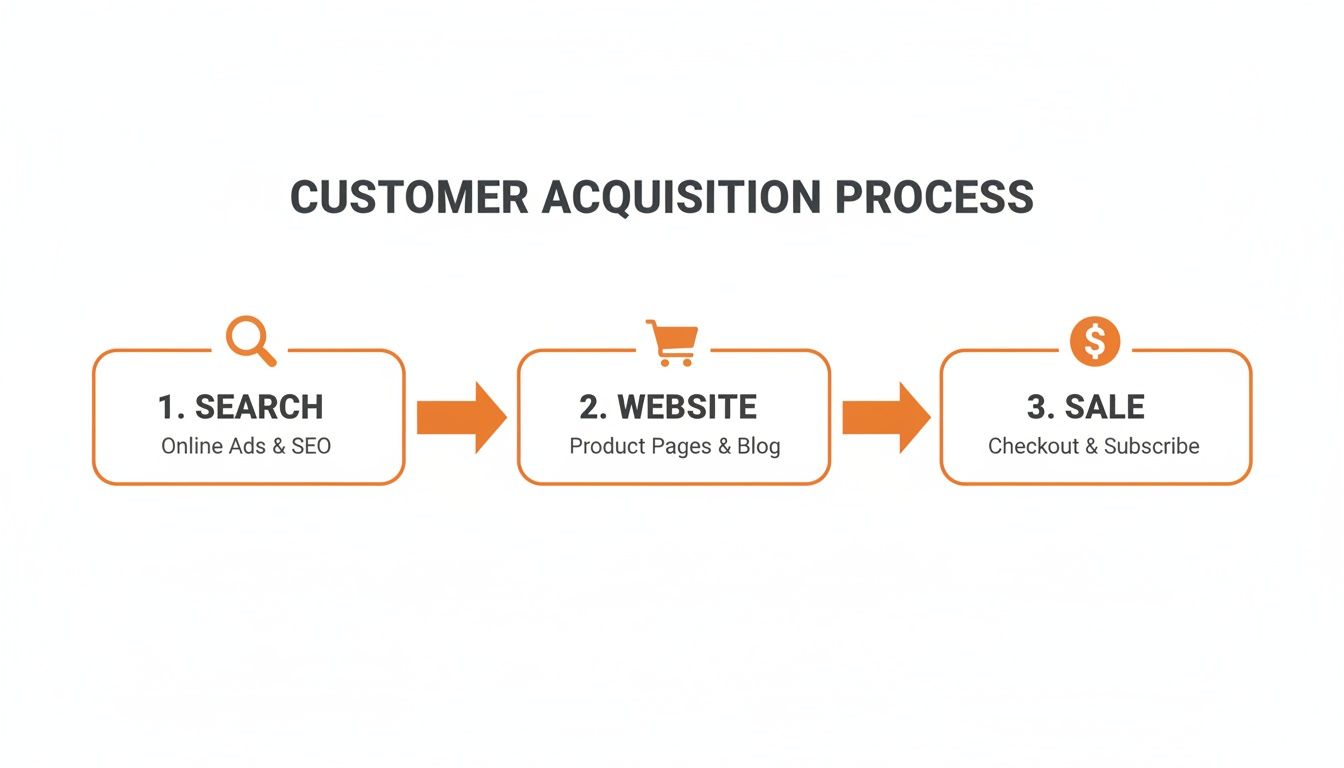
This simple flow drives home the point that trust, established right from the start of the search process, is what guides users toward making that purchase.
Resolve Duplicate Content With Canonical Tags
Duplicate content is one of the biggest and most persistent headaches for ecommerce sites. It crops up whenever the same, or very similar, content lives on multiple URLs. The usual suspects include:
- Product variations: Think separate URLs for different colours or sizes of the same t-shirt.
- Tracking parameters: URLs that have tags tacked on for campaign tracking (e.g.,
?source=facebook). - Faceted navigation: Those filter and sort options that can create a unique URL for every possible combination.
When Google stumbles across all these duplicate pages, it gets confused about which version it should index and rank. This dilutes your ranking signals and can even result in the wrong page showing up in search results—a disaster if it’s an out-of-stock variation.
The fix is the canonical tag (rel="canonical"). It’s a small piece of code you add to the <head> section of your page that tells search engines which version of a URL is the "master" copy. So, for those three t-shirt URLs in different colours, you’d place a canonical tag on the blue and green shirt pages that points back to the main red shirt page. This consolidates all your ranking power into one preferred URL, solving the duplicate content problem cleanly.
If you want to get your hands dirty and find these kinds of issues on your own site, our guide on how to perform a technical SEO audit is a great resource for digging in.
Optimising Your Product And Category Pages

While your technical setup is the foundation, your product and category pages are where the money is made. These are the pages that turn browsers into buyers, so they need serious attention. Effective ecommerce search engine optimisation here is a mix of smart keyword targeting and persuasive copywriting that keeps both customers and Google happy.
This all starts with understanding what your customers are actually typing into the search bar. This is where a lot of stores get it wrong, chasing broad, hyper-competitive terms when the real gold lies in specific, high-intent phrases.
Nail Your Keyword Research
Forget about guessing. The goal is to uncover the long-tail keywords that signal a customer is pulling out their wallet. These are longer, more specific phrases—think "waterproof trail running shoes for wide feet" instead of just "running shoes." The search volume might be lower, but the purchase intent is through the roof.
I always kick this process off by stepping into the customer’s shoes. What problem are they trying to solve? What features are non-negotiable? This helps me build out an initial list of potential terms.
From there, it's a mix of practical tools and common sense:
- Google Autocomplete: Just start typing a product into Google and watch the suggestions. These are popular, real-world searches happening right now.
- "People Also Ask" Boxes: This section in the search results is a goldmine for understanding the questions and concerns your customers have.
- Competitor Analysis: Check out the product and category pages of your top rivals. What keywords are they hitting in their page titles and headings?
This research isn't a one-and-done task. It becomes the blueprint for your page titles, descriptions, and all your on-page content, guiding every optimisation decision you make.
Craft Compelling Titles And Meta Descriptions
Your page title (the title tag) and meta description are your first—and sometimes only—shot at earning a click from the search results. They need to be informative enough for search engines and irresistible to a human user.
For a product page, a solid formula is: Primary Keyword | Secondary Keyword | Brand Name. For example, "Hoka Speedgoat 5 Trail Runners | Men's Size 11 | The Running Hub". It's clear, packed with keywords, and uses the brand for recognition.
For category pages, I usually go with something like: Product Category | Brand Name. For instance, "Men's Trail Running Shoes | The Running Hub". Simple and effective.
While the meta description doesn't directly affect your rankings, it has a massive impact on your click-through rate (CTR).
Think of your meta description as a mini-advertisement for your page. Weave in your main keyword, highlight a key benefit (like "Free Express Shipping"), and finish with a clear call to action ("Shop Now & Find Your Perfect Fit"). It needs to answer the user's silent question: "Why should I click this link over all the others?"
Write Unique, Benefit-Focused Product Descriptions
This is where so many ecommerce stores fall short. They just copy and paste the generic manufacturer's description, which creates duplicate content issues and, frankly, does a terrible job of selling the product.
Your descriptions need to be unique and focus on the benefits, not just the features. A feature is what a product has ("Gore-Tex lining"). A benefit is what it does for the customer ("Keeps your feet bone-dry on the wettest trails"). See the difference?
Structure your descriptions for scannability:
- Kick off with a compelling, benefit-driven opening sentence.
- Use bullet points to list key features and their matching benefits.
- Weave your target keywords and related phrases naturally throughout the text.
- Include specifics like dimensions, materials, and care instructions where they matter.
By crafting unique descriptions, you're providing value to both your customers and search engines, signalling that your page is a high-quality, authoritative resource. This level of detail is a core part of any successful strategy, especially on a platform like Shopify. We cover more platform-specific tactics in our guide on SEO services for Shopify.
Leverage Images And Customer Reviews
High-quality visuals are obviously non-negotiable for sales. But for SEO, they also need to be optimised. This means compressing image files so they load quickly and—most importantly—using descriptive alt text.
Alt text tells search engines what an image is about, improving accessibility and giving you another spot to include your target keyword. For example: alt="side view of a blue Hoka Speedgoat 5 trail running shoe".
Finally, actively encourage and showcase customer reviews. Reviews are powerful social proof that builds trust and boosts conversions. From an SEO perspective, they are a constant source of fresh, user-generated content rich with long-tail keywords and natural language. This helps your pages rank for a much wider array of search queries you might never have thought of.
Drive More Traffic With a Smart Content Strategy
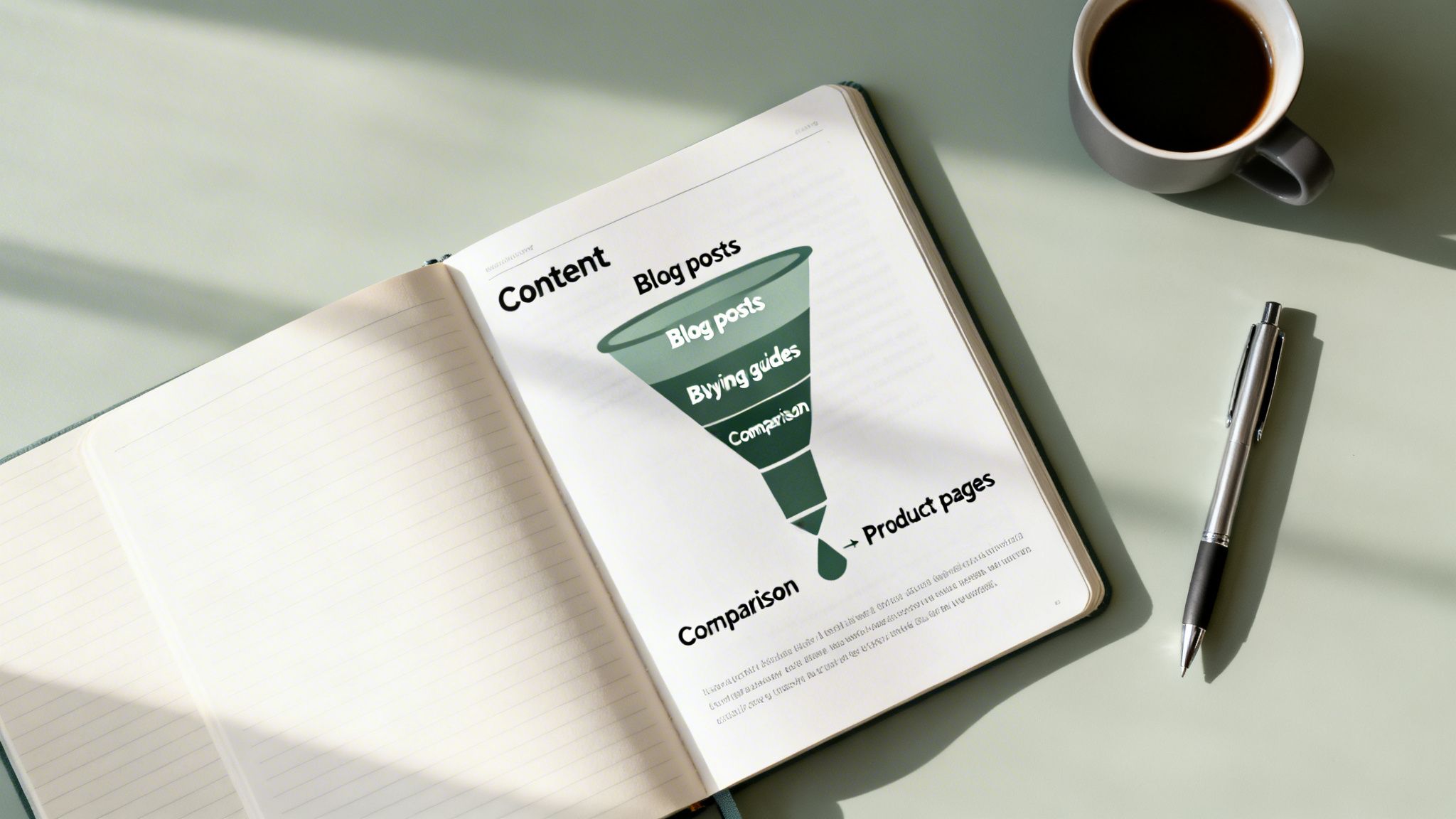
While perfectly optimised product and category pages are the bedrock of good ecommerce SEO, a truly great strategy doesn't stop there. You need to attract customers at every stage of their journey, not just when they’re pulling out their credit cards. This is where a smart content strategy comes in, transforming your website from a simple storefront into an industry authority.
Content marketing for an online store isn't about churning out bland, keyword-stuffed blog posts. It’s about creating genuinely useful buying guides, detailed comparison articles, and practical tutorials that actually solve your customers' problems. This kind of content captures traffic from people who aren't even looking for a specific product yet. It’s your chance to introduce your brand and establish yourself as a trusted resource long before they're ready to buy.
This "top-of-funnel" traffic is incredibly valuable. Not only does it introduce your brand to a much wider audience, but it also builds trust and naturally earns high-quality backlinks from other sites that find your content helpful. And the best part? You can use smart internal links to gently guide these engaged readers from your blog posts straight to your key product pages.
Find What Your Customers Are Asking
Your content plan starts with a different flavour of keyword research. Forget transactional terms like "buy running shoes" for a moment. Instead, you'll be hunting for the informational, question-based keywords that signal curiosity.
Put yourself in your customers' shoes. What questions do they have before they know which product they need? For a store selling camping gear, this could be things like:
- "what is the best tent for family camping"
- "how to waterproof a hiking jacket"
- "synthetic vs down sleeping bags comparison"
Queries like these show someone is in learning mode, not buying mode. By creating content that gives them the best, most comprehensive answer, you become the expert guide they turn to. This builds a relationship that often leads to a sale down the track.
A fantastic place to start is Google’s “People Also Ask” section for your main product categories. It's literally a list of questions your potential customers are typing into the search bar. Answering these questions better than anyone else is a direct path to ranking and building authority.
Build Your Authority With Content Hubs
Don't just write a collection of one-off blog posts. For maximum impact, you need to think in terms of content "hubs" or "clusters." This strategy involves creating a central, in-depth "pillar" page on a broad topic, then surrounding it with several more specific articles that all link back to that main page.
Imagine a furniture store. They could create a pillar page called "The Ultimate Guide to Choosing a Sofa," covering all the fundamentals. From there, they could write more detailed, supporting articles on niche topics:
- "Leather vs Fabric Sofas: A Head-to-Head Comparison"
- "How to Measure Your Living Room for a New Couch"
- "The Best Sofas for Homes with Pets and Kids"
Each of these deep-dive articles would link back to the main sofa guide. This structure does two things brilliantly. First, it signals to Google that you have deep expertise on the topic, which can boost the rankings for the entire cluster of pages. Second, it creates an amazing user experience, letting visitors go as deep as they want on the subject.
Scale Your Content With AI (Without Sounding Like a Robot)
Let's be real: creating high-quality content consistently takes a lot of time and resources. This is where AI tools can be a powerful ally, but they need to be used intelligently. The goal is to scale up your production, not to replace the human expertise and unique voice that make your brand stand out.
You can use AI to seriously speed up your workflow in a few key ways:
- Find Content Gaps: AI can analyse your competitors' sites to find topics they rank for that you haven't covered yet.
- Generate Outlines: Give an AI a target keyword, and it can quickly structure an article for you, creating a solid framework for your writers to build on.
- Refine and Optimise: Feed your draft content into an AI tool for suggestions on how to improve clarity, tone of voice, and on-page SEO.
The secret is to treat AI as a research assistant and a first-draft generator, not the final author. Your team’s hands-on experience, personal insights, and brand personality are what will ultimately make your content connect with your audience. That human touch is still your most important asset.
Alright, you've nailed the basics. Your site is indexed, your keywords are mapped, and you're starting to see some decent organic traffic. Now what? To pull away from the competition, you need to go beyond the fundamentals.
The tactics that truly separate a good ecommerce site from a great one are all about user experience, scaling your reach, and cleverly using AI to work smarter, not harder. These are the strategies we use to push clients from simply competing to leading their market.
Let's get into how you can put them to work for your own store.
Diagnose and Improve Site Speed
Site speed isn't a "nice-to-have" technical checkbox; it's a cold, hard ranking factor thanks to Google's Core Web Vitals (CWV). More importantly for ecommerce, it's a massive conversion killer. Every millisecond of delay frustrates potential customers and sends them packing before they even see a product.
Google gives you the tools to figure out what's slowing you down. Your first stop should be PageSpeed Insights. It will spit out a performance score and a detailed report on your Core Web Vitals:
- Largest Contentful Paint (LCP): How long it takes for the most important stuff on the page to load. You want this under 2.5 seconds.
- First Input Delay (FID): How quickly the page responds when a user first interacts with it. Aim for under 100 milliseconds.
- Cumulative Layout Shift (CLS): This measures how much the page jumps around while loading. A low score is good; aim for less than 0.1.
On ecommerce sites, the usual suspects are massive, unoptimised images and bloated JavaScript from all those third-party apps. Compressing your images and telling non-essential scripts to load later can give you a serious boost in both rankings and revenue.
Expand Your Reach with International SEO
If you're shipping to customers in more than one country, you absolutely need an international SEO strategy. Flying blind here creates a confusing mess for search engines, leading them to rank the wrong version of your site or dilute your authority across what looks like duplicate pages.
The trick is to clearly signal your geographic targets, and the main tool for that is the hreflang tag. It’s a small piece of code that tells Google, "Hey, I have other versions of this page for different languages or regions."
For instance, if you have a product page for Australia (en-au) and another for the United States (en-us), the hreflang tags on each page point to one another. This makes sure your Aussie customers see the AU site with local currency, while American shoppers get the US version.
Getting hreflang right is notoriously tricky, but it's non-negotiable for a good global user experience. It stops those infuriating moments where a customer lands on the wrong store, sees the wrong currency, and immediately bounces. That's a lost sale, plain and simple.
Integrate AI into Your SEO Workflow
Artificial intelligence has moved from sci-fi to a practical tool that can seriously level up your ecommerce SEO. Smart agencies are already using it to work faster and make better, data-backed decisions. You can too.
AI’s real strength is its ability to chew through enormous datasets and spot patterns a human could never hope to see. This opens up some powerful new plays for your ecommerce store.
AI-Powered Optimisation Tasks
| Task | How AI Helps | Real-World Application |
|---|---|---|
| Predictive Analytics | Forecast keyword trends and search demand. | Predict seasonal demand for products like "sunscreen" or "winter coats" months ahead, so you can prep content and stock. |
| Technical Audits | Automate the detection of site errors. | Run automated weekly crawls to instantly flag new 404 errors, broken links, or canonical tag issues before they hurt your rankings. |
| Content Briefs | Generate data-driven outlines for writers. | Create a detailed brief for a blog post on "how to choose a coffee machine," complete with target keywords, common questions, and competitor weak spots. |
This isn't about replacing human experts. It's about giving them superpowers. AI does the heavy lifting on data analysis, freeing you up to focus on strategy, creativity, and actually getting things done. If you want to dive deeper into this, check out our thoughts on AI for SEO.
By blending a lightning-fast user experience with a clear global strategy and the smart use of AI, you can build an online presence that doesn't just rank—it dominates.
Common Ecommerce SEO Questions Answered
When you're running an online store, SEO can feel like a black box. A lot of questions crop up, and it’s not always clear where to focus your energy for the best results.
I get asked these same questions all the time by ecommerce owners. Here are my straight-up, no-fluff answers to cut through the noise and give you some clarity.
How Long Does It Take To See SEO Results?
This is always the first question, and the honest answer is: it’s a marathon, not a sprint. SEO is all about building momentum over time.
You can usually expect to see some early positive signs within 3 to 6 months. This initial movement often comes from fixing technical SEO problems or optimising the low-hanging fruit on your most important pages.
However, the kind of results that really move the needle on your bottom line—a serious, sustained boost in organic sales—typically take between 6 and 12 months of consistent effort.
This timeline depends heavily on how competitive your niche is, your site's current authority, and the resources you put in. Building real authority with quality content and backlinks is a long-term play, but it’s one that delivers compounding returns.
Product Page SEO vs. Blog Post SEO
The biggest difference between optimising a product page and a blog post comes down to one thing: user intent.
A product page is built for the transaction. It targets commercial keywords like "buy black leather ankle boots" and is designed purely for conversion. For these pages, your focus should be on:
- High-quality product images from every angle.
- Clear, persuasive calls-to-action (CTAs).
- Detailed product specs and benefits.
- Customer reviews and social proof to build trust.
- Product schema markup to get those eye-catching rich snippets in search results.
A blog post, on the other hand, targets informational keywords like "how to style leather ankle boots". Its job is to educate, solve a problem, and build your brand's authority. Here, the goal is to engage the reader and subtly guide them toward your products with smart internal links. Both are absolutely vital parts of a complete ecommerce SEO strategy.
Should I Do SEO Myself Or Hire An Agency?
You can absolutely get started with DIY ecommerce SEO, and I highly encourage it. Learning the basics of on-page optimisation for your product pages and doing some initial keyword research are great first steps. Getting your hands dirty gives you a much better feel for how it all fits together.
But the field gets very complex, very quickly.
When you start diving into technical audits, advanced schema, international SEO, and competitive link-building campaigns, the learning curve gets incredibly steep.
Hiring a specialist agency is the right move when:
- You want to scale your growth faster than you could on your own.
- You simply don't have the in-house expertise or the hours to dedicate to it.
- You’re in a cut-throat market and need an expert edge to win.
A good agency brings specialised tools, years of experience, and a proven framework to the table. This helps you maximise your return on investment while you focus on what you do best—running your business.
How Important Is Site Speed For Ecommerce SEO?
Site speed is critically important. It's not just some minor technical checkbox; it's a confirmed ranking factor through Google's Core Web Vitals.
For an online store, a slow site is an absolute conversion killer.
A slow-loading website frustrates search engine crawlers, which can hurt your indexing. But far more importantly, it frustrates your potential customers. Study after study has shown that even a one-second delay in page load time can cause a huge drop in sales.
Optimising your images, using a fast web host, and using browser caching aren't just nice-to-haves. They are non-negotiable for both your SEO and your revenue.
At Click Click Bang Bang, we specialise in creating AI-first SEO and PPC strategies that drive real, measurable growth for ecommerce businesses. If you're ready to stop guessing and start seeing results, explore what our precision-driven campaigns can do for you at https://clickclickbangbang.com.au.
Read NeXt
Or Read Our Latest
- Manual vs Automated Bidding for PPC Success
- Conversion Tracking Setup: A Complete AU Guide
- Instagram Advertising Australia: Complete 2026 Guide
- Pay Per Click: A Beginner’s Guide for Australian Marketers
- Display Advertising on Google: The Complete Australian Guide
- Stakeholder Communication Plan How to Build One That Works
Click. CLick. Subscribe.
Get our best PPC insights, industry updates, and power moves delivered straight to your inbox. No fluff, just high-caliber strategies that actually work.
Don’t Leave Just Yet
Try Us For 30-Days,
Risk Free!!
We guarantee that you’ll love our work within the first 30 days, if not you’ll get your money back.
What have you got to lose?