

Facebook Ads for Ecommerce: 2026 Strategy Guide
Last Updated

You open Ads Manager, see a maze of campaign types, audiences, placements, attribution settings, and creative options, then wonder why sales don't follow the effort. That's a common starting point for ecommerce brands on Meta. They boost a post, get engagement, maybe even some traffic, but the checkout notifications stay quiet.
The problem usually isn't that Facebook ads for ecommerce no longer work. It's that most accounts are built backwards. Too much attention goes into surface-level setup, not enough into tracking, offer alignment, audience temperature, and disciplined optimisation. Meta then gets blamed for what is really an account structure problem.
The upside is still substantial in Australia. Meta's reach is broad enough to support serious ecommerce growth. DataReportal's Australia 2025 figures, cited here, put Facebook at 21.7 million local users, or 79.4% of the population, and Instagram at 14.6 million users, or 53.4%. That's why paid social sits in the core media mix for many online stores. It isn't just an awareness channel. It can prospect, retarget, and convert when the account is built properly.
A lot of founders start by looking for tricks. Better results usually come from simpler decisions made well. Clean data. Lean campaigns. Better creative. Retargeting that matches buying intent. Stronger product pages. If you've been looking for a practical reference on optimizing Facebook ads for e-commerce, that's the right frame. The goal isn't to outsmart the platform with complexity. It's to give it the right inputs and enough control to find buyers efficiently.
If you're weighing whether to keep management in-house or compare specialist support, it can also help to review what a Facebook ads agency in Australia does beyond just launching ads.
Your Starting Point for Ecommerce Success on Meta
Most ecommerce accounts don't fail because the owner picked the wrong interest target or wrote a weak headline once. They fail because the account never became a system. Spend goes in. Data comes out half-broken. Campaigns overlap. Creative gets stale. The landing page doesn't match the ad. Then every result feels random.
That's where a senior PPC process matters. For Facebook ads for ecommerce, the account has to behave like a revenue engine, not a collection of experiments. Every part should answer a specific question. Is tracking accurate? Is the store feeding enough purchase signals back to Meta? Are cold audiences seeing a compelling first impression? Are cart abandoners getting a different message from first-time visitors? Are you scaling winners carefully or resetting learning every few days?
What a healthy account actually looks like
A well-run ecommerce Meta account is usually less complicated than commonly assumed. It has:
- Reliable tracking: Pixel, Conversions API, verified domain, and tested events.
- A clear audience ladder: Cold, warm, and hot traffic separated by intent.
- Creative built for response: Not just pretty visuals, but ads that explain the product and reduce hesitation.
- Lean campaign architecture: Enough structure to control spend, not so much that data gets fragmented.
- Regular optimisation: Based on conversion signals and margin logic, not vanity metrics.
Most wasted Meta spend doesn't come from one bad ad. It comes from a chain of small errors that prevent the algorithm from learning who buys.
The mindset shift that improves performance
Treat Meta like a performance channel with creative inputs, not a social media posting tool. That changes how you judge success. Likes matter less. Comments matter less. Clicks matter less unless they turn into profitable actions on site.
That's also why this guide stays practical. No inflated promises. No made-up success stats. Just the framework agencies use when they need an ecommerce account to become more organised, more measurable, and easier to scale.
The Technical Blueprint for Accurate Tracking
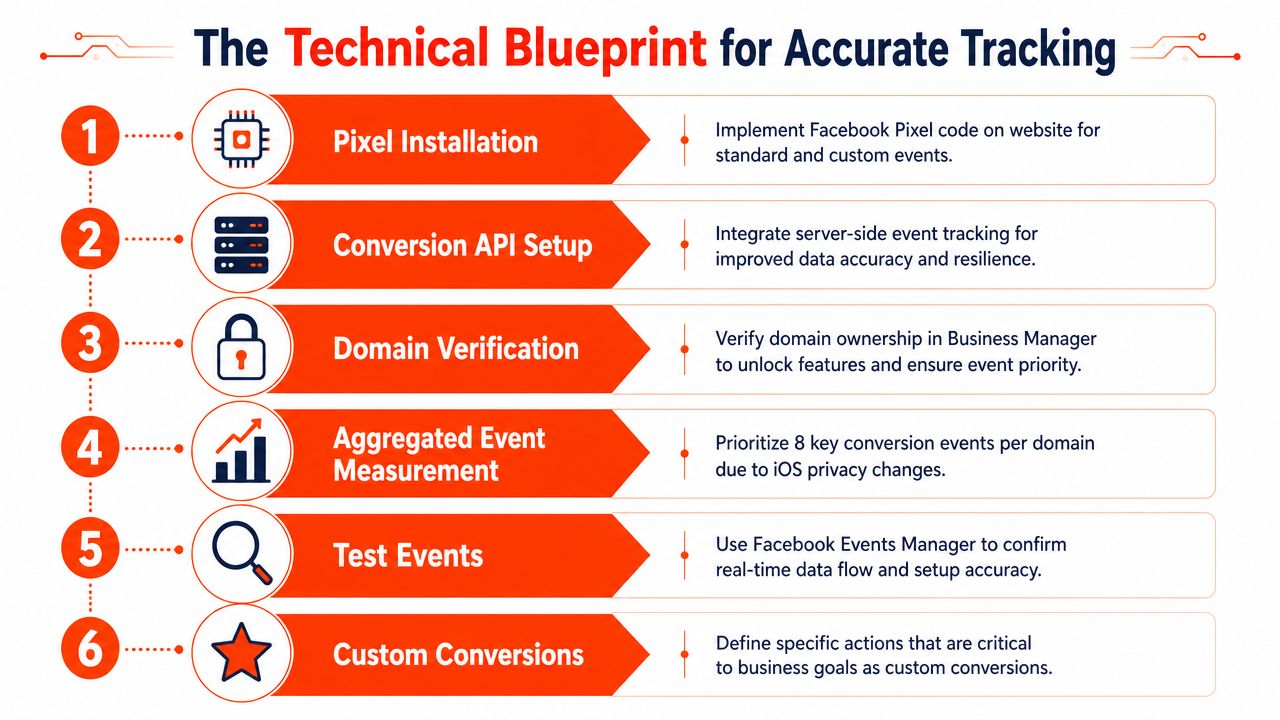
Before you touch budgets or audiences, fix the plumbing. Poor tracking creates false winners, hides real problems, and trains Meta on incomplete data. In ecommerce, that's expensive because purchase data is the signal the platform needs most.
For Australian advertisers, the baseline setup should include both the Meta Pixel and Conversions API. According to this AU-focused Meta ecommerce guide, server-side CAPI can recover about 20–30% of conversion data that the browser pixel misses. That matters because browser tracking is less reliable under modern privacy settings, ad blockers, and restricted environments.
Set up the account like a business asset
Start inside Meta Business Manager and make sure ownership is clean. The ad account, Facebook Page, Instagram profile, pixel, catalogue, and domain should all sit inside the right business account with the right user permissions.
This sounds administrative, but messy ownership causes real delays. Agencies can't access assets properly. Pixels get duplicated. Catalogues disconnect. Someone leaves the business and takes a key login with them. Clean access control saves time later when you need to troubleshoot quickly.
A practical setup checklist looks like this:
- Create or confirm your Business Manager ownership
- Connect your ad account and social profiles
- Verify your domain
- Install Meta Pixel
- Implement Conversions API
- Connect your product catalogue
- Check event priority and event quality
- Test all events before launch
The event stack needs to be complete
Meta needs a sensible ecommerce event sequence. The standard flow is:
- PageView
- ViewContent
- AddToCart
- InitiateCheckout
- Purchase
When that sequence is broken, optimisation becomes guesswork. If AddToCart fires twice, or Purchase fails to fire at all, reporting becomes unreliable. If ViewContent never triggers on product pages, your retargeting pool weakens.
The same AU guide also notes that hashed identifiers such as email and phone, along with fbc and fbp cookies where possible, improve match quality. That helps Meta connect server-side and browser-side activity more accurately.
Practical rule: Don't launch campaigns until you've tested events in Events Manager on your own device from product view through to purchase.
Why Pixel alone isn't enough anymore
A browser-only setup leaves gaps. Some people block scripts. Some browsers restrict tracking. Some sessions break between click and checkout. Pixel still matters because it provides direct browser-side behaviour, but CAPI gives you a second stream of data from the server side.
That dual setup makes the account more resilient. You're not depending on one tracking method to do all the work. For ecommerce stores on Shopify or WooCommerce, there are usually native integrations or partner tools that make this easier, but don't assume “connected” means “correct”. Check every event manually.
Catalogue quality affects more than retargeting
Your product catalogue isn't just a feed for dynamic ads. It influences how well Meta can match products to user behaviour. Product titles, images, availability, pricing consistency, and variants all affect the output.
A weak catalogue usually shows up in predictable ways:
| Setup issue | What happens in the account |
|---|---|
| Missing images | Dynamic ads look broken or don't serve well |
| Wrong variant mapping | Users see the wrong size, colour, or style |
| Inconsistent pricing | Clicks increase but trust drops on site |
| Outdated stock status | You pay to promote products people can't buy |
If your store has many SKUs, this step deserves extra care. Dynamic product ads work best when the feed is clean and your event data is trustworthy. Otherwise, Meta ends up pushing the wrong products to the wrong users at the wrong time.
The minimum standard before launch
For Facebook ads for ecommerce, this is the essential baseline:
- Business assets organised
- Domain verified
- Pixel active
- Conversions API active
- Standard events firing correctly
- Catalogue synced
- Test purchases confirmed
If any one of those is missing, you're not ready to judge campaign performance yet. You're still fixing infrastructure.
Building Your Full-Funnel Audience Architecture
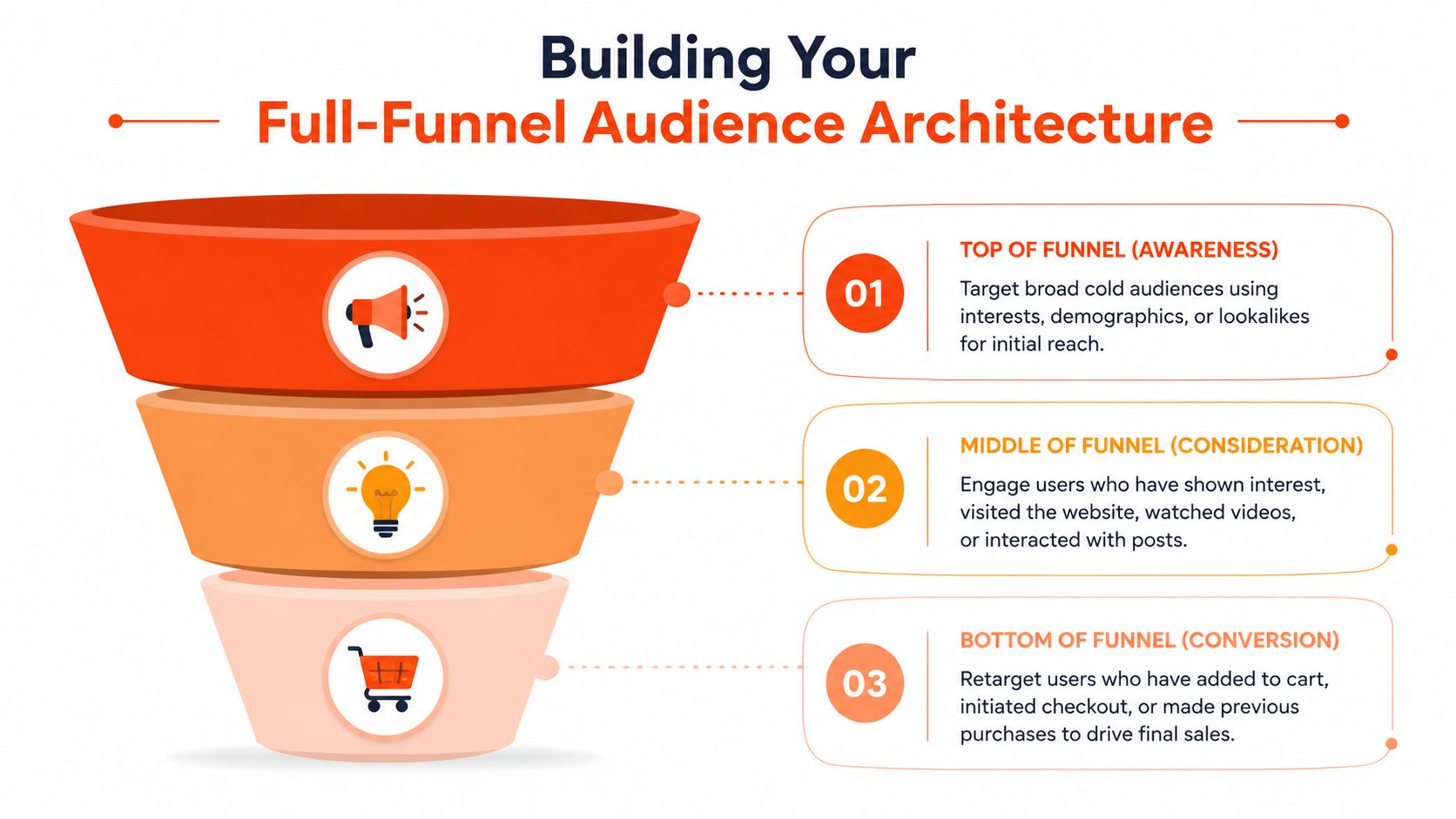
A shopper clicks your ad, views a product, adds it to cart, then disappears. If Meta keeps showing that person the same broad prospecting ad for the next three days, the account is wasting impressions and blurring performance signals. Audience architecture fixes that by aligning message, budget, and intent at each stage.
For ecommerce, I prefer a lean structure that gives Meta room to optimise while keeping enough manual control to protect spend. The goal is not to build dozens of audiences. The goal is to move people through a clear path from discovery to purchase without forcing cold, warm, and hot users into the same campaign logic.
Cold audiences should stay broad enough to learn
Prospecting is where many brands over-control the account. They stack interests, narrow by behaviour, then wonder why CPMs rise and delivery stalls. In most mature Meta accounts, broad targeting or lightly guided targeting gives the algorithm more room to find buyers, especially when the pixel, Conversions API, and catalogue are already set up properly.
Cold audiences usually fall into three groups:
- Broad targeting: Best starting point for many stores with enough conversion data.
- Interest audiences: Useful for niche products, emerging brands, or offers tied to a specific hobby or identity.
- Lookalikes: Best used as a test layer, not as automatic winners, using source lists like purchasers, email subscribers, or high-intent visitors.
The trade-off is simple. Broad audiences scale more easily, but they put more pressure on creative quality. Interest and lookalike audiences can help early on, but they often create overlap and limited scale if the account becomes too segmented.
Creative does most of the work here. A cold prospect does not need every product detail. They need a clear reason to care, a fast understanding of the product, and a format built for placement. If your team is rebuilding ads for each format manually, use a practical Facebook ad sizes guide for ecommerce creative specs so the assets fit the placements you plan to buy.
Warm audiences should reflect behaviour, not just traffic
Warm traffic includes people who engaged but did not cross the line into checkout intent. That usually means product viewers, collection page visitors, social engagers, video viewers, ad clickers, and email subscribers who have not purchased.
This audience layer is where message sequencing earns its keep.
A product page visitor often needs proof. A video viewer may need a clearer product demo. An Instagram engager may need a stronger offer or a direct path to the best-seller, not a generic brand ad. The common mistake is pooling every warm user into one audience and serving the same ad to all of them.
Useful warm segments often include people who:
- Viewed product pages or key collections
- Spent meaningful time on site
- Watched video content
- Clicked ads but did not buy
- Engaged with Instagram or Facebook profiles
- Joined your email list without making a first purchase
Window length matters. A 7-day product viewer behaves differently from a 30-day social engager. If volume is low, combine signals and keep it simple. If volume is strong, split by intent so the message can match the action.
Hot audiences are small, expensive, and worth protecting
Hot traffic sits closest to revenue. This group usually includes add-to-cart users, checkout starters, and in some cases recent buyers for cross-sell or replenishment campaigns.
These audiences do not need brand storytelling. They need friction removed.
For abandoned carts, that often means answering the exact reason the shopper stalled. Shipping cost. Delivery speed. Return policy. Payment options. Stock risk. If the product has variants, dynamic retargeting usually works better than a generic reminder because it brings the shopper back to the item they already considered.
A simple structure is enough for most brands:
| Audience temperature | Typical behaviour | Best message angle |
|---|---|---|
| Cold | No prior interaction | Product discovery and clear value proposition |
| Warm | Visited, watched, or engaged | Trust, proof, differentiation |
| Hot | Cart or checkout intent | Urgency, friction removal, direct product reminder |
Accounts with lower spend rarely need ten different retargeting windows. A 7-day hot audience and a broader 14 to 30-day warm audience are often enough to start. More segmentation only helps if each audience has enough volume to exit learning and produce stable results.
Exclusions protect both spend and reporting
Exclusions are what keep the funnel honest. Without them, prospecting campaigns pick up warm users, warm campaigns pull in cart abandoners, and reported acquisition performance looks better than it really is.
At minimum:
- Cold campaigns should exclude recent purchasers and active retargeting pools
- Warm campaigns should exclude purchasers and checkout-level users
- Hot campaigns should usually exclude recent purchasers, unless the goal is repeat purchase
- Retention or upsell campaigns should exclude users already in active acquisition retargeting
I see this issue constantly in audits. The account looks healthy on the surface, but prospecting CPA is being flattered by people who already know the brand. That leads to the wrong budget decisions.
Keep the framework lean enough to scale
A full-funnel setup should help the algorithm, not bury it under admin work. Meta is better than it used to be at finding likely buyers inside broad pools. That does not mean hands-off management is the answer. It means manual control should focus on audience intent, exclusions, and message fit, while automation handles much of the delivery.
For most ecommerce brands, a strong audience architecture is simple to describe:
- Prospect broadly
- Retarget by intent
- Exclude aggressively
- Match the ad to the last meaningful action
That framework scales better than a cluttered account full of tiny audiences, duplicated ad sets, and overlapping logic. It also makes performance analysis cleaner, which matters once spend increases and you need to know exactly where ROAS is being won or lost.
Designing Ad Creative and Copy That Sells
Most ecommerce ad creative fails in one of two ways. It's either visually polished but vague, or it's full of claims and offers but looks cheap and forgettable. The ads that sell sit in the middle. They stop the scroll, explain the product fast, and reduce doubt before the click.

Build the ad around one job
Every ad should have one primary task. Don't ask a single creative to introduce the brand, educate the user, explain every product feature, prove trust, and close the sale at once.
A better approach is to assign roles:
- Prospecting ads: Stop attention and explain why the product matters.
- Consideration ads: Handle objections, compare options, show proof.
- Retargeting ads: Remind, reassure, and remove friction.
For fashion, the creative often carries the weight. Fit, styling, movement, and texture matter. For electronics, shoppers usually need clarity. Show the product in use, not on a blank background. For homewares, context sells better than isolated product shots. A lamp on a white backdrop rarely outperforms that same lamp styled in a real room.
What to show in the first few seconds
For video and motion assets, the opening matters most. Don't waste it on slow branding or cinematic filler. Show the product early. Show the result early. Show the problem early if the product solves one.
Here's a useful pattern for direct-response creative:
- Hook: Call out the problem, desire, or product category.
- Visual proof: Show the item in use immediately.
- Reason to care: Explain the benefit in plain language.
- Confidence builder: Add review language, feature proof, or demonstration.
- Call to action: Tell them what to do next.
If you're unsure about dimensions and placements while building assets for feeds, stories, and reels, this guide to Facebook ad sizes is a practical reference.
Copy should sound like a buyer conversation
A lot of brands write ad copy like packaging copy. It looks neat but doesn't move people. Meta ads need more direct language. Speak to the hesitation, not just the product feature.
A few stronger approaches:
- Problem to solution: Good for pain-point products, skincare, storage, organisation, and convenience-led items.
- Use-case framing: Strong for electronics, kitchen products, and fitness gear.
- Lifestyle identity: Often effective for fashion, beauty, and home categories.
- Comparison framing: Helpful when your product replaces a frustrating alternative.
Weak copy:
“Premium materials. Elegant design. Crafted for modern living.”
Tired of bedside lamps that look good online and feel flimsy in person? This one has a weighted base, warm ambient light, and a compact footprint that suits small spaces.
Creative warning: If the ad only says the product is “high quality”, the customer has to guess why. Show the reason instead.
Dynamic product ads are a serious sales tool
For ecommerce, catalogue-based ads are often among the most practical retargeting formats because they reconnect users with products they already viewed. They work especially well when your feed is clean and your product page experience is strong.
Use them when people have:
- Viewed products but left
- Added to cart
- Started checkout
- Purchased and may buy complementary items later
The key is not to rely on dynamic ads alone. They're effective, but they don't replace concept-driven creative. A healthy account usually combines catalogue retargeting with stronger message-led ads that tackle trust, shipping concerns, fit questions, or use-case objections.
A good example of this balance is below. Product-first visuals matter, but the message still has to carry intent.
Test concepts, not tiny edits
Don't spend weeks debating button colours or swapping one adjective in the headline. Test bigger differences. Different hooks. Different product angles. Different formats. Different customer motivations.
A useful testing mix might include:
| Creative type | Where it often works best | What it's good at |
|---|---|---|
| Static image | Fast product scan, simple offers | Clear visual control |
| UGC-style video | Prospecting and trust building | Authenticity and relatability |
| Founder-led video | Brand-led products | Story and conviction |
| Carousel | Multi-feature or multi-SKU products | Comparison and browsing |
| Dynamic catalogue ad | Retargeting | Product relevance |
If Facebook ads for ecommerce feel inconsistent, creative is often the bottleneck. Not because you need prettier ads, but because you need clearer ones.
Structuring Campaigns for Bidding and Budgets
Most underperforming ecommerce accounts are overbuilt. Too many campaigns. Too many ad sets. Too many micro-audiences. Too many ads with too little spend behind each one. The result is predictable. Delivery fragments, learning slows down, and the account becomes hard to read.
A lean structure is usually the better option. One of the clearest practical benchmarks comes from this AU ecommerce Facebook ads guide, which recommends 2–3 ad sets with 3–5 ads and a minimum campaign budget calculated as Target CPA × 7.14 × number of ad sets. The same guide explains that roughly 7.14 daily sales are needed to exit the learning phase within a week.
Why lean structures outperform cluttered ones
Meta's system works better when you give it enough signal density. That means fewer buckets with more useful data flowing through each one. If you split a modest budget across too many campaigns, ad sets, and audience slices, each part of the account gets starved.
A cleaner account usually gives you:
- Faster learning: More conversions concentrated into fewer places.
- Clearer diagnosis: Easier to see whether the issue is creative, audience, or landing page.
- Less overlap: Reduced internal competition between similar campaigns.
- More control where it counts: You manage strategy, while Meta handles delivery optimisation.
This doesn't mean one campaign fits every store. It means you should earn complexity. Start simple, then add layers only when the account volume supports it.
A practical campaign layout
For many ecommerce brands, a sensible structure is built around funnel role rather than endless segmentation.
A workable model might look like this:
| Campaign role | Main purpose | Typical structure |
|---|---|---|
| Prospecting | Find new customers | Broad or selected cold audiences |
| Retargeting | Re-engage interested users | Warm and hot traffic pools |
| Testing or seasonal push | Validate new angles or offers | Controlled creative testing |
This keeps the account readable. You can compare like with like. You can see where the core problem sits. If prospecting clicks are healthy but purchases are weak, the issue probably isn't reach. It may be product page friction, offer weakness, or poor audience-to-creative fit.
Budgeting should respect learning
One of the fastest ways to destabilise an account is erratic budget handling. Teams launch too low, panic too early, then scale too aggressively when they finally see a winner.
The same AU guide also warns that increases above 20% every 3 days can shock the algorithm and reset learning. That's a useful guardrail. Gradual scaling tends to preserve stability better than sudden jumps.
If you want a sense of how advertisers think about spend planning more broadly, this breakdown of Facebook advertisements cost adds useful context around the budgeting side of Meta campaigns.
If a campaign is finally producing consistent purchase data, don't break it with impatience.
Objective choice matters more than fancy settings
For Facebook ads for ecommerce, conversion-focused objectives should usually lead. If the business goal is sales, optimise for purchase where volume allows. Don't choose traffic because it feels cheaper. Cheap clicks often become expensive revenue.
There are cases where softer conversion events are useful during early ramp-up, but the direction should still point toward purchase. Meta learns from the result you ask it to find.
Manual control versus automation
Some stores do well with heavily manual campaign setups. Others benefit from Meta's more automated formats. The right answer depends on product range, creative volume, data quality, and operational maturity.
The mistake is thinking more manual control automatically means better performance. Often it just means more complexity. The better question is simpler: does this structure help the system find profitable buyers without making the account impossible to manage?
If not, simplify it.
Analysing Performance and Optimising for Profit
A campaign can look healthy in Ads Manager and still miss the business target. That usually happens when teams chase platform metrics before checking margin, average order value, and contribution after ad spend. Profit analysis on Meta starts with a harder question than "Is performance up?" It starts with "Are we buying revenue at a cost the business can keep?"
That matters more in ecommerce because Meta is good at finding activity. It is not automatically good at finding profitable activity unless the account is structured, tracked, and reviewed with that goal in mind. A lean account often beats a complicated one here. Fewer variables make it easier to see what is driving sales, where spend is leaking, and which changes deserve budget.
Read the account by funnel stage
Prospecting, retargeting, and repeat-purchase campaigns should not be judged by the same benchmark. A cold campaign will usually carry higher acquisition costs. A retargeting campaign should convert more efficiently because the buyer already knows the brand. If both are forced into one target, the analysis gets distorted fast.
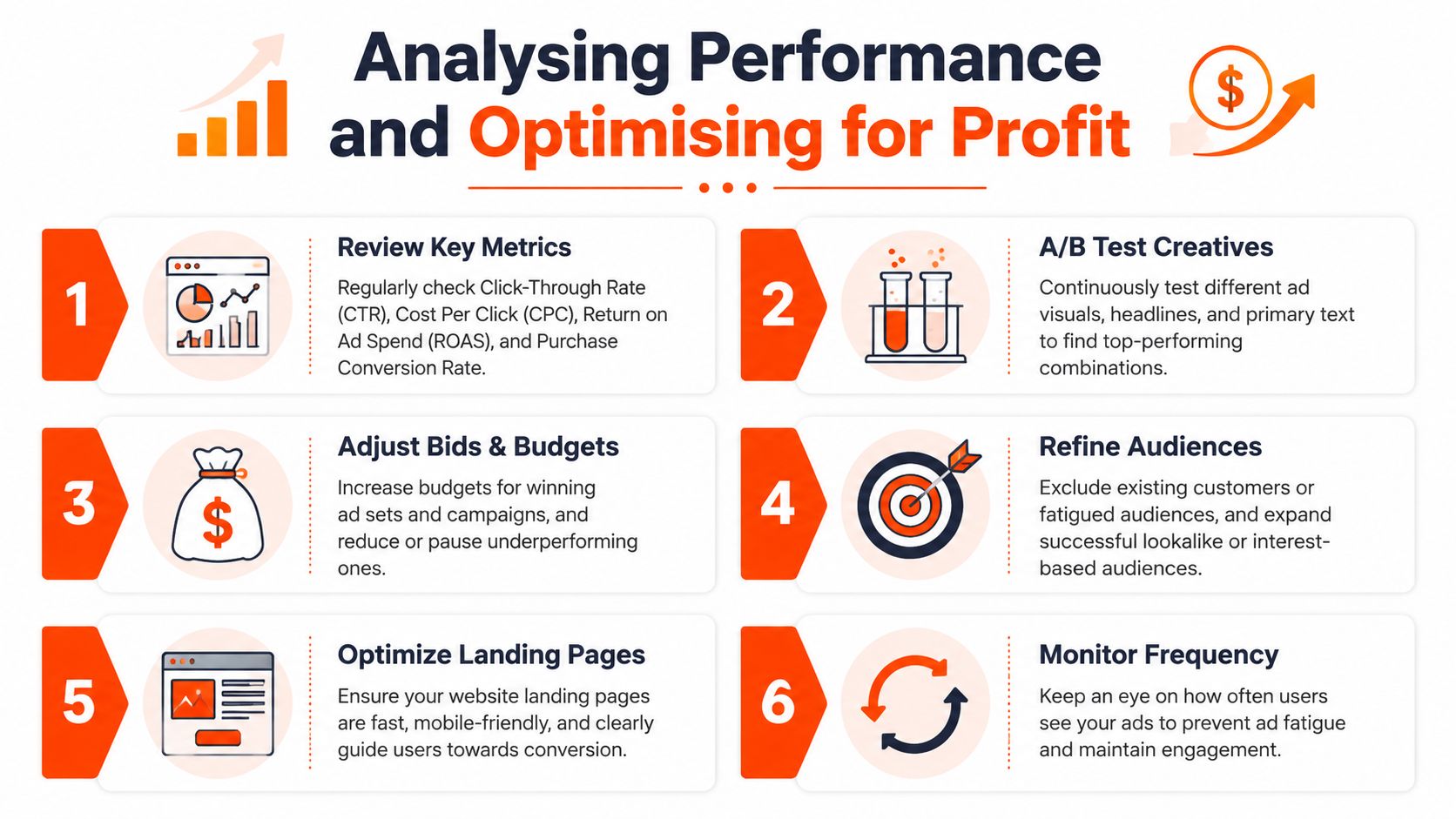
Keep the reporting tight. Four metrics usually do most of the work:
- ROAS: Only useful against your actual margin and fulfilment reality.
- Cost per purchase: A cleaner control metric for many stores.
- CTR: A quick read on whether the ad earns interest.
- Conversion rate: A check on traffic quality and site performance.
I also compare these metrics by campaign role, not just by campaign name. A broad prospecting campaign with acceptable first-order efficiency can be more valuable than a retargeting campaign with prettier ROAS but very little scale.
Find the bottleneck before making changes
Random edits are expensive. They reset learning, muddy reporting, and often fix the wrong problem.
Use a simple path analysis instead:
-
Low CTR and low purchase volume
The message is weak, the hook is generic, or the audience fit is off. -
Healthy CTR but weak conversion rate
The ad is doing its job. The product page, offer framing, mobile experience, shipping terms, or trust signals are usually the problem. -
Strong AddToCart but poor Purchase completion
Checkout friction is likely. Common causes include unexpected shipping costs, limited payment methods, coupon hunting, or slow checkout on mobile. -
Stable results, then a sudden drop
Check stock levels, feed issues, broken event tracking, creative fatigue, and site changes before touching campaign structure.
The key trade-off is speed versus certainty. Fast optimisers make more changes. Good optimisers make fewer changes with better reasons.
Optimise with controlled pressure
Profitable optimisation usually looks boring from the outside. Budgets move gradually. Weak ads are replaced without tearing apart stable ad sets. Landing pages get fixed before new audiences are launched. That is how a modern agency approach keeps Meta's automation working while still maintaining control over the account.
A practical way to handle decisions is to separate creative testing from account optimisation. Creative testing answers which angle, offer, or format gets stronger buyer behaviour. Account optimisation answers where to shift spend, what to pause, and what to protect.
| Symptom | Likely issue | Better response |
|---|---|---|
| Click volume is weak | Hook, creative angle, or first-frame problem | Test a clearer value proposition or stronger product demonstration |
| Traffic quality looks fine but sales lag | Offer or landing page mismatch | Tighten product page message match, delivery clarity, and trust elements |
| Retargeting performance flattens | Small audience pool or stale message | Refresh the ad, shorten the window, and review exclusions |
| Reporting looks inconsistent | Tracking or attribution gap | Audit events, UTMs, and backend sales patterns before changing spend |
An ad can win the auction and still lose money for the store.
Attribution needs context
Meta reporting is directional. Store data is operational. Finance data is the final check.
All three matter. If Meta shows efficient purchases but the store is seeing lower conversion rates or lower-margin product mix, the account may be optimising into the wrong outcome. If Meta underreports but blended revenue is rising at a healthy acquisition cost, the campaigns may be doing better than the platform view suggests.
For agency-managed accounts, a consistent reporting workflow matters more than any single dashboard. Some businesses use managed PPC support that includes analytics and conversion tracking, such as Click Click Bang Bang, alongside the store platform's own reporting and Meta's Events Manager. The point is consistency. Compare the same metrics, on the same reporting cadence, against the same profit targets.
What profitable optimisation usually includes
Teams that scale ecommerce accounts well tend to follow the same operating rules:
- Keep enough stability for Meta to learn, but not so much that weak ads drain budget
- Refresh creative before frequency turns efficient reach into waste
- Move budget toward purchase-driving ads, not click-driving ads
- Check product pages and checkout flow as often as ad metrics
- Use first-party customer data to improve retargeting and match quality
The best optimisation work is rarely dramatic. It is disciplined. Small fixes to creative, landing pages, budget allocation, and tracking usually compound better than constant rebuilds. That balance between automation and hands-on control is what keeps an ecommerce account scalable without making it messy.
Frequently Asked Questions About Ecommerce Ads
Some questions come up in almost every ecommerce account review. The answers are usually less about hacks and more about making the account easier to trust, manage, and scale.
FAQ Quick Answers
| Question | Answer |
|---|---|
| Should I start with traffic or sales campaigns? | If your goal is purchases, build toward conversion-focused campaigns. Traffic can produce cheap visits that don't translate into revenue. |
| Do I need both Facebook and Instagram placements? | Usually yes, if the creative suits multiple placements. Let performance data guide refinement rather than assuming one platform will do all the work. |
| How many audiences should I run? | Fewer is often better at the start. Keep a clean split between cold, warm, and hot intent rather than creating many tiny segments. |
| Are catalogue ads only for large stores? | No. They're useful whenever product feed quality is solid and you want to retarget viewed items or cart activity. |
| How often should I change ads? | Change them when performance, relevance, or buyer response starts slipping. Don't refresh on a calendar alone, but don't let stale winners run forever either. |
| Should I optimise for Add to Cart first? | Sometimes as a temporary stepping stone if purchase volume is too low, but purchase should remain the destination event for ecommerce accounts. |
| Why do clicks look fine but sales stay weak? | Usually because the ad promise and landing page experience don't match, or because checkout friction is stopping buyers late in the journey. |
| Can I run Facebook ads profitably with a small catalogue? | Yes, if the offer is clear, the landing page is strong, and creative does a good job of explaining why the product deserves attention. |
A few nuanced calls advertisers struggle with
One common mistake is trying to solve every problem inside Ads Manager. If users click but don't buy, the issue might be product-market fit, offer clarity, shipping expectations, or site trust. Ads can amplify a good ecommerce setup. They can't repair a weak one on their own.
Another is scaling too soon. A campaign that has just started producing stable purchases needs careful handling. Big changes to budget, targeting, or creative mix can interrupt the very pattern you want more of.
A third is using engagement as a proxy for demand. Comments and likes can be encouraging, but they aren't the outcome you pay for. For Facebook ads for ecommerce, the scorecard should stay tied to conversion behaviour and commercial logic.
The cleanest Meta accounts aren't the ones with the most features turned on. They're the ones where each campaign has a clear job and each result leads to an obvious next decision.
If your current account feels chaotic, simplify first. Most brands don't need more settings. They need better signal quality, stronger creative, tighter retargeting, and steadier optimisation discipline.
If you want a second set of eyes on your Meta setup, Click Click Bang Bang works with businesses on PPC strategy, campaign management, analytics integration, and conversion tracking across Facebook and Instagram. It's a practical option for ecommerce teams that want a more structured account without adding unnecessary complexity.
Read NeXt
Or Read Our Latest
- Manual vs Automated Bidding for PPC Success
- Conversion Tracking Setup: A Complete AU Guide
- Instagram Advertising Australia: Complete 2026 Guide
- Pay Per Click: A Beginner’s Guide for Australian Marketers
- Display Advertising on Google: The Complete Australian Guide
- Stakeholder Communication Plan How to Build One That Works
Click. CLick. Subscribe.
Get our best PPC insights, industry updates, and power moves delivered straight to your inbox. No fluff, just high-caliber strategies that actually work.
Don’t Leave Just Yet
Try Us For 30-Days,
Risk Free!!
We guarantee that you’ll love our work within the first 30 days, if not you’ll get your money back.
What have you got to lose?