

Google Ads for E-commerce: An AU Retailer’s 2026 Playbook
Last Updated

You’re probably in one of two situations right now.
Either your store is already spending on Google Ads and the account feels noisy. Some products sell, others burn budget, Performance Max looks busy but opaque, and mobile traffic keeps coming in faster than revenue does.
Or you’re about to launch and you’ve already seen the usual advice. Start a Shopping campaign. Add some search keywords. Let smart bidding learn. Upload a feed. It all sounds reasonable until real money is on the line.
The problem with most guidance on google ads for e-commerce is that it treats every market the same. Australia isn’t the same. Buyer behaviour is more mobile-heavy, product discovery through Google is still dominant, and campaign structures that work in a generic global playbook often create expensive blind spots here.
Profitable Google Ads for an Australian retailer isn’t about doing more inside the platform. It’s about building a cleaner data engine, choosing the right campaign mix, and optimising for how Australians shop on mobile.
Why Google Ads Is Still King for Australian E-commerce
A common pattern shows up in retail accounts. The store has solid products, decent margins, and a site that converts well enough through direct traffic and email. Then Google Ads gets layered on top with broad targeting, a rushed feed, and patchy tracking. The result looks active but not controlled.
That usually leads to the wrong conclusion. People assume the channel is the issue.
It usually isn’t.
In Australia, Google Shopping Ads captured 76% of all retail search ad spending in 2025 and accounted for 85% of all clicks within Google Ads and Google Shopping campaigns, according to Bind Media’s Google Shopping Ads statistics summary. That tells you two things quickly. Product discovery on Google is still where retail demand gets captured, and Shopping is still the centre of gravity.
If your catalogue isn’t showing up well there, you’re not just missing incremental traffic. You’re missing a large share of the market’s commercial intent.
Why this matters more than platform hype
Retailers get distracted by channel novelty all the time. New social placements appear, short-form creative gets attention, and every platform claims it can drive direct sales. Some can. But Google still sits closest to active buying intent.
That matters because intent is expensive to lose and difficult to replace.
The account that “kind of works” is often one or two structural fixes away from becoming a serious revenue channel.
For most Australian e-commerce brands, Google Ads works best when you stop treating it like a media buying exercise and start treating it like a merchandising and measurement system. Shopping campaigns depend on feed quality. Search depends on query control. Performance Max depends on conversion data quality. Mobile performance depends on the landing experience.
The real opportunity
There’s no shortage of traffic in Google. The shortage is in disciplined execution.
If your products are relevant, your feed is organised, and your tracking sends the right value signals back into the account, Google Ads can become one of the cleanest channels for scaling online sales. If those pieces are weak, the platform will still spend. It just won’t spend intelligently.
That’s the difference most stores feel but can’t immediately diagnose.
Building Your Data Foundation Before Spending a Dollar
Weak setup creates expensive learning. That’s the simplest way to think about it.
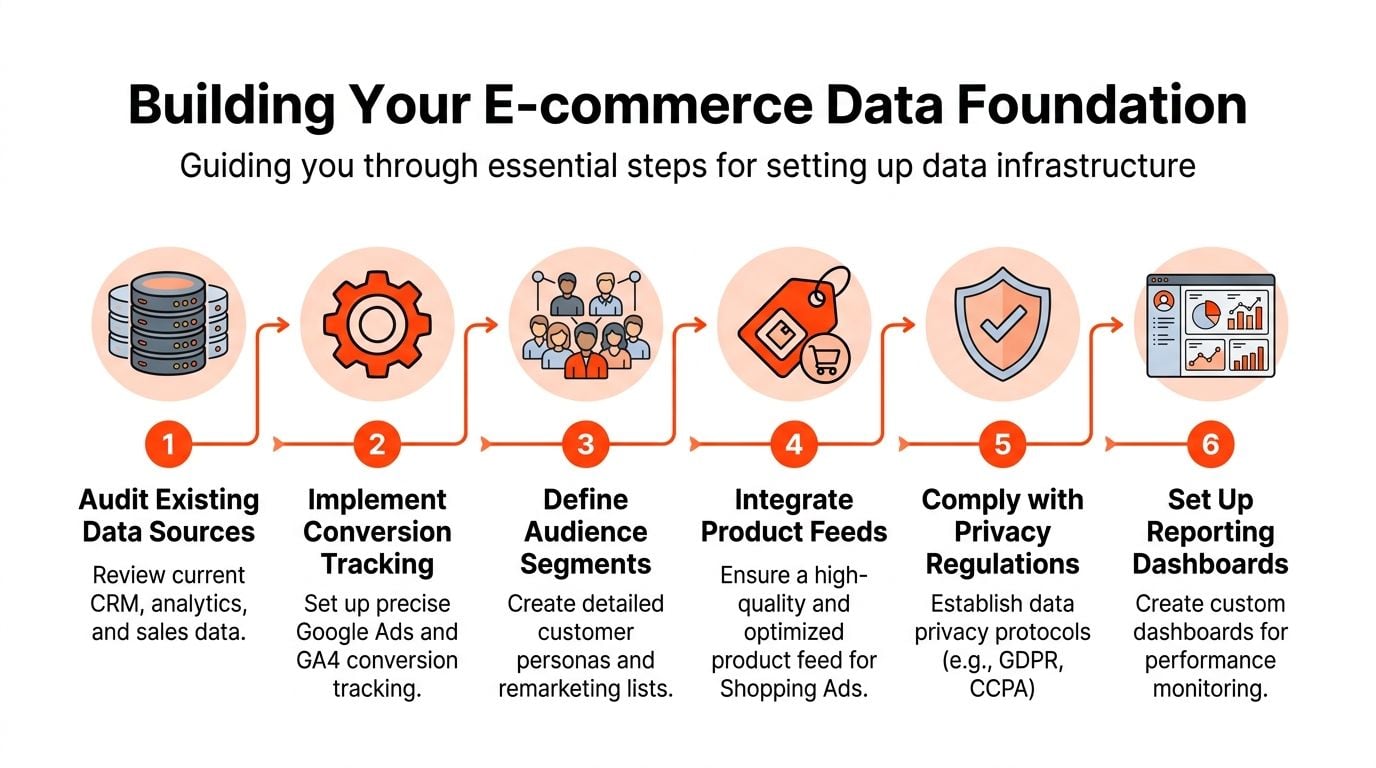
Before campaign type, before bidding strategy, before asset groups, the account needs a reliable data foundation. In e-commerce, that means two things above all else. A clean product feed and accurate conversion tracking.
Start with Merchant Center feed quality
For Shopping and retail-focused Performance Max campaigns, the feed is the campaign logic. Google can only match products to demand based on the data you give it.
The biggest lever is usually the product title.
Expert benchmarks cited by Store Growers on Google Ads for e-commerce show a 20 to 30% uplift in click-through rate when Google Merchant Center titles include high-intent keywords such as brand, model, and product attributes, typically front-loaded within the 150-character title limit.
That’s not a cosmetic change. It changes how your catalogue competes in the auction.
What a stronger title usually looks like
Generic titles underperform because they hide buyer intent.
A better title structure often includes:
- Brand first: Especially if buyers search by brand or already know the product family.
- Model or variant next: This narrows relevance and helps Google match more precise commercial queries.
- Key feature or attribute: Size, colour, material, compatibility, or use case.
- AU relevance where appropriate: Terms that align with local search behaviour and shipping context.
A product called “Women’s Jacket” tells Google almost nothing.
A product called “Brand X Women’s Waterproof Jacket Black” gives the system much more to work with.
Audit the feed before scaling spend
Most retailers don’t need a total rebuild. They need a feed audit that removes ambiguity.
Check these first:
-
Titles that are too broad
Broad, vague names attract lower-intent clicks and weaken query matching. -
Missing or inconsistent attributes
Variants, categories, gender, size, colour, material, and brand data need to be consistent across the catalogue. -
Weak custom labels
If your feed can’t separate best-sellers, high-margin products, seasonal stock, or clearance lines, campaign management gets blunt fast. -
Image issues
Google may approve them, but low-quality or inconsistent images still suppress click performance. -
Price and availability mismatches
These create avoidable friction and can trigger disapprovals or poor user trust.
Practical rule: Don’t let campaign structure carry the weight of a messy feed. Fix the inputs first.
Build conversion tracking for bidding, not just reporting
Many stores think tracking is “done” because purchases appear in Google Ads. That’s not enough.
For e-commerce, tracking needs to tell Google three things clearly:
- What converted
- What the transaction was worth
- Which user and click path deserve credit, as accurately as privacy rules allow
That’s why the setup should include GA4, enhanced e-commerce events, and Google Ads conversion actions that reflect actual commercial outcomes. If you need a practical reference for implementation details, this guide to Google Ads conversion tracking setup is useful as a technical companion.
For a retailer working through account architecture and implementation in more depth, this resource on Google Ads conversion tracking is also relevant.
What to track in a retail account
A clean setup usually includes a mix of macro and supporting signals.
A practical structure looks like this:
| Tracking layer | What to include | Why it matters |
|---|---|---|
| Primary conversion | Purchase | This is the signal bidding should prioritise |
| Value signal | Revenue passed dynamically | Needed for value-based bidding such as Target ROAS |
| Supporting actions | Add to cart, begin checkout | Useful for diagnosis and audience creation |
| Enhanced data | Enhanced conversions where implemented correctly | Helps with attribution quality in privacy-constrained journeys |
Don’t feed bad values into smart bidding
Smart bidding isn’t magic. It’s pattern recognition.
If purchases are duplicated, values are missing, or low-intent events are marked as primary conversions, the algorithm learns the wrong lesson. That’s when advertisers say Google is chasing rubbish traffic. In reality, the account is often rewarding the wrong behaviour.
The minimum standard before launch
Before meaningful budget goes live, the account should have:
- Merchant Center reviewed: No unresolved feed issues that distort product visibility
- Product titles rewritten: Starting with best-sellers and high-priority categories
- Conversion value passing correctly: Including currency and transaction-level value
- Primary conversions defined: Purchase first, with supporting events separated
- Audience seeds ready: Site visitors, cart abandoners, past purchasers, and customer lists where available
- Reporting cleaned up: So performance can be read by product, campaign, device, and search intent
That’s the difference between “running ads” and building an account that can learn.
Choosing Your E-commerce Campaign Arsenal for 2026
Different Google Ads campaign types solve different retail problems. The mistake is expecting one campaign to do all of them well.
A good account isn’t built around whatever Google is pushing hardest in the interface. It’s built around control where control matters, automation where automation helps, and clean separation between prospecting, harvesting demand, and remarketing.

The core campaign types that matter
For most Australian retailers, the useful toolkit is smaller than Google makes it look.
Standard Shopping
Standard Shopping is still valuable when you want visibility into product groups, search terms, and bid control. It’s especially useful for stores that care about margin by SKU, category-level control, or cleaner query filtering.
The trade-off is management overhead. It asks more from the operator.
Performance Max
Performance Max is useful when the account has solid conversion data, strong creative assets, and enough feed quality to let automation work. It can open reach across Search, Display, YouTube, Gmail, and Discover, and it often becomes the scale engine once the basics are stable.
Its weakness is opacity. Retailers that launch it on weak data often confuse movement with progress.
Search campaigns
Search is still where bottom-of-funnel control lives. It’s the place for brand terms, high-intent non-brand terms, and query themes that Shopping doesn’t cover cleanly.
It also gives you message control. That matters when buyers need reassurance around shipping, returns, local trust signals, or product suitability.
Demand Gen for remarketing and mid-funnel support
Demand Gen is useful for re-engaging users who viewed products, added to cart, or browsed a category but didn’t purchase. It can also support product discovery and brand recall where the catalogue has visual appeal.
Its role is support, not replacement. Don’t ask it to do the job of Shopping or high-intent Search.
Google Ads Campaign Types for E-commerce
| Campaign Type | Primary Use Case | Best For… | Key Consideration |
|---|---|---|---|
| Standard Shopping | Product-level control and query management | Retailers with distinct margins, priority SKUs, or a need for tighter control | Requires stronger feed management and hands-on optimisation |
| Performance Max | Scaled cross-network retail acquisition | Stores with solid tracking, quality creative, and enough conversion data for automation | Limited transparency means setup quality matters more |
| Search | Capturing explicit intent and protecting brand demand | Brand terms, high-intent generic searches, and tightly themed product queries | Needs strong keyword structure and disciplined negatives |
| Demand Gen | Remarketing and assisted conversions | Cart abandoners, product viewers, and warm audiences needing another touchpoint | Works best as part of a wider retail mix, not alone |
What works for different store profiles
Campaign choice should follow the shape of the business, not the latest feature release.
Smaller catalogue, tighter margins
If the product range is focused and margins matter, start with Standard Shopping plus Search. That setup gives better visibility into what’s driving spend and where query quality breaks down.
Large catalogue with clean feed and stable data
If the feed is organised and tracking is trustworthy, Performance Max plus Search is often the stronger mix. PMax handles scale. Search captures precise high-intent demand and protects branded traffic.
Heavy repeat-purchase behaviour
If the store gets a meaningful share of revenue from returning customers, add Demand Gen or another remarketing layer to support cart recovery, product reminders, and new collection launches.
A campaign type isn’t “good” in isolation. It’s good when its strengths match the problem you’re trying to solve.
When Standard Shopping beats Performance Max
This still happens more often than many advertisers expect.
Standard Shopping can outperform PMax when:
- The feed needs active product-level pruning
- The account needs query control
- Product margins vary sharply
- You need clean budget separation between product tiers
- Creative assets for PMax are weak or generic
If the account can’t tell Google which products deserve aggressive spend, wider automation often amplifies inefficiency.
When Performance Max earns its place
Performance Max usually becomes more effective when the account already has:
- Reliable purchase value tracking
- A polished feed
- Distinct audience signals
- Useful image and video assets
- Enough conversion volume for the model to learn
For retailers wanting a practical read on how Shopping is structured in the local market, the context around Google Shopping in Australia is worth reviewing.
A simple way to think about the mix
Use Shopping to surface products.
Use Search to capture explicit intent.
Use Performance Max to expand efficiently once the account is trainable.
Use Demand Gen to bring warm users back.
That’s usually a better operating model than trying to force one campaign to do everything.
Smart Bidding and Budget Strategies That Actually Work
Smart bidding works when the account gives Google clear commercial signals and enough room to optimise against them. It fails when advertisers set aggressive targets too early, feed in noisy data, or spread budget across too many experiments at once.
That’s why bidding strategy and budget strategy have to be handled together.

Australian retail benchmark data for 2025 shows that retail campaigns averaged 1180% ROAS, while Google Search campaigns achieved a 6.81% conversion rate at an average cost per acquisition of $19.38, based on MDM PPC’s Australian retail and e-commerce benchmarks. Those aren’t promises for your account. They are useful baselines for sanity-checking targets.
If your targets sit far outside what your economics and category can support, smart bidding won’t save you.
Pick the bidding model that matches account maturity
A lot of bidding problems are really sequencing problems.
Maximise Conversion Value
This is often a practical starting point for retail accounts with reliable purchase value tracking. It gives the algorithm room to find revenue before you constrain it with a return target.
It’s useful early because it reveals what the account can produce before you decide what efficiency threshold it should hold.
Target ROAS
Target ROAS works best after the account has already shown stable conversion value patterns. It’s strong when margins are understood and when the business can tolerate volume shifts in exchange for efficiency.
Set it too high, though, and the campaign narrows itself into inactivity or chases only the easiest conversions.
Manual control in selected cases
Automation doesn’t remove the need for judgement. In tightly controlled Search campaigns, brand defence, or highly specific product segments, manual oversight still matters. The point isn’t to avoid automation. It’s to stop using it where the account lacks enough clean input data.
Budgeting should follow confidence, not hope
Too many budgets are split based on what the retailer wishes would work.
A stronger approach is to allocate by confidence level:
- Proven demand capture: Campaigns already showing strong efficiency and clean intent
- Growth layer: Campaigns that can scale but still need validation
- Protection and support: Brand, remarketing, and selective experiments
That keeps the account commercially grounded.
A practical budget framework
This kind of allocation tends to keep retail accounts disciplined:
| Budget bucket | Role in the account | What belongs here |
|---|---|---|
| Core revenue driver | Protects consistent sales volume | Strong Shopping campaigns, proven Search themes |
| Controlled expansion | Tests growth without risking the full account | New product categories, selected PMax tests, non-brand search expansion |
| Defensive and retention layer | Captures demand you’ve already created | Brand Search, cart recovery, warm-audience remarketing |
The exact split depends on product range, seasonality, and how much demand already exists for the brand. What matters is the principle. Don’t give experimental campaigns the same budget priority as known winners.
Retail budgets scale cleanly when spend moves toward evidence, not enthusiasm.
How to set initial targets without choking performance
Advertisers often set a target based on boardroom expectations rather than what the account can achieve.
A more useful sequence is:
- Start with real transaction values passing correctly
- Let the campaign gather performance data
- Review product-level profitability, not just top-line ROAS
- Apply a ROAS target only after the account shows stable behaviour
- Tighten or loosen targets gradually
That pacing matters because big target swings usually destabilise the learning process.
A good explainer on how bidding strategy fits into account management sits well here:
What actually goes wrong in smart bidding accounts
The usual failure points are predictable:
- Primary conversions include weak actions such as low-intent micro events
- Revenue values are inaccurate which corrupts value-based bidding
- Targets are set too tightly before the account has enough learning
- Budgets are fragmented across too many campaigns
- Product performance is mixed together so strong items subsidise weak ones
When that happens, retailers blame the strategy type. The main issue is usually account structure.
Treat ROAS as a business metric, not a vanity metric
A campaign can report acceptable ROAS and still be commercially weak if it over-indexes on discounted products, repeat customers you would’ve won anyway, or low-margin SKUs.
The account has to be read through margin, stock position, customer quality, and repeat purchase behaviour. Smart bidding can optimise for what you feed it. It cannot infer your commercial priorities if the account doesn’t express them clearly.
Winning the Click with AU Mobile-First Creatives and Audiences
A lot of Google Ads creative still gets built like people are shopping from a laptop at a desk. That’s not how much of Australian e-commerce works.
The market is more mobile-led, and that changes what a good ad looks like, what a good landing page needs to do, and how fast you lose buyers when the journey feels clunky.
According to Zen Agency’s advanced Google Ads tactics article, 72% of e-commerce traffic in Australia is mobile-driven, mobile conversion drop-off can be up to 40% higher than desktop, and tailoring Performance Max for mobile can yield a 25% ROAS uplift. Whether you use PMax, Shopping, or Search, the lesson is the same. Mobile isn’t a placement tweak. It’s the dominant buying environment.
Why desktop-first creative underperforms
Desktop-first assets often fail in three places.
First, the message is too slow. Long headlines, vague value propositions, and cluttered imagery don’t survive a quick thumb scroll.
Second, the landing page asks too much. If the user has to pinch, hunt for shipping info, or wrestle with variant selection, they leave.
Third, the account treats all warm traffic the same. Mobile users who viewed a product, searched for a branded term, or abandoned cart don’t need the same message.
What mobile-first ad creative should do
The ad doesn’t need to say everything. It needs to resolve the next objection.
That usually means leading with one of these:
- Product clarity: Exactly what the item is and who it’s for
- Purchase confidence: Delivery, returns, local trust cues, or compatibility
- Offer relevance: Price positioning, bundles, or category benefits
- Urgency without noise: Especially for restocks, seasonal products, or limited runs
For text assets, shorter and clearer usually beats clever. For image and video assets inside Performance Max and remarketing, frame the product tightly, keep overlays legible on small screens, and make sure the first visual communicates the offer without requiring context.
On mobile, a good ad reduces thought. A bad ad asks for more of it.
Build audiences around intent, not traffic volume
Audience strategy matters more when mobile behaviour is fragmented. People browse in short bursts, compare options later, and return through a different query or device context.
That’s why first-party data should drive the account wherever possible.
High-intent remarketing pools
These are usually the most commercially useful:
- Cart abandoners
- Checkout starters
- Product viewers by category
- Past purchasers segmented by product type
- High-value customer lists where available
Each group deserves different creative and exclusions. Recent purchasers shouldn’t see the same acquisition message as a user who bounced from a product page.
Prospecting with better signals
For cold audiences, broad automation can help, but it still needs direction. Feed the account with product-led assets, quality customer lists, and stronger audience signals rather than generic “all visitors” logic.
If you’re tightening the message side of the campaign, these ad copy best practices are useful for making the jump from generic ad text to clearer buying prompts.
The landing page is part of the ad
Many Australian retail accounts leak performance at this stage.
Mobile-first means:
| Mobile page element | What it should do |
|---|---|
| Product title and image | Confirm relevance immediately |
| Price and payment clarity | Remove friction early |
| Delivery and returns info | Answer trust questions before the user hunts for them |
| Variant selection | Make choice easy on a small screen |
| Checkout path | Reduce taps, distractions, and field fatigue |
If paid traffic is strong but revenue lags, the problem is often not the ad. It’s the gap between ad promise and mobile landing reality.
A better operating standard for AU retail accounts
Build the campaign assuming the first click happens on a phone, the decision is interrupted, and the customer may need a second touch to convert.
That changes creative, audiences, exclusions, and landing design. It also explains why accounts that look fine in a desktop review can still underperform badly in the actual market.
Your E-commerce Optimisation and Scaling Playbook
A common pattern in Australian retail accounts looks like this. Launch goes well, branded search converts, Shopping finds a few winners, then performance flattens. CPCs rise, weak SKUs keep spending, mobile sessions stay high, and profit slips because nobody has built a repeatable optimisation process.
That is why scaling e-commerce on Google Ads is less about big resets and more about operating discipline. Strong accounts review search intent, product economics, feed quality, and mobile conversion friction on a fixed cadence, then push budget toward what is already proving it can hold margin in market.
What to review every week
Weekly optimisation should be commercial, not cosmetic. The goal is to catch wasted spend early and protect the products and campaigns that deserve more volume.
A useful weekly review includes:
- Search terms: Remove low-intent queries, identify new buying language, and check whether broad matching is pulling traffic too far from the product set
- Product performance: Find SKUs and categories taking spend without enough revenue or margin contribution
- Device path checks: Review how top-paid products behave on mobile, especially on sale pages and high-volume collections
- Budget allocation: Confirm profitable campaigns are not capped while weaker segments continue spending
- Merchant Center issues: Fix disapprovals, price mismatches, and feed errors before they suppress visibility
Many accounts regain margin through these fixes. Usually by removing waste that has been allowed to sit in the account for weeks.
What to review every month
Monthly reviews should answer harder questions about structure, not just tidy up execution.
Are your winners separated from your passengers?
Retail accounts often stall because top sellers and low-conviction products share the same campaign settings, budget pool, and bidding logic. That reduces control. In AU retail, where mobile traffic often dominates and product comparison happens fast, weaker items can burn budget before the best products get enough impression share.
Is creative still helping conversion?
Performance Max and remarketing assets can keep serving long after they stop doing useful work. Check asset fatigue by product line, promo message, and audience quality. If click volume holds but conversion rate softens, stale creative is one possible cause.
Is growth still profitable after fulfilment and stock pressure?
Revenue growth can hide bad scaling decisions. Review contribution margin, stock depth, return rates, and service capacity before increasing budgets. There is no upside in scaling a product range that creates fulfilment delays or pushes low-margin orders through mobile checkout.
Good scaling decisions promote proven product groups, not every category that wants budget.
Use tiered Shopping structures to scale with control
One of the most practical ways to scale Google Ads for Australian e-commerce is to tier products by actual trading performance.
As noted in Improvado’s Google Ads metrics article, advertisers that segment products by performance can scale spend more safely than accounts that treat the feed as one undifferentiated pool, provided conversion value tracking is accurate.
That matters because broad automation is useful, but it is not a substitute for merchandised control. If your feed includes hero products, seasonal items, low-stock lines, and poor converters all under the same setup, budget will drift toward whichever signals are easiest for the system to find, not always what the business wants to grow.
A useful way to tier products
This structure does not need to be complex.
| Tier | Typical product profile | Action |
|---|---|---|
| Tier 1 | Proven winners with strong efficiency and healthy stock | Increase budget priority and protect impression share |
| Tier 2 | Reliable products with room to improve | Keep active, test messaging, audience signals, and bid settings |
| Tier 3 | Break-even or inconsistent performers | Limit spend and diagnose feed quality, pricing, or landing page issues |
| Tier 4 | Persistent underperformers | Exclude, pause, or isolate for controlled testing |
Custom labels in the feed make this manageable at scale. They also help keep campaign decisions tied to product reality, not guesswork.
Optimisation is not only an ads task
Plenty of Google Ads issues are really merchandising or conversion issues exposed by paid traffic.
If a product gets clicks and fails to convert, ask direct questions:
- Is the product priced competitively for the Australian market?
- Are shipping costs and delivery timeframes clear before the user gets deep into the page?
- Do the images make the product easy to assess on a phone?
- Is variant selection easy to use with one hand on a small screen?
- Is stock status stable enough to support paid visibility?
Bid changes will not solve those problems.
If your team is working on both acquisition and on-site performance, this guide on how to increase your e-commerce conversion rate is a useful companion. Better conversion rate gives Smart Bidding cleaner outcomes to optimise toward and makes scaling less expensive.
When to scale and when to hold
Scale when:
- Top products are stable and in stock
- Tracking and conversion value are reliable
- Search term quality is controlled
- Mobile product pages convert cleanly
- Fulfilment can handle extra order volume
Hold when:
- Performance relies on a small number of fragile winners
- Performance Max is spending heavily with limited useful insight
- Feed quality is inconsistent across key categories
- Conversion value data is still questionable
- Operations cannot absorb increased demand without hurting customer experience
The mindset shift that matters
Strong e-commerce advertisers do not ask whether Google Ads is working in general. They ask which products, queries, audiences, and devices are producing profitable growth in the Australian market, then they restructure the account around those findings.
That is the job.
One option for retailers that want strategist oversight, campaign setup, conversion tracking support, and ongoing optimisation is Click Click Bang Bang, which manages PPC programs across Google Search, Shopping, and remarketing.
Read NeXt
Or Read Our Latest
- Manual vs Automated Bidding for PPC Success
- Conversion Tracking Setup: A Complete AU Guide
- Instagram Advertising Australia: Complete 2026 Guide
- Pay Per Click: A Beginner’s Guide for Australian Marketers
- Display Advertising on Google: The Complete Australian Guide
- Stakeholder Communication Plan How to Build One That Works
Click. CLick. Subscribe.
Get our best PPC insights, industry updates, and power moves delivered straight to your inbox. No fluff, just high-caliber strategies that actually work.
Don’t Leave Just Yet
Try Us For 30-Days,
Risk Free!!
We guarantee that you’ll love our work within the first 30 days, if not you’ll get your money back.
What have you got to lose?