

Google Ads for Shopify Store Success: 2026 Ultimate Guide
Last Updated
You've got a Shopify store, the products are live, margins are tight, and traffic is inconsistent. Some days sales come through. Other days Google Ads feels like a slot machine. That's usually not because the channel doesn't work. It's because the setup underneath it can't support profitable scaling.
For an Australian retailer, google ads for shopify store growth works best when three things are aligned: clean product data, reliable conversion tracking, and campaign structures that match how people search and shop. Miss one of those and the account starts lying to you. Products get disapproved, conversions go missing, and automated bidding learns from bad data.
The Blueprint for Shopify Google Ads Success
Google Ads isn't just another traffic source for Shopify. It's the most direct way to put products in front of people already searching with buying intent. That matters even more in Australia, where search behaviour tends to be high intent and comparison-driven.
The upside is real when the account is built properly. Australian Shopify merchants using Google Ads have recorded an average 4.2x ROAS for optimised Shopping campaigns, and stores integrating Google Ads saw a 28% uplift in average order value, from AU$85 to AU$109, according to this Australian Shopify Google Ads breakdown. That's the difference between ads that merely spend and ads that compound revenue.
A lot of store owners look for a shortcut. Usually it's an app, a smart campaign type, or a default integration that promises quick wins. Those tools can help, but only after the fundamentals are right. If you want a useful overview of how Shopify Google Ads fits into the broader store growth stack, it's worth reviewing it alongside your own channel mix.
What actually drives profitability
A profitable setup usually comes down to four moving parts:
- Account plumbing: Shopify, Google Merchant Center, GA4, and Google Ads must all be connected correctly.
- Feed quality: Titles, prices, availability, tax treatment, and shipping details must be accurate and compliant for Australia.
- Tracking integrity: Purchase data needs to reach Google Ads cleanly, with Enhanced Conversions and a proper tagging setup.
- Controlled optimisation: Campaigns need room to learn, but not enough freedom to waste budget on weak products or poor search terms.
Practical rule: Google Ads scales what your setup teaches it. If the feed is messy or tracking is incomplete, it scales mistakes.
That's the lens to use for every decision in this guide. Not “how do I launch ads fast?” but “how do I build an account that can keep getting smarter without wasting money?”
Foundational Account and Feed Setup
Most Shopify Google Ads problems start before the first click. The store owner thinks they have a campaign issue, but the problem sits in Merchant Center, consent settings, or the product feed itself.
Connect the stack in the right order
Use a clean sequence:
- Install the Google & YouTube app in Shopify.
- Create or connect your Google Merchant Center account.
- Link Google Ads.
- Connect GA4 so site behaviour and ecommerce events can be measured consistently.
- Confirm product sync before you build campaigns.
Doing this out of order creates messy account history. Products sync partially, conversion actions get duplicated, and Merchant Center starts throwing preventable warnings.
Treat the feed like sales infrastructure
For a Shopify retailer, the product feed isn't admin work. It's ad creative, catalogue structure, and pricing accuracy rolled into one. Google uses that feed to decide whether to show your product, how relevant it looks, and whether it can be approved at all.
Australian stores have an extra layer to manage. According to this analysis of AU-specific Shopify Google Ads practices, Australian e-commerce stores face 25% higher disapproval rates in Google Merchant Center due to unaddressed consent mismatches, and mandatory GST-inclusive pricing causes 18% of feed errors when not handled properly.
That means you need to check:
- GST-inclusive pricing: What appears in Shopify and what reaches Merchant Center must reflect Australian pricing requirements.
- Shipping settings: Merchant Center shipping must align with what customers see at checkout.
- Availability mapping: In-stock, out-of-stock, and preorder states need to be consistent.
- Product titles: Lead with brand, core product term, and useful attributes instead of internal SKU logic.
- Images: Use clear product imagery that matches the landing page exactly.
For a practical walkthrough on syncing and refining the feed, this guide to setting up a Google Shopping feed for Shopify is a useful reference.
Consent Mode v2 isn't optional
A generic global setup often misses the Australian privacy context. Shopify doesn't magically make Consent Mode v2 complete for you. You still need to verify that user consent states are being handled properly across your tags and that the data flow into Google systems reflects those choices.
If consent handling and product feed data disagree, Merchant Center usually notices before the advertiser does.
That's why a compliant setup matters before launch. If the feed is disapproved or partially limited, campaign strategy becomes irrelevant. You can't optimise visibility you never earned in the auction.
Nailing Your Conversion Tracking for Accurate ROI
If you're relying only on the native setup and hoping the numbers in Shopify and Google Ads line up neatly, they probably don't. That gap is where a lot of wasted spend hides.
Australian Shopify stores lose an average of $12,500 in monthly revenue from tracking gaps, and standard setups can underreport conversions by 40%. Moving to server-side GTM with Enhanced Conversions can achieve 92% tracking accuracy, based on the data discussed in this Shopify conversion tracking discussion.
That one issue changes everything. If Google Ads sees fewer purchases than are really happening, bidding systems become conservative, remarketing pools shrink, and profitable campaigns get paused because the data says they aren't working.
Why native tracking isn't enough
Native app tracking is convenient. It isn't powerful enough for a serious store trying to scale.
Browsers block scripts. Privacy settings interrupt sessions. Users move across devices. A basic browser-side setup loses data in all of those situations. Server-side Google Tag Manager helps stabilise the flow of event data so Google Ads gets a more complete picture of what's happening after the click.
This is also where strategy and measurement overlap. If you care about profit rather than vanity ROAS, this perspective on profitable Shopify strategy helps frame why cleaner attribution matters so much.
What to track properly
For Shopify ecommerce, a professional tracking setup should capture the full path, not just the final sale.
Focus on these core events:
- view_item: Confirms product page traffic quality.
- add_to_cart: Helps identify product and landing page friction.
- begin_checkout: Shows whether traffic has commercial intent.
- purchase: Must pass transaction value and currency accurately.
- Enhanced Conversions signals: Supports stronger match quality back into Google Ads.
Your purchase event should include AUD currency values and a clean transaction ID so reporting can be reconciled properly.
Key check: If Shopify sales are healthy but Google Ads reports weak conversion volume, don't change bids first. Audit tracking first.
For a detailed implementation path, review this guide on Google Ads conversion tracking for Shopify.
How to validate the setup
Once tags are in place, test the full purchase path yourself. Don't just rely on “tag detected” messages.
Check for:
- Event firing consistency: Product views, cart events, checkout starts, and purchases should fire once and only once.
- Value accuracy: Revenue values should match Shopify order values.
- Deduplication: Avoid double-counting when multiple tags or integrations are active.
- Consent behaviour: Confirm tracking behaves correctly based on user choices.
A visual walkthrough helps here:
When the tracking layer is solid, campaign decisions become less emotional. You stop guessing which products deserve more budget and start using purchase value data that's close enough to trust.
Choosing Your Google Ads Campaign Arsenal
Campaign type should match the job. Too many Shopify stores jump straight into whatever Google recommends, then wonder why visibility grows faster than profit.
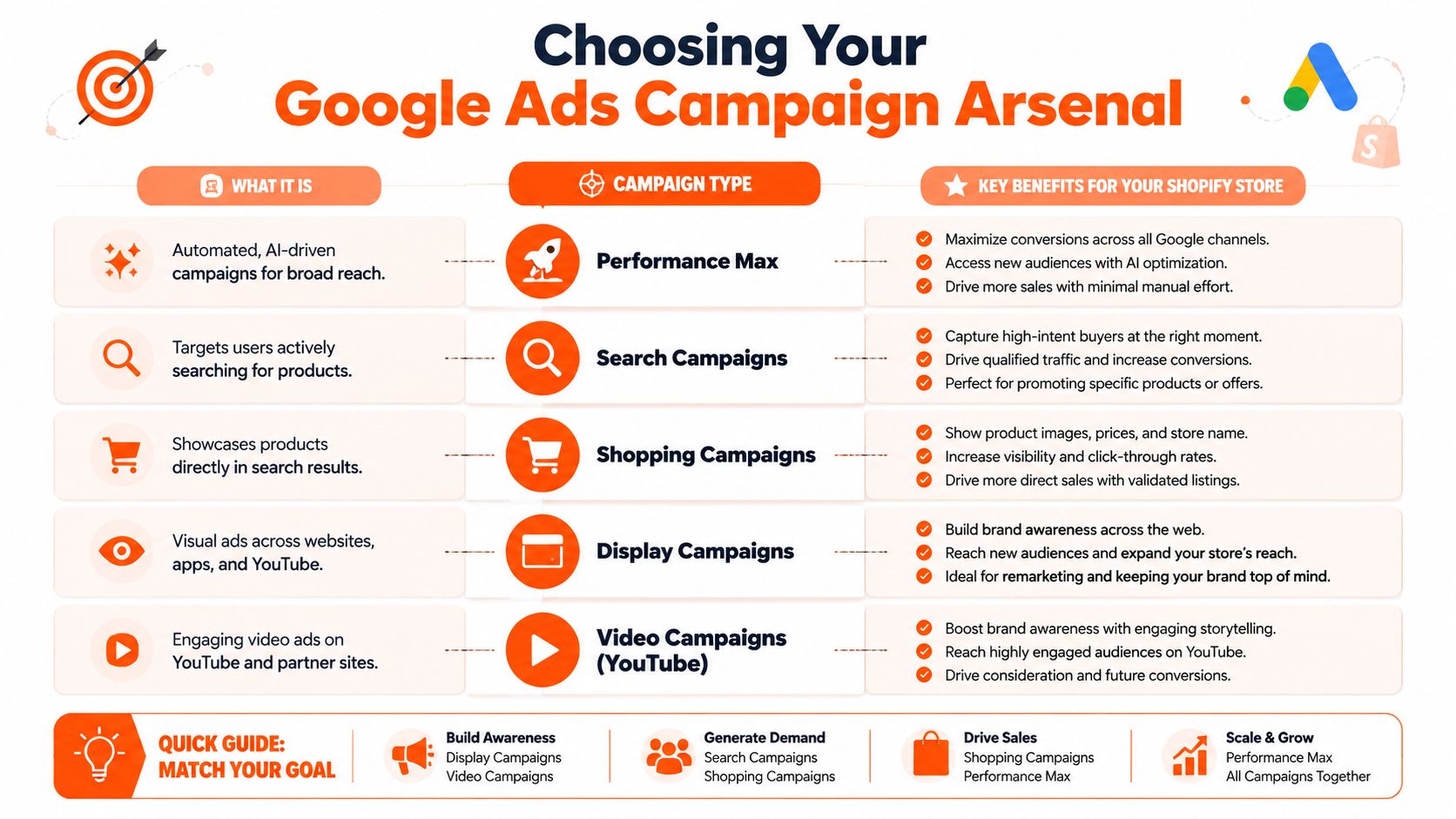
For most Australian retailers, the primary choice starts with Performance Max, Standard Shopping, and Search. Display and YouTube can support the account, but they're rarely the first lever to pull for direct-response ecommerce unless you already have strong creative and remarketing audiences.
Google Ads Campaign Types for Shopify
| Campaign Type | Best For | Control Level | Key Benefit |
|---|---|---|---|
| Performance Max | Broader scaled acquisition | Lower | Access to multiple Google surfaces with automation |
| Standard Shopping | Product-led sales with tighter management | Higher | Better visibility into product and query control |
| Search | High-intent keyword capture | Medium to high | Reaches people actively searching for specific products |
| Display | Remarketing and visual reinforcement | Medium | Keeps products visible after site visits |
| Video Campaigns (YouTube) | Brand awareness and assisted conversion | Medium | Stronger product storytelling and audience building |
Which one to use first
A newer Shopify store often does better starting with Standard Shopping. It gives you clearer control over feed-driven traffic and makes it easier to see what products and searches are carrying the account. That matters when you're still learning which categories can support paid acquisition.
Performance Max is powerful, but it needs strong inputs. If the feed is weak, the tracking is patchy, or the store has mixed product quality, PMax can spend aggressively without giving you enough insight into why performance changed.
Search campaigns do different work. They don't replace Shopping. They complement it. Use them to cover branded searches, competitor comparisons where appropriate, and high-intent non-brand product terms that deserve custom ad copy and landing page control.
The trade-off most stores ignore
More automation usually means less diagnostic clarity.
That doesn't make automation bad. It just means you should earn the right to use it. Once the account has clean data and stable product performance, broader automated campaign types become much safer to scale.
For a Shopify retailer in Australia, that sequence is usually smarter than launching every campaign type at once and hoping Google sorts it out.
Building and Launching Profitable Campaigns
A sensible launch starts narrower than is commonly expected. The goal isn't to advertise every product immediately. The goal is to find the products, search themes, and margins that can survive paid traffic.
Start with a controlled structure
For Standard Shopping, build campaigns around commercial logic rather than convenience. Good starting structures include:
- By product category: Useful when margins and conversion rates differ by category.
- By best sellers: Good for stores with a clear group of proven products.
- By brand or supplier: Helpful when brands have different pricing pressure and search demand.
- By priority products: Best for stores that want to push a focused subset first.
Keep the structure simple enough to manage. If you create too many tiny segments early, you'll spread data too thin and delay decisions.
A practical template for organising these campaigns is this Google Ads campaign structure template.
Feed optimisation before bid optimisation
Bid strategy can't rescue weak product data. Before launch, tighten the feed for the products you're pushing first.
Improve:
- Product titles: Put the actual buying terms near the front.
- Images: Make sure they're sharp, uncluttered, and consistent with the page.
- Product type and categorisation: Help Google understand context.
- Landing pages: Match the ad promise to the page the click lands on.
If you're refining destination pages for paid traffic, this guide to building Shopify landing pages is useful because it focuses on the page experience after the click, where many stores leak revenue.
Budgeting and bidding without rushing automation
A proven optimisation method for AU Shopify stores starts with a modest daily budget, uses weekly negative keyword harvesting, and then moves to Target ROAS bidding at 350% once 30+ monthly conversions are achieved. AU merchants can waste 18% of their budget on broad terms, and this approach can produce a 25-40% ROAS uplift, according to this AU Shopify optimisation methodology.
That tells you two important things.
First, don't hand the account to automated bidding before it has enough conversion history. Second, search term control still matters a lot, especially in Australia where broad, loosely matched intent can burn budget on irrelevant clicks.
Search term reports often show the truth faster than top-level ROAS dashboards do.
What to do in the first few weeks
Use a tight operating rhythm:
- Launch with a limited product set.
- Check Merchant Center daily for feed issues and disapprovals.
- Review search terms weekly and add negatives aggressively where intent is poor.
- Watch product-level performance instead of only campaign averages.
- Shift to Target ROAS only when conversion volume is stable enough to support it.
That's how profitable campaigns are built. Not by chasing scale on day one, but by proving which products deserve more spend.
Scaling with Remarketing and Performance Data
Once campaigns are producing reliable conversion data, the next lift usually comes from using that data more intelligently. At this point, many Shopify stores either grow efficiently or start wasting money on broad expansion.
Australian Shopify stores using enhanced conversions have seen a 19% increase in conversion accuracy, and that improved data has contributed to 41% year-over-year growth in ad-attributed sales for mid-sized AU Shopify stores, according to this Australian analysis of enhanced conversion performance.
That result makes sense. Better data doesn't just improve reporting. It improves audience building, smart bidding inputs, and product-level budget decisions.
Dynamic remarketing is usually the first scale lever
Dynamic remarketing works well for Shopify because your catalogue already contains the products users viewed. Instead of showing a generic brand ad, Google can show the actual item or closely related products.
Build audiences around behaviour such as:
- Viewed product but didn't add to cart
- Added to cart but didn't purchase
- Reached checkout and dropped off
- Past purchasers suitable for repeat-buy campaigns
- Higher-value customers for audience signals
These audiences can be used directly in remarketing campaigns or as stronger signals inside more automated campaign types.

Read performance by value, not just by volume
A common scaling mistake is treating all conversions as equal. They aren't. Some products carry better margin, stronger repeat purchase behaviour, or lower return risk. Others look fine on top-line ROAS but don't justify more budget once the full economics are considered.
Useful decision filters include:
- Conversion value by product group: Which categories generate the strongest revenue quality?
- ROAS stability: Which campaigns hold performance as spend rises?
- New customer potential: Which products bring in buyers likely to purchase again?
- Remarketing responsiveness: Which segments convert after a second or third touch?
Stores usually scale faster when they promote their best economics, not just their best click-through products.
That's also why GA4 audience work matters. If you can isolate cart abandoners, recent purchasers, and higher-value customer segments cleanly, your campaigns stop treating every visitor the same. That usually leads to better budget allocation and less reliance on broad prospecting alone.
Your Ongoing Optimisation Checklist
Google Ads for a Shopify store isn't a set-and-forget channel. The stores that stay profitable use a repeatable operating routine.
Every week
- Review search terms: Add negatives where intent is weak or mismatched.
- Check Merchant Center diagnostics: Catch feed disapprovals, price mismatches, and availability issues early.
- Watch budget pacing: Don't let strong campaigns go limited if they're profitable, and don't keep funding weak segments out of habit.
- Scan conversion data: Look for sudden drops in purchase tracking, value reporting, or event volume.
- Review product winners and losers: Pause products that attract spend without commercial traction.
Every month
- Assess performance by category and product group: Budget should follow margin and conversion value, not sentiment.
- Revisit bidding strategy: If campaigns have stable data, test whether automation is helping or flattening performance.
- Refresh feed assets: Improve titles, imagery, and product grouping based on what search terms and sales data reveal.
- Audit landing page fit: Make sure top-spending products land on pages that convert cleanly on mobile and desktop.
- Check consent and tracking integrity: Tag setups drift over time, especially after theme changes, app installs, or checkout updates.
A healthy account usually looks boring from the outside. Clean data. Steady pruning. Small, repeated improvements. That's what keeps Google Ads profitable when competitors are chasing shortcuts.
Frequently Asked Questions
Should a new Shopify store start with Performance Max?
Usually not straight away. A new store often benefits from more control first, especially if the feed, offer, and tracking setup haven't been pressure-tested yet. Standard Shopping and targeted Search usually reveal problems faster.
How much does tracking really affect campaign performance?
A lot. If conversions are being missed or values are wrong, Google's bidding system makes decisions on incomplete information. That can lead to underbidding on profitable products or overspending on low-quality traffic.
Do I need separate campaigns for every product category?
Not always. Split campaigns where categories differ meaningfully in margin, demand, or conversion behaviour. If categories behave similarly, simpler structures are easier to manage.
Why are products getting disapproved in Merchant Center?
For Australian stores, common causes include consent mismatches, feed data issues, and pricing setup problems such as GST handling. Merchant Center diagnostics usually points to the source, but the fix often sits back in Shopify or your tagging setup.
Is Google Ads still worth it if my store already gets sales from other channels?
Yes, if you use it deliberately. Google Ads captures existing demand well and gives you a strong way to scale proven products, support remarketing, and create a more predictable acquisition engine.
If you want expert help setting up or scaling Google Ads for your Shopify store in Australia, Click Click Bang Bang can help with campaign structure, tracking, feed optimisation, and ongoing PPC management built around real ROI.
Read NeXt
Or Read Our Latest
- User Generated Content Strategies That Actually Convert
- Copyright and Infringement Guide for Business Marketers 2026
- What Is Brand Positioning and Why It Drives Growth
- Push vs Pull Marketing: A 2026 Decision Guide
- Ad Relevance Score Explained: How It Impacts PPC Performance
- Best ROI Digital Marketing: 10 Channels Ranked for 2026
Click. CLick. Subscribe.
Get our best PPC insights, industry updates, and power moves delivered straight to your inbox. No fluff, just high-caliber strategies that actually work.
Don’t Leave Just Yet
Try Us For 30-Days,
Risk Free!!
We guarantee that you’ll love our work within the first 30 days, if not you’ll get your money back.
What have you got to lose?