

WordPress Search Optimization: A Complete 2026 Guide
Last Updated

You can have a polished WordPress site, strong content, and paid traffic coming in every day, yet still lose buyers and leads for a simple reason. People arrive, use the search box, get poor results, and leave.
That’s why wordpress search optimization matters far beyond the search bar itself. It sits at the intersection of user experience, technical SEO, and paid media efficiency. If visitors can’t find the right product, service page, article, or support answer quickly, your acquisition costs rise and your conversion rate suffers.
The same problem shows up externally. Google needs clear signals to crawl, index, and understand your site. Users need relevant on-site results once they land. If either side fails, your funnel leaks. That’s why we treat WordPress search as one connected system, not two separate tasks. A proper website audit for search performance usually reveals both kinds of issues at once.
Why Your WordPress Search Is a Leaky Bucket
Most businesses notice the leak too late. They see traffic in Google Analytics, they see clicks from Google Ads or SEO, and they assume the hard part is done. It isn’t. Acquisition only works when the site helps visitors continue their journey.
Default WordPress search often breaks that journey. It can return thin results, surface the wrong content, ignore product attributes, and behave more like a basic database query than a buying assistant. On brochure sites, that means missed leads. On e-commerce sites, that means abandoned sessions from people who were already motivated enough to search.
The leak gets wider when internal search and external visibility aren’t aligned. A page might rank well in Google, but the visitor lands and can’t find related products, support content, or a comparison page. Or the site search data shows repeated demand for something your SEO and PPC campaigns aren’t targeting yet.
Practical rule: If users search on your site, they’re telling you what they want in their own words. Ignoring that data is one of the easiest ways to waste traffic you already paid for.
Strong wordpress search optimization fixes both sides. It improves how visitors discover content on-site, and it sharpens the technical and content signals that help search engines understand the site off-site. That combination is what turns search into a growth channel instead of a cost centre.
Replace Default Search with a Smarter Engine
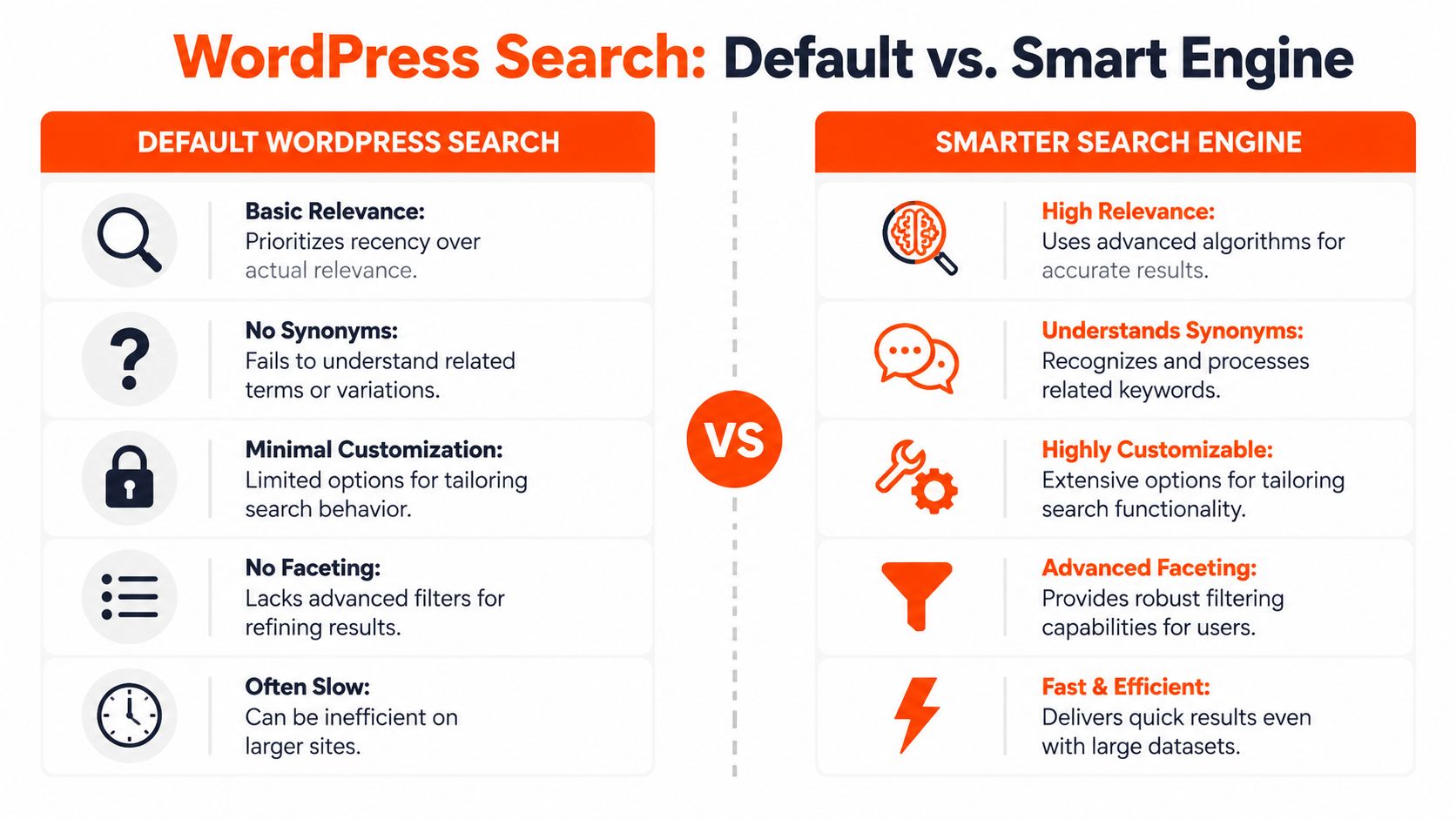
The default WordPress search was built for simplicity, not relevance. That’s fine for a small blog with a handful of posts. It’s not fine for a business site with product catalogues, custom fields, landing pages, docs, filters, and varied user intent.
A useful benchmark comes from WordPress itself. The WordPress.org plugin repository moved beyond simple keyword matching and adopted an Elasticsearch-powered approach that scores results using signals such as term frequency, active installs, and update recency, as described in this analysis of relevance-based WordPress search. That’s the same shift most business sites need to make. Less literal matching, more relevance.
Where default search falls short
Default search usually struggles in five areas:
- Relevance ranking. It often favours recency over what’s most useful.
- Content types. It may ignore critical content stored in custom fields, PDFs, WooCommerce attributes, or taxonomy terms.
- Language handling. Synonyms, misspellings, and fuzzy matches are weak or absent.
- Scalability. Performance can degrade on larger sites.
- Control. You get very little say in what should rank first.
If your business relies on search to help people find products, service variants, location pages, or technical resources, those limitations become expensive quickly.
Choosing between Relevanssi, SearchWP, and Algolia
Not every site needs the same stack. The right tool depends on content complexity, budget, and how much control your team needs.
| Tool | Best fit | Strength | Trade-off |
|---|---|---|---|
| Relevanssi | Content-heavy sites and budget-conscious teams | Fuzzy matching, better relevance, useful indexing options | Can need careful tuning on larger sites |
| SearchWP | Marketing sites, membership sites, WooCommerce stores | Strong weighting controls across titles, content, taxonomies, and custom fields | Paid tool, so the business case needs to be clear |
| Algolia | Large catalogues and enterprise-level search demands | Fast hosted search, strong autocomplete and filtering options | More implementation overhead and ongoing platform cost |
What works in practice
For many small to mid-sized business sites, SearchWP is the practical middle ground. It gives you direct control over ranking inputs without forcing a full custom build. You can assign more weight to titles, less to body content, and include category names, tags, SKU-like fields, or structured product data where relevant.
Relevanssi is often the better fit when content discoverability matters more than commerce logic. Think publishers, education providers, or firms with a large resource centre. It improves result quality without requiring the complexity of a hosted search platform.
Algolia makes sense when speed and faceted discovery are central to revenue. Large e-commerce stores, multi-location inventory sites, and sites with heavy filtering demands often outgrow plugin-only search.
The right search engine isn’t the one with the most features. It’s the one that lets users reach the next useful page with the least friction.
What not to do
A few common decisions usually create problems later:
- Don’t install a search plugin and leave defaults untouched. Relevance tuning is where the value comes from.
- Don’t index every content type blindly. Low-value pages pollute results.
- Don’t prioritise blog posts over commercial pages when buyers are using product terms. Match ranking logic to business intent.
- Don’t treat search as separate from merchandising or lead generation. Search results are part navigation, part conversion path.
Smarter search starts with the engine, but conversions usually rise because the results become more intentional.
Design a High-Converting Search Experience
A strong search engine can still underperform if the interface is clumsy. Users don’t judge your search stack by the plugin you installed. They judge it by whether they can find what they need in a few seconds.
The first improvement is visibility. Search should be easy to spot, easy to use on mobile, and present in the moments where intent is highest. Header search, category search, and in-content search can all have a role depending on the site.
A lot of businesses over-design navigation and under-design search. That’s backwards. Search is often the fastest route to conversion for users who already know roughly what they want. Good website design for SEO and usability supports both browse behaviour and search behaviour, instead of forcing one pattern onto everyone.
Add live results and autocomplete
Autocomplete reduces typing effort and narrows user intent early. It also prevents avoidable dead ends. If someone types a partial product name, service type, or problem statement, the interface should guide them towards likely matches before they hit enter.
Good autocomplete does three things well:
- Shows useful labels such as products, categories, posts, or FAQs
- Surfaces commercial pages early when the query has buying intent
- Handles messy input including spelling errors and plural variations
For e-commerce, product thumbnails, pricing fields, and category labels can make instant suggestions more helpful. For lead gen sites, service pages and case-study-style resources usually deserve priority.
Use filters that reflect how people buy
Faceted search matters when users need to narrow results without starting over. That usually includes category, brand, product type, content topic, or other practical attributes.
The mistake is copying marketplace-style filtering without thinking about your catalogue. Filters should match real buying decisions, not internal database fields. If a filter helps nobody choose, remove it.
When search results are broad, filters should reduce effort. They shouldn’t create another layer of confusion.
A short walkthrough is useful here if your team is redesigning search interactions:
Fix the no-results page
“No results found” is usually treated like an error state. It should behave like a recovery state.
Instead of a dead-end message, give users a next step:
- Suggest close matches based on partial terms or synonym logic.
- Show popular categories or bestsellers for commerce sites.
- Offer helpful content such as buying guides, FAQs, or contact pathways.
- Track every failed query so the marketing and content team can act on it.
That last point matters most. Failed searches tell you where navigation, product naming, taxonomy, or content coverage is weak. Search UX improves when design and data work together.
Build Your Technical SEO Foundation on WordPress
If search engines can’t crawl, index, and interpret your site cleanly, content quality won’t save you. Technical SEO is the baseline that allows your WordPress pages to compete.

A solid setup doesn’t have to be complicated. On most sites, Yoast SEO or Rank Math can handle the essentials if the configuration is thoughtful. The problem isn’t usually missing tools. It’s messy implementation.
Start with crawlability and index control
One of the clearest technical foundations for WordPress is this: generate an XML sitemap with Yoast or Rank Math, submit it to Google Search Console and Bing Webmaster Tools, and use 301 redirects plus canonical URLs to resolve duplicate content. That workflow is outlined in this practical WordPress technical SEO guide.
That sounds basic, but plenty of WordPress sites still get it wrong. Common issues include:
- Indexing the wrong archives such as thin tag pages
- Leaving duplicate URLs unresolved across parameters, categories, or pagination
- Publishing similar service pages without canonical signals
- Forgetting redirects after content consolidation or URL changes
Your robots settings matter too. If WordPress is set to discourage indexing, everything else becomes irrelevant. It’s a small setting with very large consequences.
Treat schema and page speed as practical SEO tools
Schema markup helps search engines interpret page purpose. On WordPress, this usually means adding the right structured data to the right content type rather than chasing every schema variation available.
For business sites, the most useful implementations often include:
- Product schema for e-commerce pages, especially when you want price, availability, and ratings to be clearer in search results
- FAQ schema for support and informational content where concise answers improve visibility
- Article or page-level structure where plugins can output clean JSON-LD without heavy manual work
Technical polish also includes performance. Core Web Vitals work is rarely glamorous, but it affects both user experience and search performance. Reducing JavaScript bloat, limiting unnecessary plugins, reserving dimensions for visual elements to prevent layout shift, and using caching and compression are all practical wins. If your team is reviewing broader AI-era search signals as well, Riff Analytics' guide for AI-driven SEO is a useful companion resource because it connects technical clarity with how modern search systems interpret content.
Use a simple technical checklist
A disciplined checklist beats ad hoc fixes every time. For most WordPress builds, we use this sequence:
- Confirm indexability on key commercial and content pages.
- Generate and submit sitemaps in both major webmaster platforms.
- Review robots rules so low-value pages are controlled without blocking important assets.
- Set canonicals and redirects before duplicate versions spread.
- Implement schema where it changes how listings appear and are understood.
- Audit speed bottlenecks caused by themes, plugins, render-heavy assets, or poor caching.
A proper technical SEO audit for WordPress websites usually finds problems across several of those layers at once. That’s normal. WordPress is flexible, and flexibility tends to accumulate technical debt unless someone is actively managing it.
Measure and Optimise Search for Business Growth
If you don’t measure search behaviour, you’re not optimising. You’re guessing.
That matters more now because some Australian WordPress sites saw a 22% drop in organic traffic after Google’s May 2025 AI Overviews update, and optimising internal search with fuzzy and semantic plugins can improve conversion rates by up to 2.5x, according to this overview of WordPress query optimisation and AI-driven behaviour. When external clicks become less reliable, on-site discovery carries more of the conversion load.

Track the queries that reveal intent
Internal search data is one of the cleanest sources of intent you’ll get. Users tell you what they expect to find, what language they use, and where your current structure fails them.
Three query groups deserve regular review:
| Query type | What it usually means | Action |
|---|---|---|
| High-frequency successful searches | Strong demand and clear matching | Improve visibility of those items outside search |
| High-frequency failed searches | Missing products, poor naming, weak synonym handling, or thin content | Add content, aliases, redirects, or catalogue changes |
| Commercial searches with weak conversion | Relevance or landing-page mismatch | Tune result weighting and review page experience |
WordPress search optimisation transforms from a technical task into a business tool. Search logs can inform SEO content planning, taxonomy changes, merchandising decisions, and paid campaign targeting.
Connect on-site search to analytics and PPC
A search query on your site should influence what you do in paid media. If somebody lands from Google Ads, searches for a product family, views a result, and leaves, that’s not just a lost visit. It’s remarketing intelligence.
Useful integrations often include:
- Analytics events for internal search use so you can compare converters and non-converters
- Search term grouping that maps user language to service lines or product categories
- Audience creation for users who searched but didn’t enquire or purchase
- Ad copy refinement based on the wording people use on-site rather than the wording your team assumes they use
The best PPC audiences often come from behaviour after the click, not before it.
This is the underserved angle most businesses miss. SEO brings in discovery traffic. PPC scales reach and retargeting. Internal search reveals what those users wanted once they arrived. When those three systems share data, return on ad spend becomes easier to defend because your campaigns are informed by actual site behaviour.
Optimise continuously, not occasionally
Search behaviour changes with product updates, seasonality, content growth, and changes in how Google presents results. That’s why review cadence matters. Weekly checks are useful for surfacing failed queries and obvious relevance issues. Monthly reviews are better for trend analysis and campaign decisions.
Performance work supports this too. Faster pages make search sessions less frustrating and improve the quality of traffic you’re paying to acquire. If your team wants a practical technical companion on that front, this guide on website speed for local SEO is worth reviewing alongside your search reports.
The key is to make search measurable in commercial terms. Not just searches performed, but searches that led to product views, enquiries, checkout starts, or closed leads.
Frequently Asked WordPress Search Questions
Is a free search plugin enough
Sometimes, yes. If your site is small, your content types are simple, and users rarely rely on search, a free tool can be enough to improve relevance over the WordPress default.
Premium tools earn their keep when search affects revenue. That usually means e-commerce catalogues, large resource libraries, membership content, or service sites with many closely related pages. In those cases, weighting controls, custom field indexing, synonym handling, and better reporting usually justify the spend because they reduce friction where it matters.
How should we handle multilingual WordPress search
Multilingual search needs more than translated pages. It needs translated intent. Users won’t always search with your preferred terminology, and they often mix languages, variants, or local phrasing.
The practical approach is to pair your multilingual plugin setup with a search tool that lets you control indexed content, synonyms, and field weighting by language context. Pay attention to titles, category labels, product attributes, and internal naming conventions. If a translated page exists but the search engine can’t match how users phrase the query, the page might as well be invisible.
How often should we review search data
Review failed searches and obvious relevance issues weekly if search is commercially important. Do a broader monthly review for trends, content gaps, and PPC alignment.
The reason to keep this discipline is simple. Australia-specific WordPress SEO statistics are hard to source, so local teams often need to lean on their own platform data. Global benchmarks still help. For example, meta descriptions can increase clicks by 5.8% and numbered headlines can improve performance by 36%, as noted in this summary of WordPress SEO statistics and the limits of AU-specific data. But your most useful optimisation data will usually come from your own Search Console, analytics, and internal search logs.
Should internal search data influence SEO content planning
Yes. Repeated searches for topics, products, comparisons, or support questions often reveal demand before your keyword tools make it obvious. Internal search logs are especially useful for finding missing landing pages, weak category structures, and support content your sales team is tired of answering manually.
If your WordPress site is attracting traffic but not converting it efficiently, Click Click Bang Bang can help you connect technical SEO, internal search optimisation, and PPC into one measurable growth system. Their team focuses on AI-first SEO, paid media, transparent reporting, and practical performance improvements that help businesses turn more of their existing traffic into leads and sales.
Read NeXt
Or Read Our Latest
- User Generated Content Strategies That Actually Convert
- Copyright and Infringement Guide for Business Marketers 2026
- What Is Brand Positioning and Why It Drives Growth
- Push vs Pull Marketing: A 2026 Decision Guide
- Ad Relevance Score Explained: How It Impacts PPC Performance
- Best ROI Digital Marketing: 10 Channels Ranked for 2026
Click. CLick. Subscribe.
Get our best PPC insights, industry updates, and power moves delivered straight to your inbox. No fluff, just high-caliber strategies that actually work.
Don’t Leave Just Yet
Try Us For 30-Days,
Risk Free!!
We guarantee that you’ll love our work within the first 30 days, if not you’ll get your money back.
What have you got to lose?