

Master the LinkedIn Insight Tag: Your 2026 Guide
Last Updated

You're probably in one of two situations right now. Either your LinkedIn campaigns are already live and the reporting feels thin, or you're about to launch and want to avoid the usual mess where clicks look fine but revenue stays fuzzy.
That gap is where the LinkedIn Insight Tag matters. Not because adding another pixel is exciting. It isn't. It matters because without it, you can't connect spend to what people did on your site, and you can't build the audience lists that let LinkedIn follow up with people who showed real buying intent.
For Australian marketers, that problem shows up fast. B2B teams need to know whether decision-makers reached the pricing page, downloaded a guide, or requested a demo. E-commerce teams need to know whether product viewers came back and bought. Installation is the easy part. The harder question is whether the data is good enough to back budget decisions.
Why Your LinkedIn Ads Need the Insight Tag
A common pattern goes like this. A marketing manager approves LinkedIn budget, the campaigns launch, traffic starts landing on the website, and everyone sees clicks in Campaign Manager. Then the meeting happens. Which campaign drove leads? Which audience produced serious prospects instead of casual visits? Which ads deserve more spend next month?
Without the LinkedIn Insight Tag, those answers are weak.
LinkedIn treats the Insight Tag as the foundation for conversion tracking and website retargeting inside Campaign Manager, and it uses first-party cookies to collect website interaction data without exposing personally identifiable information in reports, with data sources showing as Active after traffic is detected and verification sometimes taking up to 24 hours according to Ignite Social Media's overview of the Insight Tag.
That matters because LinkedIn Ads are rarely cheap traffic. If you're paying to reach a professional audience, you need more than top-line click volume. You need to know whether the people arriving on site are moving toward pipeline, sales calls, or purchases.
What changes once it's installed
With the tag in place, LinkedIn can start tying ad interactions to on-site behaviour. That gives you two commercial advantages:
- Measurement you can optimise against: You stop judging campaigns by CTR alone and start looking at business actions.
- Retargeting that reflects intent: You can build audiences from visitors who viewed meaningful pages or took meaningful actions.
Practical rule: If you're running LinkedIn without the Insight Tag, you're paying for visibility but limiting your ability to prove value.
For agency and service businesses, this is especially important when lead quality varies by offer, audience, and page path. If you want sharper thinking around funnel design and offer structure, these resources for agency lead generation are useful alongside your tracking setup.
Some teams hand this off to paid media specialists because implementation and measurement need to line up with campaign structure, audience logic, and reporting. If that's your situation, a service like LinkedIn ad management can sit on top of the technical setup and make the data usable.
How the LinkedIn Insight Tag Really Works
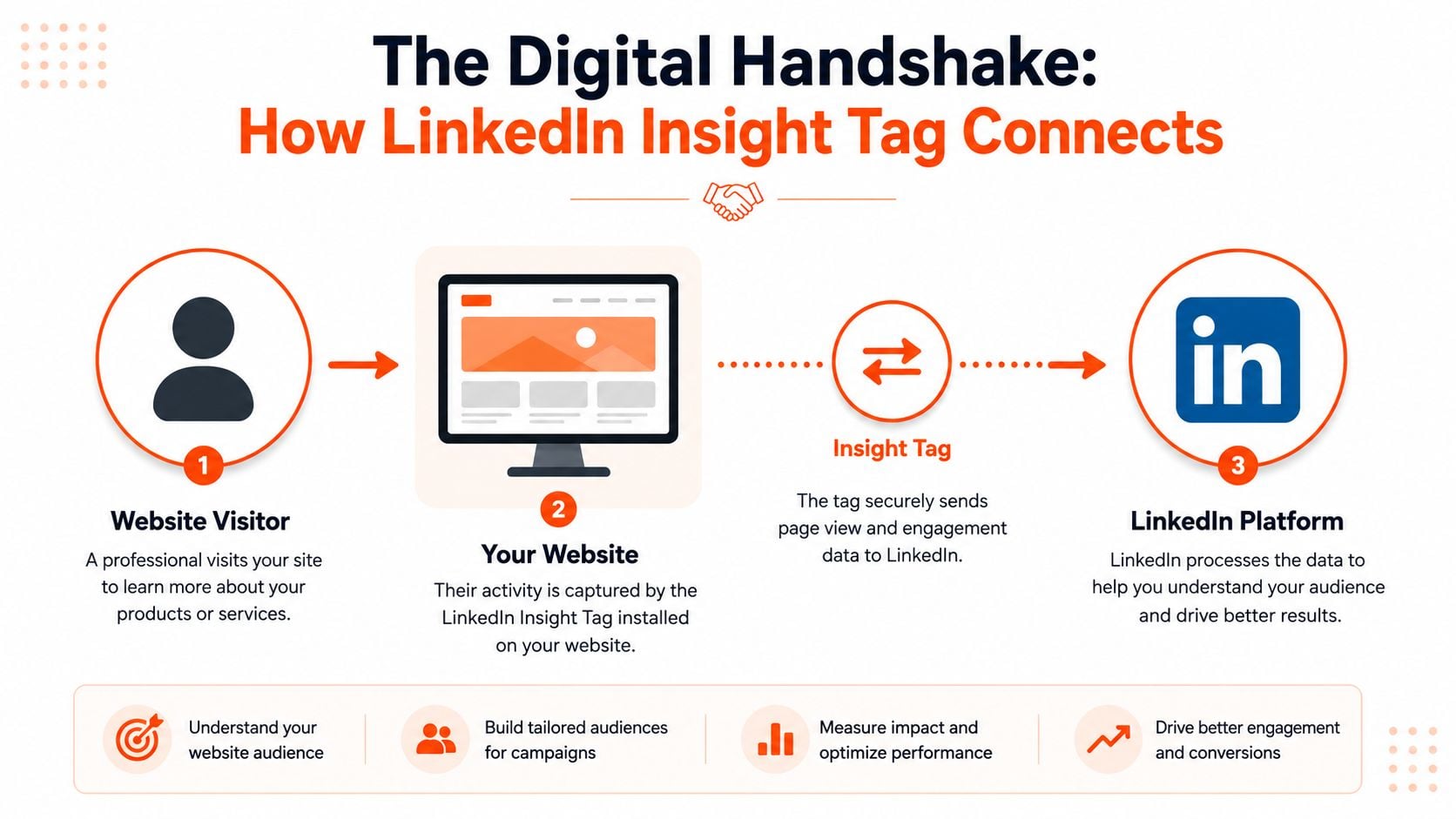
The easiest way to think about the LinkedIn Insight Tag is as a digital handshake between your website and LinkedIn. A visitor lands on your site, the tag fires, and LinkedIn uses that interaction to connect website behaviour with its professional identity graph in aggregate reporting.
That's why the tag is more valuable than a plain pageview counter. It doesn't just tell you that someone visited a page. It helps you understand the professional profile of matched visitors.
What the base tag collects
When installed, the tag fires on page load and records a set of website interaction signals. In practical terms, that includes the URL, referrer, device type, and timestamp, which gives you a more detailed starting point for measurement and remarketing than relying on standard analytics alone.
Independent crawl data found 111,433 active customers using the tag globally, and 95.81% of detected installations were deployed through Google Tag Manager, with the tag also enabling Website Demographics reporting across job function, seniority, company size, industry, and geography according to TechnologyChecker's LinkedIn Insight Tag data.
For Australian advertisers, that geography layer is more useful than it first sounds. If your campaigns target local buyers, state-based demand, or national accounts with Australian teams, you can separate local professional traffic from broader site traffic and make better targeting calls.
What standard analytics usually misses
Google Analytics can tell you a lot about sessions, channels, pages, and outcomes. What it usually can't do on its own is show the professional composition of the audience in the way LinkedIn can.
That creates a useful split:
| Tool | Best at |
|---|---|
| GA4 | Site behaviour, channel comparison, broader analytics |
| LinkedIn Insight Tag | Professional audience understanding, LinkedIn retargeting, LinkedIn-side conversion visibility |
Website Demographics is often the first report that changes strategy. You may think your ads are reaching one buying group, then find your traffic skews toward a different seniority band or industry cluster.
What this means for strategy
If you're in B2B, the tag helps answer a high-value question: who is engaging, not just how many people clicked.
That can influence:
- Targeting refinement: Exclude weak-fit industries or lean harder into strong-fit company segments.
- Creative direction: Write ad copy for the seniority level that's responding.
- Landing page decisions: Align pages with the audience LinkedIn is bringing, not the audience you assumed you had.
Your Step by Step Installation Guide
The cleanest setup for most businesses is Google Tag Manager. It keeps the LinkedIn Insight Tag under the same governance as your other marketing tags, makes troubleshooting easier, and avoids asking a developer to edit templates every time you need to adjust tracking.
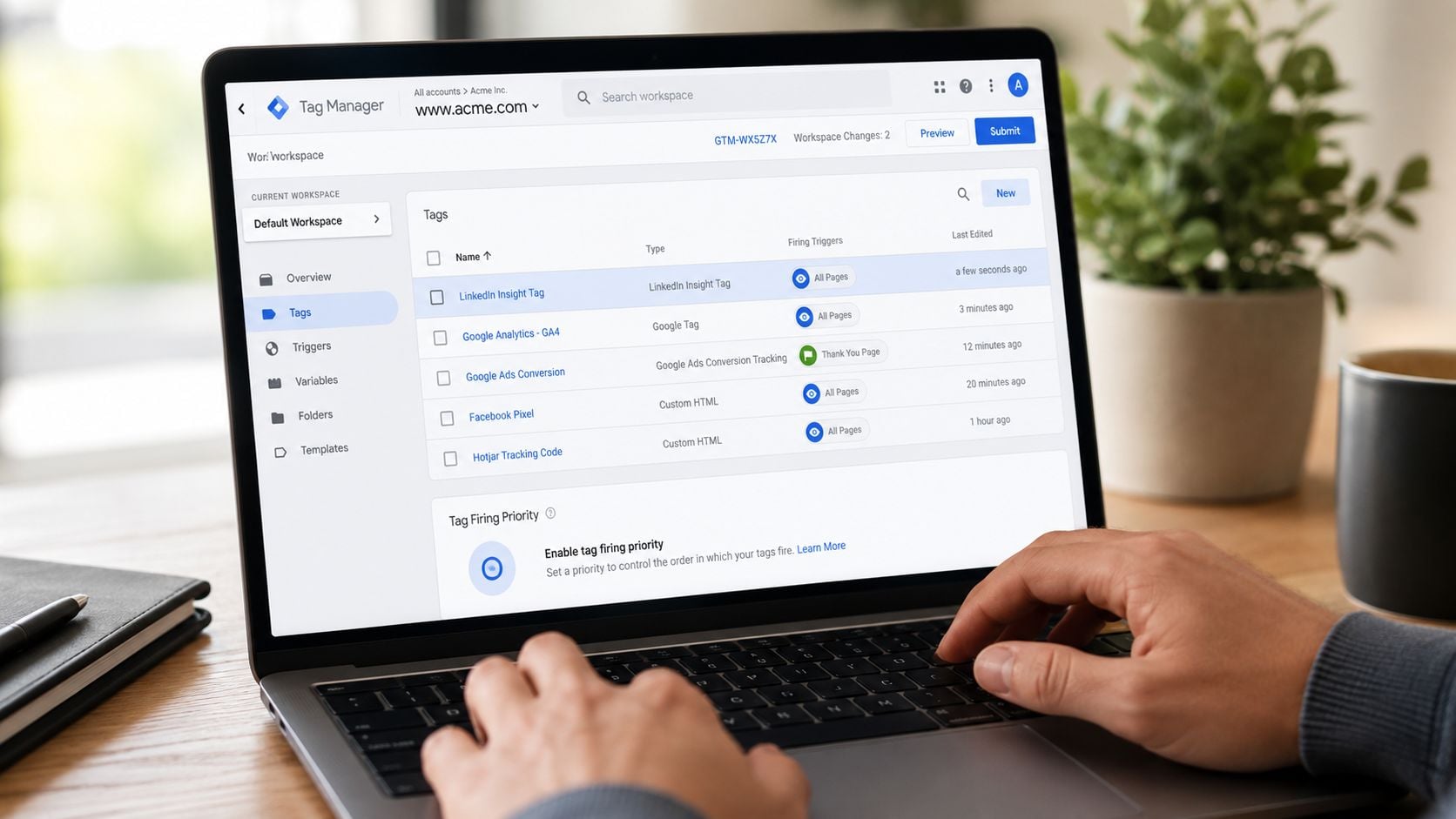
LinkedIn also recommends installing the tag in the global footer of every page, either manually or through Google Tag Manager, and notes that status can take up to 24 hours to show as Active after traffic is detected. As LeadsBridge explains in its setup guide, the base tag only collects page views, so the installation should be treated as the start of lower-funnel measurement rather than the finish line.
Install it with Google Tag Manager
If your site already uses GTM, this is the route I'd choose first.
1. Get your Partner ID from Campaign Manager
Inside LinkedIn Campaign Manager, go to Analyze > Insight Tag. You'll find the account's Partner ID there.
That ID is what ties your site activity back to the correct LinkedIn ad account.
2. Create the LinkedIn tag in GTM
In Google Tag Manager:
- Open your web container.
- Click Tags.
- Create a new tag.
- Choose the native LinkedIn tag template if it's available in your container setup.
- Paste in your Partner ID.
Name the tag something obvious, such as “LinkedIn Insight Tag – All Pages”. Good naming matters when you come back later to debug conversions or audit your container.
3. Set the trigger to all pages
The base Insight Tag should fire sitewide. Use an All Pages trigger so LinkedIn can build a complete view of page activity and audience membership.
If the tag only fires on campaign landing pages, your audience pools and conversion visibility will be incomplete.
4. Preview before you publish
Use GTM Preview mode before publishing. Check that:
- The tag fires on page load
- It appears across key templates
- There isn't a duplicate LinkedIn tag already installed
- Consent settings aren't blocking it unexpectedly
A lot of “LinkedIn isn't tracking” issues come down to duplicate installs, old hardcoded snippets, or consent tools suppressing tags in ways the marketing team didn't realise.
Publish and verify
Once the preview looks clean, publish the GTM container. Then visit the site yourself and wait for LinkedIn to detect traffic.
A short walkthrough can help if your team wants to see the process visually:
Inside Campaign Manager, check the tag status after traffic has hit the site. Don't panic if it doesn't turn active immediately. Verification can take time.
Manual install if GTM isn't available
If your site doesn't use a tag manager, place the LinkedIn Insight Tag in the global footer so it loads on every page. The key point is consistency. One install in the shared site template is better than patching it into selected pages.
This method works fine, but it's harder to maintain if multiple people touch the site or if your reporting stack changes often.
Platform-specific reality
Some businesses run on Shopify, WordPress, or a custom CMS. The principle stays the same:
- Use a central tag layer when possible
- Confirm the tag fires on every page
- Avoid mixing plugin installs and manual code unless you know exactly why
- Document who owns the tag
The best install is the one your team can still understand six months later.
Defining Success with Conversion Tracking
Most LinkedIn setups frequently fall short. The tag gets installed, someone confirms it's firing, and the team assumes measurement is handled. It isn't.
The base LinkedIn Insight Tag only collects page views. Its value comes from pairing it with conversion definitions and website retargeting audiences, which is what turns traffic into lower-funnel measurement and optimisation data, as noted in LeadsBridge's discussion of Insight Tag conversion setup.
If you stop at page views, you'll know people arrived. You won't know whether they did anything commercially useful.
Define business outcomes, not vanity actions
A proper conversion setup starts with a blunt question. What counts as a win for this business?
For a B2B lead-gen account, that might be:
- Demo requests
- Contact form submissions
- Whitepaper downloads
- Visits to a high-intent thank you page
For an e-commerce account, it might be:
- Product enquiry submits
- Cart progression
- Purchase confirmation page visits
- Key category or product page views as micro-conversions
The right answer depends on sales cycle length and buying behaviour. A software company with a long evaluation process shouldn't optimise the same way as a retailer trying to recover product viewers.
Two common conversion methods
LinkedIn lets you define success in more than one way. In practice, it is common to use one of these:
| Method | Best use |
|---|---|
| URL-based conversion | Thank you pages, order confirmations, completed lead forms |
| Event-specific conversion | Button clicks, embedded form submits, actions without a clean destination URL |
URL rules are simpler and usually more reliable if your site architecture supports them. Event tracking is stronger when forms submit inline, pop-ups are involved, or the site doesn't generate a distinct completion page.
What good tracking looks like
A solid setup usually includes a mix of primary and secondary conversions.
- Primary conversions: The actions directly tied to pipeline or sales.
- Secondary conversions: Signals that show movement toward purchase, such as pricing-page visits or content downloads.
That split helps in two ways. It gives LinkedIn optimisation signals, and it gives your team visibility into where users are progressing or dropping off.
Key takeaway: If every meaningful action is bundled into one generic “lead” conversion, you lose the ability to judge traffic quality by offer, page, and intent level.
What doesn't work well
A few setups create bad optimisation decisions fast:
- Tracking only pageviews: This gives activity, not outcomes.
- Using one catch-all conversion: You can't tell a serious enquiry from a soft content interaction.
- Ignoring offline validation: A form submit isn't the same as a qualified opportunity.
- Optimising too early on weak signals: Low-intent events can distort campaign learning.
For many advertisers, the most useful discipline is to compare LinkedIn-reported conversions against what GA4, your CRM, and your sales team say happened. You're not looking for perfect alignment. You're looking for whether the pattern is directionally reliable enough to support spend decisions.
Building High Intent Retargeting Audiences
Once the LinkedIn Insight Tag is collecting useful signals, the next job is to turn those signals into Matched Audiences that reflect intent. Subsequently, LinkedIn stops being just a demand capture platform and starts acting like a follow-up engine.
The quality of your retargeting depends on segmentation. “All website visitors” is easy, but it often blends weak-fit traffic with serious prospects. Better audience design starts with the page path and the action taken.
Audience recipes that work in practice
Here are the audience types I'd build first for most accounts.
-
All website visitors
Useful as a broad pool for awareness follow-up, especially if the account doesn't have enough traffic for narrow segments yet. -
Pricing or service page visitors
This is often your strongest non-converting intent bucket. Someone who visited a pricing page is usually further down the buying process than a blog reader. -
Content downloaders
Good for moving educational intent toward commercial intent. The follow-up creative should reference the topic they engaged with, not jump straight to a hard sell. -
Cart or checkout visitors for e-commerce
If LinkedIn is part of your assisted path, these users deserve customized reminder messaging and stronger offer framing.
A useful supporting read for messaging and follow-up sequences is this guide to LinkedIn strategies for sales professionals, especially if your retargeting needs to align with outbound or sales-assisted nurture.
The segment I like most
One of the most practical audience builds is this: visited pricing page but did not submit lead form.
That segment often outperforms broad site visitors because it captures interest plus hesitation. The creative can then answer the objection that likely blocked conversion, such as implementation complexity, proof of fit, or stakeholder buy-in.
For service businesses, another strong segment is visited case study or solution page but didn't contact sales. For retailers, think in terms of viewed product category but didn't buy.
Keep the messaging tied to behaviour
Retargeting usually underperforms when the ad copy ignores what the user already showed interest in.
A better structure looks like this:
| Audience | Better message angle |
|---|---|
| Blog readers | Educational next step |
| Pricing visitors | Commercial proof and objection handling |
| Demo page abandoners | Low-friction conversion invite |
| Product viewers | Product-specific reminder or comparison |
If you need inspiration for how behavioural segmentation changes remarketing creative, these remarketing ads examples are a useful reference point.
Don't build retargeting audiences around what's easy to track. Build them around what signals buying intent.
What to avoid
Three common mistakes waste budget here:
- Overlapping too many audiences: The same person ends up eligible for several campaigns, and reporting gets muddy.
- Using generic creative for every segment: That defeats the point of behavioural audience building.
- Skipping exclusions: If someone already converted, they usually shouldn't keep seeing the same acquisition ad.
Optimising Campaigns for E-commerce and B2B
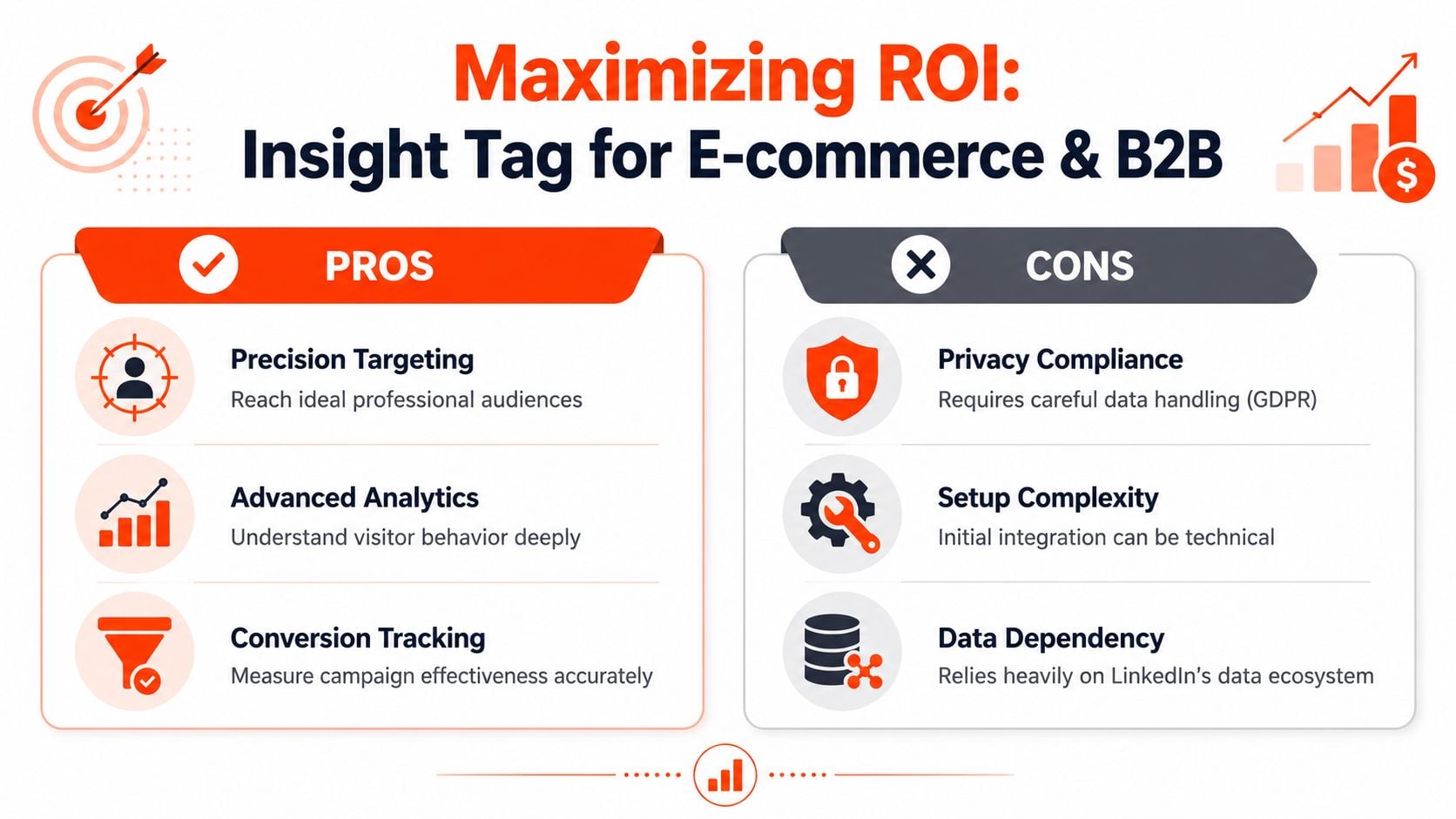
The hardest question with the LinkedIn Insight Tag isn't whether it can be installed. It's whether the reporting is trustworthy enough to influence budget. That matters more in Australia because many local B2B accounts have modest traffic, long sales cycles, and multiple stakeholders between first click and closed deal.
A useful warning from this YouTube discussion on LinkedIn Insight Tag measurement is that advertisers often don't ask whether the tag is sufficient on its own for reliable measurement, even though that's the actual business question when spend decisions are on the line.
For B2B lead generation
B2B optimisation on LinkedIn should start with qualified intent, not raw form volume.
If your campaign reports lots of conversions but sales says the leads are poor, don't assume the ads are working. Check what those conversions entail. A content download from a junior role and a demo request from a decision-maker should not carry the same strategic weight.
Here's the approach I use most often:
- Optimise toward commercially meaningful actions: Demo requests, contact submissions, consultation bookings.
- Use softer conversions as supporting indicators: Downloads, webinar sign-ups, key page visits.
- Review Website Demographics against converters: Look for job function, seniority, industry, and local geography patterns that align with actual buyer profiles.
- Cross-check against CRM outcomes: If LinkedIn says a campaign converts well but CRM quality is weak, don't scale it blindly.
The tag's demographic layer offers considerable power. If traffic is coming from the wrong industry or too junior a seniority band, the issue might not be ad performance. It might be targeting, message fit, or landing page framing.
For e-commerce
LinkedIn usually isn't the first platform I'd choose for broad direct-response retail. But it can work for specific product categories, considered purchases, premium offers, and business-relevant buying contexts.
For e-commerce, the tag is most useful when it supports:
- Retargeting product or category viewers
- Recovering users who showed buying intent but left
- Separating low-intent browsers from deeper consideration traffic
- Comparing LinkedIn-assisted behaviour with broader analytics data
The key trade-off is usually volume versus precision. LinkedIn can give you a professional audience context that other platforms don't, but you need to be realistic about where it fits in the customer journey.
A decision framework for trust
I wouldn't treat the LinkedIn Insight Tag as a single source of truth. I'd treat it as one part of a measurement stack.
Use this checklist when deciding whether to scale spend:
- Does LinkedIn-reported conversion volume align directionally with GA4 and CRM trends?
- Are the converting audience segments commercially relevant?
- Do assisted conversions make sense given your sales cycle?
- Are duplicate or inflated events likely?
- Would the same budget look stronger in another channel based on validated outcomes?
If the tag says a campaign is winning but your CRM says the pipeline isn't there, trust the business outcome first.
Where agencies can help
At this stage, many teams need less help with installation and more help with interpretation. That means auditing event logic, checking attribution bias, and deciding which signals are strong enough to optimise against. A provider such as Click Click Bang Bang can handle LinkedIn Ads management, tracking implementation, and reporting interpretation as one workflow rather than treating them as separate jobs.
Troubleshooting and Privacy Compliance
Most LinkedIn Insight Tag problems are operational, not mysterious. The tag is installed in the wrong place, the wrong account ID is used, consent stops it from firing, or the team expects immediate reporting when LinkedIn still hasn't verified traffic.

Quick checks when something looks off
Start with the simplest diagnostics first:
- Tag status still inactive: Confirm the tag is on all pages and allow time for verification after real traffic reaches the site.
- Conversions look too low: Check whether the conversion rule is too narrow, the thank you page changed, or user consent settings are suppressing firing.
- Numbers don't match other tools: Compare the logic before comparing the totals. Different tools often count different things.
- Retargeting audiences aren't populating: Make sure the right pages are included and exclusions aren't too aggressive.
A browser inspector or GTM Preview will usually tell you quickly whether the base tag and event tags are firing where expected.
Privacy is part of the implementation
Because the tag uses first-party cookies and tracks website interaction data, privacy compliance isn't optional. Your consent framework, privacy policy, and tag governance need to be aligned with how your business collects and uses marketing data.
If your legal team needs a practical reference point on the broader issues involved in data handling, By Design Law Firm's privacy practice is a useful example of the legal lens these setups should be viewed through.
The operational takeaway is simple:
- Get consent logic right
- Document what the tag collects
- Avoid collecting more than you need
- Check reporting without assuming every discrepancy is an error
Good tracking is never just about data volume. It's about data you can defend, use, and explain.
If you want help turning the LinkedIn Insight Tag into something commercially useful, not just technically installed, Click Click Bang Bang can support the setup, conversion tracking, retargeting structure, and campaign optimisation needed to tie LinkedIn spend back to leads and sales.
Read NeXt
Or Read Our Latest
Click. CLick. Subscribe.
Get our best PPC insights, industry updates, and power moves delivered straight to your inbox. No fluff, just high-caliber strategies that actually work.
Don’t Leave Just Yet
Try Us For 30-Days,
Risk Free!!
We guarantee that you’ll love our work within the first 30 days, if not you’ll get your money back.
What have you got to lose?