

A Practical Small Business SEO Growth Guide
Last Updated

Diving into small business SEO can feel a bit like you’ve been handed a compass without a map. Before you pour time or money into fancy strategies, the single most important thing you can do is figure out exactly where you’re starting from. A do-it-yourself (DIY) audit is that map. It shows you your current location so you can plot the most direct route to where you need to be.
Establishing Your SEO Baseline with a DIY Audit
Let’s be honest: you can't improve what you don’t measure. An SEO audit might sound intimidatingly technical, but for a small business, it’s really just a health check for your website. It’s about spotting the biggest roadblocks that are stopping customers from finding you on Google.
The goal here isn’t to become an SEO guru overnight. It’s to find the low-hanging fruit—the high-impact problems you can actually fix yourself to see real results, fast.
Think of this initial review as the foundation for everything that comes next. Without it, your efforts in content creation or link building are pure guesswork. You could be chasing the wrong keywords, or a simple technical glitch might be making your entire site invisible to search engines. An audit swaps out those assumptions for hard data, letting you prioritise the tasks that will actually move the needle.
Your Pragmatic Audit Checklist
Forget those overwhelming spreadsheets with hundreds of checks. A practical small business SEO audit hones in on just three core areas: technical health, on-page content, and where you stand against the competition.
-
Technical Health Check: Can search engines even access your website properly? The best place to start is Google Search Console, a free and incredibly powerful tool. Head to the 'Indexing' report to see which of your pages Google has successfully found and stored. If your key service pages are missing, that's your first fire to put out. Next, look at the 'Mobile Usability' report. With over 60% of searches now happening on mobile, a clunky mobile experience is a guaranteed way to hurt your rankings.
-
On-Page Content Review: This is all about what’s actually written on your most important pages—your homepage, your main service pages, and your contact page. Are your page titles and descriptions clear and compelling? Do they use the kind of language your customers would use to find you? A page title like "Welcome to our Website" is a massive wasted opportunity. Something like "Expert Plumbers in Carlton | 24/7 Emergency Services" is specific, useful, and tells both Google and potential customers exactly what you do.
-
Competitive Snapshot: Time for an honest look at who you're up against. Open an incognito browser window and search for your main services in your local area. Who’s showing up on that first page? What are they doing right? Check out their website’s user experience, see what topics they’re blogging about, and take a close look at how they’ve filled out their Google Business Profile. The point isn’t to copy them, but to understand the benchmark you need to meet and eventually beat.
A DIY audit empowers you to stop guessing and start making strategic, data-informed decisions. It transforms SEO from a mysterious art into a practical set of actions tailored to your business's unique challenges and opportunities.
This timeline gives you a visual of the three core phases for a practical audit.
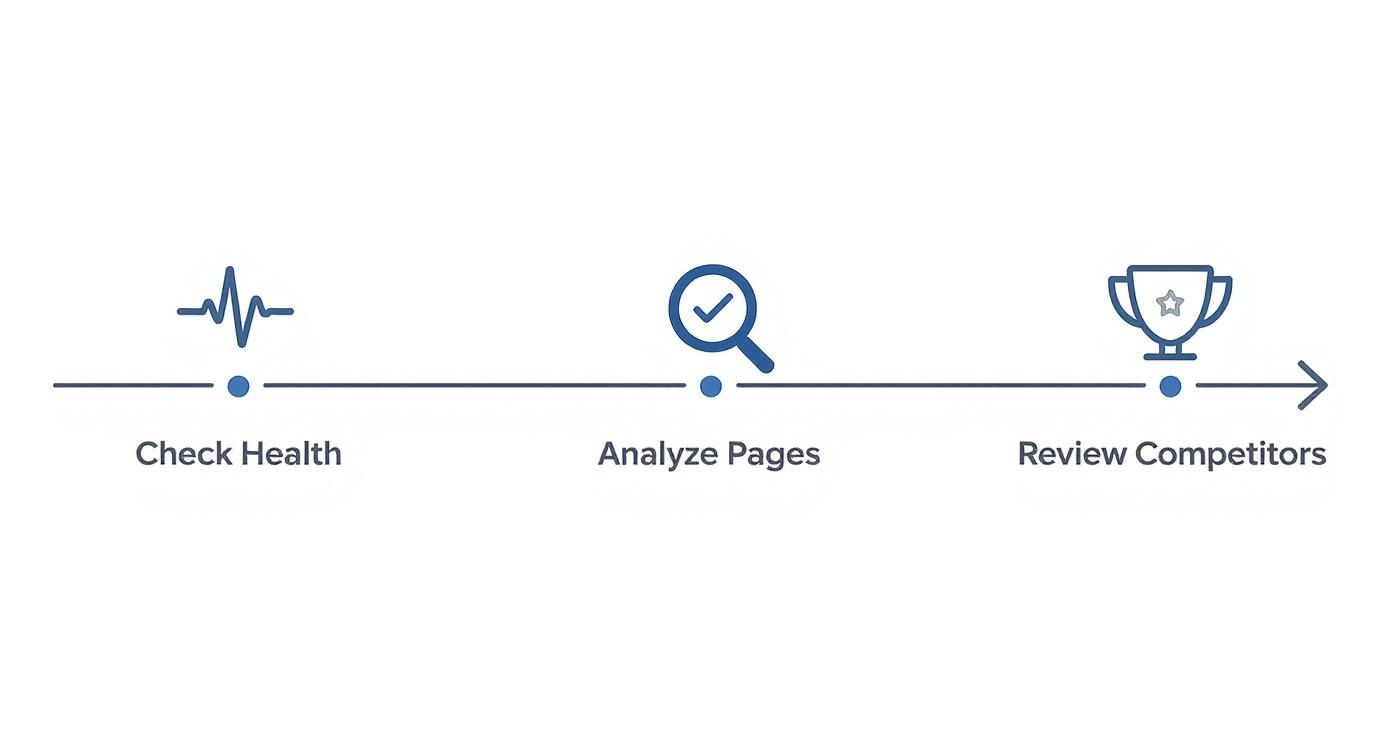
Following this flow—starting with the technical foundations before moving to content and competitor analysis—makes sure your entire SEO strategy is built on solid ground.
Gathering Your Tools
You don’t need to shell out for expensive software to get this done. Your most vital tool is Google itself—just be sure to use an incognito window to get unbiased search results.
Beyond that, Google Search Console and Google Analytics are non-negotiable, and they're both completely free. These tools give you direct insights from the search engine about how your site is performing and what your visitors are doing.
To get a bit deeper and make sure you’re covering all the essential bases, it helps to follow a structured guide. For a great step-by-step framework perfect for beginners learning how to perform a website audit, check out that resource. The insights you’ll gain from this initial audit will shape every other step in your small business SEO plan.
Finding High-Value Keywords Your Customers Use

Trying to rank for huge, single-word keywords like "landscaping" is a fast track to draining your budget with nothing to show for it. For a small business, successful SEO isn't about casting the widest net; it's about using the right bait. That means finding the exact phrases your ideal customers are typing into Google when they’re actually ready to spend money.
Your keyword strategy has to be built around customer intent. Stop thinking about what you call your services and start thinking about the problems you solve for people. A customer doesn't just search for "HVAC"; they search for "air conditioner not cooling in Brisbane" or "best price for gas heater service." These are the golden nuggets that bring qualified, ready-to-buy traffic to your site.
And this targeted approach is more important than ever. Aussie small businesses are investing heavily in SEO, with spending projected to hit $1.5 billion. Why? Because organic search drives a massive 53% of all website traffic for small businesses, blowing other channels out of the water. You can get more details in this great breakdown of local SEO statistics.
Brainstorming with Local Intent
First things first, get in your customer's head. Grab a pen and paper (or open a blank doc) and think beyond your main service category. How would someone describe their problem if they were talking to a mate?
Your initial brainstorm list should include variations that cover:
- Problem-based queries: "how to fix a leaking tap"
- Service + location: "emergency plumber Carlton"
- Qualifier keywords: "best local electrician near me" or "affordable wedding photographer Sydney"
- Question-based searches: "how much does it cost to re-tile a bathroom?"
This simple exercise grounds your strategy in real-world language, not industry jargon. It’s the first step to building a list of keywords you can actually rank for and that will actually bring you business.
By focusing on long-tail keywords (phrases of three or more words), you target users with higher purchase intent. Someone searching for "shoes" is just browsing; someone searching for "women's size 8 black running shoes" is ready to buy.
Validating Your Keyword Ideas
Once you have a solid list of ideas, it's time to see if people are actually searching for them. You don't need expensive tools for this initial check.
Google's Autocomplete and "People Also Ask" sections are your best friends here. Start typing one of your brainstormed phrases into the Google search bar and watch what suggestions pop up. These are real, popular searches. Then, scroll down the results page to find the "People Also Ask" box and the "Related searches" at the very bottom for even more gold.
For example, if you run a cafe in Fitzroy, typing "best coffee Fitzroy" might lead you to related searches like:
- "dog friendly cafe fitzroy"
- "cafe with wifi fitzroy"
- "best brunch in fitzroy"
These aren't just keywords; they're direct insights into what your potential customers are looking for. Each one is an opportunity to create specific content that answers their exact needs.
For a deeper dive, our guide on performing Google Ads keyword research has techniques that are just as valuable for SEO. Building a focused list of 20-30 high-value, achievable keywords will give your small business SEO efforts a powerful foundation for real growth.
Actionable On-Page and Technical SEO Fixes
On-page and technical SEO can sound intimidating, but for a small business, you absolutely don't need to be a web developer to see real results. It's all about nailing the fundamentals—the things that both Google and your customers actually care about.
The fixes we're about to cover are designed to be straightforward. No coding required, just tangible improvements that can move the needle.
Think of your website as a house. Technical SEO is the foundation and the wiring; if it's not solid, nothing else matters. On-page SEO is the interior design and signage—the labels, layout, and decor that help visitors (and search engines) figure out what each room is for. A successful small business SEO strategy depends on getting both right.
Crafting Titles and Descriptions That Earn Clicks
Your page title, or title tag, is arguably the single most important on-page element you have. It's that blue clickable headline everyone sees in the Google search results. It has to be clear, compelling, and—crucially—include the main keyword for that page.
A classic mistake I see all the time is a generic title like "Home" or "Services." That tells Google and potential customers precisely nothing. You need to be specific, especially if you're a local business.
- Bad Example: "Our Services"
- Good Example: "Affordable Garden Maintenance in Geelong | Lawn Mowing & Weeding"
See the difference? The second one instantly communicates the what, where, and why, making it far more likely to attract the right click from a local customer who's ready to buy.
Below the title, you have the meta description. While it's not a direct ranking factor, it's your 3-second sales pitch. A great meta description convinces someone that your page has the answer they're looking for, which can dramatically boost your click-through rate. Focus on benefits and always try to include a call to action.
Your title tag gets you seen in the search results, but your meta description gets you the click. Both are critical for turning search visibility into actual website traffic.
Structuring Content for Clarity and SEO
Once someone lands on your page, the content needs to be easy to digest. This is where headings (H1, H2, H3, etc.) are your best friend. They create a logical hierarchy, guiding both people and search engine crawlers through your information.
- H1 (Heading 1): You get one H1 tag per page. Think of it as the main headline for the page's content. It should be very similar to your page title.
- H2s (Heading 2): Use these to break up your main topics. They’re like chapters in the page's story.
- H3s (Heading 3): These are for sub-topics within your H2 sections. They help you drill down into more detail.
This structure makes your content scannable—a must-have, since most people skim online before they commit to reading. It also helps Google understand the relationships between different ideas on the page, which is great for SEO.
For a deeper dive, our comprehensive guide on search engine optimisation offers more advanced strategies.
On-Page SEO Priority Checklist
To make this even more practical, here's a quick checklist you can use for your most important pages. It breaks down what to do, why it matters, and roughly how long it should take.
| On-Page Element | SEO Impact | What to Do | Estimated Time per Page |
|---|---|---|---|
| Page Title (Title Tag) | High | Include your primary keyword and location. Make it compelling and under 60 characters. | 10 minutes |
| Meta Description | Medium | Write a compelling summary (155 characters max) with a call to action. | 15 minutes |
| H1 Heading | High | Use one unique H1 per page that reflects the page's main topic and keyword. | 5 minutes |
| Subheadings (H2, H3) | Medium | Break up content into logical, scannable sections using keyword variations. | 15-20 minutes |
| Image Alt Text | Low-Medium | Add descriptive text to all important images. Describe what's in the image. | 2-5 minutes per image |
| Main Content | High | Ensure content is well-written, helpful, and naturally includes your keywords. | Ongoing |
This checklist isn't about getting everything perfect overnight. It's about making small, consistent improvements that add up over time. Start with your most valuable service pages or blog posts and work your way through.
Essential Technical Checks You Can Do Yourself
Okay, let's tackle the 'technical' stuff. I promise it's simpler than it sounds. These checks are all about making sure your site is easy for Google to access and provides a good experience for your visitors—both are huge for your rankings.
Is Your Site Mobile-Friendly?
First things first: check if your site works well on a phone. With most searches now happening on mobile, Google will penalise sites that are a pain to use on a small screen. You can check any page on your site with Google's free Mobile-Friendly Test tool.
How Fast Does Your Site Load?
Next up is page speed. A slow website is a conversion killer. One of the biggest culprits? Massive image files. Before you upload any image, run it through a free online tool like TinyPNG. This simple step can shrink file sizes dramatically without losing visual quality, leading to much faster load times.
Are Your Images Helping or Hurting?
Finally, make sure your images have descriptive alt text. Alt text (alternative text) is what shows up if an image doesn't load. It's also what screen readers use for visually impaired visitors, and it's how search engines "see" what's in an image. Instead of an alt text like "image123.jpg," write something that actually describes the picture, like "professional landscaper planting flowers in a sunny Melbourne garden." It's a win for accessibility and a win for SEO.
Turning Your Google Business Profile into a Client Magnet

For any local business, your Google Business Profile (GBP) isn't just another online listing; it's your digital front door. Many potential customers will find and judge you here long before they ever consider clicking through to your website. Getting this right is an absolute cornerstone of effective small business SEO.
An optimised profile can single-handedly drive phone calls, requests for directions, and website visits. Honestly, it’s probably the highest-impact, lowest-cost marketing tool you have.
The secret is to stop thinking of your profile as a static business card. Instead, treat it like a dynamic, interactive hub that’s actively selling your business around the clock. This means going way beyond just plugging in your address and phone number.
Get Your Categories and Services Right
When you first set up your profile, Google asks you to pick a primary category. This choice is absolutely critical because it heavily influences the kinds of searches you'll show up for. Be as specific as you possibly can. Don't just say "Restaurant"; choose "Italian Restaurant" or "Vegan Cafe."
After locking in your primary category, you can add several secondary ones. Use these to cover every other facet of your business. A landscaping company, for instance, might set "Landscaper" as its primary category but should also add "Garden Designer," "Lawn Care Service," and "Paving Contractor" as secondary options to cast a wider net.
Next, dive deep into the 'Services' section. This is your chance to list everything you do, using the exact keywords your customers are searching for. A plumber shouldn’t just list "Plumbing." They need to detail out specific services like "Blocked Drain Clearing," "Hot Water System Repair," and "Gas Fitting Services." This level of detail is what helps Google match your business to very specific local queries.
Write a Business Description That Sells (and Ranks)
Think of your business description as prime SEO real estate. You get 750 characters to tell people who you are, what you do, and why they should pick you over the competition.
Don't waste this space with fluffy marketing speak. Instead, weave your most important local keywords and service terms into the copy naturally.
- Weak Description: "We are a local cafe that has been serving the community for years. We love coffee and our customers."
- Strong Description: "Fitzroy's favourite dog-friendly cafe, specialising in single-origin espresso and delicious vegan brunch. Located near the park, we offer free Wi-Fi and a quiet space to work or relax. Visit us for the best coffee in Fitzroy!"
See the difference? The second example is packed with keywords ("dog-friendly cafe," "vegan brunch," "coffee in Fitzroy") that directly answer what potential customers are typing into Google.
Your GBP is often the first and only impression you make on a local searcher. Every field is an opportunity to provide a signal to Google and a reason for a customer to choose you over a competitor.
Use Photos and Reviews to Build Trust
Visuals build trust in an instant. You need to upload high-quality, recent photos of your work, your shopfront, your team, and your premises (both inside and out). A study by BrightLocal found that businesses with more than 100 photos on their GBP get a staggering 520% more calls than the average business. A pro tip: where possible, make sure your photos are geotagged with your location data before uploading. It's just another helpful local signal for Google.
Reviews are the absolute lifeblood of any local business profile. You need to actively and systematically encourage your happy customers to leave you feedback. It’s easier than you think:
- Send a follow-up email with a direct link to leave a review.
- Put a small QR code on your invoices or receipts.
- Just ask in person after a great interaction.
Responding to every single review—both good and bad—is just as crucial. A thoughtful response to criticism shows you're listening and can often win over prospective customers who are just browsing. Taking proactive steps in your online reputation management guide is what makes a Google profile truly shine.
Keep Your Profile Active with Posts and Q&A
Finally, you need to use the interactive features to keep your profile feeling fresh and engaging.
Google Posts are like mini-adverts that show up directly on your profile in the search results. Use them to shout about special offers, new products, or even just link to a recent blog article. These posts expire after seven days, so try to publish a new one each week to signal to Google that your business is active and open.
The Questions & Answers section is basically a user-generated FAQ. Keep a close eye on this and answer any questions that pop up as quickly as you can. Better yet, be proactive. Add your own common questions and answer them yourself. This addresses customer queries before they even have to ask and turns your GBP into a powerful, self-service information hub that converts searchers into customers.
Building Authority with Local Content and Links
This is where the magic happens. Great content and trustworthy links are what separate a website that just sits there from one that actually grows your business. For a small local business, this isn't about launching massive, expensive campaigns. It's about being genuinely helpful to your community and building real-world connections that Google can see and reward.
The right content sets you up as the local expert. The right links act as votes of confidence from other reputable local sources. Together, they become the engine of a powerful small business SEO strategy that delivers results for years to come.
So, let's break down a practical approach. We're going to focus on two things: creating content your local customers are actually searching for, and earning links that are both achievable and genuinely move the needle. You can do this without a huge budget or a dedicated marketing team.
Create Content That Answers Local Questions
Your website content needs to do more than just list what you do. It has to solve your customers' problems and answer their questions. The most effective content for local SEO is laser-focused on the specific needs, pains, and queries of people right here in your service area.
Think beyond a generic "Services" page. Get granular. A dedicated page for "Emergency Hot Water Repair in Ballarat" will always, always outperform a vague "Plumbing Services" page when a local resident is in a panic.
-
Hyper-Local Service Pages: Don't just list a service. Go deep. Explain your process, name-drop the specific suburbs you work in, and answer the most common questions you get about that service right on the page.
-
Customer-Focused Blog Posts: What do your customers ask you on the phone all the time? Turn those conversations into blog posts. "How to Choose the Right Paint Colour for a South-Facing Room in Melbourne" is infinitely more useful (and easier to rank for) than a generic "Our Painting Tips."
-
Trust-Building Case Studies: Show, don't just tell. Put together a short case study on a project you completed for a recognisable local business or landmark. This builds instant credibility and offers tangible proof that you know what you're doing.
This kind of content directly matches what people are typing into Google, making your website the most relevant answer for local searches. It’s a cornerstone of any smart strategy for digital marketing for small business, turning your site from a simple online brochure into an indispensable local resource.
Earning Links That Matter
Link building can feel like the most intimidating part of SEO. But for local businesses, it’s less about complex outreach campaigns and more about good old-fashioned community engagement. Your goal is to get mentions and links from other relevant, local websites. Every single one is a powerful signal to Google that your business is a legitimate, respected part of the local fabric.
A single, high-quality link from a relevant local source is worth more than a hundred low-quality links from random directories. Focus your energy on authentic connections, not just quantity.
Here’s a realistic plan for building a strong local link profile that actually works.
Start With Local Directories
First things first: get your basic business information—name, address, and phone number (NAP)—listed consistently across the major local directories. These are the modern-day Yellow Pages, and they're often the first place Google looks to verify that you are who you say you are.
- Must-Have Listings: Make sure you have complete and accurate profiles on key Australian directories like Yellow Pages Australia, TrueLocal, and any that are specific to your industry.
- Chamber of Commerce: Are you a member of your local chamber of commerce? They almost always have a member directory on their website. This is often a high-authority and highly relevant local link just waiting for you.
Forge Community Partnerships
Think about the other non-competing businesses and organisations in your area. Sponsoring the local junior footy team, a community festival, or a school fete often comes with a link back to your website from their sponsors page. These are some of the most authentic and powerful local links you can possibly get.
It works with business-to-business relationships, too. If you supply products or services to other local businesses, just ask if they’d be willing to add a link to your site from a "partners" or "suppliers" page. It’s a simple request that builds both valuable community connections and SEO authority at the same time.
Got Questions About Small Business SEO? We've Got Answers.
Diving into SEO often brings up more questions than answers. It’s easy to get bogged down by the "what ifs" and "how longs," leading to analysis paralysis instead of taking action. This section is here to clear the air.
We're tackling the most common hurdles and queries we hear from small business owners just starting their SEO journey. Think of it as your straight-talking FAQ for practical small business SEO, designed to help you cut through the noise, set realistic expectations, and move forward with confidence.
How Long Does It Take for SEO to Work?
This is the million-dollar question, and the honest answer is: it depends, but you need to be patient. You might see some quick wins in a few weeks—especially after clearing up major technical glitches or giving your Google Business Profile a solid optimisation—but SEO is fundamentally a long-game.
For the kind of results that really move the needle, like ranking on page one for competitive local keywords, you should realistically plan for four to six months of consistent effort.
The journey usually breaks down like this:
- Months 1-2: This is the "quick wins" phase. Fixing technical errors and sorting out your on-page SEO can lead to better rankings for very specific, long-tail keywords.
- Months 3-4: Your local content starts finding its feet. Google begins to recognise your site as a relevant voice in your local area.
- Months 5-6+: This is where the magic happens. The compounding effect kicks in, your authority grows, your content starts ranking for more terms, and you begin to see a steady, reliable stream of organic traffic.
SEO is a marathon, not a sprint. The businesses that win are the ones that commit to steady, consistent effort over time, not those looking for a silver bullet.
Can I Do SEO Myself or Do I Need an Agency?
You can absolutely do it yourself! Honestly, many of the most impactful SEO tasks, particularly for a local business, are completely manageable for a motivated business owner. This whole guide is designed to give you the exact knowledge you need to get the foundations right in-house.
DIY SEO is a brilliant way to start. It keeps costs down and, more importantly, gives you a deep understanding of what actually drives your online visibility. You'll learn what works for your specific market, and that knowledge is priceless.
The time to think about hiring an agency or a freelancer is when you hit a ceiling. This could be when:
- You simply run out of hours in the day to manage it yourself.
- You've nailed the basics and are ready to scale up your efforts.
- You're targeting highly competitive keywords that demand more advanced, resource-intensive strategies.
Starting with a DIY approach gives you the best of both worlds. You build a rock-solid foundation and you'll be far better equipped to partner with an expert when the time is right.
Local SEO vs General SEO: What’s More Important?
For the vast majority of small businesses serving a specific geographic area—whether you have a physical shopfront or you're a service-area business—the answer is crystal clear: local SEO is far more important.
Think about it this way. General SEO is about trying to be the best answer for someone anywhere in the country. Local SEO is about being the best answer for someone standing just down the road, phone in hand, ready to buy. The intent behind a local search is incredibly high.
While the core principles are the same, local SEO puts a much heavier emphasis on signals that prove your relevance to a specific community. This includes things like:
- An exhaustively optimised Google Business Profile.
- Keywords that include your city, suburb, or the phrase "near me."
- Glowing reviews from local customers.
- Links and mentions from other local businesses or community websites.
Focusing your energy on dominating the local search results and the map pack will deliver a much higher and faster return on your time and money than chasing broad, national rankings.
At Click Click Bang Bang, we specialise in creating targeted SEO strategies that deliver real, measurable growth for businesses just like yours. If you're ready to turn search engines into your most powerful source of new customers, let's talk. Find out how our AI-first SEO services can help you.
Read NeXt
Or Read Our Latest
- Manual vs Automated Bidding for PPC Success
- Conversion Tracking Setup: A Complete AU Guide
- Instagram Advertising Australia: Complete 2026 Guide
- Pay Per Click: A Beginner’s Guide for Australian Marketers
- Display Advertising on Google: The Complete Australian Guide
- Stakeholder Communication Plan How to Build One That Works
Click. CLick. Subscribe.
Get our best PPC insights, industry updates, and power moves delivered straight to your inbox. No fluff, just high-caliber strategies that actually work.
Don’t Leave Just Yet
Try Us For 30-Days,
Risk Free!!
We guarantee that you’ll love our work within the first 30 days, if not you’ll get your money back.
What have you got to lose?