

Your Dynamic Remarketing Setup Guide for 2026
Last Updated

You're probably in one of two situations right now. Either your team already runs remarketing and the ads still feel too broad, or you're about to launch a dynamic remarketing setup and you've realised the tutorials online are written almost entirely for retail brands with product catalogues.
That's where most setups go sideways. The mechanics are similar for e-commerce and lead-gen, but the way you structure the feed, pass event data, and build audiences should reflect what you sell. A Shopify store can map viewed items and abandoned baskets. A service business has to map viewed services, enquiry intent, and decision-stage pages with the same discipline. If you don't adapt the model, Google gets vague signals and your ads fall back to generic reminders.
Why Generic Ads Fail Your Most Engaged Visitors
A visitor spends real time on your site. They compare your premium range, open multiple product pages, read delivery details, add one item to cart, then leave. Later that day, Google serves them a plain banner with your logo and a vague headline about your brand. Technically, that's remarketing. Practically, it wastes the strongest signal that user gave you.
The same thing happens in lead gen. Someone reads your pricing page, checks your service inclusions, opens the contact form, then drops off. If they later see a broad “We help businesses grow” ad, you've ignored the exact context that made them interested in the first place.
Relevance is the whole point
Dynamic remarketing setup exists to close that gap. Instead of showing one generic follow-up ad to everyone, you connect browsing behaviour to a feed and ad template so the platform can assemble a more relevant message. For retail, that usually means the exact product a person viewed. For services, it can mean the exact category, offer, course, location, or listing they explored.
That's the difference between a reminder and a reset. A reminder continues the conversation. A generic ad starts over.
Generic remarketing asks users to remember what they liked. Dynamic remarketing shows them.
The strongest campaigns don't just “retarget visitors”. They align ad content to user intent. Cart abandoners should see product-led reminders. Pricing-page visitors should see proof, reassurance, or a direct next step. High-intent service visitors should get back to the specific service page, not the homepage.
If you want examples of how much message relevance changes ad quality, these remarketing ad examples are a useful benchmark for what relevant follow-up should look like in practice. For retailers running on Shopify, this broader playbook for Shopify operators also helps frame where abandoned-cart recovery and dynamic display fit together.
Where teams usually miss the mark
Three mistakes come up repeatedly:
- They target everyone with one ad. Product viewers, cart abandoners, and past buyers all get lumped together.
- They treat setup as a media task only. In reality, this is a data and feed problem first.
- They assume lead-gen can't use dynamic logic. It can. The structure just has to mirror services instead of SKUs.
When your most engaged visitors come back, relevance does the heavy lifting. Without it, you're paying to remind people you exist. With it, you're giving them the exact nudge they were already close to acting on.
Laying the Technical Foundation for Success
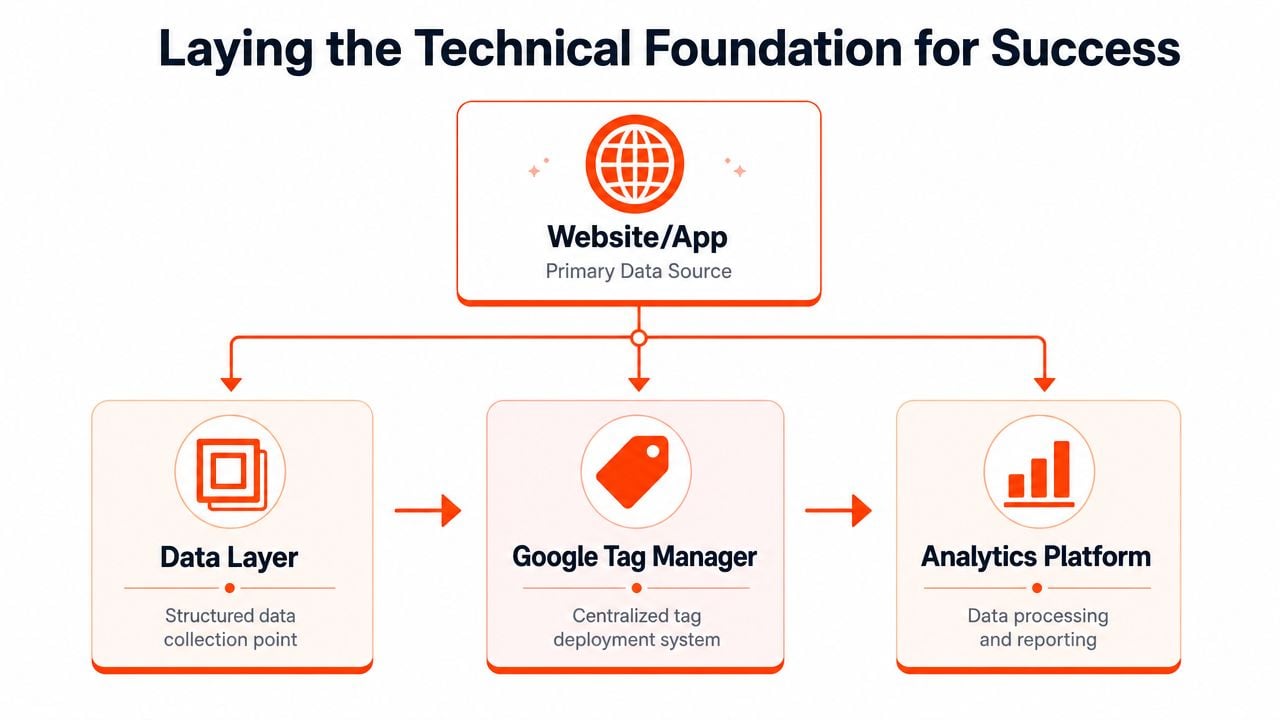
A dynamic remarketing campaign can look perfectly planned in Google Ads and still fail because the setup underneath it is inconsistent. The usual cause is not bidding or creative. It is mismatched IDs, incomplete event parameters, broken account links, or a feed structure that does not reflect how the business sells.
Before we build ads, we need a working data chain from the site to Google Ads.
Start with the account links
Google Ads needs access to two things. User behaviour and item data. For an e-commerce brand, that usually means Google Ads, GA4, Google Tag Manager, and Merchant Center are all connected and sharing the right permissions. For a lead-gen business, the same principle applies, but the catalogue may be a service feed instead of a retail product feed.
That distinction matters more than many teams expect. Retail setups usually inherit a catalogue structure from the store platform. Service businesses rarely do. If a clinic, law firm, SaaS company, or home-services brand wants dynamic remarketing to work, we have to define the “item” first. That might be a service line, location page, treatment category, or plan type. If the business cannot name those units clearly, the campaign has nothing reliable to personalise around.
Give each platform a clear job
Clean accounts usually follow a simple division of responsibility:
| Platform | Primary role |
|---|---|
| GA4 | Tracks behaviour, helps validate events, supports audience creation |
| Google Ads | Activates audiences, delivers campaigns, applies bidding |
| Merchant Center or business feed | Stores the catalogue used to assemble dynamic ads |
| Google Tag Manager | Deploys tags and passes event logic consistently |
That role split prevents a common setup problem. Teams try to fix feed issues inside Google Ads, or they try to solve tagging gaps inside GA4 reports. Those are the wrong places to patch structural problems.
If you already manage Shopping campaigns, the same feed discipline applies here. The work involved in structuring a Google Shopping feed correctly carries directly into dynamic remarketing, especially around IDs, landing pages, titles, and image quality.
Match the data model to the business model
At this point, retail and lead-gen setups usually diverge.
For e-commerce, the match is straightforward. A user views product A, the tag sends product A's ID, and the feed contains product A with the same ID. For lead-gen, we often need to create that structure ourselves. A user visits a “commercial solar installation” page, downloads a guide for that service, or views a city-specific landing page. The tag should pass a service identifier that exists in the feed, not a generic page category like “services” or “consulting.”
Generic naming causes real delivery problems later. Audiences may still build, but ad relevance drops because Google has weak item-level context. That usually shows up as bland ad combinations, poor landing page alignment, or campaigns that technically run but never feel personalized.
Check signal quality before launch
Audience quality depends on what the site is capturing. Review GA4 configuration, consent handling, cross-domain behaviour if applicable, and whether the events reflect meaningful intent instead of basic pageviews only.
Session recordings and click maps help here because they show where users hesitate, compare options, or abandon forms. Use that context to decide which interactions deserve event tracking. This guide to understand your customer journey with heat maps is useful when you are deciding whether a scroll, CTA click, pricing interaction, or form step should feed your remarketing logic.
A simple rule works well. If we cannot explain how a service page view or product view becomes an audience signal and then maps back to an item in the feed, the foundation is not ready.
The foundation checklist
Confirm these points before building the campaign:
- Account links are active. Google Ads can access GA4 and the feed source.
- Tags are present across the site. The base tag and supporting events fire where they should.
- IDs match across systems. The value sent by the site exists in the feed without formatting differences.
- Audience inputs reflect intent. Key actions capture more than generic traffic.
- The catalogue mirrors the business. Products, services, locations, or plan types are structured in a way Google can use for ad assembly.
At this stage, boring is good. If the setup is clear and predictable now, campaign optimisation gets much easier later.
Configuring Your Product or Service Feed
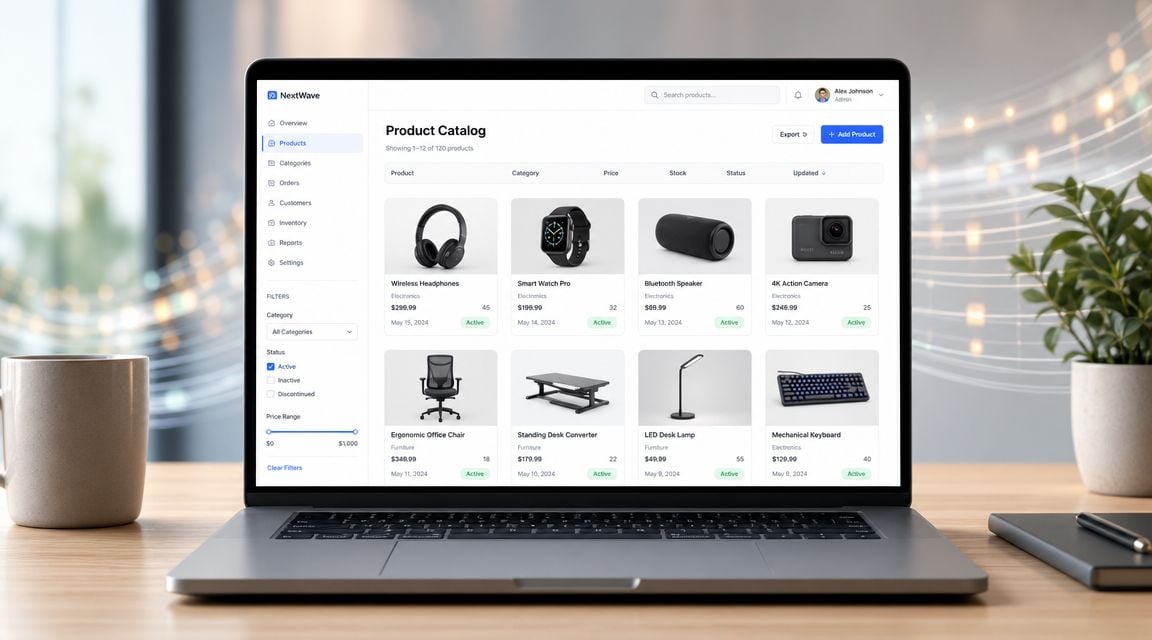
Your feed is the catalogue Google uses to decide what can appear in the ad. If the feed is weak, the campaign becomes unreliable no matter how good the audience targeting is. Many advertisers often underestimate the work, especially service businesses that assume dynamic remarketing only applies to physical products.
For e-commerce, treat the feed like ad inventory
Every item in the feed needs to be usable in an ad without manual fixing later. That means your titles, images, URLs, and IDs should already be clean before they reach Google. If your store calls something “SKU-8472-BLK” internally, that may work in operations, but it's poor ad copy.
The fundamental principle is matching. If the site sends a product ID on a product view event, that same ID must exist in the feed. If it doesn't, the user can still enter an audience, but the dynamic ad can't confidently pull the right item.
For retailers, this guide on how to set up a Google Shopping feed is useful because the same discipline around feed structure carries directly into dynamic remarketing.
For lead-gen, build a service catalogue on purpose
Service businesses usually need to stop thinking in terms of “products” and start thinking in terms of catalogue entries. Google still needs structured items. They just represent services, packages, courses, listings, or locations instead of stock units.
A service feed often works well when each row represents one offer, such as:
- A legal service like family law mediation
- A property listing for a specific suburb and price band
- A training course with a dedicated landing page
- A B2B service package such as SEO audits or paid social management
The key is consistency. If someone views “Commercial Fitout Service Sydney”, the event data should pass the same item ID your feed uses for that service entry.
Service businesses don't need less structure than retailers. They usually need more, because the offer isn't as naturally standardised.
Feed fields that matter most
You don't need a bloated feed. You need a reliable one. Focus on fields that support matching, ad assembly, and landing-page continuity.
| Feed element | Why it matters |
|---|---|
| ID | Connects site behaviour to a specific feed item |
| Title | Often becomes visible ad text or informs relevance |
| Landing page URL | Sends users back to the exact item or service |
| Image | Carries most of the visual load in display placements |
| Price or offer detail | Important where commercially relevant |
| Category or label | Helps segmentation and campaign control |
For service advertisers, “price” may not always apply. That's fine. Replace it with a meaningful offer variable where the feed structure allows, such as service type, suburb, consultation format, or package tier.
What good feed management looks like
The feed shouldn't be a one-off upload that nobody touches again. It should be maintained like a live extension of the site.
A practical operating standard looks like this:
- Keep IDs stable. Don't rename feed IDs casually, or your event mapping breaks.
- Use current landing pages. Nothing wastes remarketing intent faster than an outdated URL.
- Choose images deliberately. Category banners often outperform random stock images for service brands because they match the page users viewed.
- Label strategically. Internal labels help you separate high-margin, seasonal, local, or priority inventory without rebuilding the feed later.
If your ads feel mismatched after launch, don't start by rewriting headlines. Check the feed first. In dynamic remarketing, the catalogue often explains performance more clearly than the ad report does.
Implementing Dynamic Remarketing Tags with GTM
A visitor views a high-value product, or spends three minutes on a service page, then starts a quote form. If GTM only records a pageview, Google has almost nothing useful to work with. The campaign can still run, but the ads fall back to broad reminders instead of reflecting what that person considered.
The minimum tagging logic
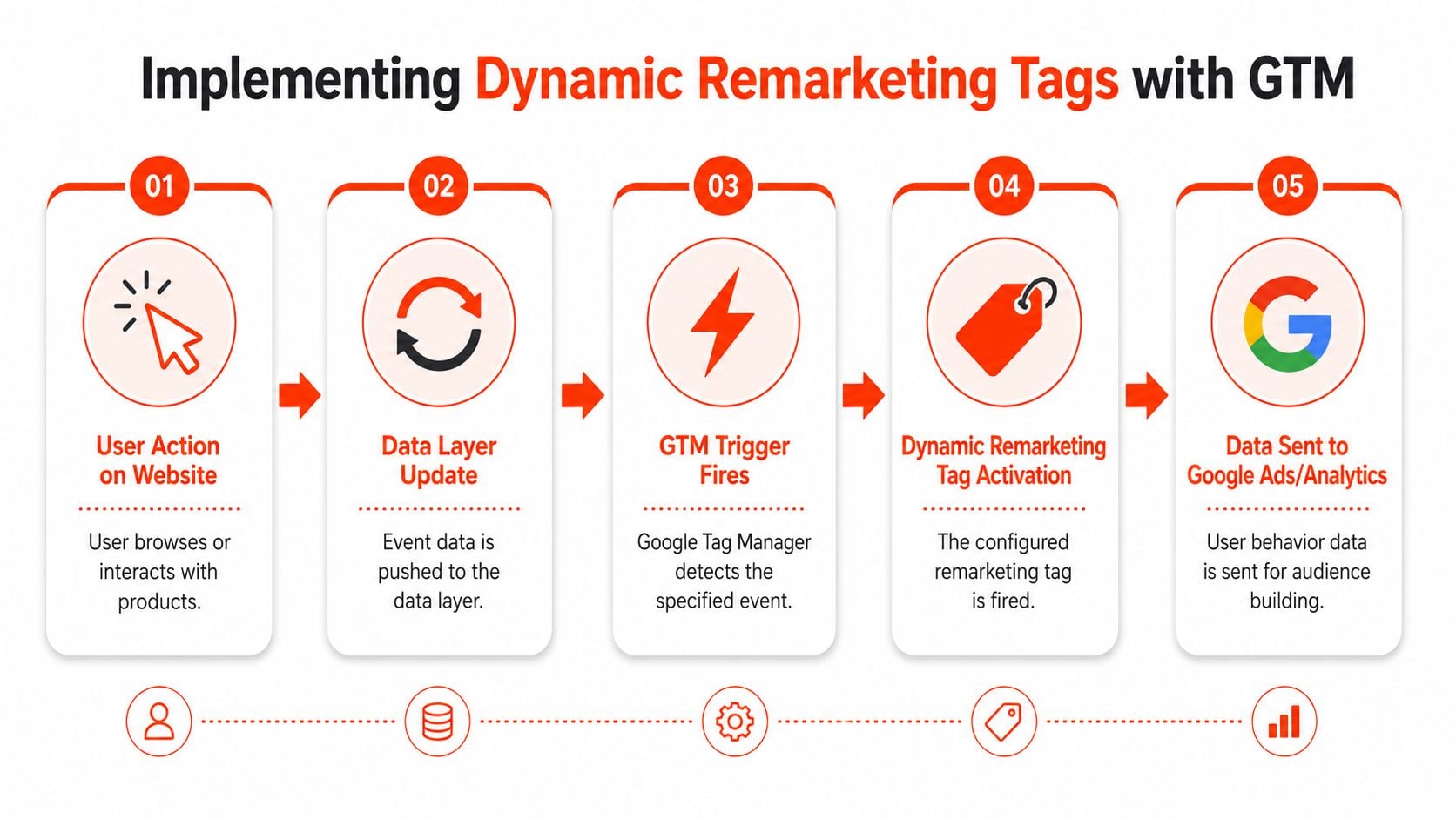
Dynamic remarketing only works well when four parts line up: the base tag, event parameters, the feed, and the ads that pull from that feed. In practice, GTM has two jobs. It needs to load the base tracking logic across the site, and it needs to pass the right item or service details when users take actions that matter.
For e-commerce, those actions are usually obvious. Product view, add to cart, checkout, purchase.
For lead generation, we have to define the equivalents. Service page view, pricing page visit, quote start, consultation booking, completed enquiry. Retail tutorials often skip this step, which is why service businesses end up with working tags and weak personalisation.
Use the dataLayer as the source of truth
The cleanest builds push event and item data into the dataLayer, then let GTM read those values into tags, triggers, and variables. That keeps implementation logic in one place and makes debugging much faster.
A simplified example for a product or service detail view might look like this:
<script>
window.dataLayer = window.dataLayer || [];
window.dataLayer.push({
  event: 'view_item',
  ecommerce: {
    items: [{
      item_id: 'SERVICE_001',
      item_name: 'Commercial Fitout Service Sydney'
    }],
    value: '0'
  }
});
</script>
An add-to-cart equivalent for e-commerce, or a stronger lead signal for services, might capture a deeper action:
<script>
window.dataLayer = window.dataLayer || [];
window.dataLayer.push({
  event: 'add_to_cart',
  ecommerce: {
    items: [{
      item_id: 'SKU_12345',
      item_name: 'Premium Office Chair'
    }],
    value: '249.00'
  }
});
</script>
A purchase or completed lead event should pass the same item references used earlier in the journey. If the conversion event drops the ID, Google can record the conversion without reliably tying it back to the viewed product or service.
Map business intent, not just page types
The setup gets stronger when we stop copying retail event names blindly and start mapping real buying signals.
A practical model looks like this:
- Retail product page maps to
view_item - Cart or basket step maps to
add_to_cartor a checkout-stage event - Service detail page also maps to
view_item, with the service treated as the catalogue item - Started quote form or booking step becomes the deeper-intent signal
- Submitted enquiry or booked consultation becomes the conversion event
The event names can vary by implementation. The principle does not. The IDs passed through GTM need to match the IDs in the feed, whether that feed contains products, service categories, package tiers, or location-specific offers.
If your team needs a plain-English explanation of how event tracking differs from a basic page tag, this overview of a tracking pixel for Shopify stores is useful background. The platform example is Shopify, but the measurement distinction applies just as much to custom service sites.
Implementation warning: if the site sends one ID format and the feed stores another, the campaign may launch without obvious errors while personalisation quietly fails.
Build GTM in layers
A strong GTM container is usually easier to maintain because each part has a single purpose.
- A base Google tag or GA4 configuration tag that loads consistently
- Event triggers tied to page templates or
dataLayerevents - Variables that read item IDs, page types, values, or service names
- A remarketing tag configured with the dynamic parameters Google Ads needs
- Preview and testing workflows before publishing
That layered approach matters more on service sites than many teams expect. E-commerce templates are often more standardised. Lead-gen sites tend to have custom forms, third-party booking tools, and uneven page structures, which is where GTM setups break if the logic is too loose.
This walkthrough video is a good visual companion while you're validating trigger flow and event logic:
What usually breaks
Tagging failures are usually small implementation errors, not dramatic outages. They still distort campaign performance.
| Failure point | What it causes |
|---|---|
| Tag missing on some templates | Incomplete audiences |
| Wrong item IDs | Feed mismatch and poor ad assembly |
| No page-type signal | Weak audience segmentation |
| Value passed inconsistently | Messy reporting and bidding signals |
| No testing before publish | Silent data loss |
One more trade-off to call out. Teams often want a fast rollout and a perfect taxonomy at the same time. In most accounts, it is better to launch with a smaller set of clean events than a larger set full of edge-case logic no one can maintain.
If you want outside help implementing the tracking layer, one option is Click Click Bang Bang, which handles PPC setup work including tracking and campaign infrastructure. The important part is whether the event logic matches the feed and the user's site journey.
Building Audiences and Launching Your Campaign
Once tracking is stable, the setup becomes useful. From this point, the raw event data turns into audiences you can target, and Google Ads starts behaving more like a response channel than a reminder channel.

Build audiences around intent, not page volume
Historically, dynamic remarketing has depended on Google Ads audience infrastructure shaped through Audience Manager and the remarketing-tag workflow, where account linking, audience creation, and dynamic attributes became standard setup steps. For Australian businesses, that matters because it supports localised catalogue advertising at scale rather than broad re-engagement as discussed here.
That historical shift still matters in day-to-day campaign building. You don't need one giant audience. You need segments that reflect how close someone is to acting.
For e-commerce, the obvious groups are product viewers, basket abandoners, checkout-stage users, and past purchasers. For lead gen, use service viewers, pricing-page visitors, quote starters, consultation-booking starters, and existing leads or clients where appropriate.
A practical audience structure
A simple starting model looks like this:
- Viewed item or service. Broadest intent signal, good for scale.
- High-intent non-converters. Users who reached pricing, basket, or enquiry steps.
- Recent abandoners. Best used when the site captures a clear drop-off stage.
- Existing customers or converted leads. Usually excluded, unless you're running cross-sell or upsell logic.
The mistake is building too many micro-audiences too early. Fragmented lists often stay weak. Start with meaningful intent tiers, then split further only after the data is dependable.
Build audiences from behaviours your business can act on. If the segment doesn't justify a different message or bid, it probably doesn't need to exist.
Launch settings that matter
When you move into Google Ads, keep the campaign build controlled. Dynamic remarketing is powerful, but a messy launch can make it look worse than it is.
Focus on these settings first:
- Choose the right campaign type. Dynamic remarketing is typically activated through Display.
- Attach the correct feed. Retail uses product feeds. Service businesses need the appropriate business-data source.
- Apply the right audiences at ad group level. Avoid broad defaults.
- Set location and language to match the market you're serving.
- Write responsive display assets that complement the feed. The feed supplies relevance. Your headlines and descriptions should supply reassurance, urgency, or clarity.
Creative should support the feed, not fight it
Advertisers often overthink the display copy and underthink the audience-message fit. The feed already handles part of the relevance. Your job is to strengthen intent.
For example:
| Audience | Better message direction |
|---|---|
| Product viewer | Reinforce product value or decision support |
| Cart abandoner | Reduce hesitation and return them to completion |
| Pricing page visitor | Address fit, trust, or next-step clarity |
| Service page viewer | Bring them back to the exact service context |
That's especially important for lead-gen. If the user previously viewed a service category, your ad copy should sound like a continuation of that category, not a disconnected brand statement.
Verification Optimisation and Troubleshooting
A campaign can launch cleanly and still underperform because the post-launch checks weren't thorough enough. In dynamic remarketing, verification and optimisation are tightly connected. You're not just checking whether ads are serving. You're checking whether the system is matching the right users, items, and events.
For Australian advertisers, dynamic remarketing should be treated as a mid- to lower-funnel tactic, and the most actionable operating metric isn't CTR alone. It's feed-match and event-coverage quality. Launches should use frequency capping plus conservative bidding, with budgets scaled only after data stabilises in this setup guidance.
Verify the mechanics first
Start with the boring checks. They solve more performance problems than bid changes ever will.
- Confirm tag firing. Use Tag Assistant and GTM preview mode on key templates.
- Check event coverage. Product views, cart or quote-stage actions, and conversions should all register consistently.
- Review audience population. If expected segments aren't filling, the issue is usually tagging, membership logic, or weak event definition.
- Inspect feed matching. If the platform can't match tracked item IDs to the feed, personalisation degrades fast.
If you're unsure whether the conversion side is trustworthy, this guide to Google Ads conversion tracking is a good diagnostic reference before you start making optimisation calls.
Then optimise where it counts
Once the mechanics are sound, adjust the campaign in ways that respect funnel position.
A practical sequence works well:
- Keep bids conservative at launch. Let the data settle before pushing spend.
- Use frequency caps. Dynamic ads are helpful until they become repetitive.
- Watch feed health and event consistency more than vanity metrics. Personalisation depends on both.
- Segment only when the audience behaviour justifies different treatment. Separate high-intent abandoners from general viewers when the data supports it.
- Refresh ad copy when needed. The feed drives relevance, but stale headlines still wear out.
A dynamic campaign usually underperforms for one of two reasons. The data is incomplete, or the audience logic is too blunt.
Troubleshooting gets much easier when you approach it in that order. Validate data collection first. Validate feed matching second. Adjust bids, caps, and creative after that. Teams often reverse the sequence and spend weeks changing ads that were never the actual problem.
If your dynamic remarketing setup needs a second set of eyes, Click Click Bang Bang can help with the tracking, feed structure, audience build, and Google Ads configuration that sit behind a working campaign. For marketing managers juggling e-commerce and lead-gen requirements at once, that kind of implementation support can save a lot of wasted spend and a lot of avoidable debugging.
Read NeXt
Or Read Our Latest
- How to Set Up Google Ads in Australia: Complete 2026 Guide
- Google Merchant Center Setup: The Complete 2026 Guide
- Business Manager Setup Facebook: The Complete 2026 Guide
- Google Ads Account Setup: Expert Guide for 2026
- Search Ads Optimisation: A Practical Guide for 2026
- Manual vs Automated Bidding for PPC Success
Click. CLick. Subscribe.
Get our best PPC insights, industry updates, and power moves delivered straight to your inbox. No fluff, just high-caliber strategies that actually work.
Don’t Leave Just Yet
Try Us For 30-Days,
Risk Free!!
We guarantee that you’ll love our work within the first 30 days, if not you’ll get your money back.
What have you got to lose?