

How Much Should a Website Cost in Australia
Last Updated
So, you're wondering what a new website is going to set you back in Australia. The honest answer? It's a bit like asking "how much does a car cost?" You could be looking at anything from a reliable $500-$5,000 for a basic setup to $10,000 or even north of $100,000 for a high-performance, custom-built machine.
It all comes down to what you need it to do. The features you want, the complexity of the design, and whether you're keen to roll up your sleeves and DIY or bring in the pros will all shape the final price tag.
Your Quick Guide to Australian Website Costs
Trying to pin down a price for a website can feel like you're navigating a maze. The spectrum is massive, and that’s because the single biggest factor is the approach you take.
For a small business just wanting to get a presence online, a DIY platform can get you started for a pretty modest annual fee. But if you’re planning a large-scale eCommerce store with all the bells and whistles, you're looking at a serious upfront investment. This isn't unusual—it just reflects the different levels of time, skill, and tech needed for each path.
Website Cost Snapshot in Australia
To give you a clearer picture, I've put together a table that breaks down the common approaches to building a website in Australia. Think of it as a cheat sheet to see where your project might fit.
| Website Type | Typical Cost Range (AUD) | Best For | Key Limitation |
|---|---|---|---|
| DIY Website Builder | $500 – $1,500 per year | Startups, freelancers, or small businesses with simple needs and tight budgets. | Limited customisation and scalability; you're doing all the work. |
| Freelance Developer | $3,000 – $15,000 | Small to medium businesses needing a professional but straightforward website. | Quality and reliability can vary wildly; ongoing support might be patchy. |
| Small Web Design Agency | $10,000 – $30,000 | Established businesses looking for a custom design, solid strategy, and reliable support. | Might lack the resources or specialised skills for highly complex projects. |
| Large/Enterprise Agency | $30,000 – $100,000+ | Large companies and eCommerce stores needing complex integrations and ongoing optimisation. | A significant investment that can be overkill for smaller organisations. |
As you can see, the investment climbs as your needs move from a basic online brochure to a powerful, custom-built sales engine. If you're looking for an even deeper dive into the numbers, this guide on how much a website truly costs in 2025 is a fantastic resource.
Here’s a great visual that breaks down these costs based on the type of website you're after.
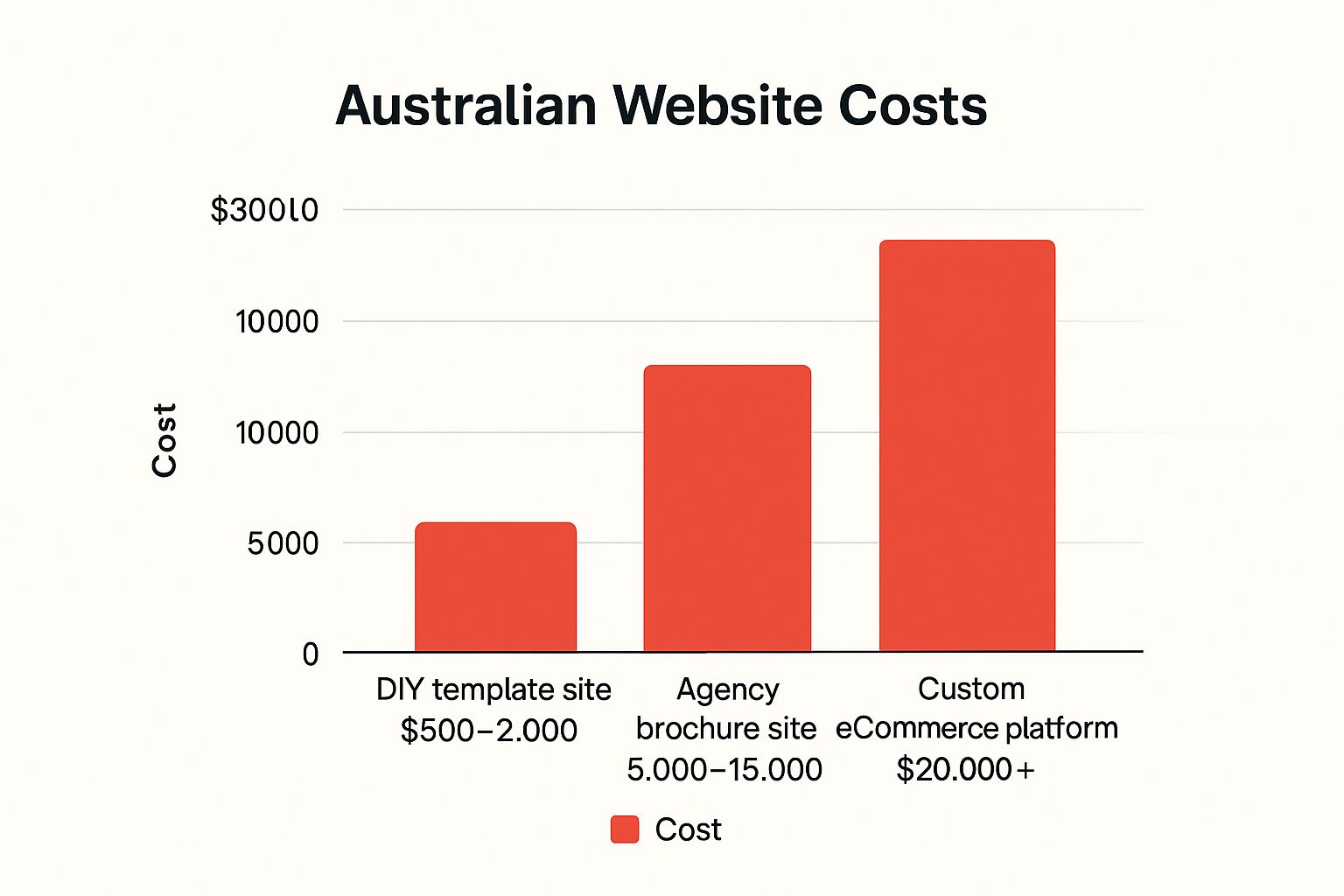
The takeaway here is pretty clear: the more you expect your website to do for your business, the more you should expect to invest in getting it right.
Deconstructing the Price Tag: What Are You Actually Paying For?
Getting a quote for a new website can sometimes feel like a bit of a shock. It’s not just a digital brochure; it’s a complex blend of strategy, creativity, and technical engineering. Understanding the individual pieces you’re paying for helps demystify the cost and see the true value behind the numbers.
Think of it like building a house. You don't just pay for the timber and bricks. You're investing in the architect's blueprints (design), the construction crew's labour (development), and the foundational utilities like plumbing and electricity (hosting and infrastructure). Each part is essential for a home that doesn’t just look good, but actually works.
The Blueprint and Aesthetics: User Experience and Design
Long before a single line of code gets written, a huge amount of work goes into planning how your website will look, feel, and function. This is the world of User Interface (UI) and User Experience (UX) design, where strategy meets artistry.
-
User Experience (UX) Design: This is the architect’s master plan. It’s all about mapping out the user’s journey, making sure the site is logical, intuitive, and dead simple to navigate. Great UX means visitors find what they need without getting frustrated, which is absolutely critical for keeping them around.
-
User Interface (UI) Design: This is the interior design – the visual appeal. It covers everything from your brand’s colour palette and fonts to the buttons, icons, and imagery. Good UI makes the website look sharp and reinforces who you are as a brand.
This design phase is arguably one of the most important investments you can make. A study by Forrester found that a well-designed user interface could raise your website’s conversion rate by up to 200%.
Building the Structure: Development and Coding
Once the blueprint is approved, it’s time for the digital construction crew to get to work. This process is usually split into two distinct but interconnected parts: front-end and back-end development.
Front-End Development (The Client-Side)
This is everything your visitors see and interact with directly in their browser. The front-end developer takes the UI designs and turns them into a living, breathing website using languages like HTML, CSS, and JavaScript. They’re responsible for making sure the site is responsive, meaning it looks great and works perfectly whether you're on a desktop, tablet, or mobile.
Back-End Development (The Server-Side)
This is the engine room of your website—the parts users don't see. It includes the server, the database, and the application logic that makes everything tick. If you have a contact form, an e-commerce store, or a user login system, the back-end is what makes it all work. It’s the behind-the-scenes magic that processes orders and keeps customer data secure.
A website's success is not just about looking good. It’s about creating a seamless bridge between a user's need and the solution you provide. The back-end is the foundation of that bridge, ensuring every interaction is fast, reliable, and secure.
Essential Foundations and Running Costs
Beyond the core design and build, there are several recurring costs needed to keep your website live, secure, and accessible on the internet. These are often forgotten in initial budget chats but are non-negotiable for any professional online presence.
These ongoing costs typically include:
- Domain Name Registration: Your website's address on the internet (e.g., yourbusiness.com.au). This is an annual fee, usually between $20 – $50.
- Web Hosting: This is like renting a plot of land on the internet where your website's files live. Costs vary wildly based on traffic and performance needs, from $10 per month for basic shared hosting to hundreds for dedicated servers.
- SSL Certificate: This encrypts data between your site and its visitors, showing the padlock icon in the browser. It's essential for security and trust, and thankfully, most modern hosting plans include it.
- Content Management System (CMS): A platform like WordPress or Shopify that allows you to easily update your website's content without needing to code. While the software itself might be free, there are often costs for premium themes or plugins that extend its functionality.
Understanding these individual components empowers you to ask the right questions and properly evaluate any quote you get. It also helps you appreciate that a higher price often reflects a deeper investment in strategy and quality, which ultimately leads to a more robust digital asset for your business. For instance, knowing which pages actually drive results is key, which is why we always recommend setting up effective website conversion tracking from day one.
Matching Your Business Goals To A Website Type
Here's the thing: not all websites are created equal. The single biggest driver of your final bill is the site's core purpose. Think of it like buying a vehicle for your business. You wouldn't buy a Ferrari to deliver pizzas, and you definitely wouldn't buy a prime mover just to visit clients across town. Your website needs to be the right tool for the job.
Getting your head around the common website types is the first step to aligning what you want to achieve with a realistic budget. It stops you from paying for flashy, complex features you'll never use. More importantly, it also prevents the flip side of that problem: underinvesting in a site that simply can't deliver on your business goals.
Let's break down the main categories.
The Digital Handshake: Brochure Websites
First up, we have the simplest and most affordable option: the brochure website. Its job is straightforward—to give your business a professional online presence, build credibility, and provide essential info. It's your digital business card and a 24/7 storefront window.
These sites are a perfect fit for businesses that get most of their work through word-of-mouth, networking, or direct sales but still need a polished hub for potential clients to check them out. They’re foundational. They build trust.
Key features usually include just the basics:
- A homepage to welcome visitors and point them in the right direction.
- An "About Us" page to tell your story.
- A "Services" or "Products" page detailing what you offer.
- A contact page with a form, map, and phone number.
Because the functionality is so direct, brochure sites are the most budget-friendly option and often the first digital step a new company takes.
The Conversion Engine: Lead Generation Websites
Taking a step up in both complexity and cost is the lead generation website. It has everything a brochure site does, but its entire structure is engineered with one primary goal in mind: capturing visitor information and turning anonymous traffic into qualified leads.
This type of site is mission-critical for any business that relies on a steady pipeline of new prospects. Think service-based companies, B2B consultants, or high-ticket sales organisations. Every single element, from the headlines to the button colours, is strategically designed to guide a user towards taking action.
A lead generation site isn't just a passive library of information; it's an active sales tool. Its success isn't measured by how many people visit, but by how many people put their hand up and say, "Tell me more."
Common features that add to the cost include:
- Prominent Calls-to-Action (CTAs): Unmissable buttons and links that scream "click me!"
- Optimised Landing Pages: Highly focused pages built for ad campaigns with a single conversion goal.
- Newsletter Sign-Up Forms: Hooks to integrate with your email marketing platform.
- Lead Magnets: Offering valuable content like eBooks or whitepapers in exchange for contact details.
The sheer scale and complexity of a website are major cost determinants here in Australia. For example, a basic small business website with a few brochure-style pages and a contact form will typically run you somewhere between AUD $3,000 and $7,000 when built by a professional agency.
But once you start bolting on more advanced features like booking systems or a full-blown online store, the price climbs steeply. It's not uncommon for custom, marketing-focused sites to hit the AUD $15,000 to $30,000 mark.
The Digital Storefront: E-Commerce Websites
The most complex and expensive of the lot is the eCommerce website. This is a full-fledged online store built to handle transactions, manage inventory, and process customer orders from start to finish. If selling products online is your game, understanding the specific costs that come with e-commerce website development is non-negotiable.
Building an eCommerce site involves a whole lot more than just a pretty design. You’re talking secure payment gateway integrations, complex product databases, customer account management, and a powerful back-end to handle all the logistics. These technical requirements add significant development time, which directly translates to a higher final price.
Adding different features to a site can have a huge impact on the final cost and the time it takes to build. Here's a quick look at how some common additions stack up.
Feature Impact On Website Cost
| Feature | Typical Added Cost (AUD) | Complexity Level | Primary Benefit |
|---|---|---|---|
| Blog / News Section | $500 – $1,500+ | Low | Content marketing, SEO, and audience engagement |
| Online Booking System | $1,500 – $5,000+ | Medium | Automates appointment scheduling, saves admin time |
| Membership Portal | $4,000 – $15,000+ | High | Creates recurring revenue and exclusive communities |
| Advanced Search Filters | $2,000 – $8,000+ | Medium-High | Improves user experience, especially for eCommerce |
| Multilingual Support | $2,500 – $10,000+ | Medium | Expands market reach to different language groups |
As you can see, what seems like a small addition can introduce a fair bit of complexity, so it's crucial to prioritise features based on the value they bring to your business goals.
The essential building blocks for any solid eCommerce site include:
- Product Catalogues: With detailed descriptions, multiple images, and clear pricing.
- Shopping Cart and Checkout System: A seamless and secure process to get people across the finish line.
- Payment Gateway Integration: Connecting with providers like Stripe, PayPal, or Afterpay.
- Inventory Management: Systems to automatically track what you have in stock.
- Customer Accounts: Letting users see their order history and save their details.
Because these sites are built to directly make money, getting them seen by the right people is everything. This is where specialised marketing becomes vital. Investing in a solid foundation with eCommerce SEO services can deliver a massive return by driving free, organic traffic straight to your product pages.
Ultimately, choosing the right website type from the very beginning ensures your investment aligns perfectly with how your business operates and grows.
Key Variables That Influence Your Final Website Cost
So, you’ve got a handle on the basic types of websites. But beyond that, a few critical variables can cause your project's final cost to swing dramatically.
Think of it like renovating a kitchen. The basic layout might be set, but choosing marble benchtops over laminate, or custom cabinetry over flat-pack, will completely change the final invoice. Understanding these levers is the key to controlling your budget without cutting corners on quality.
These factors ultimately boil down to the time, skill, and resources a developer or agency needs to invest. A simple, template-based site might take a few weeks. A project demanding custom code and complex software integrations? That can easily stretch into months, directly impacting the answer to "how much should a website cost?".
Custom Design vs Templates
One of the biggest forks in the road—and a massive cost driver—is the choice between a unique, custom-built design and a pre-made template. Each has its place, but they represent two very different levels of investment.
-
Pre-made Templates: These are essentially off-the-shelf designs. They provide a solid, professional-looking foundation for a much lower upfront cost. While you can change colours, fonts, and content, you’re fundamentally working within the template's existing structure. It's a fantastic option for businesses on a tight budget needing to get online fast.
-
Custom Design: This is a completely bespoke process. A designer creates a unique look and feel from scratch, tailored specifically to your brand, your audience, and your business goals. It’s a deep dive involving wireframing, mockups, and multiple rounds of feedback, resulting in a one-of-a-kind digital asset. Naturally, this process requires far more strategic and creative hours, making it a much larger investment.
A custom design ensures your website doesn't just look good—it's strategically crafted to guide users and scream your brand's unique value. Often, that's worth every extra dollar.
Functionality and Third-Party Integrations
Modern websites rarely operate in a silo. To be truly effective, they need to connect with other business tools to automate tasks and create a seamless experience for your customers. Each of these connections, known as an integration, adds a layer of complexity and cost to the build.
You might need your website to "talk" to other software platforms you rely on. For example:
- Pushing new leads from your contact forms directly into a Customer Relationship Management (CRM) system like Salesforce or HubSpot.
- Automatically adding new subscribers to your email marketing platform, like Mailchimp.
- Connecting your eCommerce store to accounting software like Xero to streamline invoicing.
- Embedding a third-party booking system for scheduling appointments or services.
Each of these integrations requires a developer to work with an API (Application Programming Interface)—a set of rules that lets different software communicate. This is specialised work that adds hours, and therefore cost, to your project.
Content Creation and SEO Foundation
A beautiful website with no content is like a stunning shop with empty shelves. It’s useless. The volume and quality of the content you need play a huge role in the overall project cost. Are you providing all the text, images, and videos yourself, or do you need your agency to create it for you?
Your website is just the vehicle. The content is the fuel that powers it, and a strong SEO foundation is the GPS that guides customers right to your door.
This is where many businesses seriously underestimate the investment needed. Professional copywriting, photography, and videography are separate skills and separate line items on the budget.
Furthermore, building a site with a rock-solid Search Engine Optimisation (SEO) foundation is non-negotiable if you want to be found online. This isn't just about sprinkling in a few keywords; it's a technical discipline that involves:
- Strategic keyword research to figure out exactly what your customers are searching for.
- Technical SEO setup, including an optimised site structure, lightning-fast page speeds, and flawless mobile-friendliness.
- On-page optimisation of titles, headings, and meta descriptions for every single page.
While foundational SEO adds to the initial bill, skipping it is like building a brilliant shop in the middle of the desert with no roads leading to it. It's an essential upfront investment for getting seen and growing your business.
Budgeting Beyond the Build for Ongoing Success

Popping the champagne when your new website goes live is a great feeling. But here’s the thing: that launch is the start of the race, not the finish line. A classic mistake I see all the time is businesses pouring every last cent into the initial build, leaving the piggy bank empty for the essential work that keeps a site secure, effective, and actually working for you long-term.
Think of your website like a brand-new company car. You don't just pay the drive-away price and call it a day. It needs fuel, regular servicing, insurance, and the occasional repair to keep it running smoothly. Your website is no different.
Non-Negotiable Annual Expenses
Let's start with the basics. Certain costs are simply the price of admission for having a professional website online. These are the recurring bills you absolutely must factor into your annual budget to keep your digital doors open.
These foundational costs aren't optional extras; they're the bedrock of your online presence.
- Domain Name Renewal: This is your website's street address, like
yourbusiness.com.au. It's a small but vital annual fee, usually somewhere between $20 and $50 a year. - Web Hosting: This is the service that stores all your website's files and serves them up to visitors. Think of it as paying rent for your little plot of land on the internet. Hosting costs can vary wildly depending on the performance you need.
Choosing the Right Web Hosting
The type of hosting you choose has a direct impact on your site's speed, security, and how much traffic it can handle. Skimping here is a false economy—it often leads to a slow, frustrating experience for your users, which is an absolute conversion killer.
Here’s a quick rundown of your main options:
- Shared Hosting: The most budget-friendly choice, where your site shares server space and resources with hundreds of others. It's fine for brand-new sites with low traffic, but performance can suffer if another site on the server suddenly gets a flood of visitors.
- VPS (Virtual Private Server) Hosting: This is a solid step up. You still share a physical server, but you get your own dedicated slice of its resources. This gives you much better performance and stability than shared hosting.
- Dedicated Hosting: The premium option. You get an entire server all to yourself, giving you maximum performance, security, and control. This is the go-to for high-traffic eCommerce stores or large, complex business websites.
The Critical Role of Ongoing Maintenance
Beyond hosting, your website’s software needs regular TLC to stay healthy and secure. Just like your phone gets operating system updates, the platform your site is built on (like WordPress) and all its plugins need constant updates to patch security holes and add new features.
A website maintenance plan with your developer is a smart investment. It typically covers:
- Software and Plugin Updates: Keeping everything current to prevent vulnerabilities.
- Regular Backups: Creating copies of your site so it can be restored quickly if disaster strikes.
- Security Scans: Proactively checking for malware and sniffing out hacking attempts.
- Bug Fixes: Squashing any small technical glitches that inevitably pop up.
This proactive approach is always, always cheaper than cleaning up the mess after a hack or a major crash. It’s easy to overlook, but you should budget for annual costs for technical support, security, and hosting to be around 10–20% of the initial build cost. So, a $20,000 site might need $2,000–$4,000 a year just for upkeep. This figure alone shows why long-term financial planning is so important. For more on this, check out the insights on the SPDLoad blog.
Neglecting website maintenance is like never changing the oil in your car. It might seem fine for a while, but eventually, you're heading for a catastrophic and expensive failure.
Investing in Growth and Visibility
Finally, a website that just sits there is a wasted investment. To turn it into a machine that actually generates revenue, you need to actively promote it. That means budgeting for digital marketing from day one.
Two of the most powerful strategies for long-term growth are content marketing and Search Engine Optimisation (SEO). Creating valuable blog posts, guides, and videos builds your authority and attracts potential customers who are actively looking for solutions.
Meanwhile, a solid SEO strategy ensures your site ranks high in Google searches, driving a steady stream of relevant, organic traffic. If you're serious about growth, exploring professional SEO services is one of the smartest ongoing investments you can make for your business's future.
How to Get an Accurate Website Quote and Avoid Surprises
Getting a website quote that’s either shockingly high or frustratingly vague is a classic story. But it’s usually just a symptom of an unclear request. The secret to getting a sharp, accurate, and comparable estimate isn’t some industry trick; it’s all about giving your potential developer a detailed project brief that leaves nothing to guesswork.
Think of it like building a house. You wouldn't just tell an architect, "I want a new house," and expect a precise quote. You'd give them a detailed floor plan. Your project brief is that floor plan. It helps developers give you a realistic price, lets you compare apples with apples, and builds a solid foundation for a successful project. It's your best defence against scope creep and nasty budget blowouts later on.
Creating a Powerful Project Brief
To figure out how much a website should cost for you, you need to get that vision out of your head and onto paper. Your brief doesn’t need to be a super-technical document, but it absolutely must be thorough.
Start with the big picture: what’s the core purpose of this new site? Then, you need to get into the nuts and bolts. A strong brief gives clear answers to the following questions, which are the exact things a developer needs to know to estimate their time and resources.
- Business Goals: What is the number one thing this website must do? Are you trying to generate leads, sell products directly, or simply build credibility for your brand?
- Target Audience: Who are you actually trying to talk to? Paint a picture of your ideal customer—what are their needs, their pain points, and where do they hang out online?
- Desired Features: Make a list of all the functionality you need. This could be anything from a simple blog and contact form to an online booking system, customer logins, or a full-blown eCommerce store.
- Inspiration: This one is huge. Give them 3-5 examples of websites you love. And be specific about why you love them. Is it the clean layout, the colour palette, or a clever feature you saw? For a designer, this is gold.
A project brief is way more than just a wishlist. It’s a strategic document that connects your business goals to a technical solution. The more detail you put in upfront, the more accurate and reliable your quotes will be.
Questions to Ask Before You Sign
Once the proposals start rolling in, your job isn't done. A good quote is more than just a number; it’s the beginning of a partnership. Before you commit to anyone, make sure you get crystal-clear answers to a few critical questions. This is all about protecting yourself and making sure everyone is on the same page.
- What’s actually included in this price? Does it cover the design phase, the development work, adding all my content, and basic SEO setup?
- What are the ongoing costs? Don’t forget to ask about web hosting, maintenance plans, and any software licence renewals.
- What’s the payment schedule? Most agencies will have a deposit and milestone structure (e.g., 50% upfront, 50% on completion).
- Who will be my point of contact? Knowing who you'll be talking to makes communication a million times easier and keeps the project moving smoothly.
- What’s the timeline for completion? Get a realistic project schedule with key milestones and delivery dates locked in.
By putting in the effort to create a comprehensive brief and asking these simple questions, you take control of the whole process. You’ll get quotes that actually reflect what you need, making it far easier to pick the right partner and invest confidently in your business’s future online.
Common Questions About Website Costs
When it comes to figuring out how much a website should cost, it's easy to get lost in the details. Business owners in Australia often ask us the same key questions, so let’s clear up a few things right now.
Why Shouldn’t I Just Use a Cheap Website Builder?
Look, you absolutely can. For a freelancer just starting out or someone running a hobby blog, platforms like Wix or Squarespace can be a decent launchpad.
But businesses tend to hit a wall with them, and fast. The big sticking points are always the same: limited customisation, poor scalability, and frustratingly weak performance when it comes to Search Engine Optimisation (SEO).
A professionally built website, typically on a powerhouse like WordPress, gives you total design freedom. It can be bolted onto any business tool you can think of and provides a rock-solid foundation for getting serious, long-term visibility in search engines.
How Long Does It Take to Build a Website?
The timeline really just mirrors the complexity and cost. A simple brochure site built from a template might be up and running in 4-6 weeks. A fully custom-designed site for a small business will more realistically take 8-12 weeks.
For something more involved, like a complex eCommerce store or a web application with custom-built features, you could easily be looking at 4-6 months, or even longer. The final timeline always hinges on things like design revisions, how quickly you can provide content, and the nitty-gritty of the technical build.
Do I Have to Pay the Full Cost Upfront?
No, and you should be wary of anyone who asks for that. For any professional project, it’s extremely rare. The industry standard, whether you’re working with an agency or a freelancer, is to pay a deposit to get the ball rolling, followed by payments at key milestones.
A typical payment schedule looks something like this:
- Initial Deposit: Usually 30-50% of the total cost to kick off the project.
- Milestone Payments: Invoiced when major stages are hit, like when the design is approved or the core development is finished.
- Final Balance: Due right before the website goes live.
Always make sure this schedule is spelled out clearly in your contract. It avoids any nasty surprises down the track and protects both you and your developer, making sure the whole process is smooth and transparent from day one.
Ready to get targeted traffic flowing to your shiny new website? At Click Click Bang Bang, we live and breathe precision-driven SEO and PPC campaigns that deliver actual, measurable results. Let's build a strategy that grows your business.
Read NeXt
Or Read Our Latest
- How to Set Up Google Ads in Australia: Complete 2026 Guide
- Google Merchant Center Setup: The Complete 2026 Guide
- Business Manager Setup Facebook: The Complete 2026 Guide
- Google Ads Account Setup: Expert Guide for 2026
- Search Ads Optimisation: A Practical Guide for 2026
- Manual vs Automated Bidding for PPC Success
Click. CLick. Subscribe.
Get our best PPC insights, industry updates, and power moves delivered straight to your inbox. No fluff, just high-caliber strategies that actually work.
Don’t Leave Just Yet
Try Us For 30-Days,
Risk Free!!
We guarantee that you’ll love our work within the first 30 days, if not you’ll get your money back.
What have you got to lose?