

Secure Your Ranks with an SEO Migration Service
Last Updated

Your new site is nearly ready. Design sign-off is done, templates look sharper, stakeholders want a launch date, and the development team is focused on shipping. This is the point where many businesses accidentally treat SEO like a post-launch tidy-up instead of what it is: a business continuity task.
A site migration can mean a domain change, CMS replatform, redesign, information architecture overhaul, or a move to headless. On paper, those are technical projects. In practice, they decide whether Google can still understand your pages, transfer your authority, and keep sending qualified traffic after launch.
That’s why a proper seo migration service matters. It doesn’t exist to make a checklist look complete. It exists to protect rankings, revenue, lead flow, and the work your team has already invested in building search visibility.
The High-Stakes Moment of a Website Relaunch
The risky part of a relaunch usually starts with good intentions. A retailer wants a faster storefront. A B2B company wants cleaner messaging and stronger conversion paths. A marketing team wants better content workflows and a platform that won’t fight them every time they publish a page.
Then launch day arrives, and traffic starts slipping.

In Australia, migrations without proper SEO planning commonly result in a 50%+ loss of organic traffic, with an average recovery time of 523 days, and only 10% of migrations improve rankings while 17% never recover previous traffic levels, according to Numen Technology’s migration analysis. That’s not a minor fluctuation. That’s a long commercial hangover from a rushed technical decision.
The problem is rarely one dramatic mistake. It’s usually a stack of smaller ones. Category URLs change without redirects. Canonicals point to staging versions. Internal links still reference old paths. AI-generated product descriptions get republished under new URLs with inconsistent metadata. Search engines don’t see a polished relaunch. They see confusion.
Practical rule: If your relaunch changes URLs, templates, content structure, rendering behaviour, or internal linking, you’re not doing a design update. You’re doing an SEO migration.
For Australian businesses, the stakes are sharper because Google dominates local search behaviour. If your visibility drops, your pipeline doesn’t wait politely for recovery. Paid media costs go up, branded searches become less efficient, and sales teams start asking why lead volume softened right after the “upgrade”.
A strong migration protects what already works while making room for what needs to improve. That is the essential task.
What Exactly Is an SEO Migration Service
A seo migration service is the specialist layer that sits between web development and search performance. Imagine moving house with fine art, not flat-pack furniture. Anyone can transport boxes. A specialist makes sure the fragile, valuable pieces arrive intact, labelled, and placed where they belong.
That’s what SEO equity is during a migration. It includes indexed URLs, rankings, backlinks, metadata, internal links, structured data, canonicals, user behaviour signals, and all the contextual clues Google has built up around your site over time. If those signals break during a move, the site may launch successfully for users while its search performance suffers.
More than a developer task
Developers handle builds, deployments, templates, integrations, and performance engineering. They’re essential. But most aren’t responsible for preserving how search engines interpret old and new URLs at scale.
A migration service fills that gap by managing the search side of the move:
- Benchmarking current performance so no one is guessing what must be protected
- Mapping old URLs to new URLs with one-to-one redirect logic
- Preserving metadata and structured data where it still supports rankings
- Reviewing internal linking so authority still flows through the new architecture
- Testing indexation signals before and after launch
- Monitoring recovery so issues are found quickly rather than weeks later
Poorly executed migrations in Australia can lead to 30% organic traffic declines and over 50% revenue decreases for three consecutive months, while well-planned migrations can deliver a 40% traffic increase by month three, based on ecommerce migration statistics compiled by Swell.is. That contrast explains why migration work shouldn’t be bolted on at the end.
What changes in an AI-heavy website
The older migration playbook assumed relatively stable page templates and mostly human-written copy. That’s no longer enough.
Many sites now use AI to generate or scale:
| Migration area | Traditional concern | Modern AI concern |
|---|---|---|
| Metadata | Titles and descriptions carry over | AI tools may overwrite them at scale after launch |
| Product content | Copy remains consistent | Variants may create duplication or weak differentiation |
| Schema | Markup survives the move | Automated plugins may change entity relationships |
| Internal links | Navigation is rebuilt | AI-assisted content tools may insert inconsistent links |
| Canonicals | Rules are migrated | Dynamic systems may output conflicting canonicals |
An SEO migration service now has to account for those moving parts. If your site uses AI-generated content, programmatic SEO, dynamic page creation, or entity-rich schema, migration planning has to be stricter, not looser.
A migration isn’t successful because the new site looks right. It’s successful because search engines can crawl, understand, index, and trust it without losing the signals that mattered before launch.
The best providers act like technical translators. They make sure the new site tells Google a clear story from day one.
The Strategic SEO Migration Process from Start to Finish
Most failed migrations don’t fail at launch. They fail earlier, when teams skip discovery, treat redirects as admin work, or test only what a human can see in the browser. A professional migration process is slower in planning and faster in recovery because it removes ambiguity before anything goes live.
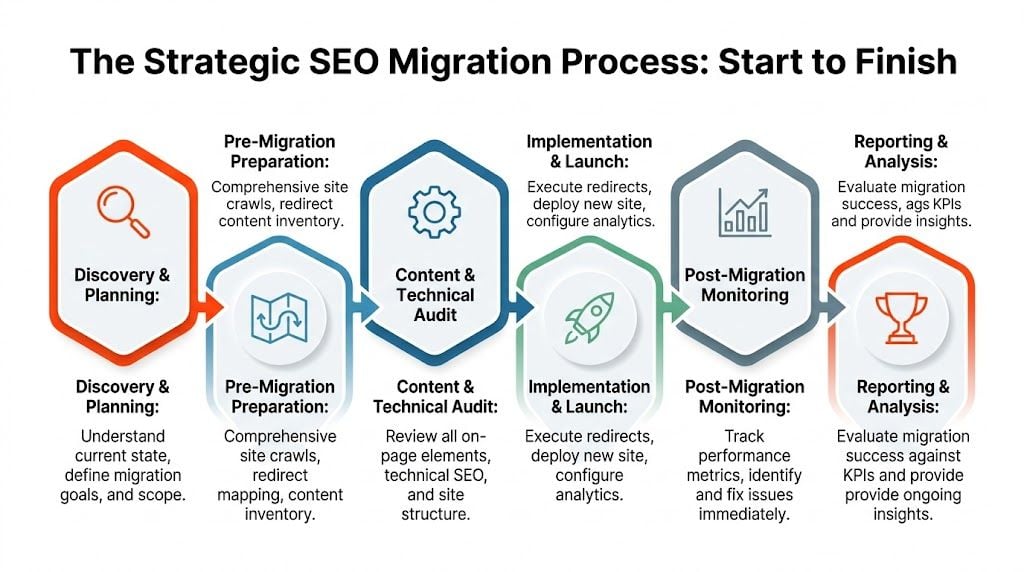
Discovery and benchmarking
Before anyone touches redirects or templates, the current site needs a baseline. Without that, teams can’t tell whether post-launch movement is normal, avoidable, or already expensive.
Start by exporting data from Google Search Console, GA4, Ahrefs, and Screaming Frog. Pull your top landing pages, top query-driving URLs, backlink-heavy pages, pages with conversions, pages with featured snippets, and any template types that matter commercially.
This stage should answer simple but important questions:
- Which pages must not lose visibility
- Which content is obsolete and can be retired
- Which templates carry most organic traffic
- Which sections are already weak and can be rebuilt without much downside
If you need a structured pre-launch reference point, a practical website migration checklist helps teams align developers, marketers, and SEO specialists before work fragments across tools and deadlines.
Content and URL planning
A migration is the best time to stop carrying dead weight. It’s also the easiest time to accidentally delete pages that still earn traffic.
The right approach is selective. Keep strong URLs where possible. Consolidate duplicate or thin content when there’s a clear destination page. Rebuild architecture only when the new structure genuinely improves usability, crawl paths, or topical clarity.
For AI-assisted sites, review content provenance as well. If product pages, location pages, or support content were generated through AI workflows, check for:
- Near-duplicates across templates
- Inconsistent heading hierarchies
- Auto-generated canonicals
- Weak entity references in schema
- Thin category copy wrapped around large page sets
Those issues often survive a migration unless someone deliberately audits them.
Redirect mapping
This is the part teams underestimate most.
Implementing thorough 301 redirects is critical. Australian sites that maintain 100% redirect coverage for top pages see less than a 5% traffic drop, compared with 20% to 30% losses when redirect maps are incomplete or contain errors such as redirect chains, based on technical migration guidance using Google Search Console export data.
That’s why redirect mapping isn’t a spreadsheet exercise delegated at the end. It’s a ranking preservation system.
Use a redirect map that includes:
- old URL
- new URL
- page type
- priority level
- traffic or backlink notes
- implementation status
- QA result
A few hard rules matter here.
Never redirect many old pages to the home page just because it’s faster. Google treats that as a weak substitute, and users hate it.
Redirect chains are another common problem. If an old URL goes to an interim URL and then to the final URL, every extra hop adds friction for crawlers and users. During migration, the goal is the shortest possible path from the old address to the correct live destination.
Technical SEO carryover
Migrations break search performance when teams preserve the visible content but lose the technical context around it. Search engines don’t just evaluate copy. They rely on directives, relationships, and supporting markup.
Review these items before launch:
Canonicals
Make sure canonical tags point to the intended live URL, not a staging domain, parameterised version, or old path.
Schema markup
Transfer useful structured data cleanly. For local businesses, service pages, products, articles, FAQs, and organisation markup, consistency matters. If AI tools or plugins regenerate schema during the move, compare outputs and remove conflicting versions.
Robots directives
A blocked staging environment is good. A blocked live environment is not. Check robots.txt and page-level directives before launch and immediately after.
XML sitemaps
Generate fresh sitemaps that reflect the final live architecture and submit them once the site is indexable.
Internal links
Navigation, breadcrumbs, contextual links, related products, and HTML sitemaps should point directly to final URLs. Internal links that still hit redirects waste crawl budget and weaken the transition.
For larger sites, a full technical review before migration is one of the highest-value steps because it catches hidden dependencies across templates, JavaScript rendering, faceted navigation, and crawl logic. A detailed website audit process is often the difference between a clean launch and a month of preventable patching.
After the technical layer is reviewed, teams can use a visual walkthrough to align stakeholders on the sequence of work. This explainer is useful during planning reviews:
Staging QA that goes beyond design review
A site can pass design QA and still be SEO-broken.
In staging, crawl the new environment exactly as a search engine would. Check indexability, status codes, canonicals, meta robots, structured data, internal links, hreflang if relevant, image paths, JavaScript-rendered content, and mobile rendering behaviour.
A practical staging QA pass usually includes:
- Template sampling across home, category, product, blog, service, location, and utility pages
- Redirect testing against priority URLs and legacy patterns
- Metadata comparison between old and new high-value pages
- Schema validation on templates likely to surface rich results
- Logically checking search journeys such as category to product to cart, or blog to service to enquiry
For AI-first stacks, add another layer. Review any system that programmatically generates copy, FAQs, summaries, or internal links. Migration often changes how those systems publish content, and small template changes can create site-wide duplication.
Launch day discipline
The launch itself needs choreography. Not drama.
A controlled launch checklist usually includes:
- deploy final redirect rules
- remove noindex directives from live templates
- confirm analytics and event tracking
- update XML sitemaps
- verify canonical tags on live pages
- crawl top sections immediately after release
- inspect key URLs in Search Console
- test forms, filters, search, and lead paths
This isn’t the moment for unplanned copy rewrites, title experiments, or broad content pruning. Stability wins first. Improvements come after Google has processed the move.
The first days after launch
Google’s first impression of the new environment matters. Watch for crawl anomalies, redirect misses, indexation gaps, and internal links that still point to retired paths.
The early post-launch period should focus on evidence, not reassurance. If impressions are softening, branded rankings wobble, or key pages aren’t being indexed, teams need to isolate the cause quickly. Incomplete redirects, canonical conflicts, and JS-rendering issues still account for a large share of migration problems, even on modern stacks.
A strong seo migration service doesn’t stop when the switch is flipped. It follows the site into the unstable period and keeps fixing what the launch exposed.
Mitigating Risk and Selecting Your Migration Partner
Migration projects often get approved on design logic and judged on revenue outcomes. That mismatch creates trouble. The board sees a relaunch. Marketing sees a visibility risk. Development sees a delivery milestone. If no one owns the search continuity layer, it becomes everybody’s assumption and nobody’s responsibility.

One of the biggest gaps in the market is risk quantification for smaller and mid-sized businesses. Many agencies make broad success claims but don’t provide enough detail on recovery expectations or likely downside, which makes budgeting harder for marketing managers, as noted in Embarque’s review of SEO migration services.
Questions to answer before hiring anyone
A business should be able to answer these internally before it compares providers.
-
What kind of migration is this really
A redesign is not the same as a replatform. A domain move is not the same as a taxonomy cleanup. The more moving parts involved, the more migration risk stacks up. -
Which pages carry commercial weight
Your top organic entry pages, backlink-heavy URLs, and conversion-driving content need named ownership. -
What systems publish content today
If AI tools, feed-driven templates, or plugin-based schema generators are involved, include them in scope from the start. -
Who has final sign-off
SEO decisions break when content, development, and marketing all assume someone else is checking live output.
If a provider can’t explain what success looks like for your specific migration, they’re selling reassurance, not a process.
What a capable provider should show you
Good migration partners are concrete. They talk in deliverables, dependencies, testing methodology, and rollback logic. Weak ones stay vague and over-index on “we’ve done loads of migrations” without showing how they manage one.
Look for these signs.
They start with diagnosis, not price
A serious provider asks for access to analytics, Search Console, crawl data, sitemap files, staging plans, and CMS details before locking scope.
They define outputs clearly
You should expect documents and assets such as:
- benchmark reports
- content inventory
- redirect mapping files
- technical QA findings
- launch checklist
- post-launch monitoring plan
They understand technical trade-offs
Sometimes preserving the exact URL structure is best. Sometimes changing it is worth the short-term friction because the current architecture is limiting growth. A strong partner can explain that trade-off plainly.
They can work with developers
Migration work is collaborative. If the SEO team can’t write tickets clearly, validate implementation, and prioritise fixes, the strategy won’t survive contact with production reality.
A provider with broader technical search support is often better positioned than one offering migration as an add-on. That matters when the project spills into rendering, template logic, or post-launch issue triage. Teams often assess that capability through a wider SEO outsourcing partner review rather than a one-off migration pitch.
Red flags that deserve scrutiny
Not every warning sign is dramatic. Some are small phrases that reveal how casually the work is being handled.
| Red flag | Why it matters |
|---|---|
| “We’ll sort redirects after launch” | That invites avoidable losses during the most sensitive window |
| “Most pages can go to the homepage” | That destroys relevance and creates poor user journeys |
| “We don’t need old analytics data” | Then they can’t benchmark what must be protected |
| “The developer will handle the SEO bits” | Maybe. But unless someone owns validation, details get missed |
| “AI content shouldn’t affect migration” | It can affect duplication, metadata, canonicals, and schema output |
Fixed fee or retainer
Both can work. A fixed project fee suits well-scoped migrations with clear deliverables and a known launch window. A retainer can make sense when the migration is tied to broader technical SEO, content restructuring, or ongoing post-launch support.
The wrong model is the one that hides responsibility. If support after launch is limited, ask what happens when indexing problems appear a week later. If the project includes AI-generated or programmatic content, ask who validates output once the new templates start publishing at scale.
The best migration partners reduce uncertainty before launch, not explain it away afterwards.
SEO Migration in Action Case Studies
Theory matters, but migrations become easier to judge when you look at common patterns in the wild. Two scenarios come up repeatedly: e-commerce replatforms and B2B redesigns with major content reshaping. The details change, but the mechanics of success are similar.
E-commerce replatform with AI-generated product content
An online retailer moved from a legacy platform to a headless setup. The commercial goal was solid: faster performance, better merchandising control, and more flexible category design. The risk sat in the catalogue. Product copy had been scaled with AI assistance over time, and metadata rules varied across collections.
The main problems were predictable:
- old category paths were being retired
- several product variants risked producing near-duplicate pages
- schema output changed between the old system and the new front end
- internal links from collections to products were being rebuilt
The migration strategy focused on preserving high-performing category URLs where possible, mapping legacy paths carefully, and reviewing AI-generated copy on pages most likely to cannibalise each other. Structured data was validated template by template rather than trusted blindly through plugins.
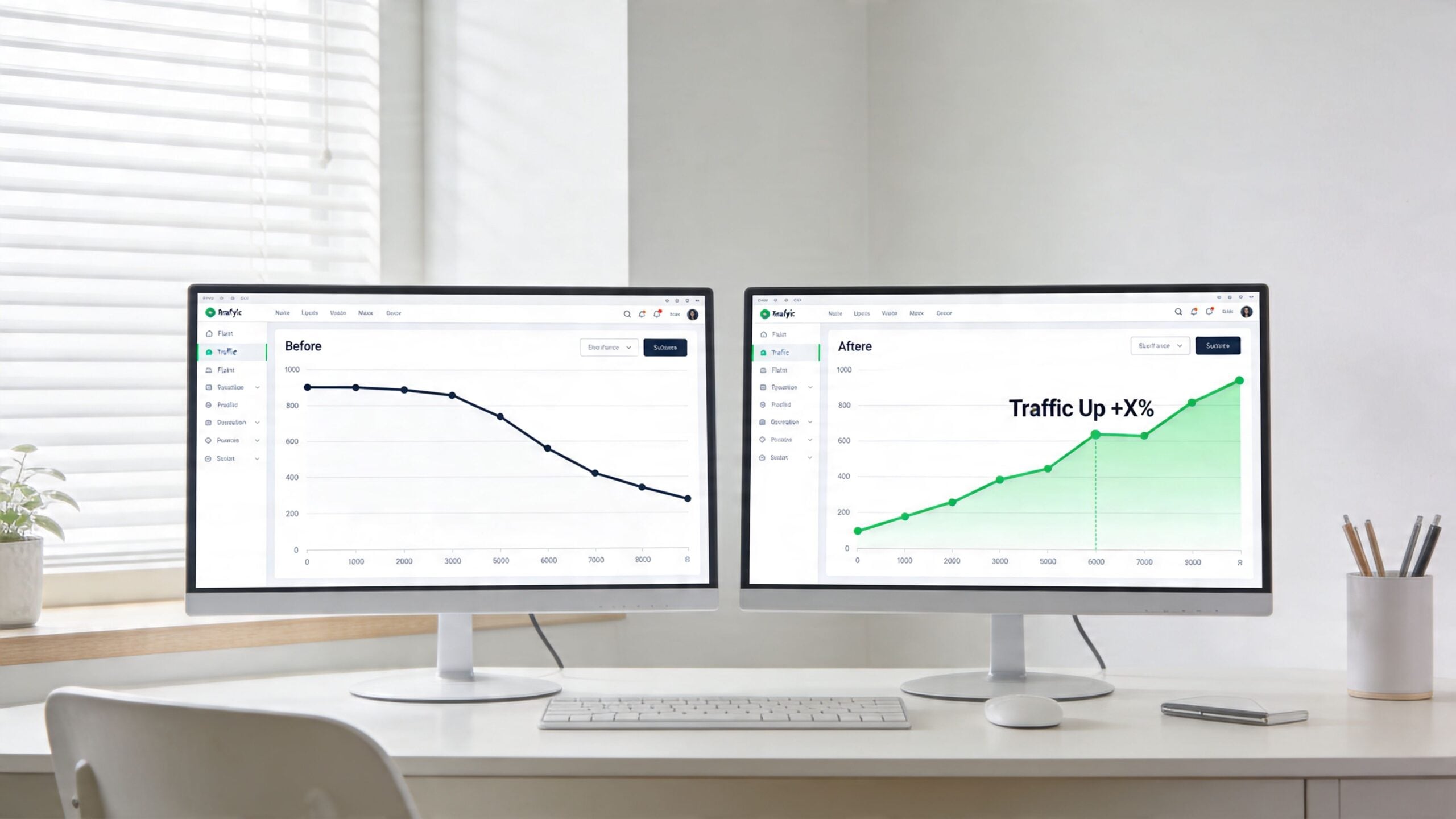
The outcome matched the pattern shown in Swell.is ecommerce migration statistics, where well-planned migrations commonly deliver 40% traffic increases by month three. In practical terms, this kind of project works when the team treats category architecture and template logic as ranking assets, not just UX choices.
The fastest way to waste a replatform is to improve the storefront while breaking the paths search engines already trust.
B2B redesign with intent-led restructuring
A services company rebuilt its site to sharpen positioning and increase lead quality. Unlike a catalogue-heavy retailer, the challenge here wasn’t product scale. It was message drift. Years of blog publishing had created overlapping pages that competed for similar queries, while core service pages were underpowered.
A good seo migration service in this situation does more than preserve URLs. It uses the migration window to clean up intent mapping. Pages with overlapping topics were consolidated, service hubs were rewritten around decision-stage searches, and internal links were rebuilt so supporting articles fed authority toward commercial pages.
The technical side still mattered. Redirect logic needed to preserve old backlinks and keep retired thought-leadership content from generating dead ends. But the strategic gain came from making the new architecture easier for Google to interpret and easier for prospects to use.
What these examples have in common
The strongest migrations usually share three traits:
-
They protect winners first
High-value pages get explicit handling, not assumptions. -
They use the move to remove clutter
Weak or duplicative content is consolidated instead of dragged into the new build. -
They validate automation
AI content systems, schema plugins, and dynamic metadata rules are checked, not trusted by default.
That’s why migration success isn’t just about avoiding losses. It’s also a rare chance to repair structural SEO issues that a business has tolerated for years because changing them in a live environment felt too risky.
Post-Launch Monitoring and Future-Proofing Your Site
Launch is the handover point, not the finish line. Search engines still need to crawl the new environment, process redirects, reassess canonicals, interpret the updated internal link graph, and decide how much trust to assign to the new version of each page.
That’s why the first post-launch period needs active monitoring. Not passive optimism.
What to watch first
For Australian sites, page experience remains a major part of migration stability. Sites that maintain LCP under 2.5s and CLS below 0.1 after migration retain 92% of organic visibility, versus 65% for sites that fail to optimise those signals, according to Adchitects’ migration checklist guidance.
The practical monitoring list is short but unforgiving:
- Index coverage to confirm important pages are being discovered and included
- Crawl errors to catch missed redirects, broken internal links, and unexpected status codes
- Keyword movement on critical commercial pages rather than vanity terms
- Organic landing page behaviour to spot sections that dipped after the move
- Core Web Vitals to make sure the new build isn’t slower, jumpier, or less stable
If your team needs a plain-English refresher on how indexing works after structural changes, this guide to Google Indexing is a useful resource to share with non-SEO stakeholders.
How AI changes post-launch analysis
AI-first monitoring gives teams a better way to triage noise. Instead of manually checking hundreds of URLs in isolation, you can cluster anomalies by template, directory, schema type, or rendering behaviour. That’s especially useful when AI-generated content or dynamic page systems start producing inconsistent outputs after launch.
Watch patterns, not just pages. One broken template can damage an entire section before individual URLs show obvious declines.
Post-launch analysis also needs clean measurement. If event tracking, forms, calls, and lead actions aren’t verified, teams can mistake a tracking gap for a traffic problem or the reverse. A proper website conversion tracking setup helps separate ranking issues from reporting errors, which is critical during the first weeks after migration.
Future-proofing comes down to discipline. Keep the site crawlable. Keep templates consistent. Audit any AI system that can change metadata, copy, schema, or canonicals at scale. The migration may be over, but the new site is still teaching search engines how to read it.
Frequently Asked Questions About SEO Migrations
How long does a typical SEO migration take
It depends on site size, platform complexity, number of templates, and how much content is being reworked. A small brochure-style site can move relatively quickly. A large e-commerce or multi-section B2B site needs more time because redirects, QA, analytics, and template validation all scale with complexity. The biggest timing mistakes come from underestimating discovery and testing.
Can an internal team handle a migration without an agency
Sometimes, yes. If your team has strong technical SEO capability, direct access to developers, reliable analytics, and enough time for proper QA, an internal migration can work. It usually becomes risky when SEO is split across marketing, development, and content teams without one person owning the final search outcome.
What’s the difference between a 301 and a 302 redirect
A 301 redirect signals a permanent move and is the standard option for most migration scenarios. A 302 redirect signals a temporary move. During a full site migration, using 302s by mistake can confuse search engines about whether the new URL should replace the old one. Temporary redirects still have valid uses, but they’re not the default tool for a permanent relaunch.
Will rankings always fluctuate after a migration
Some fluctuation can happen, especially when Google is processing structural changes. What matters is whether the movement is controlled and short-lived, or whether it points to real implementation problems such as redirect gaps, canonical mistakes, rendering issues, or weaker internal linking.
Should AI-generated content be reviewed before migration
Yes. AI-assisted content can create duplication, thin pages, metadata conflicts, and schema inconsistencies at scale. A migration is the right time to identify those issues before they get republished into a new architecture.
If you’re planning a redesign, replatform, or domain move, Click Click Bang Bang can help you protect existing search visibility while building a site that’s ready for modern AI-driven SEO. Their team combines technical audits, migration planning, tracking, and ongoing optimisation so you don’t have to choose between a better website and the rankings you’ve already earned.
Read NeXt
Or Read Our Latest
- Manual vs Automated Bidding for PPC Success
- Conversion Tracking Setup: A Complete AU Guide
- Instagram Advertising Australia: Complete 2026 Guide
- Pay Per Click: A Beginner’s Guide for Australian Marketers
- Display Advertising on Google: The Complete Australian Guide
- Stakeholder Communication Plan How to Build One That Works
Click. CLick. Subscribe.
Get our best PPC insights, industry updates, and power moves delivered straight to your inbox. No fluff, just high-caliber strategies that actually work.
Don’t Leave Just Yet
Try Us For 30-Days,
Risk Free!!
We guarantee that you’ll love our work within the first 30 days, if not you’ll get your money back.
What have you got to lose?