

Your Guide to High-Impact Web Site Audits
Last Updated

A website audit is a complete examination of your site's performance and health, but it's much more than that. Think of it as a strategic roadmap for digital growth. It's a deep analysis that uncovers critical issues long before they have a chance to damage your traffic and sales.
Why Website Audits Are Your Digital Health Check

You can think of a website audit as a thorough health check-up for your most valuable digital asset. Just as you wouldn't ignore a persistent cough, you shouldn't ignore the warning signs your website might be showing. These audits act as your diagnostic tool, pinpointing exactly what’s working and, more importantly, what’s not.
In a competitive market, a website that goes unaudited is like a car that's never been serviced. Sure, it might run for a while, but eventually, small, unnoticed issues will lead to a major breakdown—often at the worst possible time. An audit helps you proactively find and fix these problems, ensuring your site runs smoothly and efficiently.
From Finding Errors to Uncovering Opportunities
It's a common misconception that website audits are just about finding technical errors like broken links or slow pages. While that's certainly part of it, a truly valuable audit goes much deeper. It’s about translating those technical findings into strategic business insights.
For instance, an audit might reveal that your most important service page has a high bounce rate. The technical problem could be slow loading times, but the business impact is lost leads and revenue. A proper audit connects these dots, turning a technical metric into a clear business problem with an actionable solution.
A website audit is more than a technical review; it is a strategic investment in your online presence. By combining automated tools with manual testing, you gain a complete view of your website’s performance, content quality, user experience, and security.
This process helps you understand your audience better. By analysing user behaviour data, you can see where visitors are getting stuck, what content they engage with, and where they drop off. These insights are goldmines for improving user experience and boosting conversion rates.
You might discover a confusing navigation menu or a call-to-action button that's hard to find on mobile devices—fixes that can have an immediate, positive impact. You can explore our comprehensive SEO audit services to see how we turn this kind of data into real growth.
To give you a clearer picture, here’s a quick summary of what a typical audit looks at and why each piece is so vital for your business.
Key Audit Areas and Their Business Impact
| Audit Area | What It Checks | Why It Matters |
|---|---|---|
| Technical SEO | Crawlability, indexability, site speed, mobile-friendliness, and site architecture. | Ensures search engines can find and rank your site, and that users have a fast, seamless experience. |
| On-Page SEO | Content quality, keyword optimisation, title tags, meta descriptions, and internal linking. | Improves search rankings for relevant keywords and helps users find the information they need. |
| User Experience (UX) | Navigation, site structure, calls-to-action (CTAs), and mobile usability. | Keeps visitors on your site longer, reduces bounce rates, and guides them towards conversion. |
| Conversion Rate Optimisation (CRO) | User journeys, form performance, checkout processes, and landing page effectiveness. | Turns more of your existing traffic into leads and sales, directly impacting your bottom line. |
| Security | HTTPS implementation, software vulnerabilities, and malware scans. | Protects your customer data, builds trust, and prevents your site from being penalised or blacklisted. |
Each of these areas provides a different lens through which to view your website's health. A comprehensive audit brings them all together to create a unified strategy for improvement.
Navigating Today's Competitive Digital Environment
The need for regular website audits has never been more critical. Consider the Australian market in 2026, where internet penetration is forecast to hit 97.4%. This creates a massive amount of online traffic, yet many e-commerce sites still struggle with poor visibility. Audits often reveal crippling 80.55% bounce rates that stem directly from poor mobile responsiveness and slow load times.
With 26.3 million users spending over six hours online daily, unaudited sites are at a severe disadvantage. This is especially true as 58% of searches are zero-click thanks to Google's AI Overviews, making every click you do earn that much more valuable. You can find more on these Australian digital trends over at Semrush.
A thorough audit gives you the roadmap to not just survive but thrive. It identifies your weaknesses and provides clear steps to transform them into strengths, ensuring your website becomes a powerful engine for business growth, not a digital liability.
Understanding the Core Types of Site Audits
A proper website audit isn’t just one thing; it’s like a full-service check-up for a race car. You wouldn't just have one mechanic look at it. You’d have an engine specialist check the powertrain, a pit crew review its performance history, and a driver test how it handles on the track. Each assessment gives you a different piece of the puzzle, and only together do they tell you if the car is ready to win.
In the same way, a comprehensive website audit is made up of several distinct, yet interconnected, reviews. Each one digs into a specific part of your site's performance, helping you pinpoint exactly where you’re strong and where you’re falling behind.
The Technical SEO Audit
The technical SEO audit is the bedrock of any website review. Sticking with our car analogy, this is the engine, chassis, and electrical systems check. It has nothing to do with the paint job or how comfy the seats are; it’s all about whether the machine is mechanically sound and built for speed.
This audit looks at the nuts and bolts of your site to make sure search engines like Google can find, crawl, and index your pages without hitting any roadblocks. A technical audit answers questions like:
- Is my website fast enough, especially for mobile users?
- Are there broken links or redirect chains confusing search crawlers?
- Is the site structure logical and easy for Google to navigate?
- Are there security gaps, like a missing HTTPS certificate?
Without a solid technical foundation, even the most amazing content or design will struggle to get noticed. To see just how deep this goes, you can learn more about our specialised technical SEO auditing process.
The Content Audit
Next up is the content audit. Think of this as reviewing your entire sales pitch and resource library. It’s a deep dive into the quality, relevance, and performance of every single piece of content on your site—from blog posts and service pages to product descriptions and case studies.
The goal here is to figure out what’s hitting the mark with your audience, what’s falling flat, and where you have gaps in your strategy. A content audit helps you understand:
- Is our content actually ranking for the keywords that matter?
- Which pages are bringing in traffic, and which ones are just causing people to leave?
- Is our messaging clear, engaging, and persuasive enough to drive action?
- Do we have old, thin, or outdated content that’s dragging the site down?
This process is absolutely vital for making sure your website actually communicates your value and gives your ideal customers what they’re looking for.
The Link Profile Audit
The link profile audit, or backlink audit, is all about your website’s reputation across the web. In the digital world, links from other websites to yours act like votes of confidence. This audit is about checking the quality and quantity of those votes.
A strong link profile from reputable, relevant sources tells search engines that your site is a trustworthy authority. On the flip side, a profile cluttered with low-quality or "spammy" links can seriously damage your rankings and credibility.
This audit analyses your site’s off-page authority by examining the entire network of sites linking to you. It helps you spot harmful links that might need to be disavowed and, just as importantly, uncovers new opportunities to earn high-quality backlinks.
The User Experience (UX) Audit
Finally, we have the user experience (UX) audit. This is the test drive. It doesn’t matter how powerful the engine is if the steering is clunky, the dashboard is confusing, and the seats are uncomfortable. A UX audit looks at how real people feel when they interact with your website.
It aims to answer questions like: Is navigation simple and intuitive? Are calls-to-action easy to find and compelling? Does the site work perfectly on a mobile phone? As search technology evolves, this becomes even more important. For instance, recent data on Australian digital trends shows that 22% of mobile searches are now voice-based, which demands content structured for conversational AI. You can explore more about these Australian internet usage statistics to see just why a smooth, frustration-free user journey is non-negotiable.
A Practical Step-By-Step Audit Process
Knowing the different types of website audits is one thing. Actually rolling up your sleeves and getting one done is another beast entirely. It can feel overwhelming, so where do you even start?
The key is to have a structured process. Without one, you’re just swimming in a sea of data. A good process turns that mountain of information into a clear, actionable plan. Think of it as your instruction manual for systematically deconstructing and rebuilding your site’s performance.
Step 1: Define Your Goals
Before you run a single tool or pull a single report, you have to define what you’re trying to achieve. An audit without a goal is just a data-collection exercise. You need to ask: what specific problem are we trying to solve here?
Are you looking to:
- Increase your organic traffic from search engines?
- Generate more qualified leads through your contact forms?
- Slash your shopping cart abandonment rate?
- Improve user engagement on your key service pages?
Having a clear objective focuses the entire audit. For instance, if boosting leads is your main goal, your audit will zero in on landing page performance, call-to-action clarity, and form functionality. To see how this works in practice, this guide on how to do an SEO audit offers a great roadmap for improving rankings and hitting those kinds of targets.
Step 2: Gather Your Data
With your goals locked in, it’s time to gather the raw materials. This involves a mix of automated tools and manual checks to paint a complete picture of your site's health. The first, most critical step is to crawl your website.
A site crawler, like Screaming Frog or the Site Audit tool in Semrush, acts like your own personal search engine bot. It meticulously follows every link on your site, cataloguing pages, images, and files to create a complete map. This initial crawl is the foundation for all web site audits, because it immediately uncovers technical gremlins like:
- Broken links (404 errors)
- Messy redirect chains
- Duplicate content and title tags
- Missing meta descriptions or image alt text
Alongside the crawl, you need to pull data from your most important sources. Google Analytics and Google Search Console are non-negotiable here. They offer priceless insights into user behaviour, search performance, and any technical errors Google itself has spotted.
By digging into metrics like session duration and bounce rate for specific pages, you can quickly pinpoint where your users are getting stuck or losing interest.
Step 3: Analyse and Prioritise Your Findings
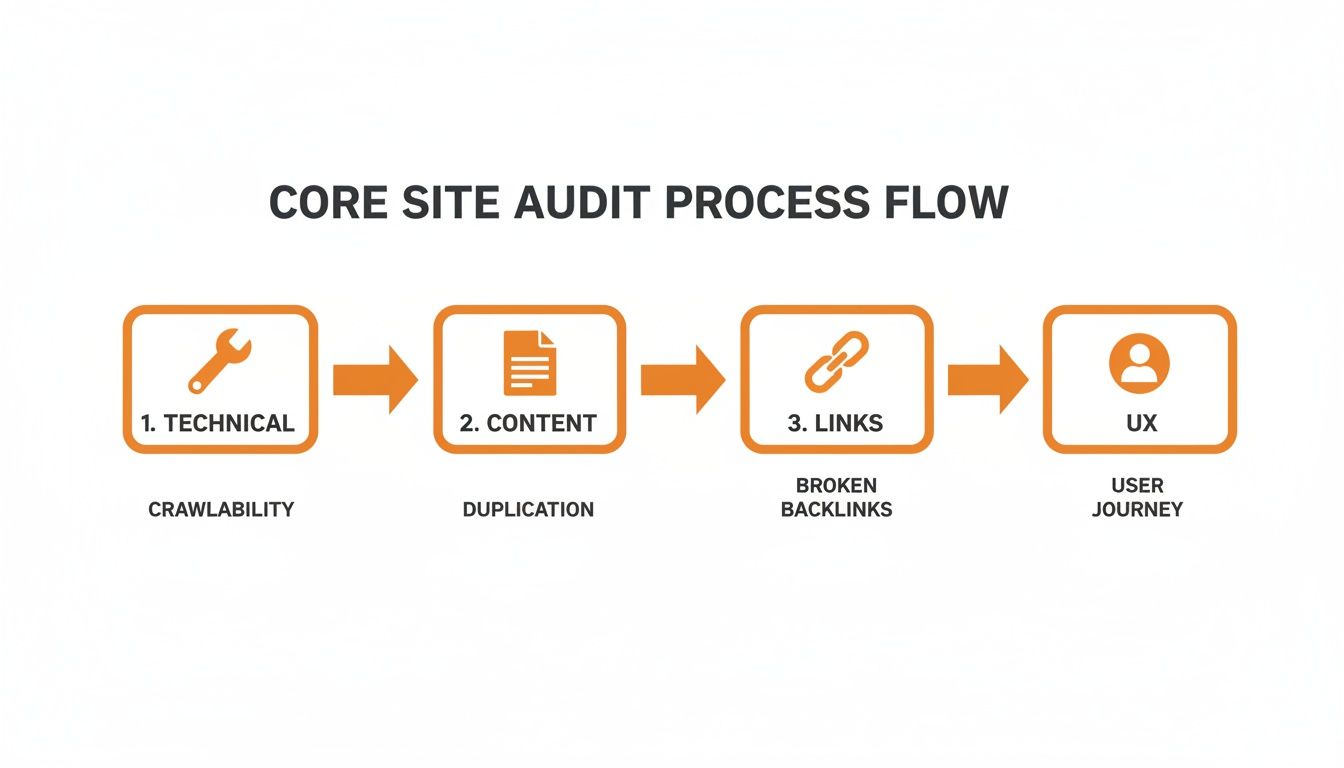
This is where the real work begins. You'll be staring at a lot of data, and the next job is to make sense of it all. Start by organising your findings into the core pillars we’ve already talked about: Technical, Content, Links, and UX.
With everything categorised, you have to prioritise. Let’s be honest, not all issues are created equal. Fixing a small typo isn’t going to move the needle nearly as much as fixing a broken checkout process.
The most effective way to prioritise is by using an Impact vs. Effort matrix. This simple framework helps you sort every issue based on how much positive impact it will have versus how much effort (time, money, resources) it will take to fix.
This process naturally creates a tiered action plan:
- Quick Wins (High Impact, Low Effort): These are the low-hanging fruit. Tackle them immediately. Think fixing broken internal links, optimising titles on critical pages, or adding missing alt text to important images.
- Major Projects (High Impact, High Effort): These are the big, strategic moves that require proper planning but deliver significant results. This could be a site-wide content overhaul, a website redesign, or a major page speed optimisation project.
- Fill-in Tasks (Low Impact, Low Effort): These are smaller jobs you can chip away at when you have the time. Things like updating older blog posts or cleaning up minor code warnings fall into this bucket.
- Reconsider (Low Impact, High Effort): These are the tasks that probably aren't worth the investment. It’s just as important to know what not to do.
By organising your findings this way, you turn a daunting list of problems into a prioritised roadmap. It ensures you’re focusing your resources where they’ll make the biggest difference first. It's also at this stage that you can connect your audit findings to other business metrics. If you want to dive deeper, you might be interested in our guide on setting up website conversion tracking to measure the true impact of your changes.
Choosing the Right Tools for Your Audit
Any website audit is only as good as the data you can get your hands on. Without the right tools, you're flying blind, trying to guess where the problems are hiding. Thankfully, a powerful suite of software exists that can shine a light into every corner of your site, turning that guesswork into a science.
Think of it like a mechanic's workshop. You wouldn't trust a top-tier mechanic to figure out a complex engine problem with just a spanner and a screwdriver. They bring out sophisticated diagnostic computers, pressure gauges, and all sorts of specialised gear. The same principle applies to a professional website audit.
You don’t need a massive, expensive toolkit, but you absolutely need to cover the essentials. We can break down the most important tools into three practical categories: site crawlers, all-in-one SEO platforms, and performance testers.
Site Crawlers: The Architect’s Blueprints
Site crawlers are the absolute foundation of any technical audit. These tools act just like a search engine bot, methodically exploring your website by following every single internal and external link it can find. What you get back is a detailed blueprint of your site's architecture, revealing its structure and flagging immediate technical headaches.
The undisputed champion in this space is Screaming Frog SEO Spider. It’s a desktop app that gives you a ridiculously comprehensive overview of things like:
- Broken Links (404s): Find every single dead-end on your site that frustrates users and wastes your crawl budget.
- Redirect Chains: Uncover those convoluted redirect paths that slow your site down and water down your link equity.
- Duplicate Content: Pinpoint pages with identical or almost-identical content, titles, or meta descriptions.
- Crawl Depth: See how many clicks it takes to reach any page from the homepage, which is crucial for improving your site structure.
It has a bit of a learning curve, but the free version can crawl up to 500 URLs. This makes it perfect for smaller sites or just for getting a feel for its power before you commit.
All-in-One SEO Platforms: The Mission Control Centre
While crawlers are busy mapping your site’s internal structure, all-in-one SEO platforms give you a 360-degree view of your entire online footprint. These platforms are your mission control, tracking everything from keyword rankings and backlink profiles to what your competitors are up to. For a deep, strategic website audit, they are indispensable.
The two heavyweights here are Semrush and Ahrefs. Both offer robust Site Audit tools that combine crawling capabilities with a massive database of web data. This is what lets you not only find on-site issues but also understand their broader strategic context.
These platforms connect the dots between a technical issue and its real-world impact. They don't just tell you a page has a thin content problem; they show you that the same page has tanked in rankings for ten high-value keywords, costing you traffic and potential revenue.
These tools are subscription-based and can be a significant investment, but the depth of data they provide is simply unmatched for any business serious about its digital performance. They pull keyword research, competitor analysis, and backlink auditing all into one place.
Performance Testers: The Speedometers
In an age where user patience is measured in milliseconds, site speed is non-negotiable. Performance testing tools measure exactly how quickly your pages load and give you a list of actionable recommendations to make them faster. Slow sites don't just frustrate users—they get penalised by search engines, too.
The go-to free tool here is Google PageSpeed Insights. It analyses your site's performance on both mobile and desktop, scoring it on key metrics like the Core Web Vitals (LCP, INP, and CLS).
A couple of other excellent options include:
- GTmetrix: Provides incredibly detailed performance reports and lets you track your speed over time.
- Chrome Lighthouse: An open-source tool built directly into the Chrome browser that audits performance, accessibility, and even basic SEO.
Using these tools is dead simple. You just plug in your URL, and they generate a report highlighting specific problems—like massive images, un-minified code, or render-blocking resources—that are putting the brakes on your site.
Turning Audit Data into an Actionable Roadmap
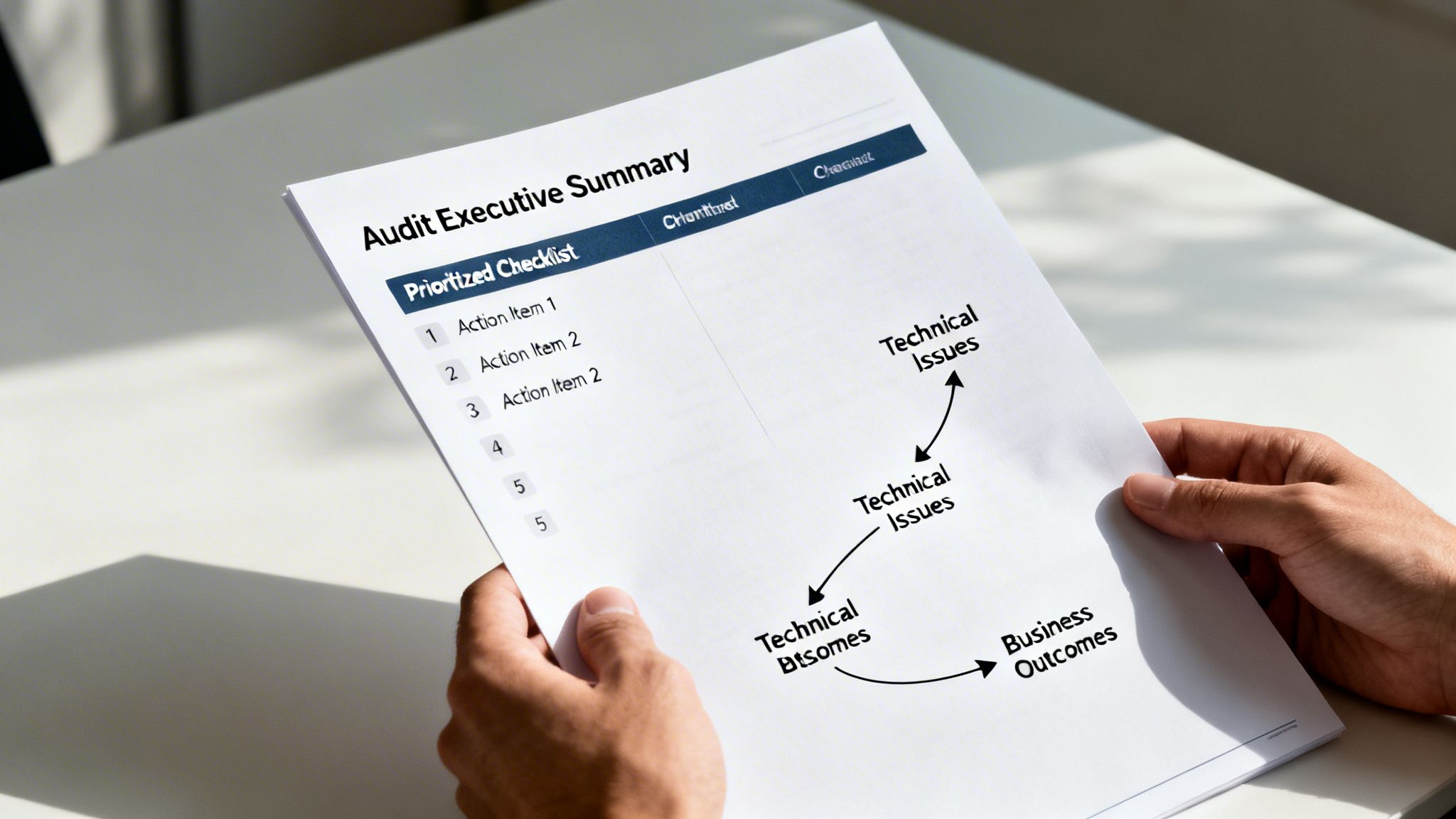
Collecting all that data is just step one. The real magic of a professional web site audit happens when we transform that raw information into a clear, compelling story that actually drives action. A spreadsheet full of technical jargon is useless; a prioritised roadmap, on the other hand, is invaluable.
The whole point is to shift from a long list of problems to a concrete plan for growth. This means structuring our findings in a way that everyone, from the marketing team right up to the CEO, can understand. It’s about connecting the dots between a technical flaw and its real-world impact on your bottom line.
Crafting the Executive Summary
Every great audit report kicks off with an executive summary. This isn't just a warm-up; it's arguably the most critical part of the entire document. Stakeholders are busy people, and they need the high-level takeaways immediately.
Your summary should be a punchy, one-page overview that answers three key questions:
- What are the top 3-5 most critical issues hurting the website's performance right now?
- What is the tangible business impact of these issues (e.g., lost revenue, poor user experience, tanking search rankings)?
- What are the highest-priority recommendations to fix them?
This section cuts straight to the chase and puts the most important findings front and centre. By focusing on what matters most to the business, it builds immediate buy-in for the work ahead.
Connecting Technical Issues to Business Problems
A list of 404 errors or slow-loading pages won’t get a leadership team to sit up and listen. But explaining that those issues are causing a 25% drop-off in your checkout process definitely will. The art of a great audit report is translating technical metrics into a compelling business narrative.
Think of it like this:
- Technical Finding: "The main product category page has a Largest Contentful Paint (LCP) of 4.2 seconds."
- Business Impact: "Customers are abandoning their carts before our products even finish loading, which is directly costing us sales every single day."
This simple reframe changes the conversation from a boring technical fix into an urgent revenue recovery mission. Once your audit data is collected, the next crucial step is to translate those insights into concrete actions. For example, learning how to diagnose, fix, and improve Shopify conversion rates lets you directly address the business problems your audit uncovers.
An effective audit report doesn't just present data; it tells a story. It connects a technical problem, like poor mobile usability, to a business outcome, like losing leads to a competitor whose site works flawlessly on phones.
Building a Prioritised List of Recommendations
After explaining the "why," you have to deliver the "how." This is your actionable roadmap. Instead of just dumping a jumbled to-do list on your team, the recommendations need to be organised, prioritised, and crystal clear.
We’ve found the Impact vs. Effort model is the most effective way to do this. It helps you sort every task into one of four buckets:
- High Impact, Low Effort (Quick Wins): These are your top priorities. Think fixing broken links on key pages or optimising crucial meta descriptions. Get these done first.
- High Impact, High Effort (Major Projects): These are bigger strategic initiatives, like a full content overhaul or a site migration. They require proper planning and resources.
- Low Impact, Low Effort (Fill-in Tasks): These are the minor tweaks and clean-up jobs that can be handled when time permits.
- Low Impact, High Effort (Reconsider): These tasks are often not worth the investment. We typically recommend shelving them to focus on what matters.
This structure transforms an overwhelming list of findings from your web site audits into a manageable, step-by-step plan. It empowers your team to start with the quick wins, build momentum, and strategically plan for the larger projects that will drive the most significant growth.
Frequently Asked Questions About Web Site Audits
Even with a detailed guide, you probably still have a few questions rattling around. It's completely normal. Here are some of the most common ones we get from clients, with straight-up answers from our team.
How Often Should I Run a Website Audit?
For most businesses, a deep, comprehensive audit once a year is a solid baseline. But if you're in a fast-paced industry or about to undertake a major project like a site redesign, you’ll want to do it more often – think quarterly or at least twice a year.
Think of it this way: while the major audit is like a full annual physical, you should also be doing regular check-ins. Ongoing monitoring of your key metrics through tools like Google Search Console should be a weekly or monthly habit. This helps you catch small issues before they snowball into big, expensive problems.
Can I Do a Website Audit Myself?
Absolutely. You can definitely perform a basic audit using free tools and the checklist we've covered. It’s a great way to get your hands dirty, spot surface-level problems like broken links or missing meta descriptions, and build a foundational understanding of your site's health.
But a professional audit goes much, much deeper. An expert isn't just pulling data; they're connecting technical findings to your actual business strategy. We interpret complex data, uncover the insights you'd likely miss, and deliver a clear, prioritised roadmap for growth. It’s the difference between a check-up and a diagnosis.
What Does a Professional Website Audit Cost?
The cost and timeline really come down to the size and complexity of your website. A simple five-page brochure site might take a week to audit properly. On the other hand, a huge e-commerce platform with thousands of product pages could take several weeks to dissect. It's a completely tailored process, not a one-size-fits-all product.
At Click Click Bang Bang, we see the comprehensive audit as mission-critical. That's why it’s a core part of our onboarding for every new monthly client. It ensures every strategy we build for you is based on a rock-solid, data-driven foundation from day one, setting you up for success right out of the gate.
Ready to turn those audit findings into real, tangible results? Click Click Bang Bang specialises in data-driven SEO and PPC strategies that deliver growth. Explore our services and start your journey today.
Read NeXt
Or Read Our Latest
- Manual vs Automated Bidding for PPC Success
- Conversion Tracking Setup: A Complete AU Guide
- Instagram Advertising Australia: Complete 2026 Guide
- Pay Per Click: A Beginner’s Guide for Australian Marketers
- Display Advertising on Google: The Complete Australian Guide
- Stakeholder Communication Plan How to Build One That Works
Click. CLick. Subscribe.
Get our best PPC insights, industry updates, and power moves delivered straight to your inbox. No fluff, just high-caliber strategies that actually work.
Don’t Leave Just Yet
Try Us For 30-Days,
Risk Free!!
We guarantee that you’ll love our work within the first 30 days, if not you’ll get your money back.
What have you got to lose?